Choosing the right Supabase alternatives comes down to two architectural questions: do you want a fully managed cloud platform that abstracts away server administration, or an open-source backend you can self-host on your own Linux VPS for predictable flat-rate pricing and complete data ownership? While Supabase has become the default PostgreSQL Backend-as-a-Service (BaaS) for many web and mobile teams, its multi-container Docker footprint and usage-based cloud tiers are not always the right fit for every workload.
If you need a single-binary backend that runs on a compact 1 GB RAM VPS, PocketBase is purpose-built for speed and simplicity. If you want a batteries-included Docker BaaS with native mobile SDKs, built-in push notifications, and 30+ serverless function runtimes, Appwrite is the strongest all-in-one contender. And if your team prefers end-to-end reactive TypeScript queries over writing SQL and Row-Level Security (RLS) policies, Convex offers a modern managed experience. In this guide, we compare the seven best managed and self-hosted backends so you can match your database model, licensing rules, and hosting budget to the right stack.
Table of Contents
Why Developers Look for Supabase Alternatives
Supabase combines PostgreSQL with PostgREST, GoTrue authentication, Realtime WebSockets, S3-compatible storage, and Deno Edge Functions. As we covered in our step-by-step tutorial on how to self-host Supabase on a VPS with Docker and HTTPS, that modular design is powerful—but it also introduces trade-offs that prompt engineering teams to evaluate Supabase alternatives:
- Multi-container self-hosting overhead: Because Supabase stitches together more than a dozen distinct microservices behind a Kong API gateway, self-hosting it requires at least 4 GB of RAM (and 8 GB for production workloads). Teams building lightweight SaaS micro-tools or internal dashboards often prefer a single binary or a leaner container stack.
- Per-project cloud pricing and pausing limits: On managed Supabase Cloud, free-tier projects pause after seven days of inactivity, and running multiple isolated staging, preview, and production environments on paid plans requires per-instance compute add-ons plus usage billing for Monthly Active Users (MAUs) and egress bandwidth.
- SQL and Row-Level Security (RLS) complexity: Exposing PostgreSQL tables directly to client browsers via PostgREST means your application security depends on writing airtight SQL RLS policies. Some teams prefer enforcing authorization inside server-side TypeScript functions or unified SDK middleware rather than database policies.
- GraphQL or non-PostgreSQL requirements: While Supabase offers the
pg_graphqlextension, teams building complex Apollo or Relay frontends frequently want a native Hasura GraphQL workflow with server-side event triggers, or an abstraction layer that works over existing MySQL, MariaDB, or SQLite databases.
Quick Comparison: Top 7 Supabase Alternatives
Before diving into individual architectures, use the comparison matrix below to see how the leading managed and self-hosted Supabase alternatives differ by underlying database engine, open-source license, and primary strength.
| Platform | Core Database | License | Self-Hosted Support | Primary Strength |
|---|---|---|---|---|
| Appwrite | MariaDB (Document/Relational Abstraction) | BSD 3-Clause | Yes (Docker Compose + Traefik) | All-in-one BaaS with Auth, DB, Storage, Messaging & 30+ Function runtimes |
| PocketBase | SQLite (Embedded WAL Mode) | MIT | Yes (Single Go Executable Binary) | Ultra-lightweight single-file backend with Realtime SSE & Admin UI |
| Nhost | PostgreSQL + Hasura GraphQL | MIT | Yes (Docker Compose / CLI) | Instant real-time GraphQL APIs, event triggers & role-based permissions |
| Directus | Any SQL DB (Postgres, MySQL, SQLite, MSSQL) | BSL 1.1 | Yes (Docker / Node.js) | Turns new or existing SQL databases into REST/GraphQL APIs + Data Studio |
| Convex | Convex Reactive Document-Relational DB | FSL 1.1 (Converts to Apache 2.0) | Yes (Cloud-first + Open-Source Backend) | End-to-end TypeScript queries, automatic reactivity & ACID transactions |
| Neon + Auth | Serverless PostgreSQL (Decoupled Storage) | Apache 2.0 (Core Storage) | Managed-first (Open-Source Engine) | Instant copy-on-write database branching for Git PRs & scale-to-zero compute |
| Google Firebase | Cloud Firestore / Realtime DB (NoSQL) | Proprietary | No (Google Cloud Only) | Native iOS/Android offline sync, FCM push notifications & Crashlytics |
Managed Cloud BaaS vs Self-Hosted VPS Backends
When evaluating backend platforms, the most consequential decision is not whether your API speaks REST or GraphQL—it is where your data lives and how your infrastructure scales financially. Backend platforms fall into two operational models: vendor-managed cloud services and self-hosted open-source backends running on a VPS.
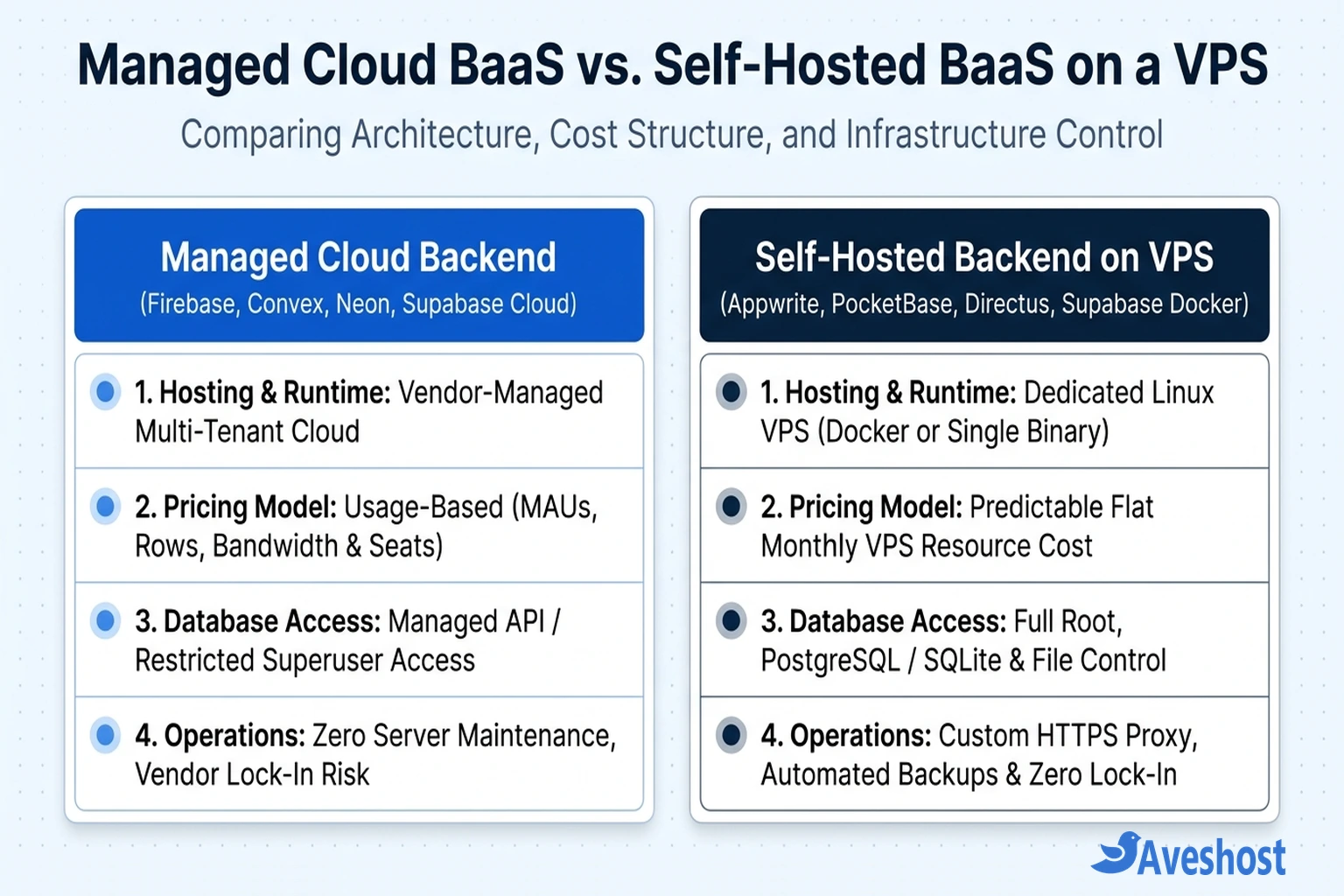
Managed cloud backends (such as Firebase, Convex Cloud, and Neon) handle operating system patching, multi-region replication, and automated point-in-time backups. They are ideal when your engineering team wants zero infrastructure maintenance during rapid prototyping. However, managed clouds meter every dimension of growth—charging per Monthly Active User (MAU), per million document reads or function invocations, per gigabyte of storage, and per gigabyte of outbound bandwidth.
Self-hosted open-source backends (such as Appwrite, PocketBase, Directus, Nhost, and self-hosted Supabase) run on your own virtual private server. Instead of paying per user or per API call, you pay a flat, predictable monthly fee for CPU cores, RAM, and NVMe/SSD storage on a self-managed Linux VPS or a Ghana Virtual Dedicated Server (VDS). Whether your application serves 500 registered users or 250,000 users, your software licensing cost remains zero and your data stays under your direct jurisdiction.
Best Self-Hosted Open-Source Supabase Alternatives
If your priority is full infrastructure control, data residency compliance, and predictable hosting bills on a Linux VPS, these four open-source platforms are the strongest Supabase alternatives available today.
1. Appwrite: Best All-in-One Docker BaaS
Appwrite (licensed under BSD 3-Clause) is the most comprehensive open-source alternative to both Supabase and Firebase. Rather than exposing raw SQL tables directly to client browsers, Appwrite provides a clean, unified abstraction layer with official SDKs for Web, Flutter, iOS/macOS, Android, React Native, Node.js, Python, PHP, Go, and .NET.
- Why choose Appwrite over Supabase: Appwrite includes native Messaging (email, SMS, and push notifications via APNs and FCM) and supports more than 30 serverless function runtimes (Node.js, Bun, Python, Dart, Go, PHP, Ruby, Rust, and .NET), whereas Supabase Edge Functions are limited to the Deno TypeScript/JavaScript runtime.
- Self-hosting experience: Appwrite ships with an interactive single-command Docker installer (
docker run -it --rm ... appwrite/appwrite) that provisions MariaDB, Redis, background workers, and a built-in Traefik reverse proxy with automatic Let’s Encrypt SSL certificates. - Trade-offs: Because Appwrite abstracts its underlying MariaDB storage behind a document-and-collection API, you cannot run arbitrary raw SQL joins or install custom PostgreSQL extensions like
pgvectordirectly inside Appwrite’s primary database.
2. PocketBase: Best Lightweight Single-Binary Backend
PocketBase (MIT license) takes the opposite architectural approach to heavy multi-container stacks. Written in Go, the entire backend—including an embedded SQLite database running in Write-Ahead Logging (WAL) mode, user authentication, file storage, real-time Server-Sent Events (SSE), and a responsive Admin Dashboard UI—compiles into a single standalone executable file.
- Why choose PocketBase over Supabase: You can deploy PocketBase on an entry-level 1 vCPU, 1 GB or 2 GB RAM VPS without even installing Docker. A single binary idling at under 40 MB of RAM can handle over 10,000 concurrent real-time SSE connections. You can also extend PocketBase using built-in JavaScript hooks (
pb_hooks) or import it as a Go library to compile your own custom binary. - Self-hosting experience: Upload the binary to your Ubuntu VPS, create a 15-line
systemdunit file, and either let PocketBase manage its own Let’s Encrypt TLS certificate on port 443 or proxy it behind Caddy. Backups are as simple as snapshotting thepb_data/directory or using PocketBase’s built-in S3 backup scheduler. - Trade-offs: Because SQLite is an embedded file database, PocketBase scales vertically on a single server rather than horizontally across multi-node read replicas.
3. Nhost: Best GraphQL-First PostgreSQL Alternative
Nhost (MIT license) is the closest architectural cousin to Supabase, built directly on standard PostgreSQL. The key difference is the API layer: while Supabase centers on PostgREST for RESTful table queries, Nhost pairs PostgreSQL with the Hasura GraphQL Engine, alongside Hasura Auth, S3-backed Hasura Storage, and Node.js serverless functions.
- Why choose Nhost over Supabase: If your frontend team uses GraphQL clients (Apollo, urql, or Relay), Nhost gives you instant real-time GraphQL queries, mutations, and subscriptions, plus Hasura’s visual role-based permission builder and webhook event triggers on database inserts/updates—eliminating the need to write raw SQL Row-Level Security policies by hand.
- Trade-offs: Hasura’s metadata engine consumes substantial memory, so self-hosting Nhost via Docker Compose requires at least 4 GB of RAM.
4. Directus: Best SQL-to-API Data Platform & Headless Studio
Directus (BSL 1.1, free to self-host for most small and mid-sized businesses) is an open-source data platform that wraps any new or existing SQL database—including PostgreSQL, MySQL, MariaDB, SQLite, CockroachDB, and MS SQL Server—with instant REST and GraphQL APIs plus a polished, non-technical Data Studio dashboard.
- Why choose Directus over Supabase: Supabase Studio is designed for developers, not content editors or operations staff. Directus provides a customizable, role-based back-office UI, visual automation Flows (webhooks, cron triggers, email notifications), and real-time WebSockets without modifying your existing SQL schema.
- Trade-offs: Directus is focused on data management, authentication, file transformations, and workflow automation rather than hosting arbitrary serverless edge compute.
Best Managed Cloud & Composable Supabase Alternatives
If your team prefers a managed cloud workflow or wants to compose a modular stack using best-of-breed serverless tools, these three platforms lead the market.
5. Convex: Best Reactive TypeScript Backend
Convex rethinks the backend by replacing SQL tables, ORMs, and manual WebSocket channels with a reactive document-relational database controlled entirely through server-side TypeScript functions. When you write a Convex query function in TypeScript, the platform automatically tracks its data dependencies and pushes live updates to your React, Next.js, Vue, or mobile client whenever the underlying records change.
- Why choose Convex over Supabase: Zero SQL migrations, zero RLS debugging, and automatic end-to-end TypeScript type safety. Every Convex mutation runs as a deterministic, serializable ACID transaction, and built-in primitives cover cron jobs, scheduled background functions, vector search, and file storage. While Convex is primarily used as a managed cloud service, its Rust/TypeScript backend engine is also open-source under FSL 1.1 for self-hosting on a VPS.
6. Neon + Dedicated Auth: Best Serverless Branching PostgreSQL
Many teams use Supabase strictly for managed PostgreSQL and authentication, ignoring PostgREST and Realtime in favor of server-side ORMs like Drizzle or Prisma inside Next.js, Remix, or Astro. For that architecture, Neon paired with Better Auth, Auth.js, or Clerk is often a cleaner fit.
- Why choose Neon over Supabase: Neon decouples PostgreSQL compute from storage, enabling instant copy-on-write database branching. Whenever a developer opens a GitHub pull request, your CI/CD pipeline can spin up an isolated branch containing a full copy of your production schema and data in less than a second, and scale compute down to zero when idle.
7. Google Firebase: Best for Offline-First Native Mobile Apps
Google Firebase remains the benchmark for native iOS, Android, and Flutter mobile apps that require seamless offline-first local caching and automatic background synchronization when a device regains connectivity. Combined with Firebase Cloud Messaging (FCM), Crashlytics, and Remote Config, it offers mobile lifecycle tooling that no PostgreSQL BaaS matches out of the box—at the cost of proprietary NoSQL vendor lock-in and zero self-hosting support.
VPS Sizing & Resource Requirements for Self-Hosted Backends
If you decide to self-host an open-source backend on a Linux server, resource consumption varies dramatically depending on whether the platform runs as a compiled Go binary, a single Node.js container, or a 12-container orchestration stack. Use the sizing table below when selecting your server plan.
| Self-Hosted Platform | Deployment Method | Minimum VPS RAM | Recommended Production VPS | Built-In Reverse Proxy / TLS |
|---|---|---|---|---|
| PocketBase | Single Go Binary (systemd) or Docker | 1 GB RAM (1 vCPU) | 2 GB RAM / 2 vCPU + SSD/NVMe | Yes (Built-in Let’s Encrypt TLS or Caddy) |
| Directus (+ Postgres) | Docker Compose (2–3 Containers) | 2 GB RAM (1–2 vCPU) | 4 GB RAM / 2 vCPU + SSD/NVMe | External (Caddy, Nginx, or Traefik) |
| Appwrite | Docker Compose (20 Lightweight Containers) | 4 GB RAM (2 vCPU) | 8 GB RAM / 4 vCPU + SSD/NVMe | Yes (Bundled Traefik + Let’s Encrypt) |
| Nhost | Docker Compose (Postgres + Hasura + Auth) | 4 GB RAM (2 vCPU) | 8 GB RAM / 4 vCPU + SSD/NVMe | Yes (Bundled Traefik in Nhost Stack) |
| Self-Hosted Supabase | Docker Compose (12+ Microservices) | 4 GB RAM (2 vCPU + Swap) | 8 GB RAM / 4 vCPU + NVMe Storage | External (Caddy or Nginx over Kong :8000) |
How to Choose and Deploy Your Backend Architecture
To avoid costly mid-project migrations, match your backend choice to your team’s primary query model and operational capacity using this decision framework:
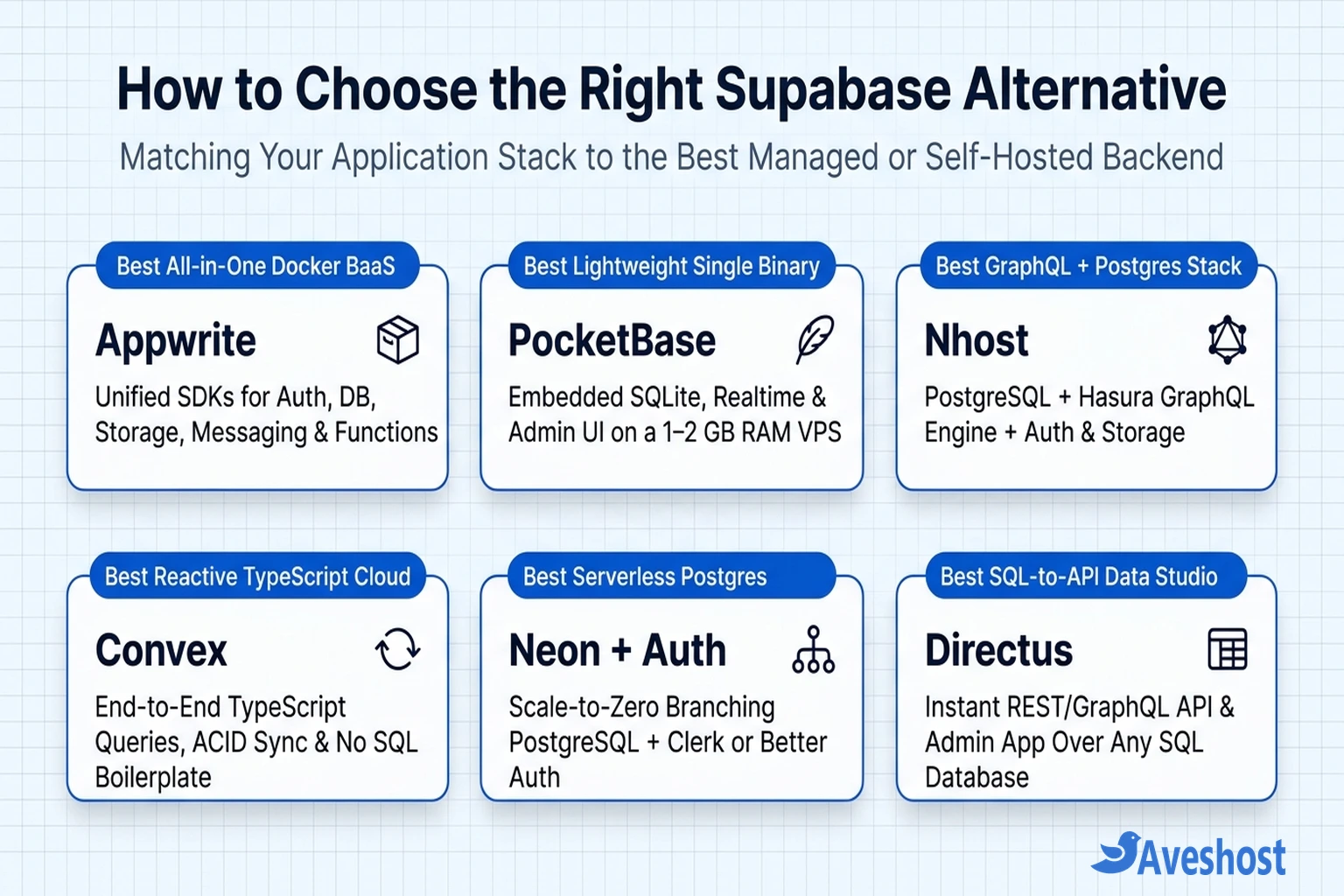
- Need a fast, low-cost MVP, internal tool, or mobile backend on a small VPS? Deploy PocketBase as a
systemdservice behind Caddy. You get instant auth, real-time subscriptions, file uploads, and an admin UI using a fraction of the RAM required by Docker stacks. - Need an all-in-one self-hosted cloud replacement with mobile SDKs, push notifications, and multi-language functions? Provision a 4 GB to 8 GB RAM VPS and run the official Appwrite Docker installer.
- Need full PostgreSQL power, extensions (
pgvector, PostGIS), and compatibility with existing Supabase SDKs? Keep Supabase, but move off usage-metered cloud tiers by following our guide to self-hosting Supabase on a VPS with Docker and HTTPS. - Need an instant back-office dashboard and API over a clean SQL schema? Deploy Directus alongside PostgreSQL or MariaDB in Docker Compose.
- Building an AI agent or automated customer support workflow? Pair your self-hosted PostgreSQL or PocketBase backend with an AI orchestration platform—see our tutorial on how to build an AI help desk with OpenClaw for a complete production blueprint.
If you are ready to deploy PocketBase, Appwrite, Directus, or a self-hosted PostgreSQL stack with predictable monthly pricing, explore our self-managed Linux VPS hosting for full root SSH access and high-speed SSD storage, or our Ghana VDS plans for dedicated CPU cores and local Accra NVMe storage. If you want help sizing your server or migrating an existing cloud database, contact the Aveshost team.
Frequently Asked Questions
What is the closest open-source alternative to Supabase?
Appwrite and Nhost are the closest full-featured open-source alternatives. Choose Nhost if you want to stay on PostgreSQL with instant Hasura GraphQL APIs, or choose Appwrite if you want a unified Docker BaaS with official web/mobile SDKs, built-in push/email/SMS messaging, and 30+ serverless function runtimes.
Can PocketBase replace Supabase for production applications?
Yes, for small-to-medium SaaS products, mobile apps, and internal tools that fit on a single vertical server. Because PocketBase runs embedded SQLite in Write-Ahead Logging (WAL) mode inside a compiled Go binary, it can serve over 10,000 concurrent real-time connections on a modest 2 GB RAM VPS. However, if you require multi-node horizontal database clustering or PostgreSQL-specific extensions like PostGIS, a PostgreSQL-based stack is a better fit.
Is it cheaper to self-host Appwrite or Supabase on a VPS than using managed cloud tiers?
For growing applications or agencies running multiple projects, self-hosting on a Linux VPS is significantly more predictable. Instead of paying per Monthly Active User (MAU), per project instance, or per gigabyte of database egress, you pay a flat monthly fee for your VPS resources while running unlimited projects and users within your server’s CPU, RAM, and disk capacity.
Which Supabase alternative is best for Next.js and TypeScript developers?
If you prefer a managed reactive backend with zero SQL boilerplate, Convex provides end-to-end TypeScript queries and automatic real-time UI updates. If you prefer writing type-safe SQL with Drizzle ORM or Prisma in Next.js Server Actions, pairing Neon (for serverless branching PostgreSQL) or a self-hosted PostgreSQL VPS with Better Auth is an excellent composable alternative.
Can I migrate my data from Supabase to another backend without downtime?
Because Supabase uses standard PostgreSQL, migrating to another PostgreSQL-based platform (such as Nhost, Neon, Directus on Postgres, or a self-hosted PostgreSQL VPS) is straightforward using pg_dump and pg_restore or logical replication. Moving to non-PostgreSQL platforms like Appwrite, PocketBase, or Convex requires exporting your tables and user password hashes (bcrypt/scrypt) via a migration script.