
To make your website eligible for Google AI Overviews and AI Mode, you do not need special AI text files, proprietary meta tags, or separate pages built for bots. According to Google Search Central’s official AI features documentation, a web page is eligible to appear as a supporting link in Google AI Overviews as soon as it meets two baseline requirements: the page must be indexed in Google Search, and it must be eligible to display a standard search snippet.
Key Takeaways: Google AI Overviews and AI Mode run directly on top of Google’s core search index using Retrieval-Augmented Generation (RAG) and a technique called query fan-out. You do not need an llms.txt file or custom generative markup to be cited. Instead, earning prominent source cards comes down to keeping Googlebot unblocked, avoiding restrictive nosnippet rules, rendering core content in clean server-side HTML, matching visible text with Schema.org structured data, and publishing original, non-commodity answers.
Table of Contents
How Google AI Overviews and Query Fan-Out Actually Work
When a user searches on Google, Google AI Overviews (and the conversational AI Mode experience) do not rely on a static, pre-trained memory bank alone. Instead, Google pairs its Gemini models with its live web search index, Knowledge Graph, Google Business Profile data, and Google Merchant Center feeds to ground every statement in verifiable web pages.
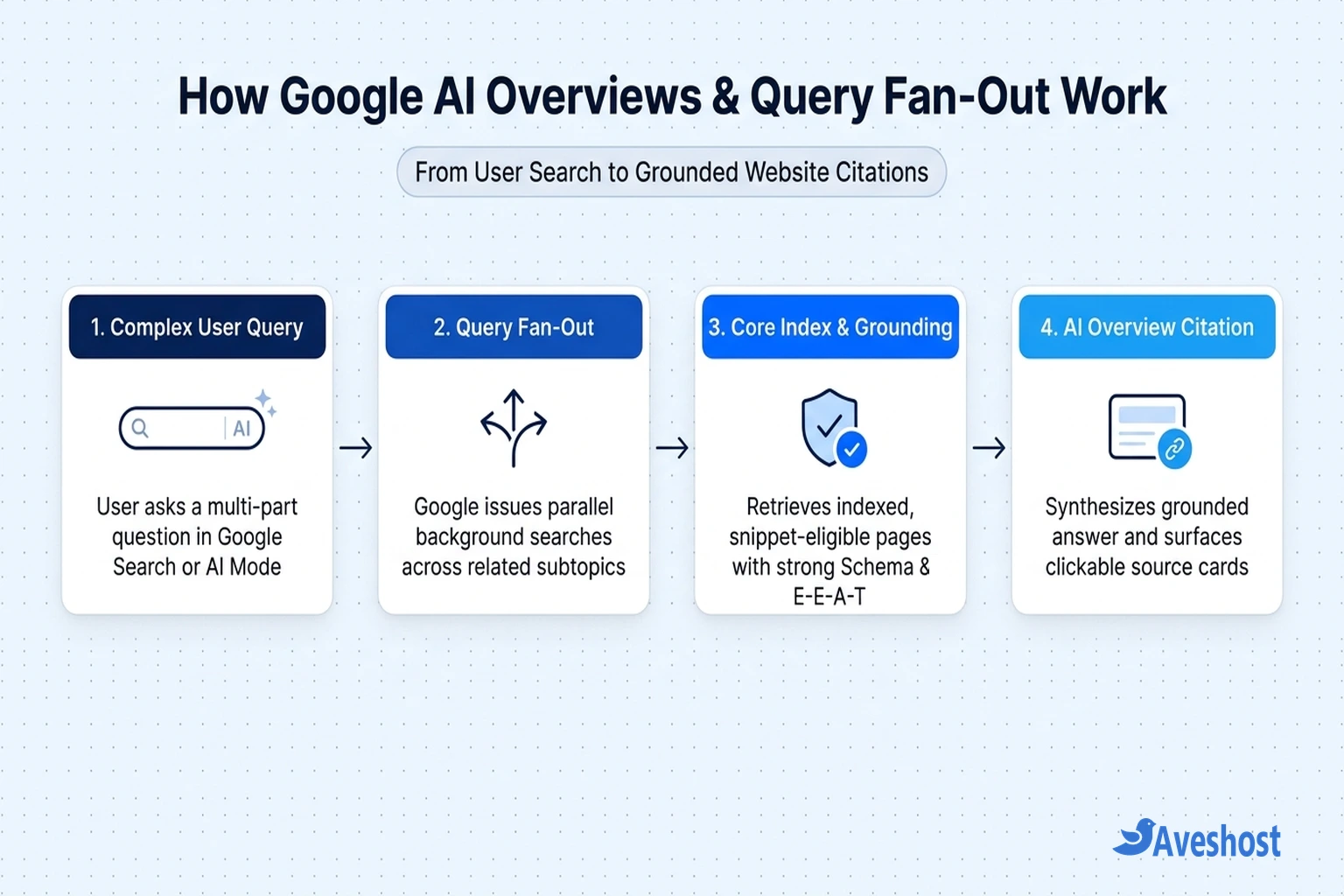
The single most important mechanism behind AI Search SEO is query fan-out. When someone enters a complex, multi-part question—for example, comparing hosting architectures, troubleshooting a WordPress database error, or pricing an ecommerce migration—Google’s AI system breaks that prompt into multiple related sub-queries behind the scenes and runs them in parallel across different facets of the topic.
Because of query fan-out, your website can earn a supporting link card inside Google AI Overviews even if your page does not rank #1 for the user’s exact top-level search phrase. If your guide provides the clearest, most authoritative answer to one of the underlying sub-queries—such as a specific configuration step, benchmark table, or compatibility rule—Google’s retrieval pipeline can pull your page into the overview’s citation carousel.
The 4 Technical Eligibility Requirements for Google AI Overviews
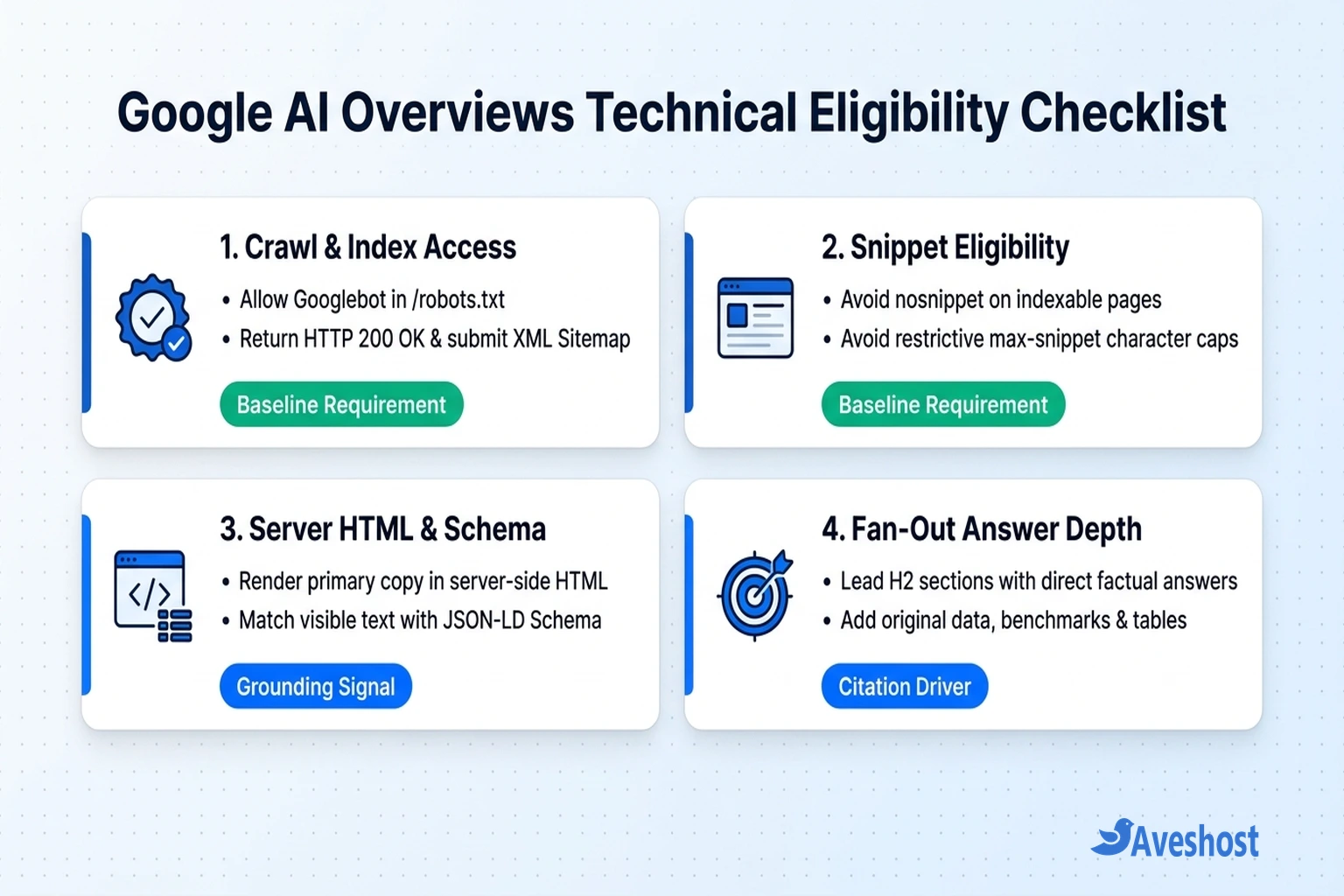
Before worrying about content formatting, your website must clear Google’s technical eligibility gates. If any of these four baseline conditions fail, Google’s retrieval engine cannot select your page as a supporting citation.
1. Allow Googlebot Crawl Access: Your /robots.txt file must allow Googlebot to fetch your HTML pages, stylesheets, and critical scripts. Also make sure your web application firewall (WAF) or CDN does not serve CAPTCHA walls to legitimate Google crawler IP ranges—if you use strict bot rules, review our guide on preventing false Cloudflare challenge blocks.
2. Ensure Clean Indexability: Every target page must return an HTTP 200 OK status code, specify a clean self-referencing rel="canonical" tag, and be free of noindex directives in both HTML meta tags and X-Robots-Tag HTTP headers. Submitting an auto-updating XML sitemap in Google Search Console ensures new and revised pages are discovered quickly.
3. Preserve Search Snippet Eligibility: Google’s documentation states explicitly that a page must be eligible to show a text snippet in regular Search to serve as a direct input for Google AI Overviews. Adding a nosnippet meta tag or a heavily restricted max-snippet character limit disqualifies your page from being summarized and cited.
4. Render Core Text in Server-Side HTML: Make sure your primary headings, answers, product specifications, and tables load directly in the initial HTML response rather than requiring complex client-side JavaScript execution or user clicks to appear.
Snippet Controls vs Google-Extended: Don’t Block Yourself by Mistake
Many website owners accidentally exclude their own pages from Google AI Overviews when trying to block third-party AI scrapers. Understanding how Google separates Search preview controls from standalone AI training tokens prevents costly traffic drops.
In Google’s ecosystem, Googlebot powers Google Search, including AI Overviews and AI Mode. By contrast, Google-Extended is a separate robots.txt product token that controls whether your content helps train standalone Gemini models and Vertex AI APIs outside of Google Search. Blocking Google-Extended in robots.txt does not remove your site from Google AI Overviews, whereas adding nosnippet to your pages blocks both traditional search snippets and AI Overview citations.
| Control or Directive | Where It Is Configured | Effect on Traditional Google Search | Effect on Google AI Overviews & AI Mode |
|---|---|---|---|
| noindex | Meta robots tag or X-Robots-Tag header | Removes the page from Google Search entirely | Ineligible — page cannot appear or be cited in AI Overviews |
| nosnippet | Meta robots tag or X-Robots-Tag header | Shows only the page title/URL with no text description or featured snippet | Ineligible — blocks the page from being used as direct input for AI Overviews |
| data-nosnippet | HTML attribute on <span>, <div>, or <section> | Excludes only that specific HTML element from text snippets | Page remains eligible, but the marked section is excluded from AI summaries |
| max-snippet:[number] | Meta robots tag or X-Robots-Tag header | Caps the character length of search snippets | Restrictive caps reduce context available to AI Overviews and can prevent citation |
| Google-Extended | /robots.txt user-agent token | No effect on Google Search indexing or rankings | No effect on Google AI Overviews (only governs non-Search Gemini training and APIs) |
# Recommended /robots.txt for Google Search & Google AI Overviews eligibility
User-agent: Googlebot
Allow: /
Disallow: /wp-admin/
Allow: /wp-admin/admin-ajax.php

Sitemap: https://yourdomain.com/sitemap_index.xml

# Recommended HTML meta tag in <head> (standard WordPress / Rank Math default)
<meta name="robots" content="index, follow, max-snippet:-1, max-image-preview:large, max-video-preview:-1" />
How to Structure Content to Win AI Overviews Citations
Once your pages are indexed and snippet-eligible, earning citations inside Google AI Overviews depends on how clearly your content answers the sub-queries generated during query fan-out.
Lead every section with an immediate, factual answer: Place a concise two- to three-sentence direct answer immediately beneath each H2 or H3 heading before diving into background context. When Google’s RAG pipeline scans candidate passages, self-contained opening paragraphs are far easier to ground and attribute than buried conclusions.
Publish non-commodity, experience-backed insights: Google’s AI features guidance emphasizes original, people-first content over generic summaries. Include real configuration commands, verified pricing breakdowns, original troubleshooting diagnostics, and side-by-side HTML comparison tables (<table>) that generic rewrites lack.
Build topical clusters with descriptive internal links: Because query fan-out explores related subtopics simultaneously, linking related guides together with clear anchor text—such as connecting our Google search visibility guide with our llms.txt analysis—helps Google map your site’s topical depth.
Use Structured Data and Official Feeds to Ground Your Entities
While there is no special “AI Overview Schema,” standard Schema.org JSON-LD structured data plays a direct role in helping Google verify entities, authorship, prices, and relationships on your page.
Always match your JSON-LD markup to the visible text on the page: use Article and Person schema to identify expert authors, FAQPage schema for genuine frequently asked questions, Product and Offer schema for ecommerce items, and Organization or LocalBusiness schema for company details. In WordPress, plugins like Rank Math SEO and Yoast SEO generate these graphs automatically.
For commercial and local searches, Google AI Overviews also pull real-time attributes from Google Merchant Center (stock status, shipping, and verified pricing for WooCommerce stores) and Google Business Profile (service areas, opening hours, and customer reviews). Keeping those feeds synchronized with your website ensures Google never cites outdated business information.
| Schema / Feed Type | Best For | What It Grounds in Google AI Overviews |
|---|---|---|
| Article + Person Schema | Blog posts, tutorials, and news guides | Headline, publication dates, and verified author credentials (E-E-A-T) |
| FAQPage Schema | Service pages and help guides with Q&A sections | Direct question-and-answer pairs for multi-part fan-out queries |
| Product + Offer Schema | WooCommerce stores and software pricing pages | Verified SKU pricing, currency, stock availability, and review ratings |
| Organization / LocalBusiness | Company homepages and regional service businesses | Official brand name, contact details, service area, and opening hours |
| Google Merchant Center & GBP | Retailers and local businesses | Live inventory feeds, shipping rules, and verified local map attributes |
How to Track and Audit Your Performance in Google Search Console
You do not need an expensive third-party tracker to confirm whether your pages are eligible for Google AI Overviews. Google Search Console provides the primary diagnostic and reporting tools:
1. Verify Page Eligibility with the URL Inspection Tool: Paste any priority URL into the top inspection bar in Google Search Console. Confirm that Page indexing shows Page is indexed, Crawl allowed? says Yes, and the rendered HTML view contains your full article text and structured data.
2. Review Clicks and Impressions in the Performance Report: Google records impressions, clicks, and click-through rates from supporting links inside Google AI Overviews and AI Mode directly inside the standard Performance → Search results report under the Web search type. Filter your queries by longer conversational phrases (5+ words) or question modifiers (how, what, why, compare, vs) to spot pages gaining impressions from fan-out searches.
3. Maintain Fast Server Response Times: High Time to First Byte (TTFB) and intermittent server timeouts slow down both Googlebot crawling and live user visits from AI citations. Running your site on Aveshost Managed WordPress hosting or Aveshost WordPress hosting ensures fast NVMe storage, server-level caching, and reliable uptime, and our team at Aveshost Support can help you resolve any server or crawl bottleneck.
Frequently asked questions
How do I make my website eligible for Google AI Overviews?
According to Google Search Central, your page only needs to meet two baseline technical requirements: it must be indexed in Google Search (allowed in robots.txt and free of noindex tags), and it must be eligible to show a standard search snippet (not blocked by nosnippet). No special AI files or proprietary meta tags are required.
Does blocking Google-Extended remove my site from Google AI Overviews?
No. Google-Extended is a robots.txt token that controls whether your content is used to train standalone Gemini models and Vertex AI APIs outside of Search. Blocking Google-Extended does not affect your rankings in Google Search or your eligibility to appear in Google AI Overviews and AI Mode.
What is query fan-out in Google AI Overviews?
Query fan-out is the process where Google’s AI system breaks a complex user question into multiple related sub-queries and runs them simultaneously across its index. This allows Google to cite specialized pages that thoroughly answer a specific subtopic even if they do not target the exact wording of the original prompt.
How can I prevent specific text on my page from appearing in Google AI Overviews?
You can wrap specific paragraphs or sections in an HTML element with the data-nosnippet attribute (for example, <div data-nosnippet>...</div>). This prevents Google from using that section in search snippets or AI Overviews while keeping the rest of your page eligible for indexing and citations.
Where do Google AI Overviews clicks show up in Google Search Console?
Clicks and impressions from supporting link cards inside Google AI Overviews and AI Mode are reported directly in Google Search Console’s Performance report under the standard Web search type alongside traditional search results.