If your goal is to rank higher in Google Search or earn citations in Google AI Overviews, your website does not need an llms.txt file. Google’s Search Relations team has confirmed that Google neither crawls nor uses llms.txt for web indexing, search rankings, or generative AI features. However, if you publish developer documentation, API references, or software guides that AI coding assistants read on demand, adding a lightweight llms.txt file is a quick, harmless way to serve clean Markdown summaries.
Key Takeaways: Google Search Central, John Mueller, and Gary Illyes have confirmed that Google ignores llms.txt for search rankings, AI Overviews, and AI Mode. Proposed by Jeremy Howard at llmstxt.org, the file is an informal Markdown directory that helps coding assistants like Cursor, Claude Code, and custom Model Context Protocol (MCP) tools ingest technical documentation without stripping complex HTML. If you choose to publish one on WordPress, both Rank Math and Yoast SEO include built-in toggles that generate /llms.txt in under two minutes.
Table of Contents
What Is llms.txt and Why Was It Created?
An llms.txt file is a plain-text Markdown document placed in the root directory of a website (for example, https://yourdomain.com/llms.txt) that provides a concise, structured overview of a site’s most important pages. Proposed by Answer.AI co-founder Jeremy Howard in the llms.txt specification, the convention addresses a practical limitation of large language models: context windows are finite, and standard web pages wrap useful text inside navigation menus, JavaScript bundles, cookie banners, and CSS layout markup.
Instead of forcing an AI tool to scrape and strip dozens of heavy HTML pages during a live prompt, a site owner can publish a curated Markdown reading list at /llms.txt. Many documentation platforms also generate a companion file named /llms-full.txt, which concatenates the full Markdown text of every core guide or API reference into a single downloadable file.
A spec-compliant llms.txt file follows a strict Markdown hierarchy: an H1 title (#) naming the project or website, a blockquote summary (>) describing what the service does in one or two sentences, optional orientation notes, and H2 section headings (##) containing annotated Markdown links formatted as - [Page Title](URL): Brief description. An optional ## Optional section at the bottom flags secondary links that an AI agent can skip when token space is tight.
What Google Actually Says About llms.txt
As SEO plugins and marketing blogs began promoting llms.txt as a shortcut for generative engine optimization (GEO), Google’s Search Relations team stepped in to clarify how Google’s systems work. Across public conferences, developer forums, and Google Search Central’s official AI features documentation, Google’s position is unambiguous: Google Search does not use llms.txt.
Speaking at Search Central Live events, Google Search analyst Gary Illyes stated directly that Google does not crawl, parse, or plan to support llms.txt for Google Search, AI Overviews, or AI Mode. Instead, Google’s generative retrieval pipeline relies on standard web crawling, canonical HTML pages, and structured data.
Google Search advocate John Mueller compared llms.txt to the retired keywords meta tag. When a website publishes one version of its content for human visitors in HTML and a separate, self-declared summary in a sidecar text file, search engines face a verification problem. Because anyone can place exaggerated promotional statements in a separate text file, search engines evaluate the live HTML pages visitors actually see. As Mueller also pointed out, website owners can verify this in their own server access logs: while Googlebot and Google-Extended regularly request /robots.txt and XML sitemaps, they do not request /llms.txt.
Why did a few Google developer documentation sites host an llms.txt file, and why did Chrome Lighthouse experiment with an agentic browsing check? Google clarified that documentation platforms like Mintlify generate llms.txt automatically for developer tools, and browser-level developer audits operate independently of Google Search indexing. Neither affects how Google ranks websites or selects citations for AI Overviews.
How llms.txt Differs From robots.txt and sitemap.xml
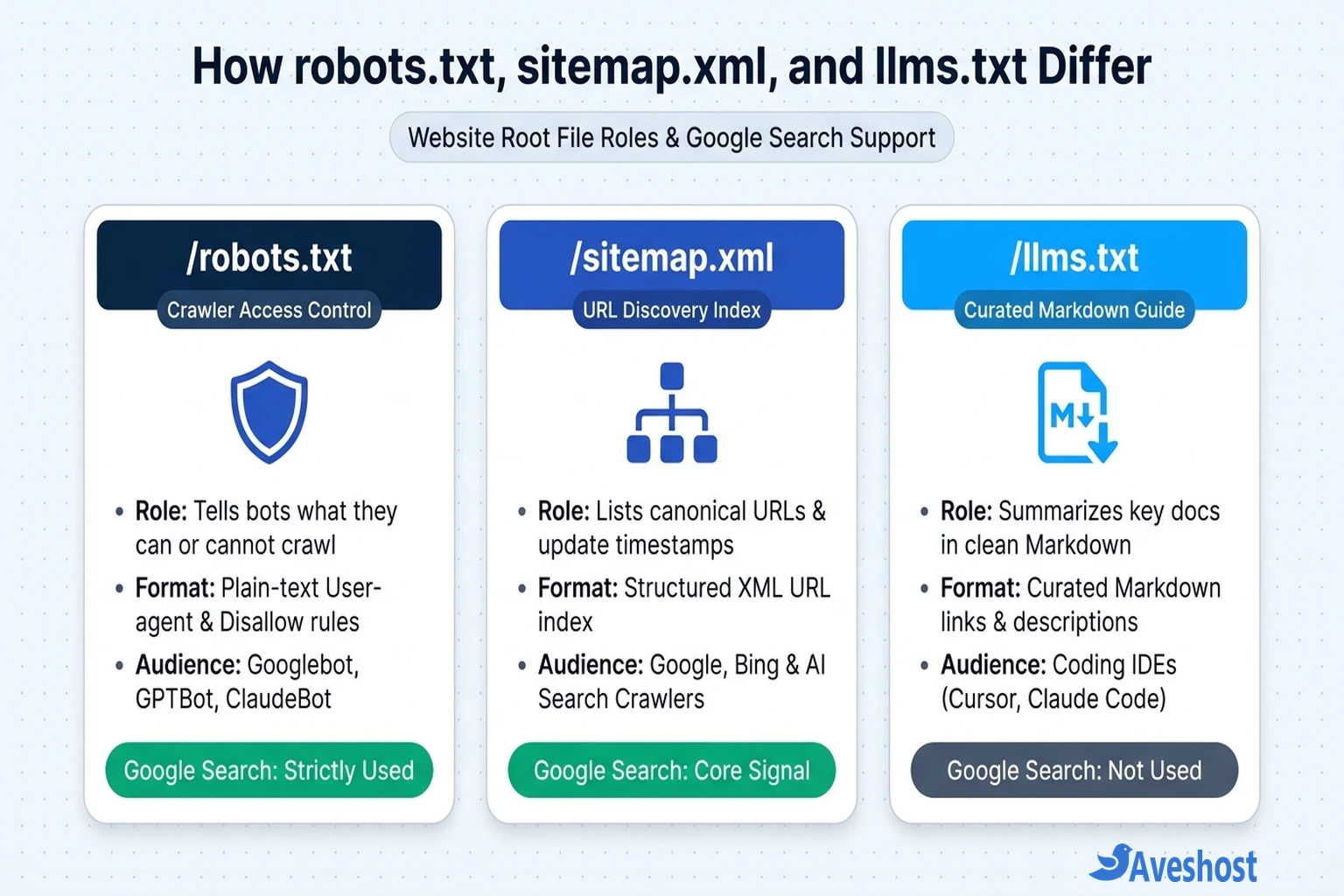
Much of the confusion around llms.txt happens because its filename looks like robots.txt, while its purpose resembles sitemap.xml. In practice, each file serves a distinct role at the root of your domain.
Defined under RFC 9309 and Google’s robots.txt specification, /robots.txt controls crawler permissions, telling automated bots—including Googlebot, GPTBot, ClaudeBot, and PerplexityBot—which paths they may or may not request. Writing access rules inside llms.txt has zero enforcement power. Meanwhile, /sitemap.xml is an exhaustive machine inventory of every indexable URL and its last-modified timestamp, whereas /llms.txt is a curated reading list of your top 10 to 50 resources designed to fit neatly inside an LLM’s context window.
| Root File | Primary Purpose | Format | Used by Google Search & AI Overviews? | Primary Consumers |
|---|---|---|---|---|
| /robots.txt | Crawler access control (Allow / Disallow directives) | Plain text (RFC 9309) | Yes — strictly enforced by Googlebot and Google-Extended | All compliant search engines and AI crawlers (Googlebot, GPTBot, ClaudeBot, PerplexityBot) |
| /sitemap.xml | Exhaustive discovery of canonical URLs and update timestamps | Structured XML | Yes — core URL discovery signal in Google Search Console | Google Search, Bing, and index-backed AI search engines |
| /llms.txt | Curated, token-efficient summary of key pages and docs | Markdown (# Title, > Summary, ## Links) | No — ignored by Google Search, AI Overviews, and AI Mode | IDE coding assistants (Cursor, Claude Code), developer agents, and custom RAG scripts |
| /llms-full.txt | Single-file compilation of full documentation text | Concatenated Markdown (.md) | No — ignored by Google Search | Developers loading complete library docs into LLM context windows |
Do ChatGPT, Claude, or Perplexity Use llms.txt?
Even though Google ignores llms.txt, website owners often ask whether OpenAI, Anthropic, or Perplexity rely on it to surface brands in conversational answers. The answer depends on the difference between automated web-search crawlers and user-directed coding or research agents.
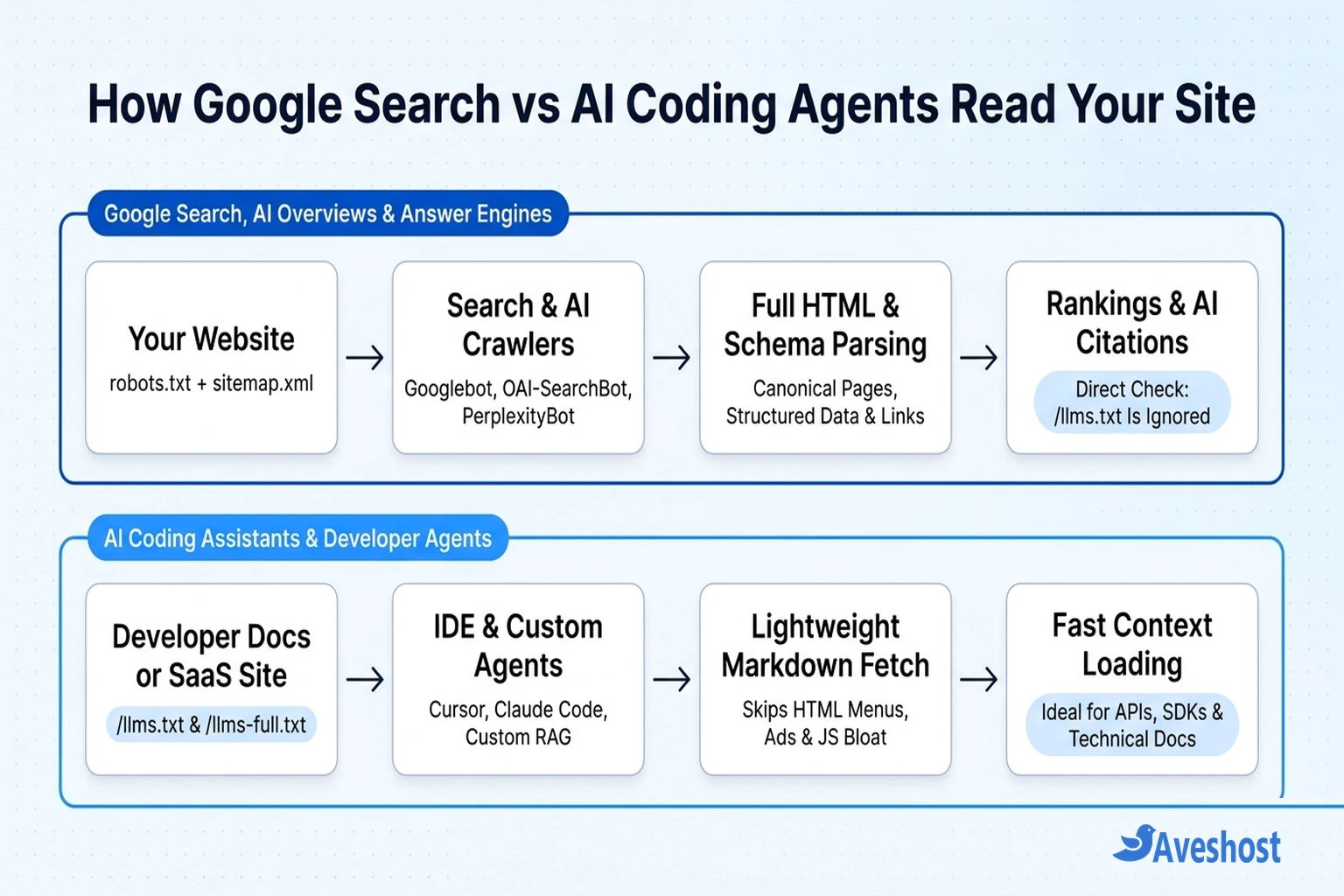
When someone asks a general question in ChatGPT Search or Perplexity, those engines rely on web search indexes and real-time HTML crawlers (OAI-SearchBot and PerplexityBot). Multi-domain server log analyses show that these search crawlers routinely check /robots.txt and crawl standard HTML pages, while automated crawler fetches of /llms.txt remain negligible. Publishing an llms.txt file will not push an ordinary blog post or local service page to the top of ChatGPT answers.
Where llms.txt genuinely delivers value is in developer-initiated and agentic workflows. Software platforms such as Stripe, Cloudflare, Vercel, and Anthropic publish /llms.txt and /llms-full.txt on their documentation portals. When a developer working in Cursor or Claude Code points their IDE assistant at a documentation URL, or connects a tool via the Model Context Protocol (MCP), the agent fetches clean Markdown immediately without parsing heavy frontend HTML.
When Your Website Should (and Shouldn’t) Add llms.txt
Because serving a small static Markdown file uses almost no server resources, adding llms.txt carries no SEO risk. However, knowing whether your audience will actually use it saves unnecessary maintenance.
Websites that benefit from llms.txt: Software, SaaS, and API documentation portals where developers use AI coding assistants to write integrations; complex B2B knowledge bases that feed internal or customer-facing RAG help desks; and open-source libraries where contributors load project architecture into IDE agents.
Websites that can skip llms.txt: Local service businesses, corporate brochure sites, news publications, and standard WooCommerce stores. Customers discover these websites through Google Search, Google Business Profile, and structured HTML pages. Dumping thousands of ecommerce product URLs into a giant text file creates maintenance overhead without helping Google Search or shopping crawlers.
| Website Type | Do You Need llms.txt? | What to Prioritize Instead |
|---|---|---|
| Developer Docs, APIs & SDK Portals | Recommended | Curated /llms.txt + /llms-full.txt Markdown files alongside clean OpenAPI specs |
| B2B SaaS & Technical Knowledge Bases | Helpful (Optional) | Curated /llms.txt of top 25–50 help guides + Article & FAQPage Schema |
| Ecommerce / WooCommerce Stores | Not Needed | XML Product Sitemaps, Merchant Center feeds, Product Schema & fast TTFB |
| Local Business & Service Websites | Not Needed | Google Business Profile, LocalBusiness Schema, clean HTML & robots.txt |
| Content Blogs & News Publishers | Not Needed | XML News/Post Sitemaps, clear H2/H3 structure & internal linking |
How to Add llms.txt to WordPress (Or Manually on Your Server)
If an llms.txt file fits your documentation or business website, you do not need to install an extra single-purpose plugin. Both major WordPress SEO plugins include built-in generators, and creating a custom file manually on Aveshost WordPress hosting takes only a couple of minutes.
Option 1 — Enable llms.txt in Rank Math SEO: In your WordPress admin dashboard, open Rank Math SEO → Dashboard and toggle on the LLMS Txt module. Next, go to Rank Math SEO → General Settings → Edit llms.txt, select the post types and taxonomies to include, set a concise link limit (such as your top 25 to 50 cornerstone guides), and save your changes.
Option 2 — Enable llms.txt in Yoast SEO: Navigate to Yoast SEO → Settings → Site features, scroll to the AI tools card, and toggle on the llms.txt feature. Yoast automatically compiles and updates a spec-compliant Markdown index at /llms.txt.
Option 3 — Upload a Custom /llms.txt File Manually: For developer documentation where you want exact control over every link description, create a UTF-8 file named llms.txt in your public root directory (public_html/llms.txt in cPanel File Manager or your web root on an Aveshost VPS). Start with an H1 site title (# Site Name), add a one-sentence blockquote summary (> Summary), and group your core guides under H2 headings (## Core Docs) using standard Markdown bullets:
# Acme Cloud API

> High-throughput webhook and payment infrastructure for modern web applications.

Use the links below to access our canonical authentication guides, REST endpoints, and SDK references.

## Core Documentation

- [Authentication & API Keys](https://example.com/docs/authentication): Issue, rotate, and scope bearer tokens safely.
- [Webhooks Guide](https://example.com/docs/webhooks): Verify HMAC signatures and configure automatic retry logic.
- [Rate Limits & Errors](https://example.com/docs/rate-limits): Understand HTTP status codes and concurrency quotas.

## Optional

- [Release Changelog](https://example.com/docs/changelog): Historical API version notes and deprecations.
Once published, visit https://yourdomain.com/llms.txt in an incognito browser window to confirm it returns an HTTP 200 OK response. Make sure your CDN or firewall rules do not block automated Markdown fetches—see our guide on resolving Cloudflare challenge blocks if external tools receive a security challenge.
What Actually Improves Visibility in Google Search and AI Overviews
Because Google Search ignores llms.txt, earning citations in Google AI Overviews, ChatGPT Search, and Perplexity comes down to the core technical signals outlined in Google’s official AI features guidance:
First, keep robots.txt and XML sitemaps clean so Googlebot, OAI-SearchBot, and PerplexityBot can crawl your canonical pages without hitting accidental blocks. Second, render primary content in server-side HTML rather than hiding text behind heavy client-side JavaScript scripts that many AI crawlers skip. Third, structure articles with clear H2/H3 headings, direct opening answers, and comparison tables alongside validated Schema.org JSON-LD markup (Organization, Article, FAQPage, and Product).
Finally, run fast, dependable hosting infrastructure so crawlers never encounter slow Time to First Byte (TTFB) or 5xx timeouts. Hosting on Aveshost Managed WordPress hosting keeps your pages fast and accessible to both search engines and human visitors, and our engineers are always ready to help through Aveshost Support.
Frequently asked questions
Does llms.txt help with Google SEO or AI Overviews?
No. Google Search Central, John Mueller, and Gary Illyes have confirmed that Google does not crawl or use llms.txt for search rankings, AI Overviews, or AI Mode. To appear in Google AI features, focus on standard crawlability via robots.txt, XML sitemaps, structured data, and authoritative HTML content.
Can adding an llms.txt file hurt my website rankings?
No. Placing a valid llms.txt file at the root of your domain will not penalize or harm your Google Search rankings. Search engines that do not support the convention simply ignore the file, provided you do not accidentally block normal pages in robots.txt or expose sensitive internal URLs.
What is the difference between llms.txt and llms-full.txt?
An llms.txt file is a concise Markdown index that lists your most important URLs alongside brief one-line descriptions. An llms-full.txt file is an optional companion document that combines the entire Markdown text of your documentation or core guides into a single file so AI coding assistants can ingest everything in one request.
Does llms.txt block AI crawlers from training on my content?
No. Unlike robots.txt, which enforces Allow and Disallow directives for bots like GPTBot, ClaudeBot, and Google-Extended, llms.txt is purely an informational directory. If you want to restrict AI bots from scraping your site, you must configure rules in robots.txt and enforce them at your web application firewall or CDN.
How do I add llms.txt to a WordPress website?
You can enable llms.txt in seconds using either Rank Math SEO (under Rank Math SEO → Dashboard → LLMS Txt module) or Yoast SEO (under Yoast SEO → Settings → Site features → AI tools). Alternatively, you can upload a custom UTF-8 llms.txt file directly to your public_html root directory.