Learning how to host an MCP server on a VPS with HTTPS and authentication is the key to turning local AI tools into a secure, always-on service that you and your team can reach from anywhere. When you run a Model Context Protocol (MCP) server over local stdio, your AI assistant can only call those tools while sitting on that exact laptop. Moving the server onto a Linux VPS unlocks shared access across desktop IDEs, cloud workflows, and mobile coding setups.
However, exposing an MCP server to the public internet requires three critical safeguards: switching from local stdio to the Streamable HTTP transport bound to localhost (127.0.0.1), terminating TLS/HTTPS through a streaming-aware reverse proxy like Caddy or Nginx, and enforcing strict Bearer Token or OAuth 2.1 authentication before any tool can execute.
In this step-by-step tutorial, we walk through the complete production setup on an Ubuntu VPS—from writing a Streamable HTTP MCP server and running it as a persistent service to configuring unbuffered HTTPS and locking down authentication.
Table of Contents
Why Move an MCP Server from Local stdio to a Remote VPS?
Most developers start with local stdio MCP servers because the host application (such as Claude Desktop, Cursor, or Google Antigravity) simply spawns a local Node.js or Python script as a child process. While stdio is convenient for single-machine tools, it creates immediate bottlenecks as soon as you work across multiple devices or collaborate with a team.
Hosting a remote MCP server on a Linux VPS solves three major problems: you only store sensitive database credentials and third-party API keys in one hardened server environment rather than scattering .env files across every developer laptop; your tools stay online 24/7 for background agents and remote mobile development workflows; and your MCP server can sit on the same private network as your self-hosted Supabase or PostgreSQL database for sub-millisecond queries.
The table below compares the three MCP transport modes defined across the official MCP specification:
| MCP Transport Mode | Endpoint Structure | Network Scope | Authentication Standard | Recommended Use Case |
|---|---|---|---|---|
| Local stdio | Standard input/output pipes (stdin/stdout) | Local machine only | OS user permissions | Local filesystem tools and single-device scripts |
| Legacy HTTP + SSE | Dual endpoints (/sse for stream, /messages for POST) | LAN or Internet | Custom headers (Deprecated) | Older MCP clients that have not upgraded to Streamable HTTP |
| Streamable HTTP (Current Standard) | Single unified endpoint (e.g., https://mcp.yourdomain.com/mcp) | Remote VPS / Cloud over HTTPS | Bearer Token or OAuth 2.1 + PKCE | Production remote MCP servers, shared team tools, and cloud agents |
Remote MCP Server Architecture and VPS Prerequisites
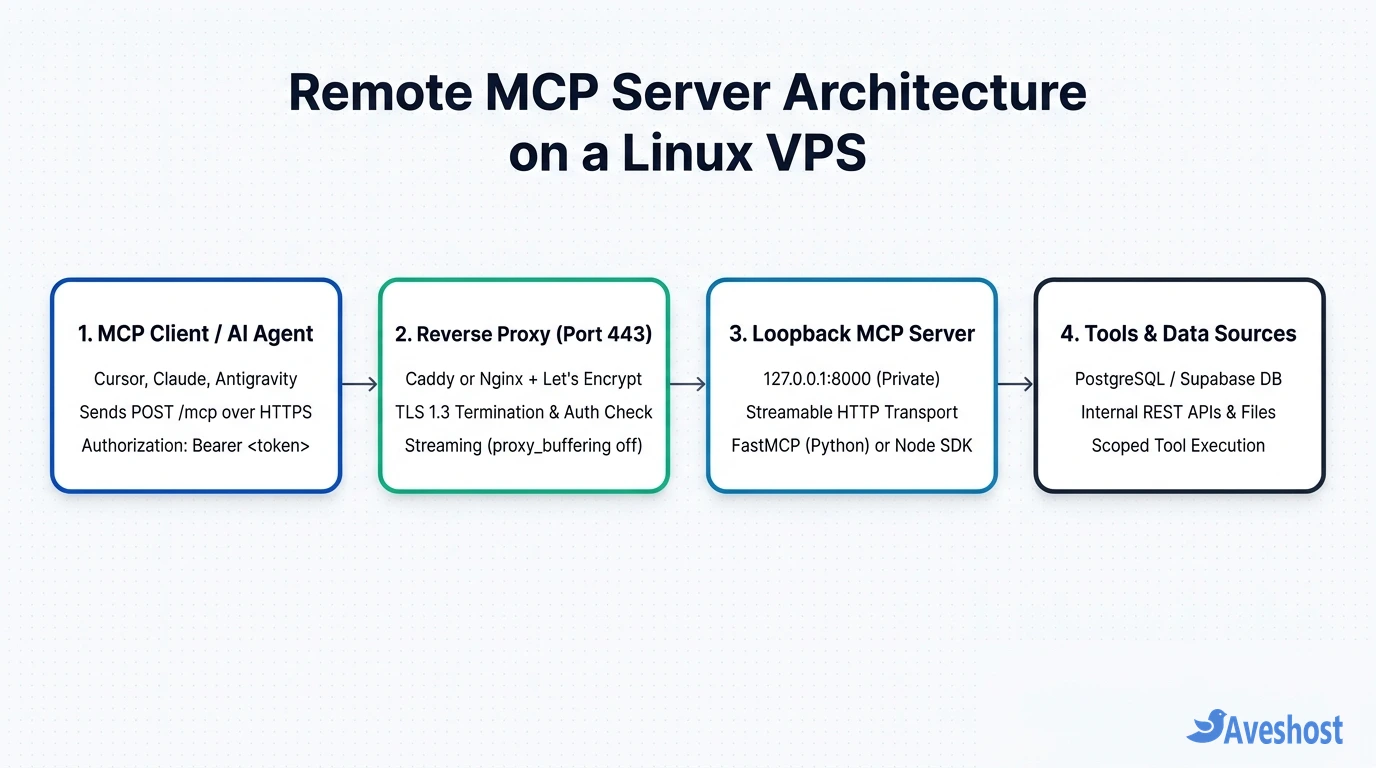
Never expose a raw Python or Node.js MCP process directly on public port 8000 without encryption. Instead, a production-grade VPS deployment uses a four-layer defence-in-depth architecture:
1. The AI Client Layer: Your IDE or agent connects to https://mcp.yourdomain.com/mcp over TLS 1.3 and attaches an Authorization: Bearer <token> header.
2. The Reverse Proxy & Auth Gate (Port 443): Caddy or Nginx terminates Let’s Encrypt HTTPS, rejects any request missing a valid Bearer token or trusted Origin header with 401 Unauthorized, and disables proxy buffering so streamed JSON-RPC packets flush immediately.
3. The Loopback MCP Process (127.0.0.1:8000): Your FastMCP (Python) or @modelcontextprotocol/sdk (TypeScript) server listens strictly on the local loopback interface, unreachable from the outside internet except through the reverse proxy.
4. Internal Data & APIs: Once authenticated, the MCP server executes scoped tools against your internal databases, WordPress REST APIs, or cloud services.
Before starting, make sure you have an Ubuntu 22.04 or 24.04 LTS VPS with at least 2 GB of RAM and 1–2 vCPU cores, root or sudo SSH access, and a subdomain (such as mcp.yourdomain.com) with an A record pointing to your VPS IP address.
Step 1: Build a Remote MCP Server with Streamable HTTP and Bearer Auth
Even if you validate tokens at the reverse proxy layer, your application code should also verify the Authorization header so defence is never reliant on a single configuration file. Let’s create a clean project directory on your Ubuntu VPS, generate a cryptographically random 256-bit Bearer token, and build a Streamable HTTP server using Python and FastMCP.
First, SSH into your VPS, create /opt/mcp-server, and generate your secret token:
sudo mkdir -p /opt/mcp-server && sudo chown $USER:$USER /opt/mcp-server
cd /opt/mcp-server

# Generate a 256-bit (64-hex-character) secret Bearer token
 echo "MCP_BEARER_TOKEN=$(openssl rand -hex 32)" > .env
chmod 600 .env
cat .env
Copy the generated MCP_BEARER_TOKEN value—you will need it later for your MCP client configuration. Next, create a Python virtual environment, install fastmcp and python-dotenv, and create server.py:
import hmac
import os
from dotenv import load_dotenv
from fastmcp import FastMCP
from fastmcp.server.dependencies import get_http_headers
from fastmcp.exceptions import ToolError

load_dotenv("/opt/mcp-server/.env")
EXPECTED_TOKEN = os.environ.get("MCP_BEARER_TOKEN", "")

mcp = FastMCP("AveshostRemoteMCP")

def verify_bearer_token() -> None:
    headers = get_http_headers()
    auth_header = headers.get("authorization", "")
    expected = f"Bearer {EXPECTED_TOKEN}"
    if not EXPECTED_TOKEN or not hmac.compare_digest(auth_header, expected):
        raise ToolError("401 Unauthorized: Invalid or missing Bearer token")

@mcp.tool()
def check_server_health(service_name: str) -> dict:
    """Check the live status of an internal VPS service."""
    verify_bearer_token()
    return {"service": service_name, "status": "healthy", "transport": "streamable-http"}

if __name__ == "__main__":
    # Bind strictly to localhost; Nginx or Caddy handles public HTTPS
    mcp.run(transport="streamable-http", host="127.0.0.1", port=8000, path="/mcp")
Notice two security details in server.py: we use hmac.compare_digest() for constant-time token comparison (preventing timing attacks), and we bind the server to 127.0.0.1 on port 8000 so external scanners cannot bypass your HTTPS proxy.
Step 2: Run the MCP Server as a Persistent Service
To keep your MCP server running continuously in the background and automatically restart it if your VPS reboots, register it as a hardened systemd service (or run it inside Docker with restart: unless-stopped).
Create /etc/systemd/system/mcp-server.service with the following configuration:
[Unit]
Description=Remote Model Context Protocol (MCP) Server
After=network.target

[Service]
Type=simple
User=www-data
Group=www-data
WorkingDirectory=/opt/mcp-server
EnvironmentFile=/opt/mcp-server/.env
ExecStart=/opt/mcp-server/venv/bin/python /opt/mcp-server/server.py
Restart=always
RestartSec=3
NoNewPrivileges=true
PrivateTmp=true

[Install]
WantedBy=multi-user.target
Set ownership of /opt/mcp-server to www-data, reload systemd, and verify that your server is listening on 127.0.0.1:8000:
sudo chown -R www-data:www-data /opt/mcp-server
sudo systemctl daemon-reload
sudo systemctl enable --now mcp-server
sudo systemctl status mcp-server
Step 3: Configure HTTPS and Unbuffered Streaming in Caddy or Nginx
Because MCP’s Streamable HTTP transport uses chunked HTTP responses and Server-Sent Events (SSE) to stream incremental tool progress and server notifications, a default reverse proxy configuration will buffer responses in memory and cause your AI client to time out.
Option A — Caddy (Simplest Automatic HTTPS): Caddy automatically provisions and renews Let’s Encrypt TLS certificates. Put the following block in /etc/caddy/Caddyfile, replacing mcp.yourdomain.com and YOUR_SECRET_BEARER_TOKEN with your real subdomain and token:
mcp.yourdomain.com {
    @unauthorized {
        not header Authorization "Bearer YOUR_SECRET_BEARER_TOKEN"
    }
    respond @unauthorized "Unauthorized" 401

    reverse_proxy 127.0.0.1:8000 {
        # Disable buffering so Streamable HTTP chunks flush immediately
        flush_interval -1
    }
}
Option B — Nginx + Certbot: If your VPS already runs Nginx, disable proxy_buffering and extend proxy_read_timeout inside /etc/nginx/sites-available/mcp.conf so long-running tool calls are never cut off mid-stream:
server {
    listen 443 ssl http2;
    server_name mcp.yourdomain.com;

    ssl_certificate /etc/letsencrypt/live/mcp.yourdomain.com/fullchain.pem;
    ssl_certificate_key /etc/letsencrypt/live/mcp.yourdomain.com/privkey.pem;

    location /mcp {
        if ($http_authorization != "Bearer YOUR_SECRET_BEARER_TOKEN") {
            return 401;
        }

        proxy_pass http://127.0.0.1:8000/mcp;
        proxy_http_version 1.1;
        proxy_set_header Connection "";
        proxy_set_header Host $host;
        proxy_set_header X-Real-IP $remote_addr;
        proxy_set_header X-Forwarded-For $proxy_add_x_forwarded_for;
        proxy_set_header X-Forwarded-Proto $scheme;

        # Critical for MCP Streamable HTTP & SSE
        proxy_buffering off;
        proxy_cache off;
        chunked_transfer_encoding on;
        proxy_read_timeout 3600s;
        proxy_send_timeout 3600s;
    }
}
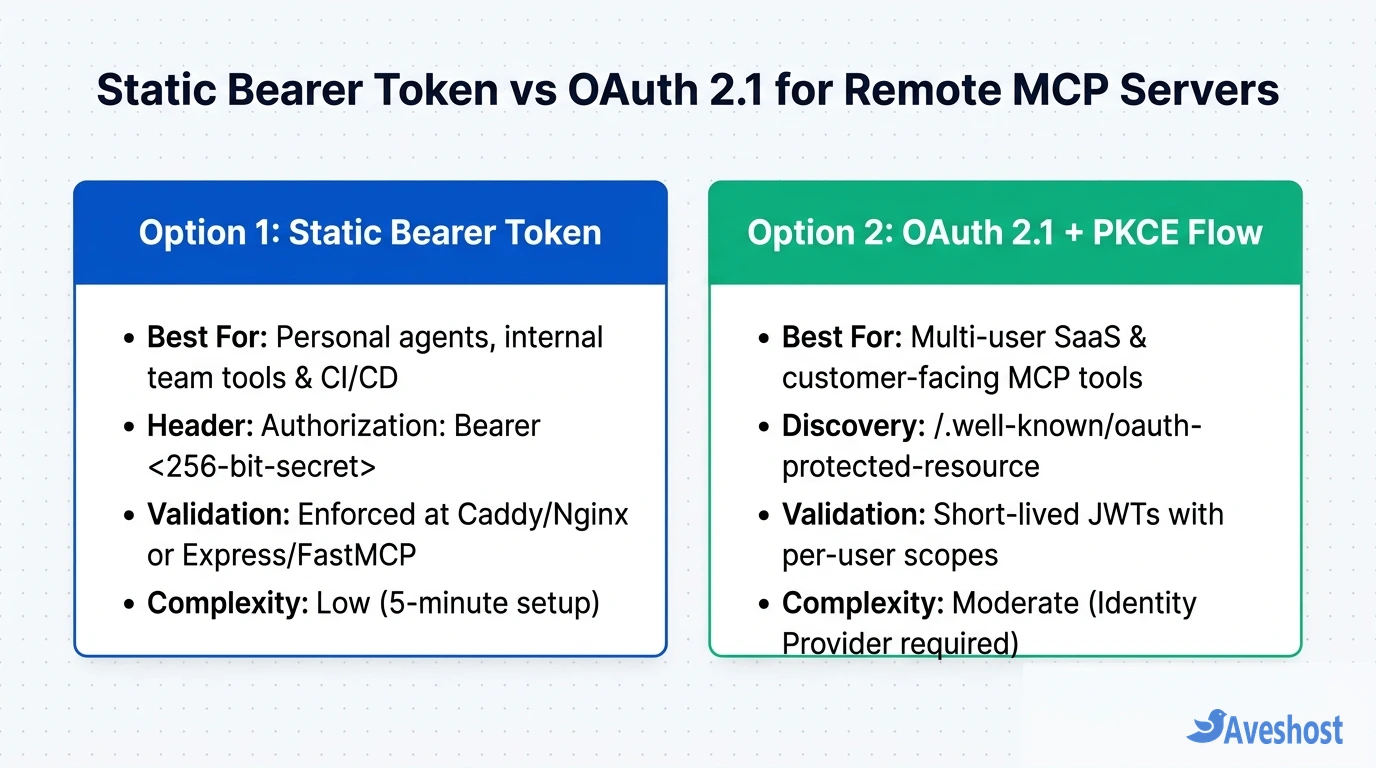
Step 4: Choosing Between Static Bearer Tokens and OAuth 2.1
The official MCP Authorization specification supports two ways to authenticate remote HTTP connections. Choosing the right one depends on who will connect to your VPS:
Use a Static 256-bit Bearer Token when you are the sole user, when your internal engineering team connects via shared secrets, or when an automated backend like OpenClaw calls your MCP server machine-to-machine. Use OAuth 2.1 with PKCE when you are publishing a multi-tenant MCP server where external users sign in with their own accounts and grant scoped permissions (for example, mcp:tools:read vs mcp:tools:write).
Once your HTTPS proxy and Bearer token are active, connect your MCP client (such as Google Antigravity, Cursor, or Claude) by adding the remote serverUrl (or url) and Authorization header to your MCP configuration file:
{
  "mcpServers": {
    "aveshost-vps-tools": {
      "serverUrl": "https://mcp.yourdomain.com/mcp",
      "headers": {
        "Authorization": "Bearer YOUR_SECRET_BEARER_TOKEN"
      }
    }
  }
}| Feature | Static Bearer Token (API Secret) | OAuth 2.1 + PKCE Resource Server |
|---|---|---|
| Best Audience | Solo developers, internal team tools, and CI/CD agents | Multi-user SaaS platforms and customer-facing MCP servers |
| Token Lifecycle | Long-lived 256-bit secret rotated manually in .env | Short-lived JWT access tokens + refresh tokens via Identity Provider |
| Discovery Flow | Configured directly in client mcpServers JSON headers | 401 response + /.well-known/oauth-protected-resource metadata |
| Granular User Scopes | All-or-nothing per token (unless multiple tokens are mapped) | Per-user, per-tool scopes enforced via JWT claims |
Production Hardening Checklist and Choosing a VPS
Before connecting production databases or business APIs to your remote MCP server, complete four quick hardening steps on your Linux VPS:
1. Lock Down the Firewall (UFW): Allow only SSH (22/tcp), HTTP (80/tcp), and HTTPS (443/tcp). Never open port 8000 in UFW—keeping port 8000 closed externally guarantees that nobody can bypass your Caddy or Nginx authentication check.
2. Validate Origin Headers: If you use the TypeScript SDK (StreamableHTTPServerTransport) or FastMCP, keep Origin validation enabled to prevent cross-site request and DNS rebinding attacks.
3. Scope Tool Permissions: Give your MCP server a read-only database role or narrowly scoped API credentials unless a tool explicitly requires write access, and log every tool invocation.
4. Match Your VPS to Your Workload: A single lightweight Python or Node.js MCP server uses only 80 MB to 200 MB of RAM, making an entry-level Aveshost Self-Managed Linux VPS (2 GB to 4 GB RAM with fast SSD storage and full root SSH access) more than fast enough. If your MCP server runs alongside a heavy local database or serves latency-sensitive West African traffic, deploy on an Aveshost Ghana VDS with dedicated Accra NVMe storage. Need a clean subdomain for your endpoint? You can also register your domain with Aveshost and point your DNS record in seconds.
Frequently asked questions
Can I host a remote MCP server on shared cPanel hosting?
Standard shared hosting is not designed for persistent, long-running Streamable HTTP daemons or custom unbuffered reverse proxy rules. A Linux VPS with root SSH access lets you run systemd services or Docker containers and disable proxy buffering in Caddy or Nginx.
Why does my remote MCP server connect but hang when calling tools?
In almost every case, Nginx or a cloud load balancer is buffering the chunked HTTP response stream. Add proxy_buffering off; and proxy_cache off; in Nginx (or flush_interval -1 in Caddy) so JSON-RPC messages flush to the client immediately.
Should I use HTTP+SSE or Streamable HTTP for a new VPS MCP server?
Use Streamable HTTP. The Model Context Protocol specification replaced the older dual-endpoint HTTP+SSE transport with Streamable HTTP, which handles all requests and event streams over a single unified endpoint such as /mcp.
Is a static Bearer token secure enough for a production MCP server over HTTPS?
Yes, for single-tenant, personal, or internal team deployments—provided the token is generated with at least 256 bits of entropy (openssl rand -hex 32), transmitted exclusively over TLS 1.3 (HTTPS), and compared in constant time. For multi-user SaaS products, use OAuth 2.1 with PKCE.
How much RAM and CPU does a remote MCP server need on a VPS?
A standalone Node.js or Python (FastMCP) server consumes roughly 80 MB to 250 MB of RAM. A 2 GB RAM, 1–2 vCPU Linux VPS easily handles a standalone MCP server, while an 8 GB RAM VPS is ideal if you also host Supabase or PostgreSQL on the same machine.