
Looking for cheap bulk email marketing in Ghana without a growing software bill tied to every contact? Hosting Listmonk on an Aveshost VPS gives your team control over subscriber records, campaign templates and scheduling, while an approved SMTP relay handles message delivery.
This can be a useful Mailchimp alternative in Ghana for developers, agencies and businesses that have a permission-based audience and someone responsible for the platform. It also shifts work onto your team: updates, backups, consent records and delivery monitoring still matter.
This guide explains a realistic budget in Ghana cedis and a practical Listmonk deployment, then covers the checks needed before a large campaign.
Table of Contents
What cheap bulk email marketing in Ghana really costs
Listmonk is free, open-source software. A free software licence does not make delivery free. Your monthly bill can include the VPS, an email relay, backups, domain renewal, processing or data charges, and staff time.
| Cost item | How to estimate it |
|---|---|
| VPS | The monthly hosting plan for the application and database |
| SMTP relay | Message volume, service tier and enabled features |
| Domain and backups | Renewals, storage and recovery requirements |
| Operations | Setup, updates, testing and campaign management |
Calculate message volume from recipients and campaigns. A list of 25,000 active subscribers receiving four campaigns creates 100,000 recipient messages before tests and other sends. A list of 100,000 receiving four campaigns creates 400,000. Check whether the relay counts each recipient and how retries, attachments or extra services are billed.
A useful formula is: monthly cost = VPS + relay message charges + extras. As an illustrative budget only, a relay quote of GH₵2 per 1,000 messages would cost GH₵200 for 100,000 messages. Adding a GH₵100 VPS gives GH₵300 before other costs. The relay figure is a calculation example, not a provider offer.
Our starter self-managed VPS is GH₵100 per month at the time of writing. Confirm the selected plan and obtain the actual relay quotation before comparing it with your current software bill. Savings depend on usage and the work your team takes on, rather than a universal fixed-price promise.
Separate your campaign platform from email delivery
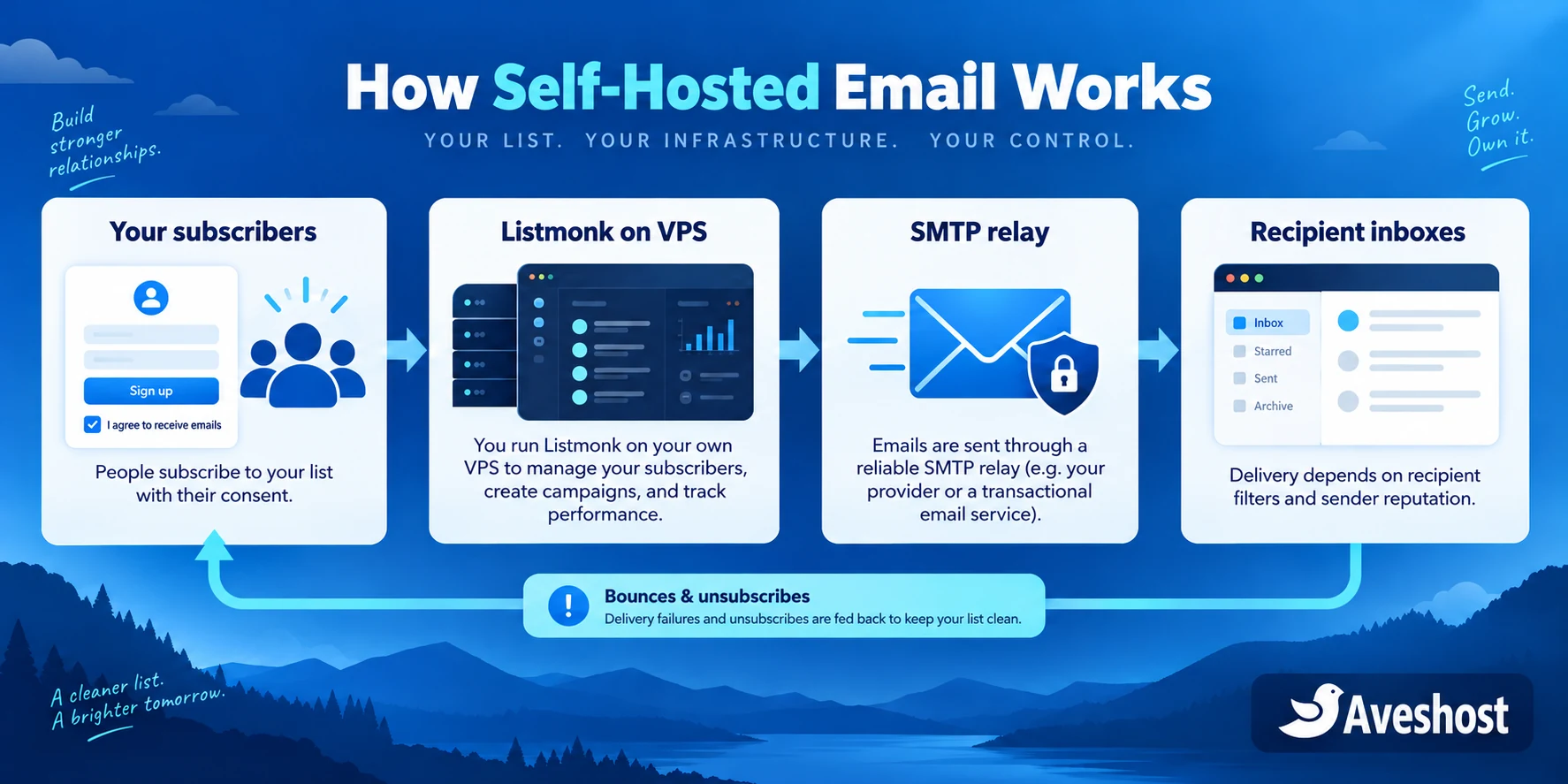
Listmonk manages the audience and campaigns. The relay accepts outgoing messages and attempts delivery to receiving mail systems. Aveshost provides the VPS environment where the application runs. Keeping those roles separate makes the setup easier to budget and operate.
| Component | Responsibility |
|---|---|
| Aveshost VPS | Run the application, database and supporting services |
| Listmonk | Manage subscribers, templates, segments and campaigns |
| Approved SMTP relay | Send messages under its quotas and sending policies |
| Feedback handling | Record delivery failures, complaints and opt-outs |
Use an SMTP relay that explicitly permits your subscribed marketing traffic. A service branded “transactional” may have different rules for marketing campaigns. Complete its onboarding and production approval, then verify its daily quota and per-second limits.
A regular business mailbox is designed for correspondence and should not become a 100,000-message campaign engine. Keep customer replies on a monitored address, while the campaign system uses the approved sending route. Our business email service can support your team’s correspondence separately.
A dedicated VPS IP is not a shortcut to inbox delivery. If the relay sends the messages, its sending infrastructure and authentication affect delivery; your VPS IP mainly hosts the application. Operating a direct mail server adds reputation, reverse-DNS and abuse-handling responsibilities beyond this guide.
Choose Listmonk for a self-hosted email platform
Listmonk is an open-source newsletter and mailing-list application with a web dashboard. It uses PostgreSQL and can run through Docker Compose. It is a strong option when your team wants to manage its own campaign platform rather than pay for a hosted platform’s entire feature bundle.
Before switching, list the features you use today: signup forms, segmentation, automations, ecommerce events, templates, reporting and staff access. Self-hosting does not automatically reproduce every feature of your current provider. Test the workflows important to your business before exporting the whole audience.
- Start with one newsletter and a small engaged segment.
- Keep a working reply address and a recognisable sender name.
- Plan how signup forms reach the application and record permission.
- Identify who maintains the server and who approves campaigns.
- Keep an exit copy of subscriber data and suppression records.
This guide focuses on Listmonk, so you have one clear deployment path. A smaller, well-maintained setup is easier to operate than several overlapping campaign tools that disagree about unsubscribed contacts.
Choose an Aveshost VPS and plan your resources
Our self-managed cloud VPS plans come with root access and SSD storage. Cloud VPS 1 provides 1 vCore, 2 GB RAM, 20 GB SSD and 1 TB traffic for GH₵100 per month. Cloud VPS 2 provides 4 vCores, 8 GB RAM, 100 GB SSD and 32 TB traffic for GH₵170 per month at the time of writing.
A small pilot can start on the entry plan. Campaign history, PostgreSQL activity, media uploads and backups consume resources; test the chosen plan with your real audience and campaign workload. A recipient target alone does not determine the required VPS size.
- Use a supported Linux release and keep it updated.
- Reserve disk space for the database, uploads, logs and temporary backup work.
- Monitor memory and database growth before increasing campaign concurrency.
- Choose a separate off-server backup destination.
- Confirm outbound relay connectivity and its supported submission ports.
Self-managed hosting gives your team control of server maintenance and application security. If you need a managed server platform, our fully managed VPS includes DirectAdmin at no additional cost. Discuss the support scope for your custom application and relay setup with us.
Our Acceptable Use Policy prohibits unsolicited bulk email. Build this system for recipients who requested your messages, with working opt-outs and responsible sending practices.
Self-host Listmonk on VPS with Docker
Install Docker Engine and its Compose plugin using the official Ubuntu instructions. Use a dedicated project directory on the VPS. Obtain the Compose file from the Listmonk installation documentation and review it before starting services.
mkdir -p ~/listmonk
cd ~/listmonk
curl -fL https://github.com/knadh/listmonk/raw/master/docker-compose.yml -o docker-compose.yml
nano docker-compose.yml
Customise the official file: replace the shared default PostgreSQL password, set the hostname for your application, and pin a tested stable Listmonk image tag rather than leaving production on an automatically changing tag. Bind the app’s published port to localhost for the first setup:
# Under app → ports:
- "127.0.0.1:9000:9000"
Keep PostgreSQL private; the application uses the internal Docker network to reach it. Retain persistent database storage and the uploads mount. Set the timezone to Africa/Accra where appropriate. Protect files containing secrets with restrictive permissions, and keep them out of Git.
sudo docker compose config --quiet
sudo docker compose up -d
sudo docker compose ps
sudo docker compose logs --tail=50 app
The configuration check validates Compose structure, not application security. Inspect startup logs and health status. Reach the localhost-bound setup screen over an SSH tunnel from your computer:
ssh -L 9000:127.0.0.1:9000 YOUR_SSH_USER@YOUR_VPS_IPThen open http://localhost:9000 on that computer and create the administrator account before enabling public access. Use a strong unique password. This tunnel is for initial setup and administration, not for public unsubscribe links.
Secure the dashboard and public subscription pages
Create a domain or subdomain such as newsletters.yourdomain and point it to the VPS. Configure an HTTPS reverse proxy to the localhost-bound application. Obtain a valid certificate, renew it automatically and test its public URL before sending campaigns.
Keep PostgreSQL and the raw application port off the public internet. Allow the actual SSH port and the HTTPS access needed by the proxy; coordinate container publishing rules with your firewall. Docker-published ports need careful review because publishing a port can affect the way host firewall restrictions apply.
Protect administration separately from subscriber-facing routes. The Listmonk configuration documentation distinguishes private admin endpoints from public subscription, tracking, upload and feedback routes. If you use an additional access gate, make sure it does not block unsubscribe requests or the relay’s required feedback callbacks.
Set the application’s public base URL to the HTTPS hostname. Test a subscription confirmation, an unsubscribe link and any image URL from a device outside the server. Links pointing to localhost or a private IP will fail for recipients, even if they work in your dashboard.
Back up the proxy configuration and certificate-renewal settings with the deployment notes. Keep administrative access limited to staff who need it, and remove unused accounts.
Connect an approved SMTP relay
In Listmonk’s settings, configure the approved relay’s hostname, port, credentials and required TLS mode. Use the values from that relay’s documentation. Port 587 commonly uses STARTTLS and port 465 commonly uses implicit TLS, but follow the service’s exact configuration rather than guessing.
- Complete domain verification and marketing-use approval.
- Confirm production quotas, permitted sender addresses and supported feedback events.
- Store SMTP credentials privately and restrict their access.
- Choose a consistent From address and a monitored Reply-To address.
- Set throughput below the approved relay rate and review retry behaviour.
- Send a small test and confirm acceptance in both Listmonk and the relay logs.
SMTP acceptance means the relay received the message. It does not prove that the recipient saw it in the inbox. Separate application errors, relay rejections and mailbox-provider filtering when troubleshooting.
Do not add multiple accounts or servers to bypass quota or abuse restrictions. Request a legitimate limit increase when your audience and sending history justify it. If the relay pauses delivery, investigate the cause before restarting the campaign.
Authenticate your sending domain
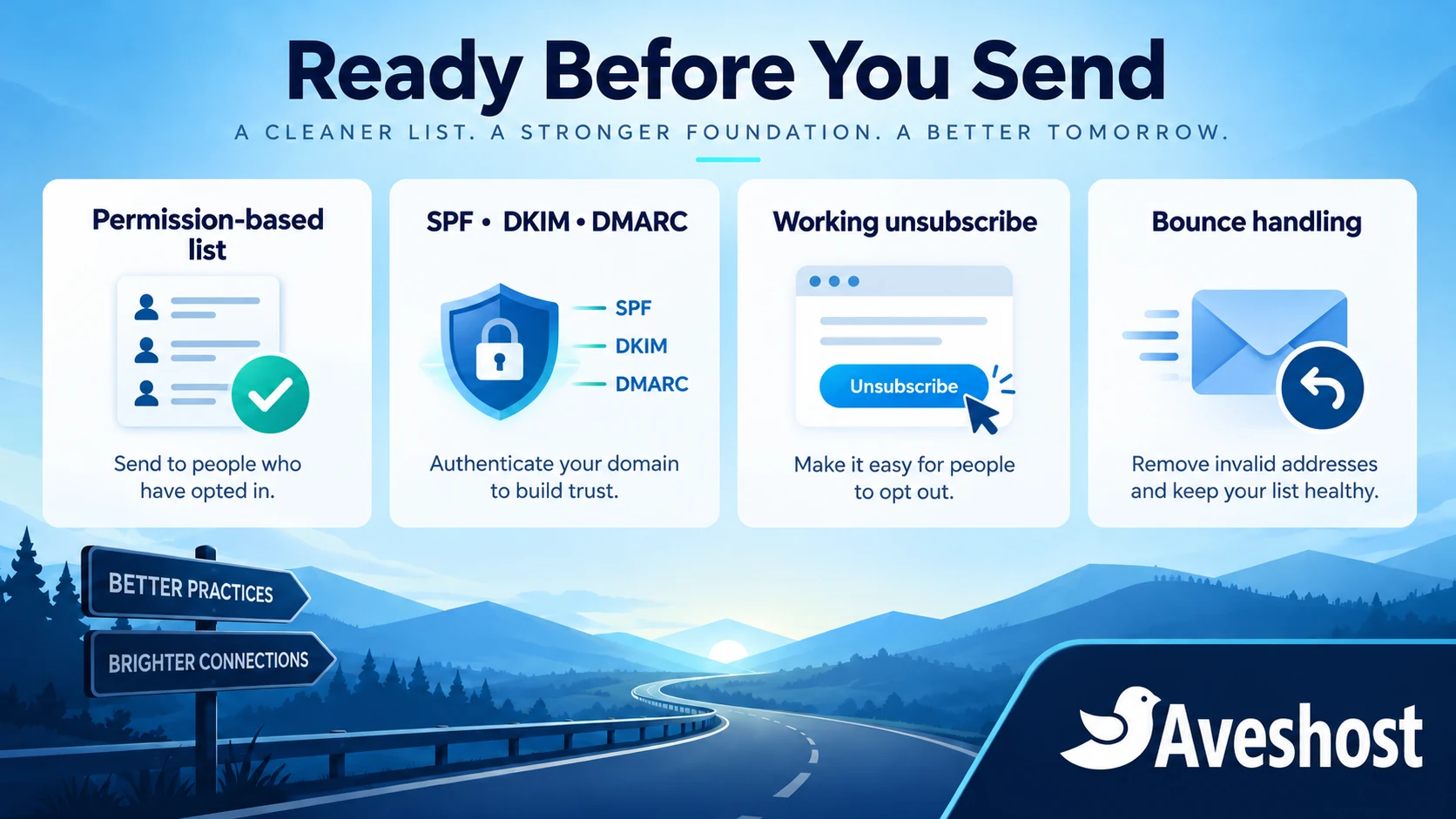
Configure SPF, DKIM and DMARC for the domain used in your campaign identity. Follow the relay’s generated records, and verify the resulting messages rather than merely checking that DNS contains some TXT entries.
| Control | Purpose |
|---|---|
| SPF | Authorise the intended sending infrastructure for the relevant envelope domain |
| DKIM | Sign messages with the domain’s configured key |
| DMARC | Check alignment with the visible From domain and apply your chosen policy |
Avoid publishing multiple separate SPF records for the same hostname. Review existing business email senders before editing authentication so campaign setup does not break normal correspondence. Keep a separate sending subdomain where that suits your domain and reporting plan.
Gmail’s sender guidelines require stronger controls for high-volume senders: SPF and DKIM, DMARC, alignment, TLS and appropriate DNS for the sending infrastructure. Marketing and subscribed messages must support one-click unsubscribe as well as a visible body link. Review the current requirements for the mailbox services your audience uses.
Send test messages and inspect Authentication-Results, the visible From address and the unsubscribe headers. With a relay, reverse DNS of its actual sending IP is normally part of its infrastructure; a PTR record on the application VPS alone does not authenticate the relay’s mail.
Authentication is necessary for a professional setup. It cannot compensate for an unwanted message or an audience that no longer expects to hear from you.
Import subscribers without losing consent or suppression data
Export more than active email addresses when leaving a campaign platform. Retain subscription status, list memberships, opt-in source and date where available, plus unsubscribed, bounced and complaint records. Preserve the data needed to avoid sending to people who already opted out.
- Import a small sample first and check field mappings.
- Keep suppressed contacts suppressed in the new platform.
- Do not turn unsubscribed records into active subscribers during CSV cleanup.
- Deduplicate addresses without discarding subscription or suppression history.
- Keep a record of which signup form, event or service produced the permission.
A purchased list, scraped directory or old contact export is not a substitute for newsletter permission. A customer buying a product does not automatically mean they requested every marketing campaign. Use a clear signup process with confirmation where appropriate, and state what messages subscribers will receive.
For an agency, separate each client’s audience and credentials with appropriate access controls. Avoid mixing unrelated clients under one sender identity. Keep exports encrypted or access-restricted, and delete unnecessary temporary copies under your data-handling process.
Move signup forms and suppression handling before retiring the old platform. During the transition, record opt-outs from both systems and reconcile them so an unsubscribe does not disappear between exports.
Handle bounces, complaints and unsubscribes
Connect relay feedback to the Listmonk mechanisms supported by your chosen service. The bounce-processing documentation lists supported integration routes and configuration. Test the callback and confirm that the corresponding subscriber status changes.
| Event | Practical response |
|---|---|
| Hard bounce | Suppress the invalid address and stop retrying it |
| Temporary delivery failure | Use bounded retries appropriate to the relay’s guidance |
| Complaint | Suppress the recipient and investigate the campaign |
| Unsubscribe | Stop the affected marketing sends promptly |
| Repeated webhook | Process consistently without duplicate or contradictory changes |
Protect feedback endpoints using the validation required by the integration. A public endpoint does not mean arbitrary requests should be trusted. Keep a record of processing failures so a broken callback does not silently leave bad addresses active.
Include a clear unsubscribe link in the template and verify one-click unsubscribe headers in the message actually delivered. Do not hide opt-outs behind a mandatory login or a customer-support request. Respect the scope of the recipient’s choice across your lists.
Pause sending if complaints, hard bounces or authentication failures increase. Investigate the signup source, audience age and content before resuming. Delivery problems are signals to fix the process, not a reason to rotate identities to evade filtering.
Test, monitor and scale your campaigns
Begin with engaged subscribers who expect the newsletter. Send a small pilot, inspect the results and increase volume within the relay’s approved limits. Avoid treating a freshly configured system as ready for 100,000 messages just because its dashboard loads.
- Check the mobile email layout and a plain-text version.
- Confirm From, Reply-To, campaign links and unsubscribe behaviour.
- Validate authentication in received messages.
- Test bounce and complaint processing with the relay’s supported test tools.
- Watch database storage, CPU, memory, queues and delivery failures.
- Reconcile sent counts with relay reports and suppression changes.
Use clicks, replies and meaningful business outcomes alongside campaign reports. Open tracking can be distorted by image blocking, privacy features and automated scanning. Do not promise a campaign’s exact readership based on an open-rate number alone.
Back up PostgreSQL, uploaded media and protected configuration. Keep an off-server copy and test restoring the application into a separate environment. Follow the Listmonk upgrade procedure with a database backup before application or database changes. Do not remove persistent Docker volumes during routine maintenance.
Ready to self-host your campaign platform? Explore our Linux VPS plans or discuss the setup with Aveshost support. Share your permission-based audience size, expected monthly messages, relay choice and maintenance needs so we can help you plan suitable hosting.
Frequently asked questions
Can I send 100,000 emails for the equivalent of one dollar?
There is no verified basis for that total-cost promise. Include the VPS, relay charges, backups and operations when calculating a campaign budget.
Is Listmonk free?
Listmonk is open-source software. Hosting, delivery services and maintenance still have costs.
What is a practical Mailchimp alternative in Ghana?
Listmonk on a VPS can suit teams that want control over their campaign platform and can maintain it. Compare your required workflows before switching.
Can I self-host Listmonk on VPS?
Yes. It runs with PostgreSQL and supports Docker Compose. Protect the admin setup, use persistent storage and configure HTTPS before public campaigns.
Does a VPS include unlimited bulk email sending?
No. Application hosting and message delivery are separate. Use an approved relay and follow its quotas and sending policy.
Do I need a dedicated email IP for this setup?
Not necessarily. When an SMTP relay sends the mail, its sending infrastructure is relevant. A VPS IP for the dashboard does not guarantee inbox placement.
Can I import my old marketing contacts?
Import permission and suppression information with the addresses. Keep unsubscribed, bounced and complaint records suppressed.
Which authentication records should I configure?
Use the relay’s SPF and DKIM instructions and configure DMARC alignment. Test the headers of delivered messages.
Why do I need bounce and unsubscribe processing?
It keeps invalid addresses, complaints and opted-out recipients out of later campaigns and helps you manage delivery responsibly.
Can Aveshost help me choose a VPS for Listmonk?
Yes. Contact support with your audience size, monthly message volume, relay and technical maintenance requirements.