An MTN MoMo API staging server gives your development team a stable place to receive payment callbacks, inspect integration behaviour and test recovery before launch. A Linux VPS provides a persistent public endpoint while the application listener stays behind a reverse proxy.
For developers in Ghana, this removes the changing laptop address, router configuration and interrupted local sessions that complicate webhook testing. The server still needs careful configuration: receiving a message and confirming a payment are separate jobs.
This guide builds a small Node.js receipt collector on an Ubuntu VPS, adds HTTPS with Caddy and explains the MTN sandbox workflow. The collector records an unverified event; a separate worker must query MTN before updating an order. All examples use fictional data and sandbox credentials.
Table of Contents
Plan your MTN MoMo API staging server
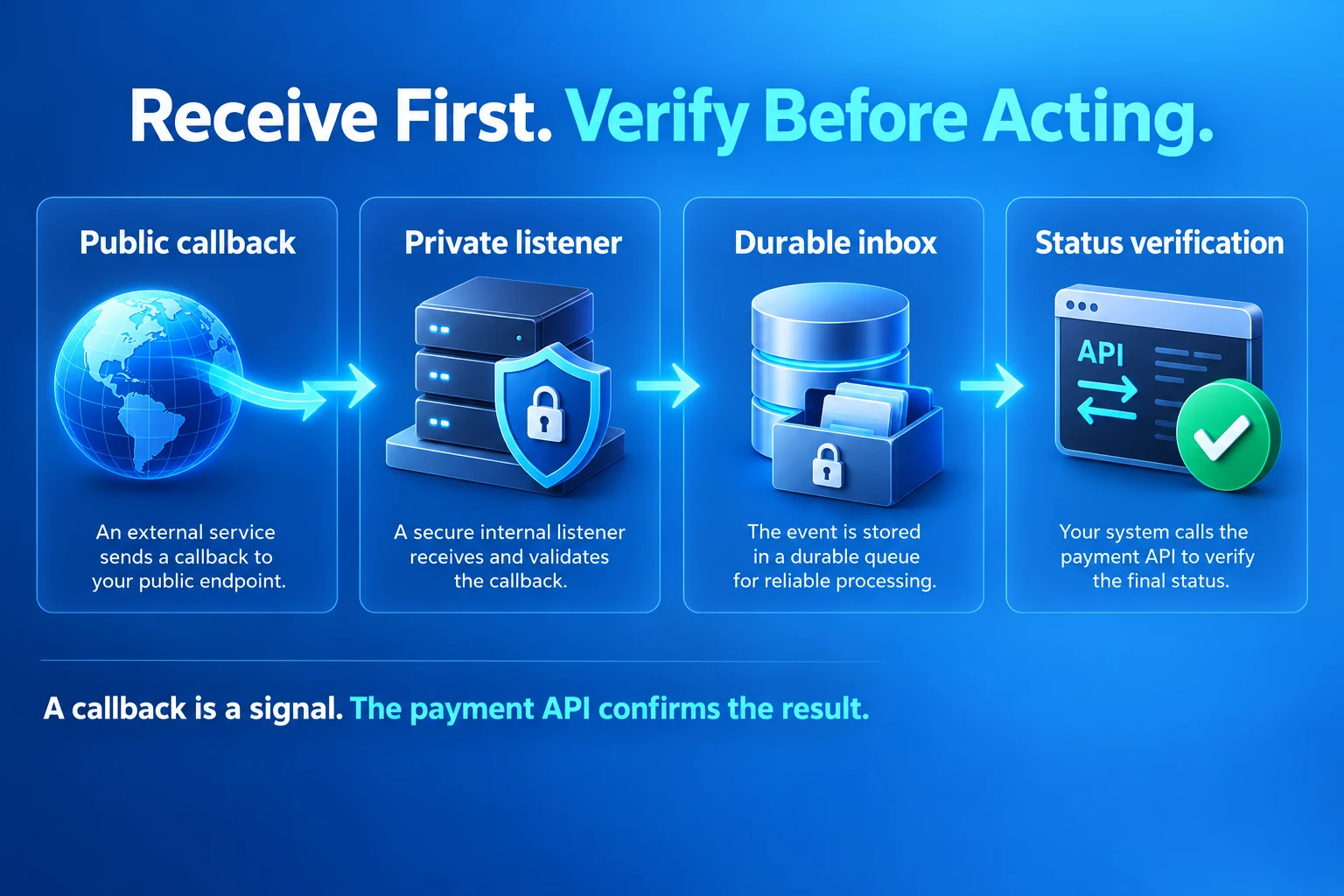
Use four layers: a public callback URL, a loopback-only listener, a durable inbox and an authenticated status-verification worker. The reverse proxy handles the public connection. The listener validates the request shape and stores a receipt. The worker reconciles known payment requests against the provider API.
Keep your order database as the source of business context. Save the request reference, order ID, expected amount, currency and environment before calling MTN. A callback supplies a reason to check a known transaction; it must never create a payable order or choose an arbitrary verification URL.
| Component | Responsibility |
|---|---|
| Caddy on public ports | Route the callback and handle HTTPS |
| Node.js on 127.0.0.1:3000 | Validate and persist a minimal unverified receipt |
| Private inbox | Retain accepted receipts across application restarts |
| Verification worker | Query MTN, match the saved payment and update state once |
| Reconciliation scheduler | Check outstanding requests even when no callback arrives |
MTN’s callback documentation describes asynchronous notifications and status polling. Build both paths. A payment can complete while your endpoint is unavailable, and a successful HTTP response from your server says nothing about whether the customer paid.
Prepare a VPS, DNS and firewall
Choose a Linux VPS with sufficient memory for the application, proxy, monitoring and any database you run. Start with measured staging needs and leave capacity for concurrent tests. Our self-managed VPS hosting provides root access for a custom Node.js stack; your team manages its software and configuration.
Use a dedicated hostname such as momo-stage.example.com. Replace this reserved example with a subdomain you own. Point its A record to the VPS public IPv4 address. Add an AAAA record only when IPv6 is configured and reachable; a broken IPv6 route can interfere with validation and callbacks.
Allow public TCP 80 and 443 at both the provider firewall and operating-system firewall. Restrict SSH to your administrative IP or approved access network. Keep port 3000 closed publicly. Confirm your current SSH access rule before enabling a firewall so you retain administration access.
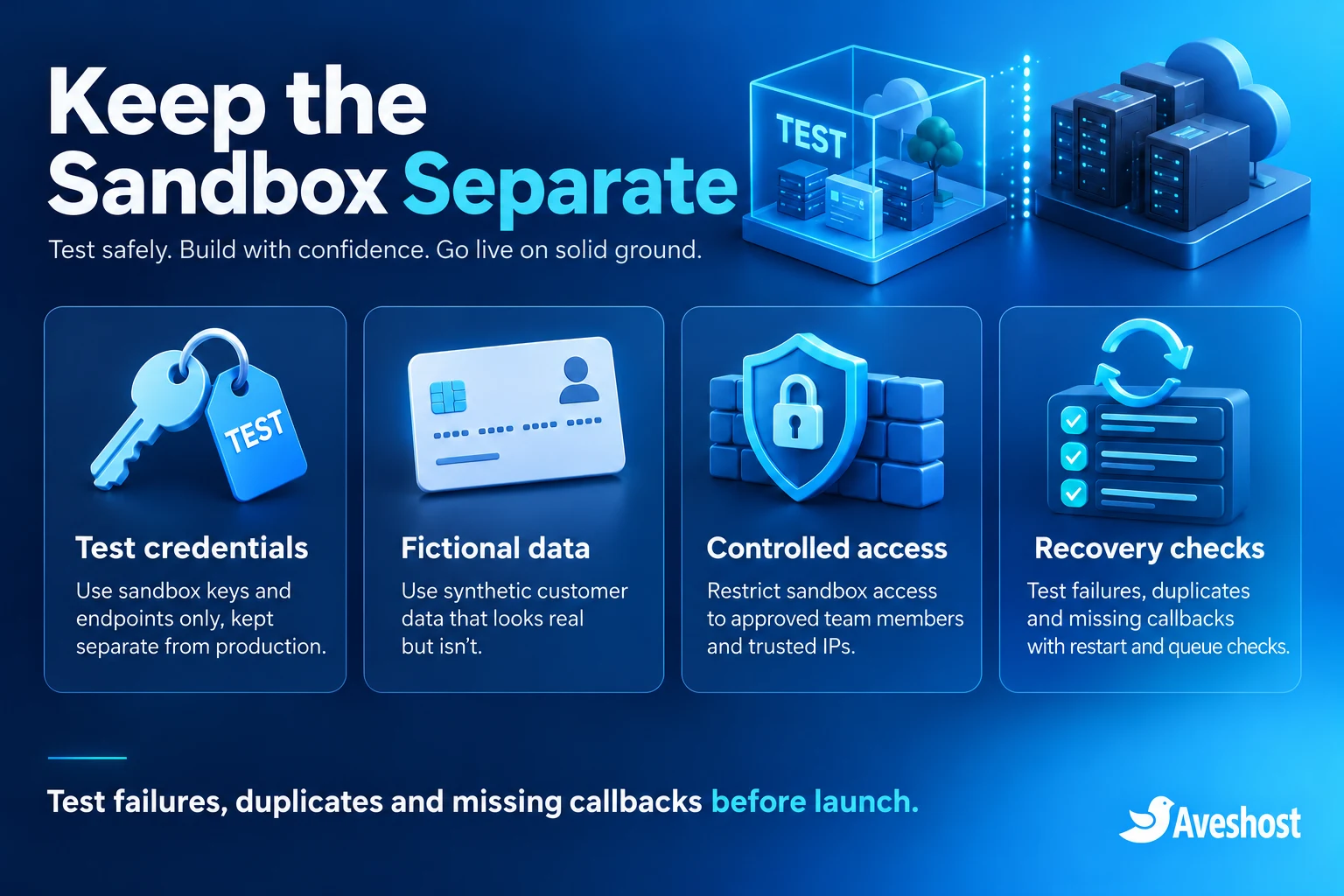
Create a separate staging application, database and credential set. Do not copy production customer records onto an internet-facing test server. Use individual administrator accounts and SSH keys, apply operating-system updates and keep the server’s time synchronised for logs and token handling.
Install Node.js and create a service account
Use a supported Ubuntu LTS release and install the current Node.js LTS from the official Node.js distribution. Verify the downloaded release using its published checksums and follow the installation instructions for your CPU architecture. The example uses standard Node modules and needs no npm packages.
The service below expects Node at /usr/local/bin/node. Check command -v node and node --version, then adjust ExecStart if your installation uses another location. Install Caddy using its official Ubuntu instructions.
sudo useradd --system --home /var/lib/momo-stage --shell /usr/sbin/nologin momo-stage
sudo install -d -o root -g root -m 755 /opt/momo-stage
sudo install -d -o momo-stage -g momo-stage -m 700 /var/lib/momo-stage
Create /opt/momo-stage/app.mjs with the code below. Keep the file owned by root and readable by the service account. The data directory belongs to the service account, sits outside a web root and must not be served by Caddy.
Build a private Node.js callback listener
This receipt collector accepts POST and PUT on one route, limits the body to 128 KiB and requires a JSON object. It stores a receipt ID, timestamp, body hash and tightly limited correlation hints. It deliberately omits phone numbers, credentials and the full callback body.
A 200 response is returned only after the receipt is written and synchronised. A storage failure returns 503. The word SUCCESSFUL in an incoming body remains unverified; the code never marks an order paid. A directory inbox is useful for this staging exercise. A production system needs a managed retention policy, capacity limits and a properly designed queue or database.
import http from 'node:http';
import { open, rename, unlink } from 'node:fs/promises';
import { randomUUID, createHash } from 'node:crypto';
import { join, resolve } from 'node:path';
import { pathToFileURL } from 'node:url';

export function createListener(dataDir) {
  const server = http.createServer(async (req, res) => {
    const reply = (code, text) => {
      res.writeHead(code, { 'Content-Type': 'text/plain', 'Cache-Control': 'no-store' });
      res.end(text);
    };
    if (req.url === '/healthz' && req.method === 'GET') return reply(200, 'ok');
    if (req.url !== '/callbacks/mtn/sandbox') return reply(404, 'Not found');
    if (!['POST', 'PUT'].includes(req.method)) return reply(405, 'Method not allowed');
    if (req.headers['content-type']?.split(';')[0].trim() !== 'application/json') {
      req.resume();
      return reply(415, 'JSON required');
    }
    let size = 0;
    const chunks = [];
    try {
      for await (const chunk of req) {
        size += chunk.length;
        if (size <= 131072) chunks.push(chunk);
      }
      if (size > 131072) return reply(413, 'Body too large');
      const raw = Buffer.concat(chunks);
      let body;
      try { body = JSON.parse(raw.toString('utf8')); }
      catch { return reply(400, 'Invalid JSON'); }
      if (!body || Array.isArray(body) || typeof body !== 'object') return reply(400, 'Object required');
      const receipt = {
        receiptId: randomUUID(), receivedAt: new Date().toISOString(),
        method: req.method, verified: false,
        bodyHash: createHash('sha256').update(raw).digest('hex')
      };
      // Correlation hints only. Never use these as payment authority.
      if (typeof body.externalId === 'string' && /^[A-Za-z0-9_-]{1,80}$/.test(body.externalId)) receipt.externalId = body.externalId;
      if (['PENDING', 'SUCCESSFUL', 'FAILED'].includes(body.status)) receipt.reportedStatus = body.status;
      const temp = join(dataDir, receipt.receiptId + '.tmp');
      let file;
      try {
        file = await open(temp, 'wx', 0o600);
        await file.writeFile(JSON.stringify(receipt));
        await file.sync();
        await file.close(); file = undefined;
        await rename(temp, join(dataDir, receipt.receiptId + '.json'));
        if (process.platform !== 'win32') {
          const dir = await open(dataDir, 'r');
          try { await dir.sync(); } finally { await dir.close(); }
        }
      } catch {
        if (file) await file.close().catch(() => {});
        await unlink(temp).catch(() => {});
        console.error('Receipt persistence failed');
        return reply(503, 'Retry later');
      }
      reply(200, 'Received');
    } catch { if (!res.destroyed) reply(400, 'Incomplete request'); }
  });
  server.requestTimeout = 10000;
  server.headersTimeout = 5000;
  server.maxConnections = 100;
  return server;
}

if (process.argv[1] && import.meta.url === pathToFileURL(resolve(process.argv[1])).href) {
  createListener(process.env.DATA_DIR || '/var/lib/momo-stage').listen(3000, '127.0.0.1');
}
The Node.js HTTP documentation covers request and header timeouts. Keep timeouts and connection limits at the proxy as well as in the application. Add request-rate and disk-usage controls suited to your test traffic; a body limit alone does not prevent repeated small requests from filling storage.
The health route checks process availability only. It does not prove the inbox is writable, the worker is running or MTN is reachable. Monitor those separately. The public callback must remain reachable by the provider, while dashboards and operational tools stay behind administrator authentication.
Keep the listener running with systemd
Create /etc/systemd/system/momo-stage.service. Run the process as the dedicated account and permit writes only to the inbox. Keep code and service configuration outside that account’s write access.
[Unit]
Description=MoMo sandbox receipt collector
After=network.target

[Service]
User=momo-stage
Group=momo-stage
WorkingDirectory=/opt/momo-stage
ExecStart=/usr/local/bin/node /opt/momo-stage/app.mjs
Environment=DATA_DIR=/var/lib/momo-stage
Restart=on-failure
RestartSec=3
UMask=0077
NoNewPrivileges=true
PrivateTmp=true
ProtectHome=true
ProtectSystem=strict
ReadWritePaths=/var/lib/momo-stage

[Install]
WantedBy=multi-user.target
sudo systemctl daemon-reload
sudo systemctl enable --now momo-stage
curl --fail http://127.0.0.1:3000/healthz
sudo journalctl -u momo-stage -n 30 --no-pagerThe receipt collector needs no MTN credentials. Give the separate verification worker only the credentials it requires. Store secrets in a protected service configuration or secret manager, outside source control and web directories. Never paste API keys, bearer tokens or complete callback bodies into public logs or support screenshots.
Configure HTTPS and the sandbox callback route
Use this Caddy site block for HTTPS staging and synthetic tests. Replace the example hostname first. Caddy’s automatic HTTPS guide explains the DNS and public reachability requirements for certificate issuance. Test the complete certificate chain from outside the VPS.
momo-stage.example.com {
    @allowed path /callbacks/mtn/sandbox /healthz
    handle @allowed {
        reverse_proxy 127.0.0.1:3000
    }
    handle {
        respond "Not found" 404
    }
}
sudo caddy validate --config /etc/caddy/Caddyfile
sudo systemctl reload caddy
curl --fail https://momo-stage.example.com/healthzMatch the callback transport to the MTN environment. MTN’s FAQ specifies HTTP for sandbox callbacks and HTTPS for production. Its product callback guide also describes HTTPS and TLS requirements. Follow the current instructions for your exact API product and environment; a working browser HTTPS test does not establish sandbox callback compatibility.
Where the MTN sandbox requires HTTP, add the explicit HTTP block below alongside the HTTPS block. It exposes only the sandbox callback route. Use fictional data, send no credentials in the callback and treat the receipt as an untrusted signal. Verify payment status over the authenticated HTTPS API. An HTTP-to-HTTPS redirect is not a substitute for the transport the sandbox expects.
http://momo-stage.example.com {
    @sandbox {
        method POST PUT
        path /callbacks/mtn/sandbox
    }
    handle @sandbox {
        reverse_proxy 127.0.0.1:3000
    }
    handle {
        respond "Not found" 404
    }
}
Keep the HTTP exception limited to sandbox testing and remove it from production. Production callbacks need the provider-approved HTTPS configuration and certificate chain. Do not put a login page, CAPTCHA or browser-only challenge in front of the callback; those controls stop server-to-server delivery.
Register the exact sandbox callback hostname
Register with the MTN MoMo developer portal and subscribe to the required sandbox product. Create a sandbox API user and API key following the portal’s Sandbox User Provisioning documentation. Production partner credentials belong to a separate environment.
For the standard sandbox provisioning request, send POST to https://sandbox.momodeveloper.mtn.com/v1_0/apiuser. Supply a fresh UUIDv4 in X-Reference-Id, your sandbox subscription key in Ocp-Apim-Subscription-Key and this JSON body:
{"providerCallbackHost":"momo-stage.example.com"}The registered value is the exact hostname, without a scheme or path. Registering example.com does not register momo-stage.example.com. The host in your later X-Callback-Url must match. Create the API key using POST /v1_0/apiuser/{apiuser}/apikey, then protect the returned key.
For Collection, obtain a bearer token with POST https://sandbox.momodeveloper.mtn.com/collection/token/, using HTTP Basic authentication with the sandbox API user and API key, plus the subscription-key header. Run credential-bearing calls from a protected backend. Avoid shell history, shared terminals and verbose HTTP output that exposes secrets.
Send a sandbox request and check its status
Use the standard Collection RequestToPay endpoint: POST https://sandbox.momodeveloper.mtn.com/collection/v1_0/requesttopay. Save a new UUID request reference against your test order before sending it. The API reference and your business order ID are separate identifiers.
Authorization: Bearer <SANDBOX_ACCESS_TOKEN>
Ocp-Apim-Subscription-Key: <SANDBOX_SUBSCRIPTION_KEY>
X-Target-Environment: sandbox
X-Reference-Id: <NEW_REQUEST_UUID>
X-Callback-Url: http://momo-stage.example.com/callbacks/mtn/sandbox
Content-Type: application/json
The callback URL above follows the FAQ’s HTTP sandbox flow. Use the transport required by your subscribed sandbox product. All outbound requests to the MTN sandbox API continue to use HTTPS. Replace every placeholder and use a current predefined test payer from MTN’s sandbox test scenarios. Do not use a customer’s real phone number.
{
  "amount": "10",
  "currency": "EUR",
  "externalId": "order_demo_1",
  "payer": {
    "partyIdType": "MSISDN",
    "partyId": "<SANDBOX_TEST_MSISDN>"
  },
  "payerMessage": "Sandbox test",
  "payeeNote": "Development only"
}
The EUR value belongs to the documented standard sandbox example; it does not define the currency for a Ghana production account. Use the currency and payer values required by the current test scenario. For live Ghana operations, use the currency, credentials and target environment approved during onboarding.
HTTP 202 means the request was accepted for asynchronous processing. It does not mean payment succeeded. Query GET https://sandbox.momodeveloper.mtn.com/collection/v1_0/requesttopay/{request-reference} with the bearer token, subscription key and X-Target-Environment: sandbox. Handle PENDING, SUCCESSFUL and FAILED according to the product response.
If the initial request times out, check the saved reference before retrying. Generating another reference immediately can create a second payment request. Keep retries and status queries bounded, honour rate limits and record enough non-sensitive context to investigate the result.
Verify payments with an idempotent worker
The worker should resolve a callback’s external ID against an existing sandbox payment record, retrieve that record’s saved MTN reference and query the fixed provider endpoint. Match the verified amount, currency, external ID and application context before changing business state. Unknown identifiers belong in a controlled review path, without granting access or creating fulfilment work.
Do not invent an MTN HMAC signature header. Use the authentication or signature mechanism documented for the exact product when available, and retain authenticated status reconciliation. A source IP, a secret-looking URL or a JSON field labelled SUCCESSFUL is insufficient authority to release goods or credit a wallet.
Make state changes atomic. Enforce a unique payment reference, lock or conditionally update the order record and record a fulfilment event in the same database transaction or transactional outbox. Repeated callbacks and repeated status checks must produce one credit or delivery action. Do not let an older PENDING response overwrite a confirmed terminal result.
The sample collector stores duplicate receipts deliberately; financial deduplication belongs in the worker and database. Keep the inbox bounded, schedule retention and monitor free disk space. A public endpoint also needs traffic controls. Retain only the information needed for troubleshooting and reconciliation.
Schedule checks for outstanding requests even when the inbox is empty. MTN’s FAQ describes a callback sent once, without retry. Use bounded backoff, a maximum reconciliation window and an operational review queue for unresolved payments. Mark a receipt processed only after the corresponding verification outcome is durably recorded.
Test missing callbacks, failures and recovery
Begin with a synthetic request against your public endpoint. This checks routing and persistence without initiating a payment. The response should be 200 and a redacted JSON receipt should appear in the private inbox. The order database must remain unchanged.
curl --fail -X POST https://momo-stage.example.com/callbacks/mtn/sandbox \
  -H "Content-Type: application/json" \
--data '{"externalId":"order_demo_1","status":"SUCCESSFUL"}'| Test | Expected result |
|---|---|
| Malformed JSON or an array | 400 response; no accepted receipt |
| Body above 128 KiB | 413 response |
| Wrong route or method | 404 or 405 response |
| Repeated POST and PUT | Receipts retained; one verified financial transition |
| Unknown order or forged success | No credit or fulfilment |
| Unwritable or full inbox | 503 and an operational alert |
| Process restart | Accepted receipts remain available |
| Missing callback | Scheduled status checks reconcile the payment |
| Initial request timeout | Check the original reference before a new request |
| Expired token or provider outage | Controlled retry and visible unresolved work |
We tested the accompanying listener locally for JSON validation, route and method handling, the body limit, redaction, duplicate receipt storage, restart persistence and storage-error responses. Local tests do not establish MTN delivery, public DNS, TLS compatibility or a complete payment-processing integration. Run those checks against your own sandbox setup.
Monitor callback error rates, inbox growth, oldest unresolved payment, worker failures, certificate expiry and backup recovery. Keep a short runbook covering who responds, how to query a reference safely and when a payment requires provider support. Use correlation IDs in logs instead of customer phone numbers or API secrets.
Prepare the production handover
Production is a separate deployment with approved credentials, endpoints, target environment and currency. Complete MTN onboarding, validate the required certificate chain and remove the sandbox HTTP listener. Keep live keys out of staging and restrict who can initiate production payment requests.
Rehearse a restore with outgoing payments and notifications disabled, then reconcile the recovered records before resuming work. Test alert delivery and the operational review process. Protect administrative access with individual accounts and two-factor authentication; our website security checklist covers the wider account and application controls.
Hubtel and Zeepay integrations can use the same general separation of receipt, verification and fulfilment, but their credentials, callback formats and validation rules differ. Build a provider-specific adapter from each service’s documentation. Do not reuse MTN headers or sandbox rules across providers.
Ready to host a webhook listener on a VPS in Ghana? Explore our Linux VPS options and domain services, or discuss your staging environment with our team. Bring your runtime, expected callback volume and operational requirements so we can plan the server setup.
Frequently asked questions
What is an MTN MoMo API staging server?
It is a separate test environment with a stable public callback endpoint, protected application services and sandbox credentials for testing the payment integration.
Can I host a webhook listener on an Aveshost VPS?
Yes. A Linux VPS lets your team run a custom listener and reverse proxy. Configure DNS, firewall rules, access controls, monitoring and updates for the application.
Does the MTN sandbox require HTTP or HTTPS callbacks?
MTN’s FAQ specifies HTTP for sandbox and HTTPS for production; product documentation also includes HTTPS requirements. Follow the instructions for the exact subscribed product and environment. Keep any HTTP exception restricted to fictional sandbox testing.
What goes in providerCallbackHost?
Use the exact hostname, such as momo-stage.example.com, without a scheme or path. The later callback URL must use that registered host.
Does HTTP 202 confirm a successful payment?
No. It confirms asynchronous request acceptance. Retrieve the final status through the authenticated provider API before updating the order.
Should I open Node.js port 3000 publicly?
Keep the listener on 127.0.0.1 and expose the required route through the public reverse proxy. Restrict administration access separately.
Will MTN retry a missed callback?
The MTN FAQ describes a callback sent once without retry. Schedule authenticated status checks so a missed notification does not leave the payment unresolved.
Can a callback marked SUCCESSFUL release an order?
Verify the known request through the provider API and match its amount, currency and business context first. Apply the resulting state change atomically and only once.
Can I use real customer information in staging?
Use fictional data and the provider’s documented sandbox test values. Keep production credentials, payments and customer records separate.
Can the same server design support other payment providers?
The architecture can be reused, but each provider needs its own documented authentication, callback validation, status queries and reconciliation rules.