
To start a job board in Ghana, choose a specific audience, publish useful vacancies and give employers a simple way to pay for listings with Mobile Money. A focused directory for teaching roles, software teams in Accra or technical vacancies in the Western Region can offer a clearer service than a website trying to cover every occupation.
The opportunity depends on relationships and useful listings. A working payment button cannot create employer demand on its own. Speak to recruiters and job seekers first, then build a small platform around the vacancies they actually need to publish and find.
This guide explains a WordPress approach using WP Job Manager, WooCommerce paid listing packages and Paystack for MoMo checkout. It also covers plugin compatibility, employer approval, applicant privacy and the checks that turn a directory into a dependable service.
Table of Contents
Choose a focused niche before you start a job board in Ghana
Define the audience in one sentence: “We help private schools in Greater Accra find teachers,” for example. That sentence should guide your categories, employer outreach, pricing and content. Start with a market you can reach through existing professional contacts or a relevant community.
| Possible niche | Useful filters | Employer problem to validate |
|---|---|---|
| Teaching and school administration | Subject, region, qualification, job type | Finding applicants with the right teaching experience |
| Software and digital roles | Specialism, seniority, location, remote status | Reaching candidates with relevant technical skills |
| Engineering and industrial roles | Trade, region, contract type | Explaining site requirements and required credentials |
Interview a small group of employers before choosing the niche. Ask how often they recruit, where they advertise, what makes applications unsuitable and what a useful listing service would include. Ask job seekers which information is usually missing. These conversations are more useful than copying the categories of a large national directory.
For a first version, offer public job browsing, employer registration, paid posting and a verified application route. Keep a public CV database, automated candidate scoring and complex recruiter subscriptions outside the initial launch. Each adds cost, privacy responsibilities and support work.
Set employer packages and a realistic budget
Charge employers for advertising vacancies while keeping the job search and application route free for candidates. Define the service precisely: how long a listing stays live, what a featured position means, which review checks you perform and when an employer can request a correction or refund.
| Illustrative package | Example price | What the employer receives |
|---|---|---|
| Standard listing | GH₵150 | One approved vacancy displayed for 30 days |
| Featured listing | GH₵250 | One approved vacancy displayed for 30 days with clearly labelled featured placement |
These are planning examples, not Aveshost product prices or market rates. Test willingness to pay with your chosen employers. Ten standard purchases at GH₵150 produce GH₵1,500 in gross sales; hosting, domain renewals, commercial plugin licences, payment fees, taxes where applicable, marketing and review time still have to be paid.
Build a simple budget with setup costs and ongoing costs in separate columns. Include someone’s time for rejecting fraudulent vacancies, answering payment questions and closing filled positions. When people ask how to earn money with a job website in Ghana, recurring employer value is the stronger starting point than a forecast based only on visitor numbers.
Publish your package and refund terms before taking payment. Explain what happens if a paid vacancy is rejected, removed early, duplicated or withdrawn by the employer. Featured placement should describe a visible promotional position; it should never promise applications or a successful hire.
Register your domain and choose hosting
Pick a short name that is easy to read on a phone and say aloud. A .com, .careers or .work domain can suit a recruitment brand. Check availability and renewal costs through our domain search, and register the domain in your business’s own account with a renewal contact you control.
A small WordPress job board can begin on a suitable shared or WordPress hosting plan. Compare our web hosting and managed WordPress hosting options against your plugin requirements, expected activity and backup needs. Our managed WordPress plans include SSD storage, SSL and staging tools.
Choose capacity for logged-in employers, searches, checkout and database activity. Public page caching helps browsing, but account pages, carts, checkout and submission forms need appropriate exclusions. Do not cache one employer’s dashboard into another visitor’s response. Test performance with the actual theme and extensions you intend to use.
A VPS becomes useful when you need more control, custom services or additional resources. Our self-managed VPS plans come with SSD storage and root access. Server administration remains your responsibility on a self-managed service. Discuss management requirements before choosing the deployment.
Keep the public site on HTTPS from the start. Set up a business email address for employer support and transactional delivery. Your hosting account, domain registration and payment gateway should all belong to the business, with access retained if a developer leaves.
Select a supported WordPress job board stack
Use WordPress with a lightweight supported theme. The free WP Job Manager core handles the job directory. WooCommerce handles orders, and the commercial WooCommerce Paid Listings extension connects job packages to that checkout. Paystack supplies its official WooCommerce gateway. Budget separately for the paid extension and its renewal.
Check compatibility before purchasing. At the time of writing, WP Job Manager documents WooCommerce Paid Listings as incompatible with High-Performance Order Storage (HPOS). Confirm support for your exact WordPress, WooCommerce, extension and gateway versions. A fresh test site using supported legacy order storage is the route to evaluate for this stack.
For that new test site, review WooCommerce → Settings → Advanced → Features → Order data storage. WooCommerce documents the choice between HPOS and WordPress posts storage. Select the storage method supported by every component and test the complete flow. Compatibility mode by itself does not establish extension support.
Keep an existing live store out of this experiment. Changing its order storage requires its own backup, synchronisation and migration plan. If you need HPOS or a component no longer supports the required combination, choose a currently supported paid-listing solution before proceeding. Do not keep outdated software online merely to preserve a checkout integration.
Install plugins from WordPress.org or their official developers and activate legitimate commercial licences. Avoid nulled job recruitment website scripts, pirated themes and modified payment plugins. An apparent saving can leave your employer accounts, payment configuration and database exposed to backdoors.
Build the job search and employer pages
On your staging site, install and activate WP Job Manager. Use its setup process, then review the page assignments in the plugin settings. The official setup documentation explains the main pages and submission controls.
| Page | Shortcode or purpose |
|---|---|
| Browse jobs | [jobs] |
| Post a job | [submit_job_form] |
| Employer dashboard | [job_dashboard] |
| Pricing | Explain packages, review times and refund terms |
| Contact, privacy and posting terms | Explain support, information use and acceptable vacancies |
Place each shortcode in a WordPress Shortcode block on its corresponding page. Add Browse Jobs, Post a Job and Pricing to the main navigation. The employer dashboard should remain an account-specific view, even though visitors can see its link.
Enable categories, choose a short set of job types and use clear Ghanaian locations. Require employer accounts and enable moderation. Use the Employer role for signups; never give public registrants administrative access. Require review of published edits too, so an approved listing cannot quietly become a different vacancy.
For the first version, use a verified employer application website. WP Job Manager supports an application email address or website URL. Check the employer’s HTTPS destination before publishing. Tell candidates that they are continuing to the employer’s application system and identify the organisation responsible for that process.
Build the vacancy template around job title, organisation, location, employment type, responsibilities, requirements, application instructions and a real closing date. Make the Apply button clear on a phone. Separate a job’s location from your board’s office address, and distinguish remote work from a role that merely accepts online applications.
Create paid job listing packages
Install the licensed WooCommerce Paid Listings extension after passing the compatibility checks. In WooCommerce, create a product using the Job Package type. Set price, listing limit and duration; publish the product. Create a separate featured package if you sell promotional placement. Keep the first offer simple: one listing per purchase.
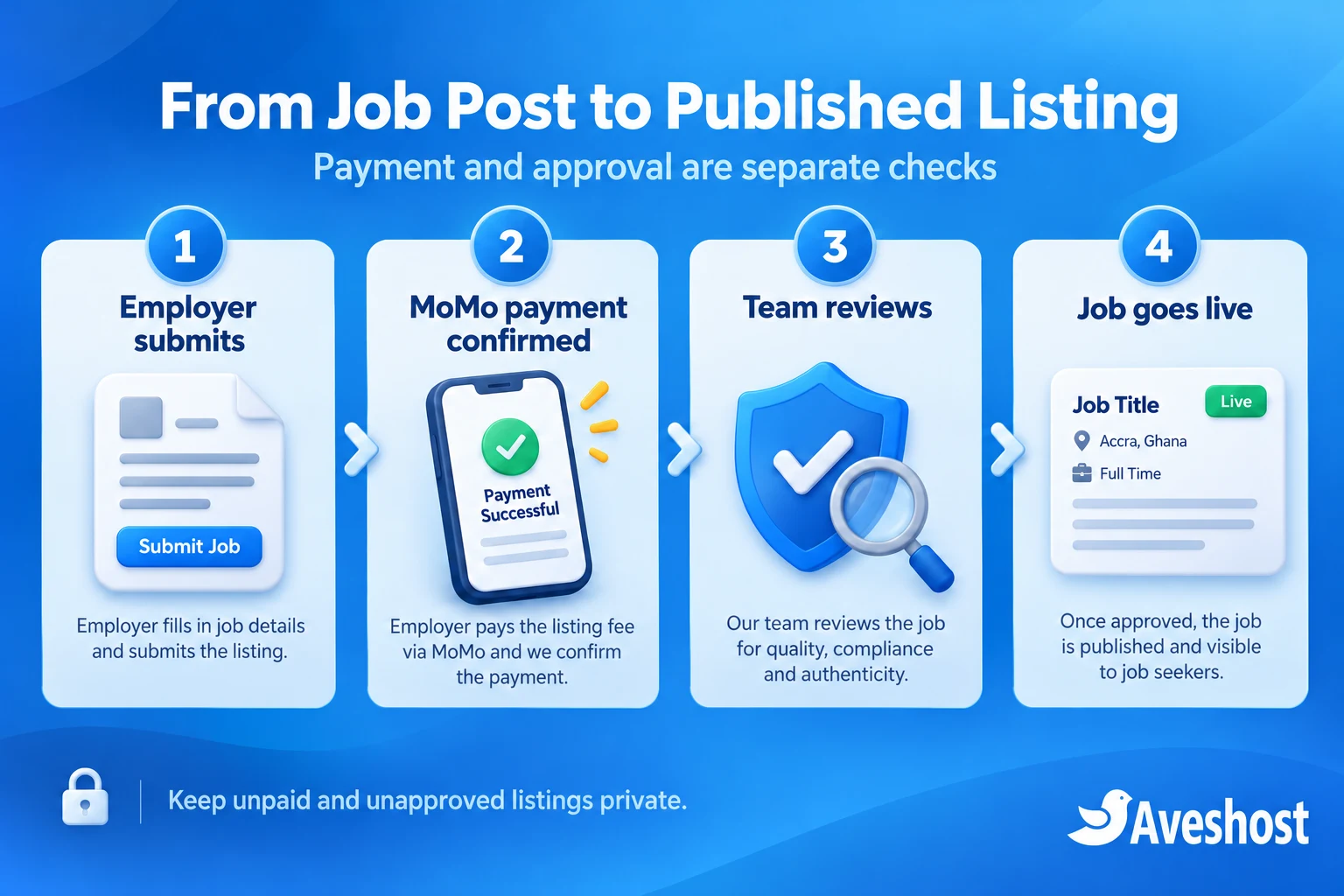
Paid packages require a user account. The documented flow is submission, preview, package selection and checkout. Unpaid jobs remain pending payment; qualifying paid orders can then proceed to approval. With moderation enabled, use the extension’s documented Approve action after review. See the paid listings setup guide.
Write product descriptions in the same language as your pricing page. “One vacancy for 30 days after approval” is easier to understand than an unexplained credit system. Display the amount and currency before checkout and make the rejection/refund policy accessible at purchase.
Connect MoMo payments through Paystack
Create a Ghanaian Paystack merchant account and complete the provider’s business verification and activation requirements. Set WooCommerce’s currency to Ghana cedis (GHS). Install the official gateway linked from Paystack’s WooCommerce instructions, then open WooCommerce → Settings → Payments → Paystack.
Enable the gateway, enter test keys in test mode and configure the webhook URL displayed by the plugin in the Paystack dashboard. Keep secret keys out of page content, screenshots and client-side code. Check that the checkout method you use is supported by the installed gateway version.
Paystack supports Mobile Money payments in Ghana through MTN, Airtel/Tigo and Telecel. Make sure the required channel is available on your approved account. Use one-time employer package purchases: recurring MoMo payments are not currently supported. Employers can purchase another package when they need to post again.
The gateway’s verified payment result should drive the WooCommerce order state. A mobile screenshot or a successful-looking browser return is insufficient evidence of payment. Reconcile delayed payments and abandoned checkouts against the provider’s transaction record. A network interruption must not create a second charge or grant a duplicate entitlement.
Run test transactions first, then a controlled low-value live transaction after merchant activation. Confirm money movement, the order record, employer receipt, listing entitlement and moderation state. Sandbox results alone cannot establish live MoMo availability. Use the gateway’s supported notifications and verification rather than a custom snippet that publishes on a return URL.
For a broader walkthrough of the WordPress and WooCommerce foundations, follow our step-by-step guide to creating an online store in Ghana. For a job board, the product being purchased is the posting package, while the actual vacancy remains a separate listing.
Verify employers before approving vacancies
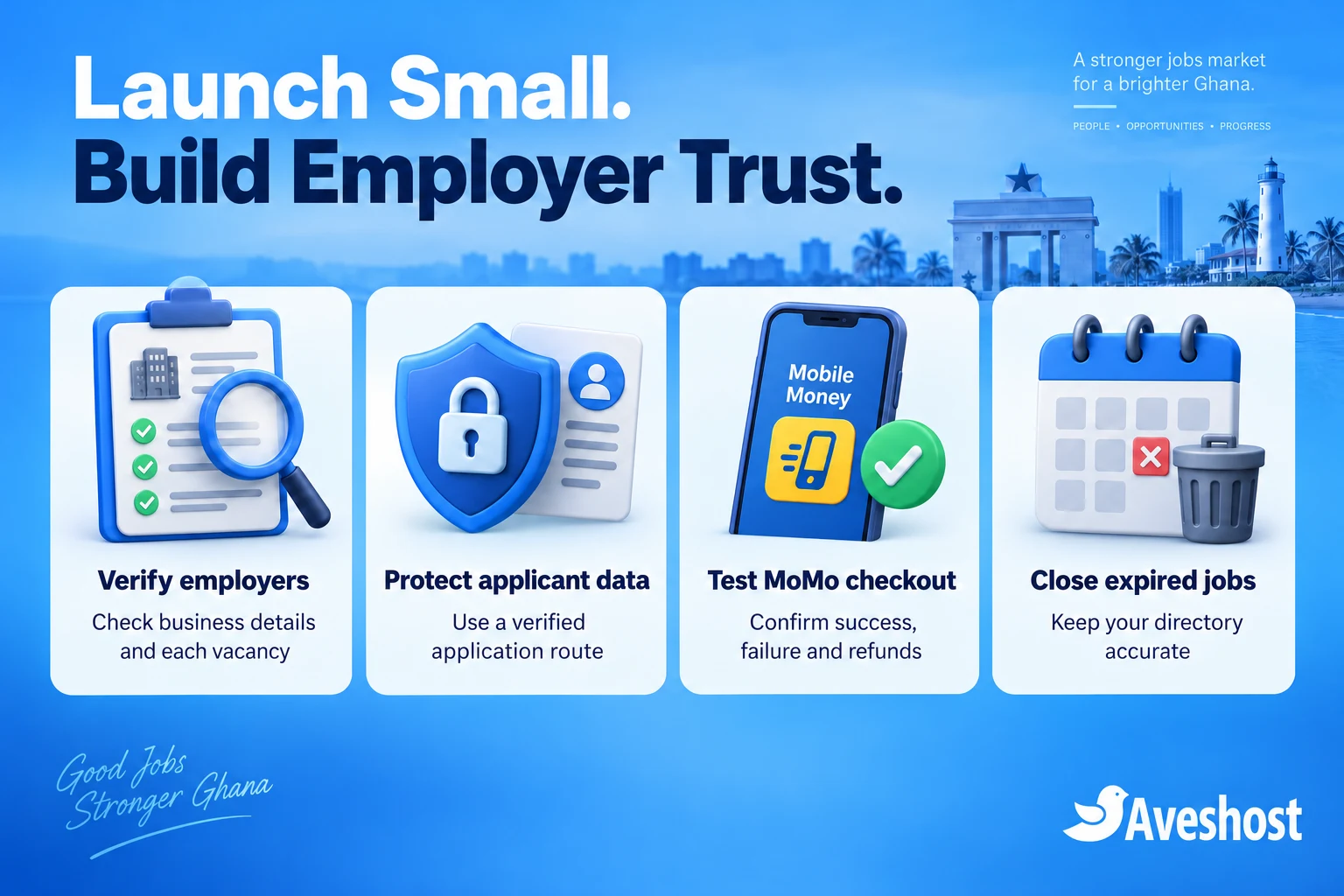
Payment confirms a purchase; it does not establish that a vacancy is genuine. Give a named reviewer responsibility for checking employers and new posts. Compare the organisation’s website, business contact details and advertised position, and confirm posting authority through an independently verified contact when needed.
- Reject requests for candidates to send Mobile Money to secure an interview or release an offer.
- Review suspicious external links, misleading company identities and requests for unnecessary identity documents.
- Check the vacancy’s location, duties, application route and closing date against the employer’s instructions.
- Provide a visible way to report suspicious jobs and a process for suspending them during investigation.
- Record the reason for each approval, rejection or removal, and communicate the outcome to the employer.
Publish a realistic review time that your team can meet. Keep a paid but unapproved vacancy private while you investigate concerns. Avoid “verified employer” badges unless you can explain the actual checks behind that label. Retain enough review history to resolve disputes without collecting excessive personal documents.
Confirm the regulatory scope of your business before launch. Ghana’s official private employment agency guidance defines employment intermediation broadly and sets out licensing requirements. Describe your exact advertising, matching and recruitment activities to the Labour Department and obtain guidance on the requirements that apply. Calling the service a job board does not settle that question.
Protect employer accounts and applicant information
Even with applications directed to employers, your board still holds account details, order records and support messages. Map that information, identify why you need it and decide who can access it. Follow Ghana’s Data Protection Act, 2012 (Act 843) and address applicable registration and compliance responsibilities using the Data Protection Commission’s guidance.
Publish a privacy notice explaining your role, the payment provider, the application destination, retention periods and how people can contact you about their information. Keep marketing consent separate from a purchase or job enquiry. Do not add applicants to promotional email lists simply because they clicked Apply.
If you later accept CVs, use a protected application system with authorised access on every file request. Ordinary public WordPress media links are unsuitable for confidential applications. Test that one employer cannot view another employer’s applicants, including by guessing a file URL. Avoid CV attachments in general support inboxes and open directories of applicant details.
Use unique staff accounts, multifactor authentication for administrators, least-privilege access and timely software updates. Maintain protected backups of the database and website files, and test restoration away from the live site. Agree a retention schedule for unsuccessful applications and remove data when its purpose ends, subject to applicable obligations.
Make individual vacancies easy to find
Write a distinct page for every genuine vacancy. A useful title such as “Mathematics Teacher — Kumasi” tells candidates more than “Urgent Jobs Available.” Add clear category and location pages only where you have relevant listings or helpful original information. Avoid hundreds of empty location pages.
Follow Google’s JobPosting structured data rules. Put job markup on individual vacancy pages, not the directory or search results. Match the visible description, employer, location, dates and application route. Inspect the markup already generated by your job plugin before adding another schema tool to prevent duplicates.
Use accurate closing information and remove active JobPosting markup from vacancies that have expired or closed. A retained page should clearly show that applications have ended. Do not refresh the posting date just to make an old vacancy appear new. Test individual URLs with Google’s Rich Results Test and review Search Console; correct markup does not guarantee visibility or rankings.
Create useful supporting content for your niche: a guide to writing a teaching vacancy, an employer checklist for technical roles or an explanation of what candidates should prepare. Link that content to relevant live vacancies. Ask employers for permission to share listings with professional groups and community partners.
Test payments, launch and maintain your board
Before inviting paying employers, complete a documented acceptance test with a new employer account on desktop and mobile. Keep staging isolated from search indexing and avoid sending test messages to real candidates. Record the component versions and expected results so updates can be checked against the same baseline.
| Test case | Required result |
|---|---|
| Successful MoMo purchase | One paid order and the correct package; listing waits for review |
| Pending, declined or cancelled payment | No unpaid vacancy published and no paid package granted |
| Delayed confirmation or repeated notification | Payment reconciles once without duplicate entitlements |
| Unapproved job and direct URL | Vacancy remains unavailable to the public |
| Employer account separation | Each employer sees only their permitted dashboard and orders |
| Rejected vacancy and refund | Money, package entitlement and listing state follow the published policy |
| Closing date or filled vacancy | Job leaves active results and its schema reflects closure |
| Backup recovery | Files and database restore successfully to a separate test site |
Test a refund explicitly. Refunding an order, removing a package and withdrawing a listing are related operational actions; verify the behaviour of your installed extensions and document any staff steps. Also test receipts and password reset emails through your chosen mail delivery service.
Launch with a manageable group of employers and authorised vacancies. Measure approved jobs, completed employer purchases, application link clicks, repeat purchases and support requests. A click is not a completed application or a hire. Ask employers for feedback instead of treating traffic as proof that the service works.
Review suspicious posts, failed payments and support messages regularly. Check upcoming expiry dates, software updates, backup completion and renewal costs. Test updates in staging before applying them to the live board, especially when WooCommerce, the gateway or paid listing extension changes.
Ready to build your niche job board? Explore our WordPress hosting and domain options, or discuss your job board and MoMo integration with our team. Tell us your niche, expected posting volume and application workflow so we can plan a suitable setup.
Frequently asked questions
How do I start a job board in Ghana?
Choose a focused audience, validate employer demand, register a domain and build a supported listing platform. Test employer checkout, moderation and vacancy expiry before launch.
Can employers pay job posting fees with MoMo?
Yes. Use an approved Ghanaian payment gateway account and a compatible checkout integration, then verify the complete live payment and listing workflow.
Is WP Job Manager completely free for this setup?
The core directory plugin is free. This approach also needs the commercial WooCommerce Paid Listings extension; budget for its licence and renewal.
Should job seekers pay to apply?
The model in this guide charges employers for advertising. Candidates browse and follow the application route without paying the board.
Can I use recurring MoMo subscriptions?
Use one-time packages for this setup. Paystack currently does not support recurring Mobile Money payments; employers can make another purchase when needed.
Do I need a VPS at launch?
A suitable WordPress hosting plan can support a small launch. Choose a VPS when your workload or custom services require more resources and administration control.
Can I publish a job immediately after receiving a payment screenshot?
No. Confirm the transaction through the gateway and review the vacancy before making it public.
Should I store candidate CVs on the website?
Start with verified employer application links if you do not need to collect CVs. Add on-site applications only with protected storage, access controls and a clear retention policy.
Will JobPosting markup guarantee Google traffic?
No. Accurate structured data helps eligibility, but Google does not guarantee search visibility or ranking.
Can Aveshost help build a job board and connect MoMo?
Yes. Contact our support team with your niche, employer package requirements and application workflow to discuss your project.