You can sell e-books online in Ghana through your own author website, accept Mobile Money payments and deliver PDF or EPUB editions to readers after payment is confirmed. A direct store gives your books a dedicated home and puts the purchase journey under your control.
For Ghanaian novelists, poets, educators and nonfiction writers, that means a reader can discover a title, preview a sample, pay through a supported MoMo checkout and receive a download link. You also gain a place to explain your work, announce new releases and provide reader support.
This guide shows how to build the store with WordPress and WooCommerce, connect a payment provider and protect the paid files. It also explains publishing rights, fees and the support responsibilities that come with direct sales. At Aveshost, we help authors plan suitable hosting, domains and business email for that setup.
Table of Contents
Plan how to sell e-books online in Ghana
Start with one finished title and a simple route from book page to checkout. Your website needs an author introduction, a clear product page, a sample, secure payment, controlled downloads and a contact route. A large online bookshop is unnecessary for a first release.
Direct sales work best when the buying process suits the readers you already reach. A local reader can use MoMo through a supported provider; a reader abroad may use an enabled card channel. State the actual payment options at checkout instead of promising that every wallet or card will work.
Your store becomes a sales channel you manage. You set the presentation, approved prices, bundles and reader-support process. You also handle marketing, maintenance, refunds and access problems. Publishing a website creates the route to purchase; it does not create an audience automatically.
Keep print and digital editions clearly labelled. A person buying an e-book should not expect a physical parcel. If you also sell signed copies, use separate product options and delivery terms so digital access and shipping do not become confused.
Check your publishing rights and KDP Select status
Confirm that you hold the rights needed to sell the digital edition in the intended territories. Review any publishing, illustration, translation and distribution agreements. Cover art, photographs, maps and quoted material also need the appropriate permissions for the way they are used.
KDP and KDP Select are different arrangements. Amazon’s KDP Select programme requires digital exclusivity during its enrolment term, including restrictions on distribution through your own website. Check each title’s current enrolment and renewal position before offering its digital edition directly.
Changing the file from a Kindle edition to a PDF does not provide a way around a digital exclusivity commitment. Schedule the direct release only when your rights and any applicable exclusivity obligations permit it. Keep that review documented for every title in the catalogue.
A direct store does not require deleting your Amazon account. Choose the channels available under your agreements and publishing strategy. When evaluating royalty collection, use the payment methods available for your actual KDP account and banking details rather than treating every Ghanaian author’s situation as identical.
Create a short reader licence explaining the permitted use of the purchased file. Keep it understandable and consistent with the rights you can grant. If a school or organisation wants multiple-reader access, offer an appropriately scoped licence instead of presenting one personal purchase as unlimited redistribution.
Prepare reader-friendly PDF and EPUB editions
Prepare a clean final PDF and, where useful, a reflowable EPUB edition. PDF preserves a fixed page layout, while a properly made EPUB allows compatible reading apps to adjust text size. Explain which formats are included and how readers can open them on their devices.
Proofread after export. Check the cover, contents links, chapter navigation, illustrations, footnotes and any embedded links. Test on a small phone screen as well as a laptop. A document that looks good on your writing computer can still be awkward for readers.
Use selectable text, meaningful headings and sensible reading order. Provide alternative text for informative images where the format supports it. Avoid turning the entire book into page scans when an accessible digital edition is available. Compress large images without making text or diagrams unreadable.
Keep a version identifier for the paid edition and a separate public sample file. The sample can contain a short excerpt and purchasing link, subject to your rights. Verify that the sample upload is actually the sample before linking it publicly.
Keep your source files and final exports backed up outside the live store. Use clear internal filenames and record which edition is attached to each product. Removing an old file without planning replacement access can leave earlier purchasers with broken links.
Choose your author domain, hosting and email
Choose an author domain that can grow with your catalogue. Your own name or a recognisable publishing brand is easier to reuse than one book title. Our domain registration service helps you check suitable options such as .com or .me and their renewal terms.
Choose hosting that supports the store, payment integration, download sizes and expected launch traffic. Our WooCommerce hosting provides a route to discuss those requirements. Review the selected plan’s resources, storage, transfer allowance and backup scope before committing to a launch campaign.
A few text-based e-books can be lightweight, but illustrated PDFs and repeated downloads increase transfer use. As a simple example, a 20 MB file downloaded 1,000 times transfers about 20 GB before other website traffic. Plan for repeat downloads and backups as well as the first purchase.
Use HTTPS throughout the store and keep WordPress, themes and plugins maintained. Give administrators named accounts with available multifactor authentication. Record who owns the domain, payment account, hosting account and site backups so the author retains business control.
Set up business email for reader support and store notifications. Configure domain authentication and test delivery of order receipts, download notices and password resets. A paid order needs a reliable support route even when the reader’s email provider delays a message.
Create a clear downloadable book product
In WordPress, install and configure WooCommerce, then add a simple product for the e-book. Mark a digital-only edition as both Virtual and Downloadable. Add its price in Ghana cedis and attach the intended files through the product’s downloadable-file settings. The official virtual and downloadable product guide explains these controls.
Write a product description that states the subject, audience, author, language, edition and included formats. Add a legible cover, a sample link and a realistic description of what the reader receives. Explain that this purchase is a digital download and identify any device or app requirements.
Give each included file a clear customer-facing name, such as “Book title — PDF” or “Book title — EPUB”. Set any download limit and expiry deliberately, then explain them before checkout. Avoid a one-attempt limit that punishes readers for a failed connection.
For a bundle, list the exact titles and formats. For a revised edition, explain whether previous purchasers receive it. Keep promises about future updates specific and manageable rather than advertising lifetime access without a support and retention plan.
Publish contact, privacy and refund information in a place readers can find. Describe how to report a corrupted file, duplicate payment or access problem. Apply the requirements relevant to the business and customer transaction instead of relying on a blanket “no refunds” statement.
Connect MoMo checkout and confirm payment
Open and verify an eligible merchant account with a provider that supports Ghana Mobile Money and the chosen store integration. Paystack is one option. Check the current supported channels and account requirements, then use a maintained WooCommerce integration compatible with your checkout.
Configure the store currency, test mode and integration settings using the provider’s instructions. Keep secret keys on the server and restrict administrator access. Use the provider’s test environment before enabling live transactions; test credentials cannot establish that real payments and settlement are working.
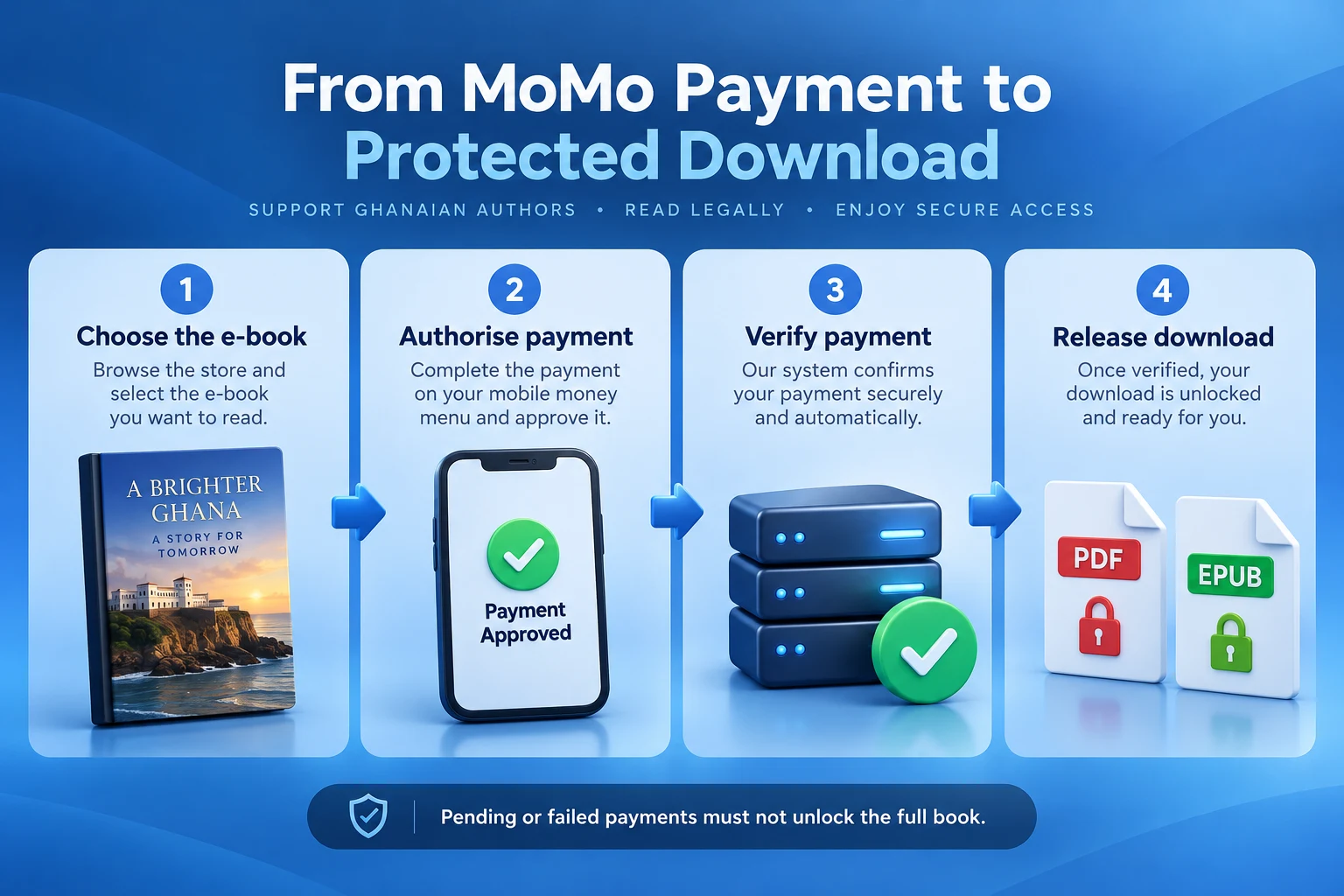
The purchase flow should create an order, send the buyer through payment authorisation and update the order only after the result is verified. MoMo can remain pending while the buyer approves the request. Tell readers to complete authorisation and wait for the final result.
For custom integrations, follow Paystack’s payment verification guidance. Validate the actual transaction status and match its reference, amount, currency and intended order before fulfilling it. A browser redirect or customer screenshot is not proof that the order has been paid.
Authenticate callback notifications, handle retries without duplicate fulfilment and reconcile uncertain payments through the provider. Use the maintained plugin’s documented process rather than marking every incoming notification successful. Keep pending, failed and paid states distinct.
Download access can be automatic after verified payment; payment itself is not guaranteed to be instant. Bank or wallet settlement to the author is also separate from the reader’s download access. Explain these stages so readers and the author know what each confirmation means.
| Stage | What the store should do |
|---|---|
| Order created | Keep download access locked |
| Payment pending | Show a pending status and await verification |
| Payment failed | Provide a safe retry or support route |
| Payment verified for the correct order | Apply the appropriate paid status and download permissions |
| Merchant settlement | Reconcile the payout separately from reader access |
Protect paid files and configure download access
Use a protected download location. An ordinary public WordPress Media Library URL or public cloud-sharing link exposes the full book to anyone who obtains that link. Hiding the page, adding a long filename or excluding it from search engines does not enforce purchase access.
Under WooCommerce > Settings > Products > Downloadable products, choose Force downloads or a correctly configured X-Accel-Redirect/X-Sendfile method. Avoid Redirect only and the insecure redirect fallback for paid files. Server configuration matters, particularly on NGINX. Check the WooCommerce download-handling guide with your developer or hosting team.
Choose the access timing deliberately. “Grant access to downloadable products after payment” allows access at Processing; otherwise access waits for Completed. Orders containing only virtual and downloadable products normally complete automatically after successful payment. Test the actual gateway and order flow.
For account-only access, require login for downloads and disable guest checkout. A login requirement alone does not apply to guest purchases. Readers with accounts can return to My Account > Downloads, and eligible order messages provide download links.
Use Approved Download Directories to control permitted product-file locations. This is a location allowlist, not purchaser authentication or a replacement for protected storage. Keep remote storage private and use an integration that checks entitlement before releasing a file.
Test the raw file address in a logged-out browser and confirm it does not return the paid book. Then test an authorised order download. Keep direct storage URLs out of samples and emails. These controls restrict unauthorised retrieval from your server, but cannot stop a buyer copying a file after download.
Make the purchase and reading journey simple
Make the book page readable on a phone, with a clear price and one obvious purchase action. Keep checkout fields relevant to the payment and transaction. A digital-only order should not force the reader through an unnecessary physical-delivery selection.
Explain what happens during MoMo authorisation and provide a useful pending-payment message. If payment is still uncertain, offer order-status help instead of encouraging an immediate second payment. Readers should have a way to quote their order reference without sending confidential wallet credentials.
After payment, show the available download route and short opening instructions. Explain that EPUB usually needs a compatible reading app, while PDF can open in a suitable viewer. Do not imply that purchasing a file installs an app or automatically places it in every Kindle library.
Keep support instructions beside the download. Readers may switch phones, lose an email or reach a download limit. Verify the purchase through the store record before restoring access, then use the authorised system rather than sending a permanent public link.
Offer a practical file size and format for your audience. If an illustrated edition is large, state the size before purchase and provide a lighter edition where appropriate. Do not promise offline reading until the reader has successfully downloaded a compatible file.
Calculate fees and the real cost of direct sales
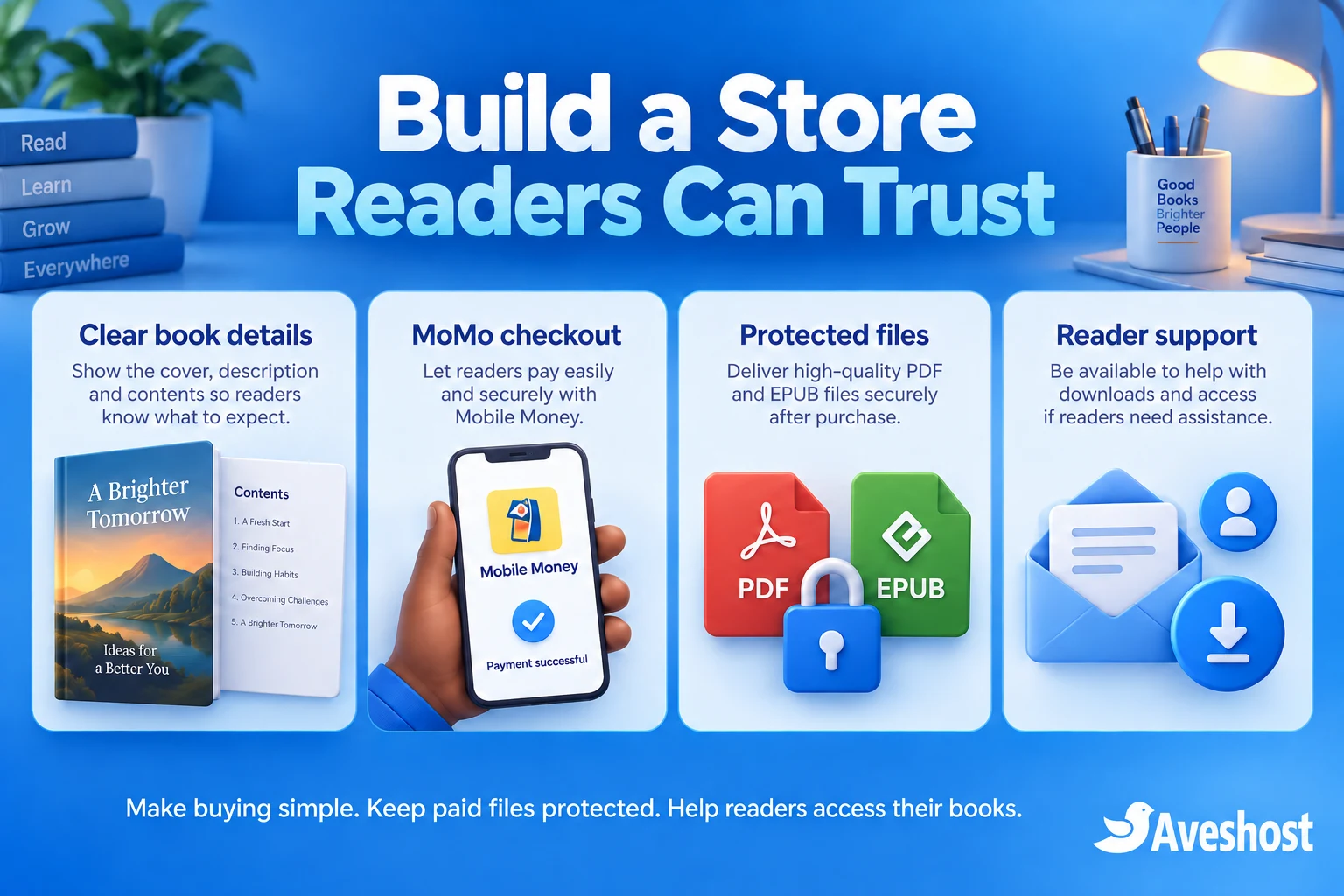
Direct sales remove the marketplace royalty split from that transaction, but they still have costs. Budget for payment processing, hosting, domain renewal, maintenance, support, promotion, applicable taxes and refunds. Editing, cover design and formatting are publishing costs too.
At the time of writing, Paystack’s Ghana pricing page lists a 1.95% fee for local transactions. Using only that fee, a GH₵50 sale has a processing charge of GH₵0.975, leaving GH₵49.025 before other costs and settlement rounding. Check the actual transaction record and merchant terms.
That example leaves 98.05% before the other expenses; it does not establish a 98% profit margin. If advertising to acquire the buyer costs GH₵10, the remaining amount falls to GH₵39.025 before allocating hosting, publishing and other costs. Use your own records when setting the price.
Track gross sales, fees, refunds and net settlement separately. Compare completed paid orders with gateway records rather than treating every checkout attempt as revenue. Keep any tax or accounting treatment aligned with the business’s actual obligations and appropriate professional advice.
Evaluate the channels using net results and audience fit. Your own store gives you control over presentation and permitted customer relationships, while you carry acquisition and operational costs. Avoid comparing one marketplace percentage with a direct-sales percentage that leaves out the expenses of running the store.
Build a direct reader relationship with permission
Use the author website as a stable destination for interviews, readings, social posts and event links. Publish a strong book page, an author introduction and useful related content. A short sample gives readers a way to assess your writing before paying.
Offer a separate newsletter sign-up with a clear purpose. Purchasing a book should not silently subscribe someone to promotional messages. Keep transactional order emails focused on the purchase and respect the reader’s marketing preferences.
Add reader reviews only when they are authentic and used with appropriate permission. Do not invent endorsements or imply that a public figure recommends the book without evidence. Explain bonuses and discounts clearly, including what the offer includes.
For launches, share one consistent product link and test it from the same mobile journey readers will use. If a school, church or reading group wants multiple copies, provide a clear bulk-licensing enquiry route. Keep personal-use downloads separate from institutional permissions.
Protect reader information. Explain why contact details are collected, restrict staff access and define retention. The Data Protection Commission’s organisational guidance sets out registration, transparency and security responsibilities. Include the relevant hosting, payment and messaging arrangements in your privacy planning.
Test the full store before your book launch
Run a complete test for each file and format. Buy the correct test product through the gateway’s documented test process, confirm the stored order state and open the resulting download. Check the book contents rather than verifying only that a link appears.
Test failed and pending payments, repeated callbacks, a buyer closing the browser after authorisation, a delayed email and a download that reaches its configured limit. Confirm that unpaid orders never expose the full book and that a verified paid order remains recoverable through the intended access route.
Check guest and account behaviour against your chosen policy. Test a logged-out raw file URL and an unauthorised account. Review refunds and access revocation; removing future access cannot recall a copy already downloaded. Keep any refund decision and permission change recorded.
Back up the database, protected files and essential configuration together. Rehearse a restore in an isolated environment with outgoing email and payment actions disabled. After a real recovery, reconcile newer orders and gateway transactions before resuming automated fulfilment.
Exclude checkout, account pages and private download responses from shared public caching. Monitor failed payments, delivery problems, storage and transfer use during the launch. Keep a support contact available and fix recurring reader problems before expanding the catalogue.
Ready to sell your books directly to readers? Explore our WooCommerce hosting, author domain options and business email, or discuss your e-book store with Aveshost. Bring your file formats, catalogue size, payment requirements and expected launch traffic so we can plan a suitable setup.
Frequently asked questions
Can I sell e-books online in Ghana with MoMo?
Yes. Use an eligible merchant account, a supported checkout integration and a store that releases the correct download after payment is verified.
Can I sell a KDP Select e-book on my own website?
Digital exclusivity applies during the applicable KDP Select term. Review the title’s enrolment and your rights before making its digital edition available directly.
Do I have to close my Amazon account to sell directly?
No. Choose the channels permitted by your rights and agreements. KDP Select exclusivity needs a separate check for each enrolled title.
Should I offer PDF or EPUB?
Offer formats that suit the book and your readers. Explain what is included, test both editions and provide clear opening instructions.
Does a MoMo payment always unlock the book instantly?
Access should follow verified payment. Pending authorisation, gateway delays or an unresolved transaction must not be treated as a successful purchase.
Can I use a public Google Drive link for the full book?
A public sharing link exposes the book to anyone who obtains it. Use protected storage and a purchase-authorised delivery process for paid files.
Does download protection prevent every kind of piracy?
No. It restricts unauthorised retrieval from the store, but cannot stop a buyer copying a file after downloading it.
Does keeping about 98% after a gateway fee mean 98% profit?
No. Hosting, publishing, marketing, support, refunds and applicable taxes also affect the result. Calculate net income using your actual costs.
Can readers recover a lost download email?
Provide a documented recovery route. Depending on your account policy, readers can use their account downloads or contact support to verify the order and restore access.
Can Aveshost help plan my author store?
Yes. Contact our team with the store platform, formats, catalogue, payment requirements and launch traffic to discuss hosting, domains and business email.