
A fashion designer website in Ghana can do more than display your latest collections. With a private client portal, your atelier can keep measurement records, fabric choices, fitting appointments and sewing progress connected to the right customer and order.
For bespoke tailors and seamstresses in Accra, Kumasi and beyond, the problem is familiar: a missing measurement card, a size update buried in a chat, or a returning customer whose previous garment details are difficult to find. A well-designed portal gives the team one organised place to work.
This guide explains the website and hosting setup behind that service. Clients can sign in and submit updates, while the tailor reviews measurements before they become part of an approved cutting record. At Aveshost, we help fashion businesses plan the domain, hosting and business email that support a professional online presence.
Table of Contents
Plan a fashion designer website in Ghana
Start with the work your atelier needs to organise. A practical first version includes public service pages, private client profiles, measurement submissions, order records and a simple progress view. Add fabric selections and fitting requests where they solve a real problem for the team.
Keep the public portfolio separate from private customer work. Visitors should see your brand, garment categories, contact details and approved portfolio photographs. A client should see only their own records and orders after signing in. A public customer directory has no place in this workflow.
Map the process before selecting software: enquiry, consultation, measurement capture, review, quotation, order approval, cutting, fitting, alterations and handover. Decide who handles each stage and which updates the client needs. A small business can combine staff roles while still keeping individual accountability.
A portal supports your craft; it does not replace professional measurement or fitting. Remote clients can submit information for review, but a form cannot guarantee accuracy or a perfect fit. Set clear expectations about the measurement method, required checks and fitting arrangements before accepting an order.
For a diaspora customer ordering an outfit for an event in Ghana, separate the event deadline from the planned fitting and collection times. Capture enough information to assess feasibility before promising delivery. The website should reflect the atelier’s actual capacity and service terms.
Choose your domain, hosting and business email
Choose a short domain that matches your fashion label and is easy to share on a business card or garment tag. Our domain registration service helps you check suitable names. Keep registration under the business’s control and document renewal and recovery responsibility.
Your public portfolio and a modest enquiry form can run on suitable WordPress hosting. A private portal also needs capacity for its database, authenticated users, uploads and backups. Check the actual application requirements rather than choosing only by the number of pages.
For a dedicated application or growing workflow, discuss managed VPS hosting with our team. Agree who maintains the server, portal software, security updates and integrations. A managed server does not automatically include custom portal development or every application maintenance task.
Use business email for addresses such as fittings@yourdomain and orders@yourdomain. Configure email authentication and test delivery for invitations and password resets. Give staff named accounts instead of circulating one shared password across the workshop.
Keep the public site fast on mobile connections. Resize portfolio images, avoid unnecessary autoplay video and use a clear sign-in link. Configure caching so private dashboards, measurement forms and account pages are excluded from shared public caches.
Structure client profiles and measurement records
Create a stable client identifier that remains the same when the person changes their name, phone number or email. Store contact details separately from measurement sets and order records. The person placing an order and the person wearing the garment can be different people, so define that relationship explicitly.
Use a measurement template for each garment category. A shirt, fitted dress and pair of trousers need different fields and instructions. Let the atelier define the relevant labels and measuring method. Avoid one crowded form that asks every customer for every possible measurement.
Record the unit alongside each numeric value or enforce a clearly displayed unit for the entire set. Distinguish body measurements from finished-garment measurements and fit allowances. A measurement entered in inches must never be interpreted as centimetres merely because another staff member opened the record.
Keep the source, capture time, person taking the measurements and review status with each set. Mark whether the client measured themselves, another tailor supplied the values, or your team measured in person. Use validation to catch missing fields and obvious entry mistakes, followed by professional review.
Keep preferences such as sleeve style, fit and garment length in the right fields. Design preferences and technical cutting adjustments should not overwrite body measurements. Store only information needed for the agreed service; unrelated medical details or identity documents are unnecessary for ordinary tailoring records.
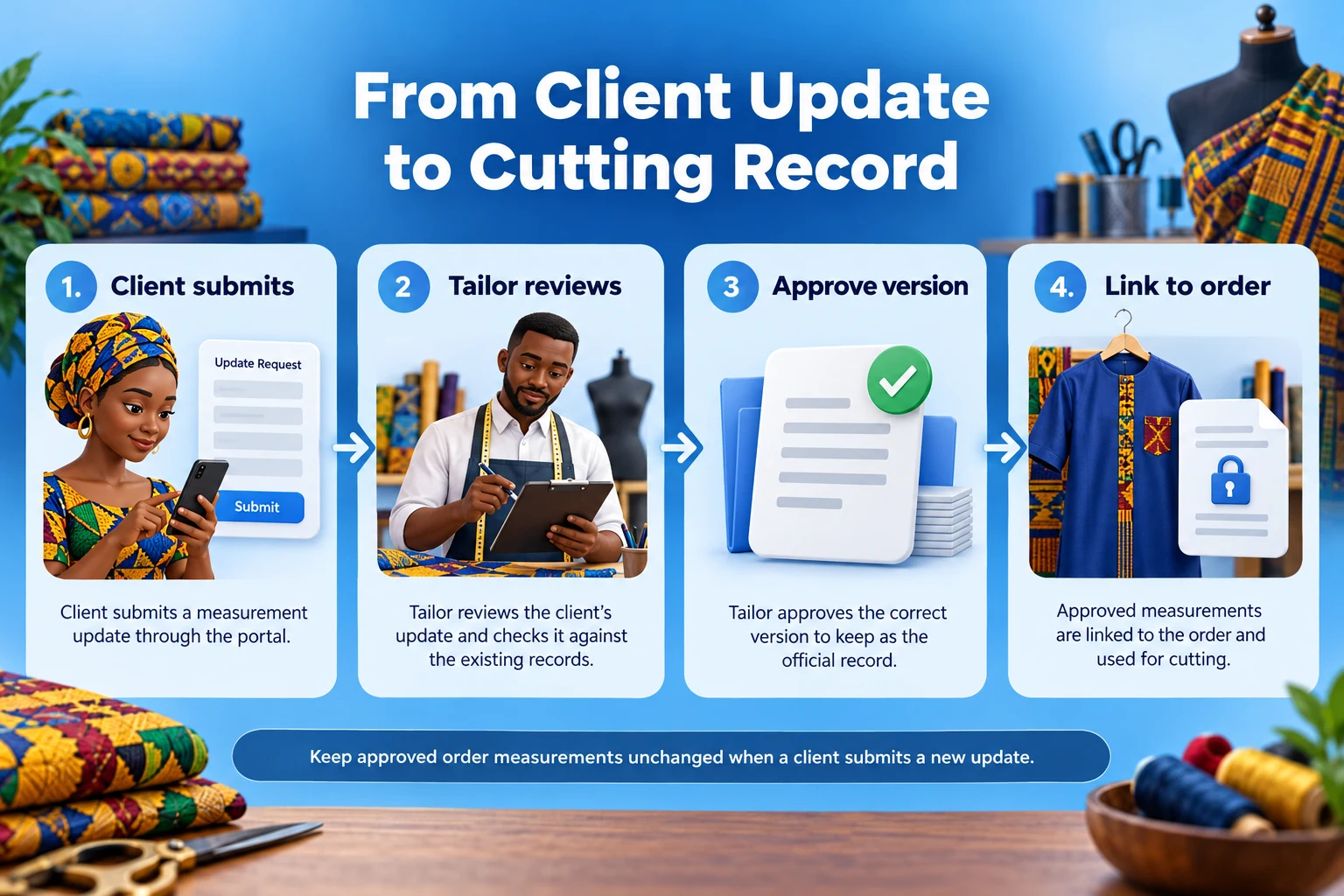
Let clients submit updates for tailor review
Invite accepted clients to their own account with a password-setting link. Use a role that can access the intended portal features without editing the website. Confirm the correct client record before linking an existing paper card or previous order to the new account.
Give clients a clear “Submit measurement update” action. Explain the units, required method and which fields apply to the garment. Save the result as a new submission awaiting review. Keep the last approved set available until the responsible tailor accepts a replacement.
Show a confirmation that explains the next step: “Your update has been received. Our team will review it before using it for a new order.” Notify staff of the pending task and preserve the original submission. Do not quietly convert every customer edit into an approved production instruction.
A returning customer may change one value while leaving others untouched. Ask whether the update is a complete new set or a correction to specified fields, and record that distinction. The tailor should review consistency instead of combining unrelated measurements without checking them.
Separate account contact changes from measurement approval. Updating a phone number need not reopen every garment record. Protect email changes and account recovery carefully, since access to the account can reveal private records. Never accept a customer identifier supplied by a hidden form field as proof of ownership.
Link approved measurements to each order
When the order is ready for approval, link it to a specific reviewed measurement version. Store the agreed garment specification, fit preferences, fabric reference and relevant fitting notes with that order. The cutting team needs an unambiguous record of what was approved.
Freeze that order’s measurement snapshot when production is authorised. If the client submits an update later, preserve it as a new version for review. It must not silently change the values already used to cut an active garment. Staff should see a clear notice that a newer submission exists.
For example, a client has one approved measurement set attached to an outfit already being sewn. They submit a different waist measurement for a future order. The portal retains the active outfit’s record and creates a pending update. The tailor decides whether the current job needs remeasurement, an alteration or no change.
Record approved changes with the person responsible, reason and affected order. Keep earlier versions available to authorised staff. If an alteration changes the garment, add an alteration record rather than rewriting the original body measurements to match the finished piece.
Keep internal construction notes separate from the client-facing summary. Pattern adjustments, seam allowances and workshop instructions are production records. The client needs the agreed design, relevant measurements, fitting arrangements and clear progress updates without an overwhelming technical worksheet.
| Record | Purpose |
|---|---|
| Client profile | Identity and contact details |
| Measurement submission | New information awaiting review |
| Approved measurement version | Reviewed values with source and units |
| Order snapshot | The approved measurements used for that garment |
| Alteration record | A documented change to the specific garment |
Organise fabric choices and design approvals
Build a small fabric and design catalogue with stable reference codes. Record fabric type, colour or pattern, available quantity and whether the material belongs to the client or the atelier. Photograph swatches clearly, with permission for any customer-supplied reference images.
A customer selecting a swatch online is expressing a preference. Confirm stock, required length, suitability and the exact agreed material before reserving it for production. Screens can show colours differently, and a photograph cannot reproduce fabric feel. Offer an in-person review where the service requires it.
If material is held for an order, record the quantity reserved, the staff member and any reservation expiry. Several clients should not be promised the same remaining fabric through separate forms. Inventory reservation needs an implemented stock workflow; a gallery or favourite button does not provide it.
For client-supplied fabric, record receipt, quantity, condition and the associated order. Agree how leftovers and additional purchases are handled. Do not infer ownership from the account that uploaded a photo or confuse an inspiration image with material physically received.
Save the design approval against a specific revision. Use clear options for neckline, sleeve, lining and other agreed features, with notes for exceptions. When a design changes, preserve the previous version and record any effect on price, fitting needs or completion time.
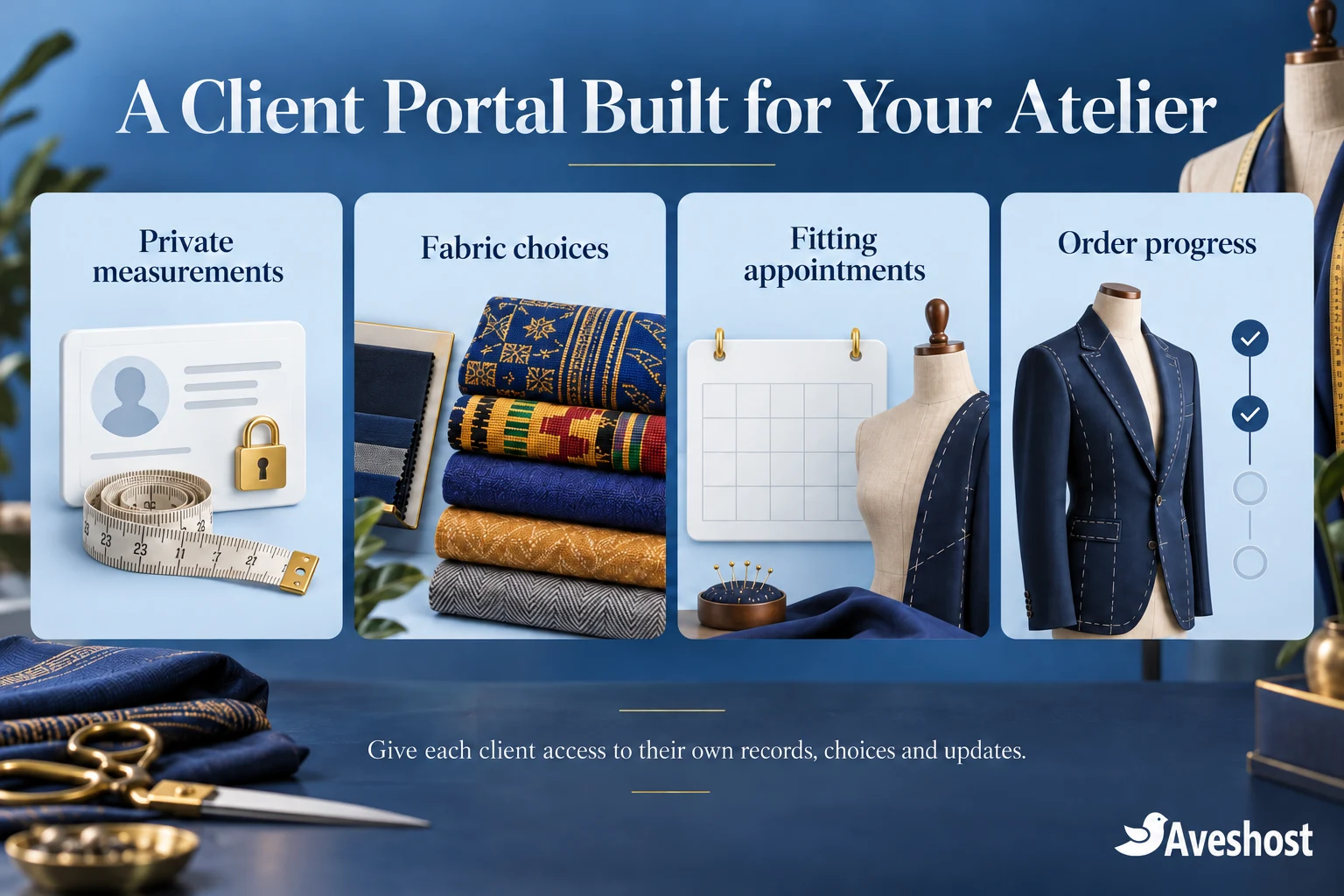
Manage fittings, deadlines and sewing progress
Use separate appointment and production records. A fitting request needs a confirmed time, location, responsible staff member and any preparation instructions. The event deadline belongs on the order. One calendar field should not serve all these purposes.
Begin with appointment requests that staff confirm after checking availability. If you add online scheduling, configure staff capacity, duration, buffers and conflicting appointments. A general form does not prevent double bookings without a scheduling process behind it.
Give customers a short progress sequence: awaiting approval, materials confirmed, cutting, sewing, fitting, alterations and ready for collection. Publish updates when the responsible staff member records the event. Do not move an order forward automatically because a set number of days has passed.
Keep estimated readiness separate from a confirmed collection arrangement. If the fitting reveals extra work or materials arrive late, update the customer promptly and record the revised plan. Avoid a progress percentage that suggests precision the workshop cannot support.
Handle group orders with individual wearer records and controlled access. A bride, organiser or family member should see another person’s measurements only where the appropriate authority and permission are recorded. A shared event or payer does not automatically justify access to every wearer’s profile.
Build the portal with the right tools
There are two practical build routes. WordPress can combine a public portfolio with forms and a carefully developed private workflow. A dedicated application offers more control when you need several branches, detailed staff permissions, measurement histories and production integrations. Choose the route your team can maintain.
For a WordPress implementation, a maintained form builder can capture submissions. The Gravity Forms User Registration documentation explains creating accounts and updating the current user’s mapped profile fields, using separate forms for registration and updates. Check the licence and role configuration for the intended setup.
That account feature is a building block, not a complete tailoring portal. Reviewed measurement versions, order snapshots, fabric reservations, customer dashboards and access rules require additional implementation. Do not map approved cutting values directly to freely editable profile fields.
Write the developer’s specification around records and actions: clients submit, reviewers approve, production staff use an approved order snapshot, and authorised staff record changes. Ask for a working demonstration using two unrelated clients and an active order, rather than accepting a login screen as evidence of a complete portal.
Document the database structure and export format. The atelier should be able to retrieve client records, version history and order links in a usable form. Agree source-code ownership, licence renewals, maintenance responsibility and the process for moving the service to another environment.
Protect client measurements and private files
Measurement records and identifiable client photographs are personal information. Explain what the atelier collects, why it is needed, who can see it and how clients can raise questions. The Data Protection Commission’s guidance for organisations sets out registration, transparency and security responsibilities. Assign responsibility for that work before launch.
Use server-side ownership checks for every profile, order, measurement version and file. The OWASP authorisation guidance recommends denying access by default and checking permissions on every request. Hiding a menu or using an unpredictable record number does not establish access control.
Protect reference images and fitting photos with private storage and an authorised download route. Public WordPress media links remain accessible to anyone who has the URL. Restrict file formats and sizes, inspect uploads and prevent uploaded content from executing. A small portal can start without photo uploads.
Avoid collecting intimate photographs as a routine requirement for remote measurements. Provide clear instructions and arrange the appropriate consultation instead. Keep necessary customer files out of ordinary notification emails, and obtain separate permission before using client garments or photos in public marketing.
Set staff permissions around the work they perform. A receptionist may need appointment details without every measurement history; a cutter needs the approved order specification. Use named accounts, available multifactor authentication, timely access removal and a record of important changes.
Document retention, deletion, processor arrangements and incident handling. Closed orders, unsuccessful enquiries and accounting records can have different retention needs. Review where files and backups are stored and who can access them. Secure hosting supports the service, while the business remains responsible for its privacy processes.
Connect customer messages and payment records
Send concise messages when an action needs attention: a measurement submission awaits review, a design approval is required, a fitting is confirmed or an outfit is ready. Link the authorised client to the portal for private details instead of including their measurements in the message.
Our WordPress SMS guide compares provider options in Ghana. Order-specific reminders need a suitable integration with your portal’s events. Keep credentials on the server and prevent retries from sending the same update repeatedly.
Record quotations, deposits, balances and receipts against the correct order. If you add MoMo checkout, use a supported integration and an eligible merchant account. Verify the transaction through the provider before marking payment received. A payment screenshot or browser confirmation is insufficient evidence.
Keep payment status separate from production approval. A deposit does not establish that measurements or fabric choices have been reviewed. Define what starts production and who can authorise it. Record refunds and price adjustments without erasing the original transaction history.
For a made-to-order clothing shop alongside the portal, our guide to selling fashion to the diaspora covers the wider storefront journey. Keep private measurement access scoped to the wearer and order, even when a public shop handles checkout.
Move paper cards online and test the workflow
Migrate paper cards in manageable batches. Start with active clients and open orders, confirm the identity match and record who entered and checked the values. Preserve the unit and the source. If handwriting is unclear, arrange clarification rather than inventing a value.
Treat OCR as a draft-entry aid that staff must check. A mistaken decimal or unit can change the cutting instruction. Keep the original card under the atelier’s retention policy and mark uncertain records for remeasurement before use. Do not automatically attach an old card to a new client with a similar name.
Test with fictional profiles before entering real client records. Use two unrelated clients, a reviewer, a production worker and an administrator. Confirm that changing a record reference cannot expose someone else’s data, and that logged-out file requests return no private content.
Run a complete sample order: submit measurements, review them, select the approved version, agree a fabric and design, record a fitting and update progress. Then submit a new size update. Verify that the active order’s approved snapshot remains unchanged and any correction follows the recorded review process.
Back up the database, private uploads and essential configuration together. Rehearse restoration in an isolated environment with outgoing messages and payment actions disabled. Reconcile recent orders and permissions before reopening access after a recovery.
Launch with a small client group, review support questions and improve the forms before expanding. Track missing measurements, review delays and appointment conflicts. Keep software maintained and periodically check that staff access and recovery contacts are current.
Ready to build a client measurement portal for your fashion business? Bring your garment categories, approval process, order volumes and storage needs to our team. Explore our WordPress hosting, managed VPS options and business email, or discuss your portal with Aveshost.
Frequently asked questions
What should a fashion designer website in Ghana include?
Combine a public portfolio and enquiry route with private client records where needed. A bespoke portal can organise measurements, design choices, fittings and order updates.
Can clients update their measurements online?
Yes. Save each update as a new submission for tailor review. Keep approved measurements and active order records separate from freely editable client fields.
Does the portal replace a professional fitting?
No. It organises information and communication. The tailor determines the measurement checks and fittings required for the garment and service.
Can an update change an order already being sewn?
It should not do so automatically. Preserve the approved order snapshot and use a reviewed change process when the current garment needs adjustment.
Should I store measurements in inches or centimetres?
Choose the atelier’s required unit and display it clearly. Record units consistently and distinguish body measurements from garment measurements and fit allowances.
Can WordPress support a tailor client portal?
Yes, with a suitable implementation. Forms and account tools provide building blocks; permissions, approval history and order snapshots need additional development.
Can customers choose fabric online?
Yes. Present clear fabric references, then confirm availability, suitability and reservation before production. An online selection alone does not reserve stock.
Can a family organiser see every wearer’s measurements?
Only where the appropriate authority and permission are recorded. Paying for a group order does not automatically grant access to everyone’s private profile.
Are public media links suitable for fitting photographs?
No. Keep private customer images in protected storage and check authorisation on each download. Obtain separate permission before public portfolio use.
Can Aveshost help plan the portal hosting?
Yes. Contact our team with the application, client volumes, file storage, permissions and backup requirements to discuss suitable hosting and business email.