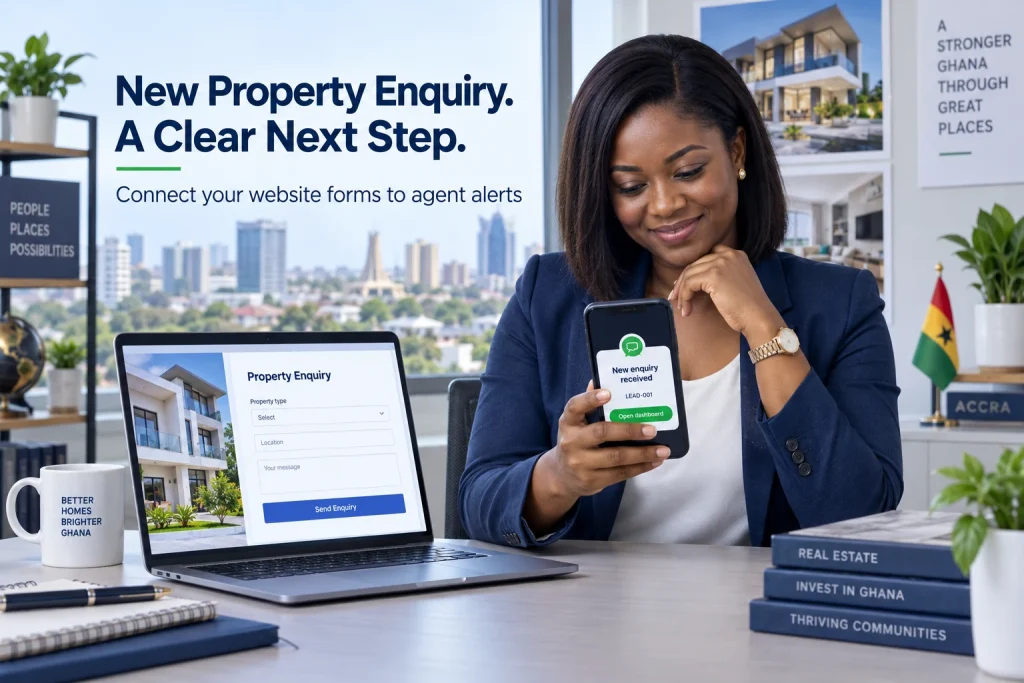
A website to WhatsApp lead alert can notify your property team when someone submits an enquiry, helping agents spot new requests without repeatedly checking an inbox. For Ghanaian real estate businesses, the useful workflow connects the website form, a saved lead record and an alert to the assigned agent’s phone.
The alert is a prompt to act. The website should retain the enquiry, show who owns the follow-up and record what happens next. This keeps a missed notification from becoming a lost customer request and gives the agency a clear view of unanswered enquiries.
This guide explains a WordPress form integration using an authenticated receiver, a background queue and the official WhatsApp Business Platform. It covers messaging requirements, privacy, delivery tracking and hosting. At Aveshost, we help businesses plan the website and server setup behind these integrations.
Table of Contents
Plan a website to WhatsApp lead alert workflow
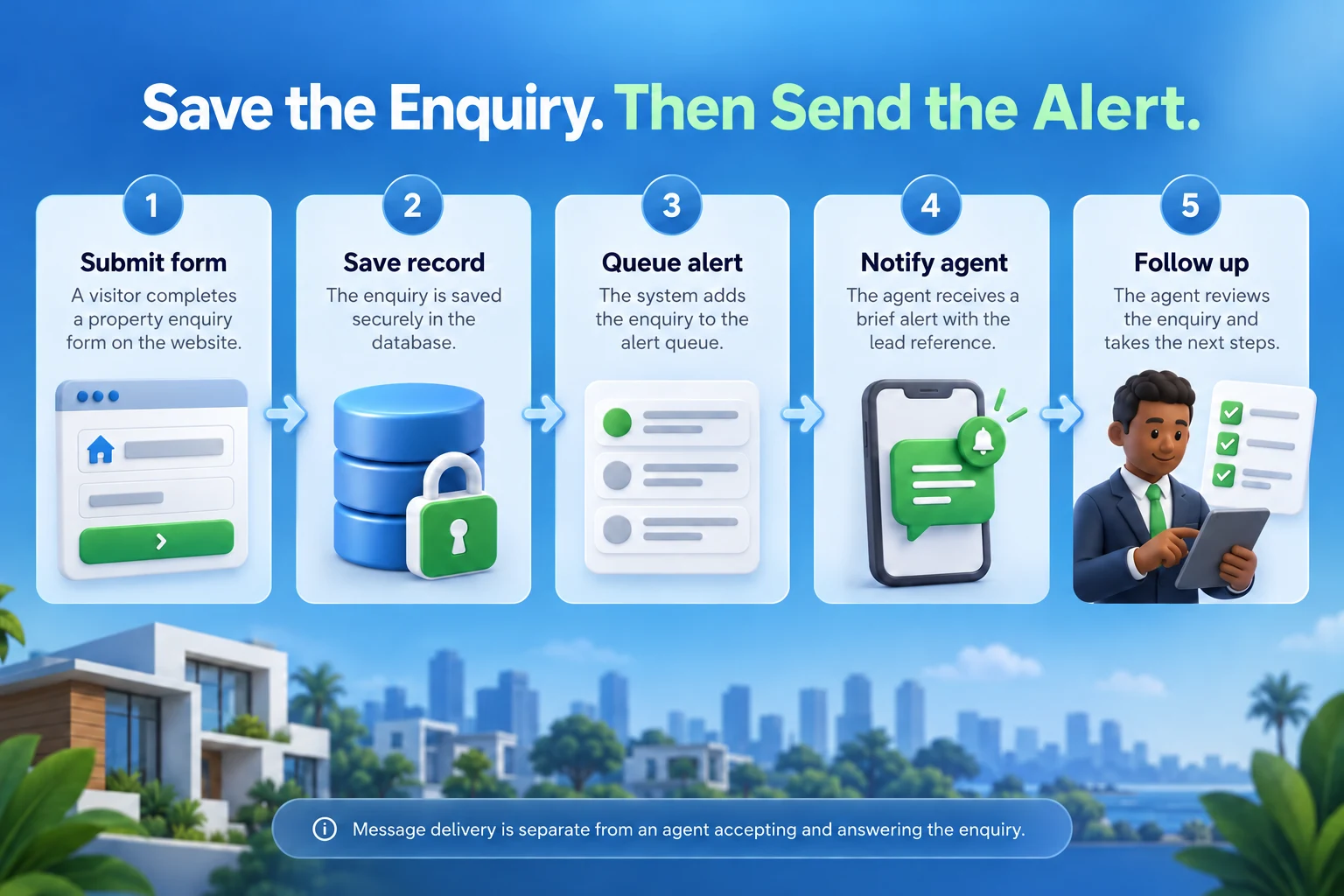
Define the event first: a valid property enquiry has been saved and assigned to someone who can respond. The alert should carry a reference and an authenticated dashboard route. The full buyer file remains in the agency’s controlled system.
Separate three tools that are often confused. A click-to-chat button opens WhatsApp for the visitor, who still has to send the message. A web-form webhook transfers a saved form event to your integration. The WhatsApp Business Platform sends the resulting message through an authorised business setup.
A wa.me link by itself does not automatically deliver a submitted form to an agent. Likewise, installing the ordinary WhatsApp Business app does not create a server API for arbitrary website notifications. Choose the integration around the actual sending capability.
Define a service target the team can staff, such as reviewing new enquiries during published business hours. Measure the actual time to human follow-up. A fast alert is useful, but it does not guarantee a viewing, a qualified buyer or a completed sale.
Treat “instant” as the goal of prompt event processing, with delivery dependent on the provider, internet connection and recipient device. Show pending or failed states internally instead of promising that every notification reaches a phone immediately.
Build a focused property enquiry form
Ask for the listing reference, enquiry type, name and a preferred contact method with the necessary contact detail. A short message field can capture the person’s question. Only add budget, preferred area or viewing preferences where they help the team respond to the requested service.
Use the listing’s server-side record to confirm which property the form refers to. A visitor can alter a hidden field or URL parameter, so the integration must validate the submitted reference. An unknown or withdrawn listing should trigger a useful review route.
Keep the form separate from a tenancy application or eligibility decision. Initial lead routing needs service details, not sensitive personal characteristics or extensive identity documents. Route property interest by listing, area, availability and staff responsibility rather than discriminatory criteria.
Use accessible labels, clear validation and a confirmation explaining when the person can expect a response. Avoid saying a viewing is booked merely because someone entered a preferred time. A viewing request requires the relevant availability and appointment confirmation.
Include a privacy notice and a separate choice for any optional marketing. If you intend to contact the enquirer on WhatsApp, obtain the required permission for that communication. A person choosing email follow-up should not be silently enrolled in WhatsApp promotions.
Keep a phone-based enquiry easy to complete. Use appropriate telephone input and normalise numbers carefully, including Ghana’s country code where relevant. Preserve the supplied value for authorised review and reject invalid input rather than guessing a different person’s number.
Save the lead before sending a notification
Store the validated submission in the form system or CRM before scheduling the alert. Give it a stable lead identifier, capture time, listing reference and current status. The visitor should receive a receipt confirmation only after the record has been saved successfully.
Keep a visible staff list of unassigned and unanswered enquiries. The saved record is the source of truth; WhatsApp is one notification channel. A provider outage or muted phone should not remove the agency’s ability to find and handle the request.
Use separate event and notification identifiers. A lead can have several legitimate updates, while a repeated delivery of the same submission should not create multiple alerts. Define the event being sent, such as “new lead assigned”, and retain its relationship to the original enquiry.
Build an outbox or equivalent recovery mechanism. The system should be able to find saved enquiries whose notification event was not queued because processing stopped between those operations. A saved form and an attempted HTTP request alone do not guarantee reliable delivery.
Retain the minimum operational history needed to investigate a problem: record saved, assignment made, alert queued, provider response and follow-up state. Keep sensitive form contents out of general application logs. The authorised staff dashboard holds those details.
Choose the official WhatsApp messaging route
Choose the WhatsApp Business Platform through an appropriate business setup or provider. Plan the sending number, account access, approved message content and billing before promising automated delivery. A development test setup has recipient and production limitations that must be resolved before launch.
Use a separate authorised recipient number for the agent rather than trying to send a business alert back to the same sending identity. Record that the agent wants these work alerts and define how the recipient list changes when staff responsibilities change.
The WhatsApp Business Messaging Policy requires recipient opt-in and approved templates for business-initiated conversations. Outside the applicable customer-service window, use an approved template. A web-form submission does not open a WhatsApp conversation window with the agent or the buyer.
Submit the intended staff-alert use case for the required template review and use only an approved purpose and category. Approval, category and continued availability are controlled by the platform. If the use case is not approved, keep email or another suitable channel as the operational fallback.
A concise proposed message is: “New property enquiry received. Reference: LEAD-001. Sign in to the agency dashboard to review and follow up.” Treat that wording as a draft for review, not an already approved template. Keep the link destination under the agency’s control.
A webhook is a way to move an event, not a promise of free messaging. Review the official WhatsApp Platform pricing and any provider fees for your account and message category. Include form licences, hosting and integration maintenance in the budget.
Connect the WordPress form to your receiver
For one WordPress route, use Gravity Forms with its Webhooks Add-On under a suitable licence. The official webhook setup guide describes a form feed configured through Form Settings > Webhooks > Add New.
Set the request URL to your own HTTPS receiver, choose POST and JSON, and select the minimum fields needed for the event. Include a stable entry reference and a validated listing identifier. Configure authentication through an appropriate header rather than a secret embedded in the URL.
The webhook receiver and WhatsApp API are different endpoints. The form sends an event to your receiver; your controlled integration validates it, assigns the agent and requests an approved message. Avoid sending the complete form directly to a messaging endpoint with an unreviewed payload.
Authenticate each incoming request and validate the payload, allowed form and event type. Enforce size and rate limits. Keep secrets in server configuration or protected application settings, with access restricted to the integration. Never expose them in browser JavaScript or a publicly shared form export.
Only acknowledge successful processing after the event is durably stored or queued according to the receiver’s contract. If storage is unavailable, return a failure and use a documented recovery path. Confirm the form connector’s actual retry behaviour instead of relying on retries it may not provide.
Test the feed with fictional enquiries. Confirm that the saved lead exists, the receiver can match it, and the alert uses the server-selected recipient. Do not let a public form choose an arbitrary WhatsApp destination or external callback address.
Queue alerts and assign the right agent
Send WhatsApp requests from a worker or background process so the visitor’s form does not wait on phone delivery. The queue record should include the event identifier, assigned staff account, intended recipient, approved template and the lead reference needed for the alert.
Resolve assignment using rules controlled by the agency: listing owner, branch, service area or a reviewed rotation among available staff. Validate the mapping on the server. A visitor-supplied agent number is not an authorised routing rule.
Start with one responsible recipient per event and a visible escalation process. Broadcasting every buyer enquiry to a large group creates duplicate calls and widens access unnecessarily. If responsibility changes, update the lead record and send a clearly identified reassignment event.
Use an idempotency key such as site, form, entry and event type to prevent normal retries creating duplicate jobs. Store the result before moving the item to its next state. An ambiguous provider timeout still needs careful reconciliation because the message may already have been accepted.
Apply retry limits and backoff to temporary failures. Invalid recipients, missing permission or rejected templates need staff attention rather than endless retries. Move exhausted jobs to an actionable failure list with enough diagnostic information to repair the cause.
Keep a periodic reconciliation task for saved leads missing an expected event and queued items that stopped progressing. If the website and worker run on different systems, document which one owns the record and how recovery avoids creating a second enquiry.
Track delivery, retries and agent acknowledgement
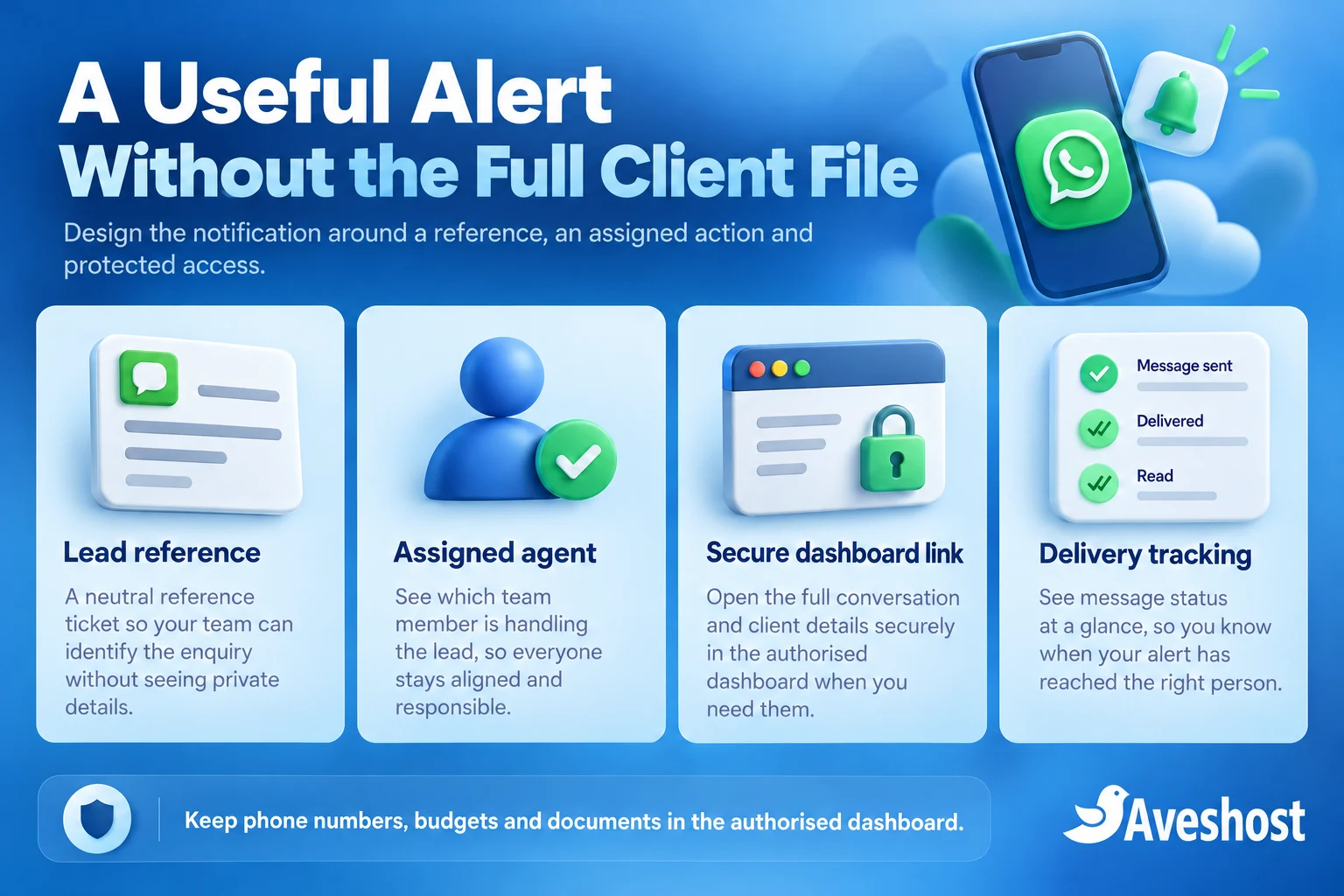
Distinguish queued, accepted by provider, delivered and failed. Record the provider’s message identifier when available and handle authenticated status events through the integration. An accepted API request is not evidence that the phone received the alert.
Provider delivery and read indicators are also different from an agent accepting responsibility. Add an “Accept enquiry” action inside the authenticated dashboard and record it separately. A read receipt should not mark the buyer contacted or the viewing arranged.
The status callback from the messaging provider is separate from the form’s outbound webhook. Validate its authenticity using the provider’s documented mechanism, correlate it with the saved message identifier and process repeats safely. A callback URL verification challenge alone does not authenticate every later notification.
Choose a short operational escalation rule for enquiries that remain unaccepted during staffed hours. Notify the designated supervisor or use the existing email queue. Keep the lead’s owner and status clear so two agents do not unknowingly make competing follow-up calls.
Make fallback messages minimal and traceable. An email can say that an enquiry needs review without attaching the complete buyer file. Our Ghana SMS integration guide compares provider options for an additional channel where appropriate.
Measure saved enquiries, queued alerts, delivery failures, agent acceptance and first follow-up as separate metrics. This shows whether a problem comes from form capture, the integration, phone delivery or staffing. A message-delivery percentage alone does not measure customer response quality.
| Recorded event | Meaning |
|---|---|
| Lead saved | The website retained the enquiry |
| Alert queued | The integration has work waiting to send |
| Provider accepted | The sending request was accepted |
| Delivered | The provider reported delivery |
| Agent accepted | The assigned person took responsibility in the dashboard |
| Customer contacted | A separate follow-up action was recorded |
Separate staff alerts from customer conversations
An alert sent to an agent is an internal notification. It does not automatically start a WhatsApp conversation between that agent and the enquirer. The agent opens the authorised lead record and follows the contact method and permissions recorded for that person.
If you add an automatic buyer acknowledgement on WhatsApp, build it as a separate message flow with its own recipient permission, approved content and delivery tracking. Do not reuse the staff notification template or interpret staff opt-in as customer opt-in.
A buyer’s message to the business on WhatsApp can create a service conversation under the platform’s rules. A website request is a different event. Apply the actual conversation state rather than using the form submission time as the start of a messaging window.
Do not promise that replying to the internal alert will forward a response to the buyer. That requires a separately implemented conversation-routing system. Provide a clear dashboard action for follow-up and record the result in the lead workflow.
Use factual outcomes such as contact attempted, customer replied, viewing requested and viewing confirmed. Keep current property availability and appointment scheduling under the responsible team’s process. Automation should make the next action easier to identify without inventing sales progress.
Protect buyer details and dashboard access
Keep the phone notification brief: lead reference, assigned action and a safe dashboard route. Names, phone numbers, budgets, identification documents and private property records belong in the controlled system rather than a lock-screen preview or a forwarded chat.
Use normal sign-in and server-side access checks for each lead. A dashboard URL containing a record number must not function as a secret key to the buyer file. Avoid long-lived bearer links that expose the record to anyone who receives the message.
Limit staff access to the leads they are authorised to handle, with a defined supervisor role where needed. Give staff named accounts, available multifactor authentication and a process for lost phones and role changes. Revoke access in the dashboard and routing rules when an agent leaves.
The Data Protection Commission’s organisational guidance explains registration, transparency and security responsibilities. Document the collection purpose, recipients, retention, processing providers and relevant data locations before launch.
Do not collect identity documents or detailed financial records in an initial public enquiry form. Where later professional work needs private documents, use an appropriate protected process and authorisation. Keep private uploads out of public WordPress media links and ordinary notification attachments.
Review the automation platform’s stored execution history. A workflow tool can retain complete payloads even when the final alert is minimal. Restrict access, minimise retained data and set a documented retention approach for logs, exports and backups.
Choose hosting and dependable background processing
A WordPress site with an external managed integration may only need suitable WordPress hosting for pages, forms and saved enquiries. Check the form’s requirements, outbound requests, scheduled tasks, database use and backups for the chosen setup.
A self-hosted receiver and persistent worker can suit a self-managed VPS when the developer can maintain the operating system and application. Plan HTTPS, process supervision, private configuration, queue storage and monitoring. A dedicated IP is useful only where the actual architecture requires it.
For managed infrastructure, discuss managed VPS hosting with our team and define the maintenance boundary. Hosting management, workflow development, WhatsApp account administration and message-template review are separate responsibilities.
Use business email for the saved-enquiry fallback and customer support. Configure domain authentication and test delivery. Exclude private dashboards and enquiry responses from shared public caches.
Monitor queue age, failed sends, scheduled reconciliation, credential validity and provider status. Back up enquiry records and essential configuration with restricted access. Keep a documented recovery method for secrets rather than placing access tokens in screenshots or public support tickets.
Test the complete enquiry journey
Test with fictional enquiries and authorised test recipients before enabling real buyer data. Verify saving, routing, queuing, template selection, delivery tracking and dashboard access as one complete journey. Confirm that the visitor receives a truthful form confirmation.
Test a rejected webhook, worker restart, provider timeout, paused template and phone without connectivity. The saved lead should remain available, retries should be bounded and failures should become visible to staff. Check that a repeated form event does not create multiple normal alerts.
Use two unrelated agent accounts to test permissions and reassignment. Confirm that changing a lead reference does not expose another agent’s unauthorised record. Check that a dashboard link forwarded to a logged-out browser requires authentication.
Test an expired credential and an agent removed from the rota. The system should stop sending to that recipient and provide an actionable error or reassignment route. Do not leave a former staff member receiving new lead references indefinitely.
Rehearse restoration in an isolated environment with outbound messages disabled. Reconcile queued events and provider message identifiers before resuming live delivery so old jobs do not unexpectedly resend after recovery.
Launch with a small team, review failures and measure first human follow-up. Bring your form platform, assignment rules, expected enquiry volumes and messaging setup to our Aveshost team to discuss the hosting and integration requirements for your website-to-WhatsApp lead alerts.
Frequently asked questions
What is a website to WhatsApp lead alert?
It is a workflow that saves a website enquiry and sends a notification to an authorised agent through a suitable WhatsApp business integration.
Does a wa.me button automatically send a submitted form?
No. It opens a chat for the visitor to send. Automated form alerts need a separate server-side integration.
Is the complete WhatsApp alert setup free?
Not necessarily. Review messaging and provider fees, form licences, hosting and maintenance. A webhook is an event-transfer mechanism, not a free-message entitlement.
Does submitting a website form open a WhatsApp service window?
No. Apply the actual WhatsApp conversation state and the platform’s template and permission requirements.
Can the agent receive the full buyer file in the alert?
Keep the notification minimal and direct the authorised agent to the protected dashboard. Avoid sending private documents, contact details or budgets to phone previews.
Does API acceptance mean the alert reached the phone?
No. Track provider acceptance, delivery and failures separately. Agent acknowledgement and customer follow-up are further distinct events.
Will replying to an internal alert automatically message the buyer?
No. That requires a separately implemented conversation-routing workflow. The agent should use the approved follow-up process.
What happens if WhatsApp delivery fails?
The saved enquiry remains available. Use bounded retries, an actionable failure list and a suitable fallback notification or staff review process.
Can WordPress forms trigger the integration?
Yes. A suitable form connector can send a saved event to an authenticated receiver. Validate inputs, protect credentials and keep the recipient under server-side control.
Can Aveshost help plan the infrastructure?
Yes. Contact our team with the form platform, receiver, queue, enquiry volumes and integration needs to discuss suitable hosting and business email.