A veterinary clinic website in Ghana can help pet owners book appointments, find the clinic and access an organised record of their animal’s care. For a breeder, a website can present accurate animal profiles and manage enquiries without losing track of availability or promised follow-up.
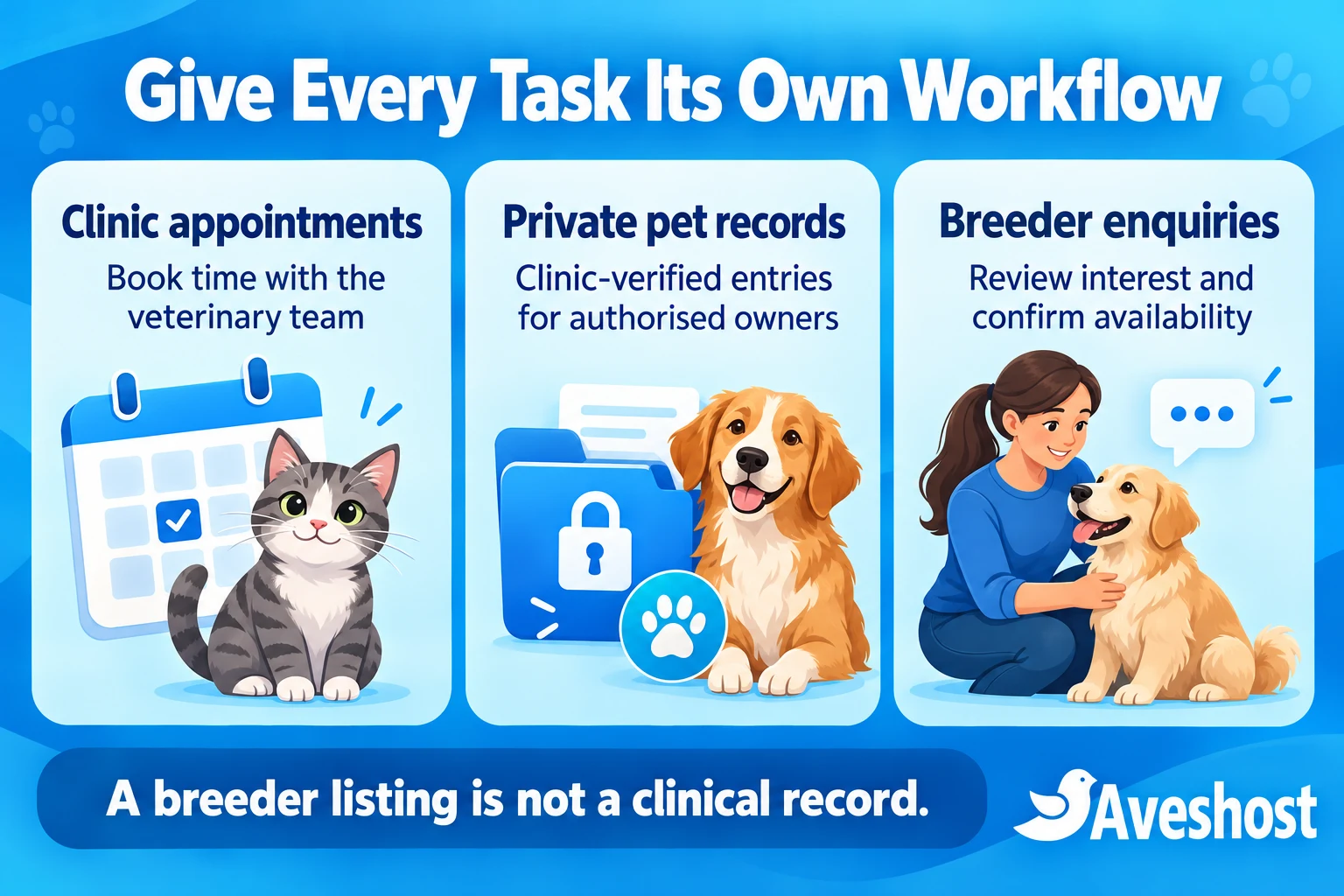
These services need distinct workflows. An appointment reserves time, a clinical record documents care, and a breeder enquiry starts a conversation about a particular animal. Connecting them thoughtfully creates a useful portal while keeping each person’s responsibilities clear.
At Aveshost, we help businesses plan their website, hosting, domain and professional email. This guide explains the practical setup for veterinary clinics and dog breeders, including booking calendars, clinic-verified vaccination records, reminders and private owner access. Start with a manageable service and build around the way your team actually works.
Table of Contents
Plan a veterinary clinic website in Ghana
Choose the first problem to solve: missed appointment requests, scattered pet records or poorly tracked breeder enquiries. Define who uses the system and what a successful visit looks like. Avoid launching several complex features before staff can manage the basic booking journey.
Create a short public navigation: Services, Meet the Team, Book a Visit, Contact and Owner Login where a private portal exists. A breeder can add an Animals or Enquiries section with clear descriptions. Keep routine visitor information accessible without requiring an account.
Publish the location, opening hours, contact methods and services actually available. Explain how owners should contact the clinic for urgent concerns and whether the practice offers an emergency service. A routine online booking form needs a clear message that it is not monitored as emergency dispatch.
Separate the public website from the practice’s clinical source of truth. If the clinic already uses practice-management software, decide whether the portal will connect to it or display selected approved information. Two independently editable clinical histories create confusion unless changes are reconciled deliberately.
Write the project scope around outcomes: an owner requests a suitable slot, staff confirm it, the visit is recorded by authorised personnel and follow-up reaches the right contact. Keep a documented fallback for phone bookings or periods when the website is unavailable.
Present the clinic and breeder roles clearly
Introduce the veterinary professionals accurately, with their roles and relevant credentials. The Veterinary Council of Ghana regulates veterinary practice and professionals. Provide a clear way for owners to identify the clinician responsible for care rather than relying on a generic medical-looking logo.
At the time of writing, the Council’s public verification page is under development. Use the Council’s published contact route for credential enquiries. Do not present an unavailable online search as a completed verification service.
A breeder profile should explain the business, contact process and available information about its animals. Distinguish breeder-supplied descriptions from veterinary assessments. Operating an animal catalogue does not make its administrator the clinician who can verify a vaccination or provide veterinary advice.
Use real, permission-based photographs that represent the clinic or breeder accurately. Keep owners’ faces, contact details and identifiable documents out of public images unless you have the appropriate permission. Show a tidy reception and clear services rather than staged badges suggesting an approval you do not hold.
Publish useful policies for appointments, cancellations, record access and enquiries. Explain who owns each communication channel and what response owners can expect. Keep clinic and breeder contact routes distinct when the businesses are separate, even if they cooperate.
Build a practical pet appointment booking system
Create appointment types that reflect the clinic’s actual work. A routine consultation, follow-up and pre-arranged procedure may require different lengths and approval. The veterinary team should define the categories and triage process; the web form should not diagnose an animal or decide treatment eligibility.
Capture the owner’s contact details, the selected pet, reason for the visit and requested service. Ask only the initial information the clinic needs to arrange the visit. Let the practice review unusual requests and provide an appropriate direct contact route when the normal calendar is unsuitable.
Model availability around the resource that limits the appointment. If one veterinary professional covers several services, those services must share that person’s calendar. Several product pages should not allow simultaneous bookings with the same clinician.
Allow for consultation length, room preparation, staff breaks and closures. If a booking requires both a clinician and a particular room or machine, the system must allocate the necessary combination safely. A calendar that reserves only one resource is not a complete solution for every multi-resource appointment.
Keep phone and reception bookings in the same scheduling system. Use clear states such as Requested, Awaiting Review, Confirmed, Cancelled and Completed. A message acknowledging a request should not imply that staff have confirmed the slot or reviewed the animal’s needs.
State the clinic’s timezone and arrival instructions. Give staff a process to move appointments, notify owners and release unused capacity. For households bringing several pets, confirm how many appointments or how much time the practice requires rather than fitting every animal into one standard slot.
Create pet profiles and verified vaccination records
Give each animal a stable internal pet identifier separate from the owner account. Record the details the veterinary team needs, such as name, species and distinguishing information. Two dogs with the same name must remain separate records, and one owner should be able to manage several animals.
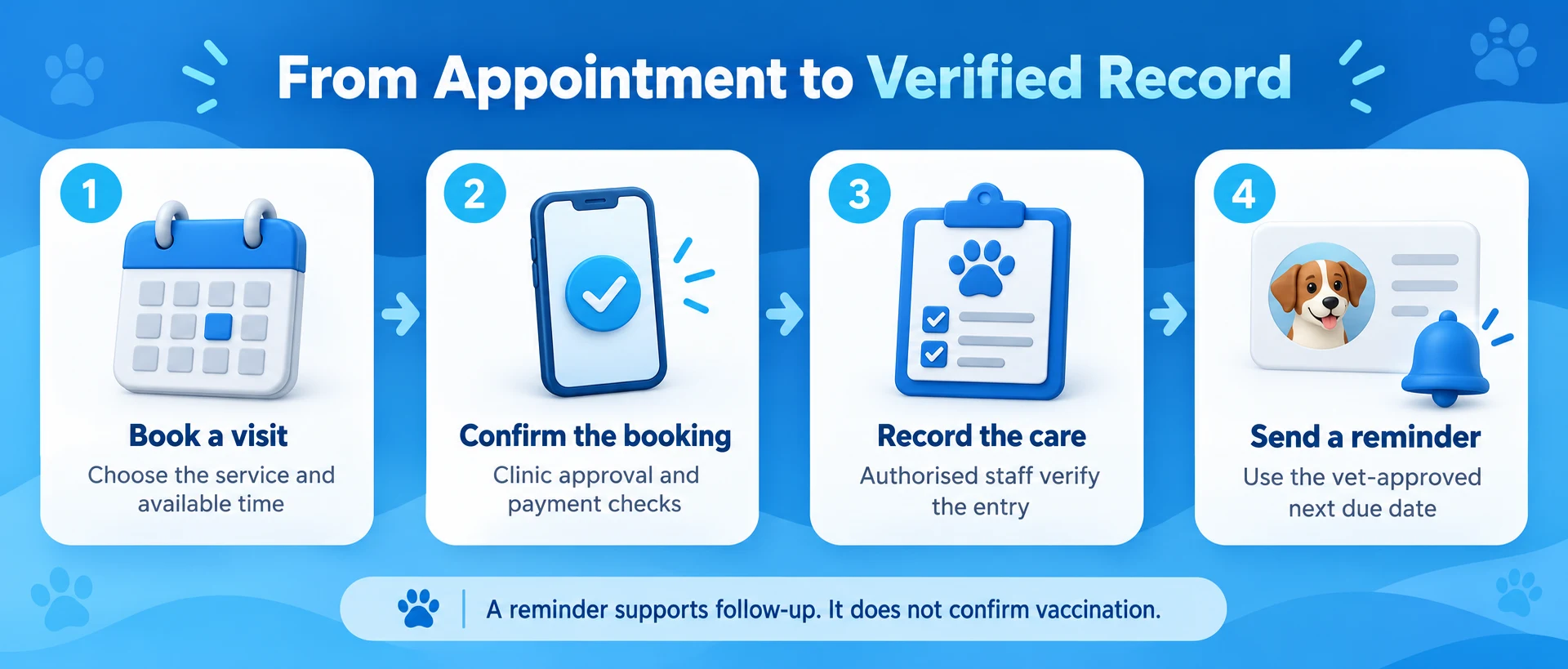
Distinguish owner-entered information from clinic-verified entries. An owner can submit an existing vaccination card for review, but uploading a photograph must not automatically mark the animal vaccinated. Staff should confirm the source and animal identity before adding verified information to the clinical record.
Have the veterinary team define the vaccination record fields and authorised staff roles. The record can include the care event, relevant product and batch details, administration information, responsible clinician and approved follow-up. These are documentation requirements for the application, not a vaccination schedule or treatment recommendation.
Keep corrections traceable. Preserve the original entry and record who amended it, when and why, rather than silently overwriting the history. As an international recordkeeping reference, the UK RCVS clinical and client records guidance describes accuracy, confidentiality and amendment history. Ghanaian practices should follow their own applicable professional obligations.
Display provenance clearly in the owner portal: clinic recorded, reviewed external record, or awaiting review. A booking payment, attendance tick or reminder acknowledgement does not establish that a vaccine was administered. Only the authorised clinical workflow should update the verified care record.
Provide a readable owner copy where appropriate, with a record reference and issuing clinic details. A website-generated summary should not be represented as an official travel document, pet passport or universally accepted vaccination certificate. The issuing professional and receiving organisation determine the documentation needed for a particular purpose.
| Portal item | What it establishes |
|---|---|
| Appointment confirmation | A valid reservation for the agreed visit |
| Owner-uploaded card | Submitted information awaiting clinic review |
| Clinic-verified vaccination entry | A recorded care event verified through the clinical workflow |
| Reminder notification | A request to arrange appropriate follow-up |
Send reminders from vet-approved information
Use the next due information approved by the veterinary team. Do not make the website invent a universal schedule from a pet’s species, age or breed. A reminder supports follow-up; the clinician determines what care is appropriate for the individual animal.
Define reminder timing, the permitted contact channels and the responsible staff owner. Send a short message with the clinic name, relevant pet reference and a booking or contact route. Avoid putting detailed clinical histories into SMS previews, shared phones or broad staff chat groups.
Connect reminders to current records. A corrected entry, completed visit or updated follow-up plan should cancel or replace obsolete reminders. Use a unique reminder reference so repeated background jobs do not send the same notification several times.
Track message attempts and outcomes without treating delivery as completed care. A provider accepting the message, the phone receiving it and the owner booking a visit are separate events. Keep failed or unanswered reminders visible to staff according to the clinic’s follow-up process.
SMS and WhatsApp require their own supported integrations and messaging permissions. Our WordPress SMS alerts guide helps you compare a notification setup. Test the exact form and record triggers; installing a generic messaging plugin does not automatically connect it to verified pet records.
Build a responsible breeder catalogue and enquiry flow
Give each listed animal a unique reference and accurate photographs. Use clear status labels such as Available for Enquiry, Under Review, Reserved and No Longer Available. A public litter gallery should not imply that every pictured animal can be reserved immediately.
Show the animal details and documents you can substantiate. Explain what has been verified and what information is available during a conversation with the breeder. A pedigree document, veterinary record and description of temperament are different pieces of information and should not be treated as interchangeable guarantees.
Start with an enquiry and responsible review process. Let the breeder confirm current availability, discuss care requirements and agree the next step. Avoid presenting a general online payment as automatic proof of suitability, final ownership transfer or readiness for collection.
If reservations are offered, use a controlled record for each animal. Prevent two applicants securing the same individual through separate pages, manual messages or simultaneous payments. For complex approval, keep the enquiry reviewed by staff before issuing a payment request.
Publish clear reservation terms before collecting money. Explain the amount, what it secures, any conditions, cancellation process and what happens if the animal becomes unavailable. Separate a breeder reservation payment from a veterinary appointment fee, even when the businesses share a website.
Make welfare and accurate records part of the handover process. Agree the appropriate timing and documentation with the veterinary team and responsible parties. Review ownership and portal access carefully when an animal changes keeper; the new account must not inherit the previous owner’s unrelated personal information.
Choose WordPress tools and define custom portal work
WordPress can provide the public clinic or breeder website. WooCommerce and the paid WooCommerce Bookings extension provide a documented appointment framework. The bookable product guide covers duration, availability, resources and confirmation settings. Confirm the current licences and requirements before selecting the stack.
Set up one representative appointment type first. In Products, create a Bookable Product, define its duration and assign the appropriate resource. Connect services using the same clinician to shared availability. Demonstrate the exact configuration with overlapping bookings and manual reception entries.
Choose the confirmation route deliberately. With Requires Confirmation enabled, Bookings uses an availability request and payment follows approval. This differs from an immediately payable appointment. Match the page wording and emails to the journey owners will actually use.
A booking plugin does not by itself create a clinical record system. Pet profiles, authorised clinical entries, owner relationships, amendment history and reminder rules need an appropriate practice-system integration or separately implemented portal. List those requirements explicitly in the development scope.
Keep the existing clinical system authoritative where one is used. Define the identifiers, permissions, approved fields and error handling for any integration. Changes that fail to synchronise should enter a review queue rather than silently creating conflicting vaccination histories.
Use a staging site with fictional owners and animals to demonstrate the workflow. Agree who maintains each component and how data can be exported if the business changes software. Avoid choosing a plugin solely because a demonstration dashboard looks like a pet-health application.
Handle MoMo payments and reservation states
Use a supported MoMo checkout with an eligible merchant account and a maintained integration. State whether a charge is an appointment fee, deposit toward services or breeder reservation. Show the total, amount due now and any remaining balance before the owner authorises payment.
Keep the appointment or reservation record separate from payment state. A successful payment still needs a valid allocation and any required approval. A payment screenshot or return-page message should not be the system’s only evidence that money arrived.
For custom payment work, follow the provider’s server-side checks, such as Paystack payment verification. Match the transaction status, reference, amount, currency and intended order. Process repeated notifications without creating duplicate appointments, receipts or reservations.
Set temporary holds and their expiry deliberately. If MoMo approval completes after the hold expires, recheck availability before confirming. Where the slot or animal has been allocated elsewhere, staff should arrange an accepted alternative or refund through the agreed process.
Handle cancellations, changes and refunds as recorded workflows. Cancelling an appointment does not automatically return money, and refunding an order does not erase a clinical event. Preserve the financial record and the clinic’s care history according to their distinct purposes.
Protect owners, pet records and shared access
Owner names, phone numbers, addresses and account activity are personal information. Ghana’s Data Protection Commission provides guidance under Act 843. Define collection purpose, access, retention and a privacy contact before enabling the portal. Publishing a privacy page alone does not complete those operational responsibilities.
Separate permission to manage an animal from access to an entire household account. A temporary carer, breeder or new keeper should receive only the access that has been verified and authorised. Knowing a pet’s name or microchip reference must not unlock its private record.
Enforce permissions on the server for every pet, appointment, document and download. The OWASP authorisation guidance explains why page visibility and guessed identifiers are insufficient. Test direct links as well as the menus shown after login.
Store uploaded documents privately. Public WordPress media links can remain reachable even when the page containing them requires login. Restrict file types and size, review uploads safely and keep confidential material out of search indexes and shared caches.
Use individual staff accounts, appropriate multi-factor authentication and role-specific permissions. Reception may need appointment details while clinical editing requires a narrower role. Review account recovery, access history and access removal when staff responsibilities or owner relationships change.
If you use QR codes, make their purpose explicit. A public code can point to a minimal contact page, while private clinical details require appropriate authentication and access checks. A copied QR code must not become unrestricted access to owner contacts or the pet’s complete record.
Choose hosting, storage and a suitable domain
Choose a domain that owners can remember and recognise in appointment messages. Consider a suitable .com, .pet or .vet where available and appropriate to the business. A domain extension does not verify professional registration or certify a breeder’s animals.
Use Aveshost domain registration and business email for a consistent identity. Give booking messages a monitored reply route. Authenticate domain email and test confirmations and password-recovery messages with external accounts.
Aveshost WordPress hosting can support the public website, while WooCommerce hosting is an option to review for a booking and payment site. Size the plan for the actual application, concurrent users, images, private storage and background reminders.
Compress public animal photographs and retain suitable originals in controlled storage. Separate marketing media from private clinical documents. Estimate storage growth from real record volumes and retention rules instead of choosing a plan on the expectation of unlimited files.
Maintain supported software, HTTPS, backups and a tested restore process. Exclude private account and checkout content from inappropriate caching. Monitor reminder queues and booking cleanup, and include the portal database and private files in a consistent recovery plan.
Confirm hosting location, support scope and any integration requirements with the providers involved. Hosting creates the foundation; it does not configure clinical permissions, guarantee message delivery or maintain the practice’s records automatically. Assign those responsibilities to named members of the project team.
Test the portal before accepting live bookings
Test with fictional data and several owner accounts. One owner with two similarly named pets should still select the correct animal. Another owner must not see either record by changing a URL, opening a copied document link or using an old notification.
Run the appointment journey from phone selection to staff review, payment where applicable, confirmation, arrival and completion. Test simultaneous requests, staff leave, manual bookings, cancellations and late payments. Keep reception’s recovery process as clear as the normal online flow.
Test a submitted vaccination card, staff review, verified entry and correction. Confirm that an owner upload never becomes verified automatically and that a correction preserves its history. Check that the next reminder uses the current clinician-approved information.
For breeders, test two enquiries for the same animal, a reservation expiry, a cancelled reservation and a change of keeper. Confirm public availability updates correctly and that previous owners’ private details remain protected when access changes.
Launch one dependable workflow, then add more features as the team is ready. To plan your veterinary website, breeder catalogue, booking system or portal hosting, discuss your project with Aveshost. Share your services, current software, record workflow and expected users so we can scope the right setup.
Frequently asked questions
What should a veterinary clinic website in Ghana include?
Include services, location, opening hours, veterinary team details, clear contact routes and a suitable appointment workflow. Add a private owner portal only when its record and access controls are properly implemented.
Can owners book vaccination visits online?
They can request an appropriate appointment through the clinic’s booking system. The veterinary team determines the care and timing for the animal. A calendar booking does not confirm that vaccination has occurred.
Can owners upload existing vaccination cards?
Yes, through a controlled private upload process. Keep the submission labelled as awaiting review until authorised clinic staff verify the source and animal identity. Do not automatically convert an uploaded image into a verified care entry.
Will the portal calculate a universal vaccination schedule?
Use the information approved by the veterinary team for each animal. The website should not invent a universal schedule or make treatment decisions from breed or age alone.
Is a digital record automatically a pet passport?
No. A portal summary is not automatically an official travel document or an accepted vaccination certificate for every purpose. Confirm required documentation with the issuing professional and receiving organisation.
Does WooCommerce Bookings include clinical pet records?
It provides appointment scheduling features. Verified clinical entries, pet ownership permissions, amendment history and record-based reminders require suitable additional implementation or a practice-management integration.
Can a breeder reserve individual animals through the website?
Use a reviewed enquiry and reservation process with one authoritative availability record for each animal. Explain the payment terms and conditions, and prevent duplicate reservations through online and manual channels.
Can customers pay appointment fees with MoMo?
Yes, through an eligible merchant account and supported integration. Verify the successful transaction and match the expected order before applying the paid state. Confirm availability and any required staff approval separately.
Should a pet QR code reveal the full vaccination record?
Private clinical details need appropriate authentication and permission checks. A public code can have a limited purpose, but it should not expose the owner’s contacts or complete pet record to anyone who scans it.
Can Aveshost help plan the portal?
Contact Aveshost about your website, domain, hosting and business email. Describe the clinic or breeder workflow, current software, user permissions and intended integrations so the implementation can be scoped accurately.