Few deployment issues are more frustrating than seeing every image load cleanly on localhost:3000, only to break with 400, 404, or 500 status codes on /_next/image once your site goes live. Because Next.js image optimization relies on strict hostname allowlists, Linux file paths, and server-side processing, small differences between local development and production servers quickly surface after deployment.
Whether you are deploying a static site to shared web hosting or running a Node.js container on self-managed VPS hosting with Aveshost, each HTTP error code points to a specific configuration or runtime root cause.
In this guide, you will learn how to diagnose and fix the most common Next.js image optimization failures—including remotePatterns rejections, Next.js 16 qualities and localPatterns rules, missing sharp binaries, output: 'standalone' Docker asset copies, and static export setups.
Table of Contents
Quick Diagnosis: What /_next/image Status Codes Mean
Open your browser’s Network tab and click any broken image request targeting /_next/image?url=.... Before editing code, you can also temporarily add the unoptimized prop to a single <Image /> tag—if the image immediately loads, the file exists and the failure is inside the Next.js image optimization pipeline.
Use this lookup table to match the HTTP status code to its production fix:
| HTTP Status | Typical Console / Network Error | Root Cause & Primary Fix |
|---|---|---|
| 400 Bad Request | “url” parameter is not allowed / invalid quality | Missing images.remotePatterns, Next.js 16 qualities whitelist, localPatterns, or blocked SVG |
| 404 Not Found | The requested resource isn’t a valid image / file not found | Linux case-sensitivity mismatch, /public prefix in src, or missing public/ copy in standalone Docker |
| 500 Internal Server Error | upstream image response failed / sharp crash | Missing sharp dependency in production, CDN blocking server IP, or exceeded maximumRedirects |
| Build Error (Static) | Image Optimization using default loader is not compatible with export | Using output: ‘export’ on shared web hosting without images: { unoptimized: true } |
Fix HTTP 400 Errors: remotePatterns, Qualities, and SVGs
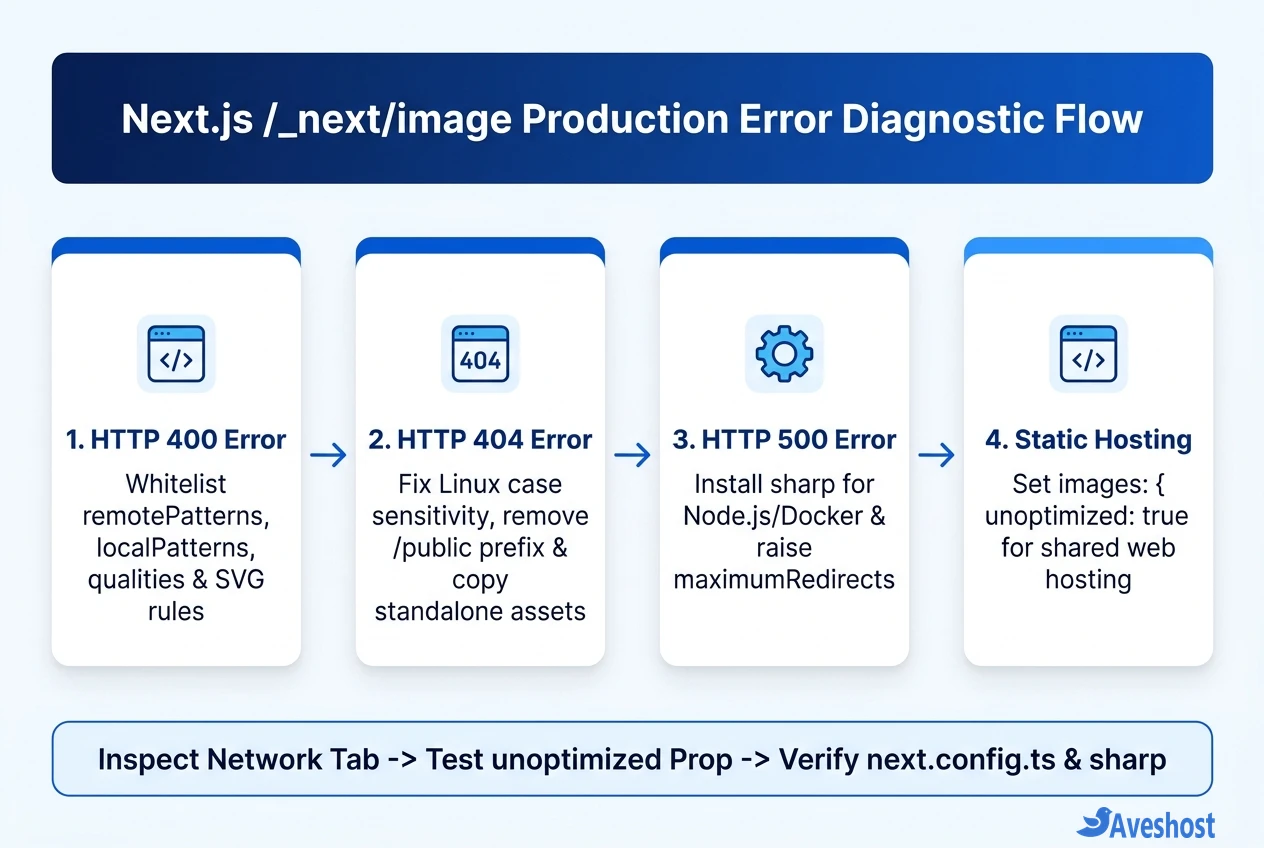
An HTTP 400 Bad Request on /_next/image means Next.js deliberately rejected the request for security or configuration reasons. According to the official Next.js Image documentation, four settings trigger 400 errors after deployment:
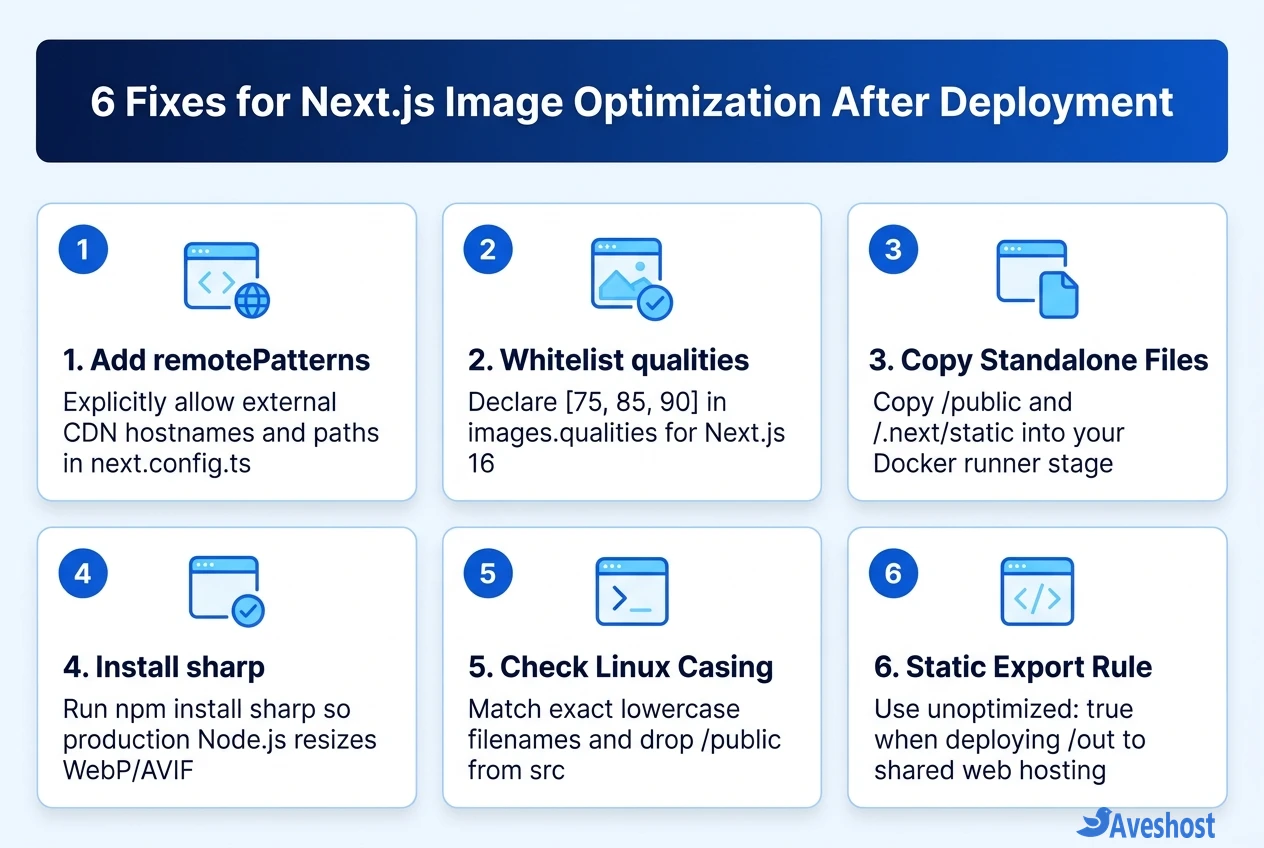
• 1. Missing images.remotePatterns: Every external hostname (S3, Cloudflare R2, WordPress media, or Cloudinary) must be explicitly whitelisted in next.config.ts. Legacy images.domains arrays are deprecated and removed in Next.js 16.
• 2. Next.js 16 images.qualities Enforcement: In Next.js 16, images.qualities defaults strictly to [75]. If you pass quality={85} or quality={90} on an <Image /> component without adding those numbers to images.qualities, the optimizer rejects or coerces the request.
• 3. Dynamic Local Paths & Query Strings (localPatterns): If local images inside public/ include query parameters (such as cache-busting tokens), declare them under images.localPatterns.
• 4. Blocked SVG Files: Next.js blocks SVG optimization by default to prevent XSS attacks. Either render SVGs with a standard <img> tag or enable dangerouslyAllowSVG: true alongside contentDispositionType: 'attachment'.
// next.config.ts — Production Image Optimization Allowlist
import type { NextConfig } from 'next';

const nextConfig: NextConfig = {
  images: {
    qualities: [75, 85, 90],
    maximumRedirects: 5,
    dangerouslyAllowSVG: true,
    contentDispositionType: 'attachment',
    remotePatterns: [
      {
        protocol: 'https',
        hostname: 'cdn.yourdomain.com',
        pathname: '/uploads/**',
      },
    ],
  },
};

export default nextConfig;
Fix HTTP 404 Errors: Linux Casing and Standalone Docker Assets
Local images that work on Windows or macOS often return 404 Not Found after deploying to a Linux server or container:
• Linux Case Sensitivity: Windows and macOS filesystems treat Hero.PNG and hero.png as identical, whereas Linux servers treat them as completely different files. Always verify exact lowercase filenames across both public/ and your JSX src strings.
• Do Not Include /public in src: Next.js serves files from public/ at the root path /. Writing src="/public/banner.webp" produces a 404; use src="/banner.webp" instead.
• Copy public/ and .next/static in Standalone Docker Builds: When deploying with output: 'standalone' on self-managed VPS hosting or fully managed VPS hosting, Next.js does not copy public/ or .next/static/ into .next/standalone automatically. Add both COPY --from=builder lines to your Dockerfile runner stage.
# Dockerfile runner stage: prevent 404s on /_next/static and /public images
COPY --from=builder /app/public ./public
COPY --from=builder /app/.next/standalone ./
COPY --from=builder /app/.next/static ./.next/static
Fix HTTP 500 Errors: Install sharp and Check Redirects
When /_next/image returns 500 Internal Server Error in production logs (upstream image response failed or out-of-memory crashes), the Node.js optimization worker is failing at runtime:
• Install sharp Explicitly: Without sharp installed, Next.js falls back to slower WebAssembly image processing that frequently runs out of memory under production traffic. Run npm install sharp and commit it to package.json.
• Verify Docker Architecture & Permissions: If you build on Apple Silicon (ARM64) and push to an x86_64 VPS without multi-arch builds, native sharp binaries will crash. Always build inside Docker on the target architecture (linux/amd64) using node:22-alpine or node:22-slim.
• Increase maximumRedirects if Your CDN Redirects: Next.js 16 limits how many HTTP redirects the image optimizer follows when fetching remote images. If your asset CDN uses multiple redirect hops, set maximumRedirects: 5 inside images in next.config.ts.
Fix Image Errors on Static Exports and Shared Web Hosting
As covered in our Next.js static export vs server hosting comparison, running output: 'export' removes the Node.js server completely—meaning there is no /_next/image endpoint available when you upload the out/ folder to shared web hosting.
To eliminate build errors and broken images on static hosting, set images: { unoptimized: true } in next.config.ts (or configure a custom external loader such as Cloudinary or Cloudflare Images) and pre-compress your assets to WebP before building.
Frequently asked questions
Why does /_next/image return 400 Bad Request only after deployment?
An HTTP 400 error on /_next/image usually means the external image hostname is missing from images.remotePatterns in next.config.ts, or—in Next.js 16—you passed a quality prop (such as quality={85}) that is not whitelisted in images.qualities (which defaults strictly to [75]).
Why do local images in public/ return 404 in a Docker standalone deployment?
When output: ‘standalone’ is enabled, Next.js excludes public/ and .next/static/ from .next/standalone by default. You must explicitly add COPY –from=builder /app/public ./public and COPY –from=builder /app/.next/static ./.next/static to your Dockerfile runner stage.
How do I fix 500 Internal Server Error on Next.js Image Optimization?
Install sharp as a production dependency (npm install sharp) so Next.js does not rely on the slower WebAssembly fallback, ensure your Docker container matches your VPS CPU architecture, and check whether your external image host is blocking server-side fetches or exceeding Next.js 16’s maximumRedirects limit.
How do I use next/image on shared web hosting with output: ‘export’?
Shared web hosting serves static files without a Node.js /_next/image server. Add images: { unoptimized: true } to next.config.ts (or supply a custom external CDN loader) so Next.js renders standard image URLs inside your static out/ build.
How can I quickly test if an image bug is caused by Next.js optimization or a broken URL?
Temporarily add the unoptimized prop to that specific Image component and redeploy or test locally. If the image appears immediately, the file path is valid and the error is inside your /_next/image server config (remotePatterns, qualities, or sharp).