
Knowing how to transfer a domain from Hostinger to Aveshost makes it easy to bring your domain registration, DNS records, web hosting, and professional email together under one dashboard. Whether you are consolidating domains across multiple registrars or switching away from higher multi-year renewal rates, preparing your domain in Hostinger’s hPanel takes less than five minutes.
At a high level, the transfer requires turning off two toggles inside Hostinger’s Domain Overview panel—Transfer Lock and WHOIS Privacy Protection—copying your unique EPP Secret Key (Authorization Code), and submitting that code on the Aveshost Domain Transfer page.
Key Takeaways:
• Confirm the 60-day ICANN rule: Under ICANN inter-registrar transfer rules, a domain must be registered or last transferred at least 60 days ago.
• Disable both Transfer Lock and Privacy Protection in hPanel: Hostinger requires your domain to be unlocked and your administrative contact email visible so registry verification messages can reach you.
• Back up your DNS zone before starting: Save your existing A, CNAME, MX, and TXT records so your website and email stay online without interruption.
• Keep your remaining registration period plus 1 extra year: Transferring to Aveshost Domains preserves your existing expiration date and adds one full year upon completion.
Table of Contents
Why Transfer a Domain from Hostinger to Aveshost?
Many website owners register their first domain during a promotional introductory offer at Hostinger, only to find later that managing renewals in one account while running hosting or email elsewhere creates extra admin work. When you transfer a domain from Hostinger to Aveshost, you simplify both billing and technical management.
• Straightforward renewal pricing: Review registration, renewal, and transfer rates upfront on our domain pricing page with no surprise renewal jumps.
• Unified control panel for domains, hosting, and email: Manage your domain name, DNS zone, web hosting, WordPress hosting, and business email from a single Aveshost client area.
• Fast, hands-on 24/7 support: When your domain and hosting live under one roof, our technical team can verify your nameservers, SSL certificates, and mail records immediately without bouncing you between providers.
| Feature | Leaving Domain at Hostinger | Transferring Domain to Aveshost |
|---|---|---|
| Account Management | Separate hPanel login for domain renewals and DNS edits | Single Aveshost dashboard for domains, DNS, hosting, SSL, and email |
| Registration Term on Transfer | Standard annual renewal at current Hostinger rate | Transfer includes a 1-year extension added to your current expiry date |
| DNS & Nameserver Control | Managed separately from your Aveshost hosting server | One-click nameserver and DNS zone alignment with your hosting |
| Technical Support Scope | Support split between registrar and web host | End-to-end support covering domain, DNS, SSL, and server setup |
What to Check in Hostinger hPanel Before You Start
Before you submit a transfer order, verify three quick requirements inside your Hostinger account so the registry accepts your request on the first try:
1. Your domain meets the 60-day eligibility rule: A domain cannot be transferred within 60 days of initial registration or a previous registrar transfer. You can verify your domain’s registration date and current status flags anytime using the Aveshost WHOIS Lookup tool.
2. Your administrative contact email is active: In Hostinger’s hPanel → Domains → Contact Information, confirm that the primary email address attached to your domain is an active inbox you can access right now.
3. You understand the difference between domain and hosting transfers: Moving your domain registration to Aveshost does not automatically move your website files or email messages. To see how the two layers interact, read our guide on domain name vs. web hosting.
Step 1: Back Up Your DNS Records in Hostinger hPanel
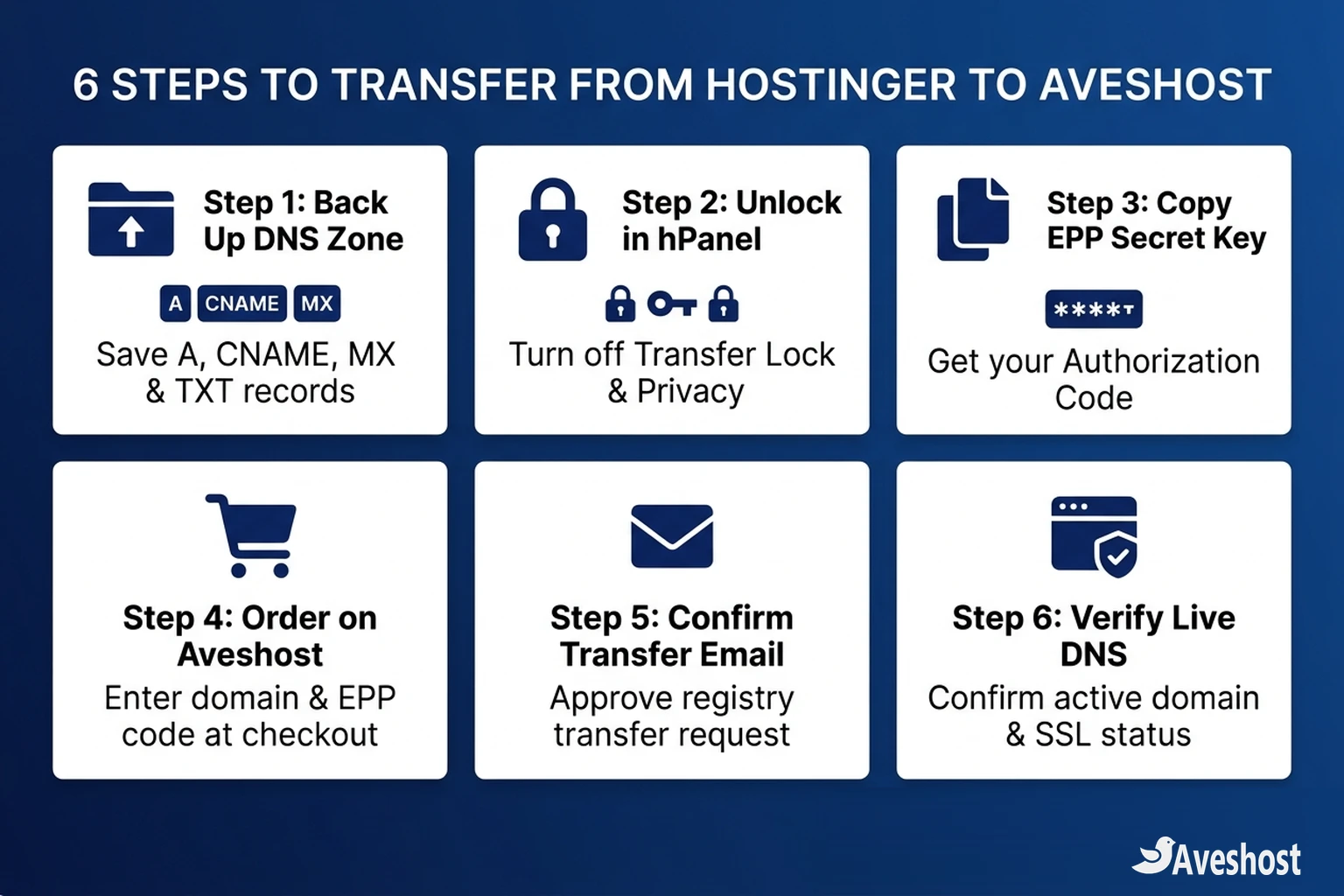
Your first step when you transfer a domain from Hostinger is saving a copy of your active DNS zone so your website and custom email addresses stay online without interruption.
1. Open DNS / Nameservers in hPanel: Log in to your Hostinger account, click Domains in the top menu, select Manage next to your domain, and click DNS / Nameservers in the left sidebar.
2. Export or copy your DNS records: Record your root A record, www CNAME record, mail MX records, and all TXT records (including SPF, DKIM, and DMARC).
3. Disable DNSSEC if active: Open the DNSSEC tab in hPanel and ensure DNSSEC is turned off before changing nameservers or transferring, then re-enable it once your domain is active on Aveshost.
Step 2: Unlock Your Domain and Turn Off Privacy Protection
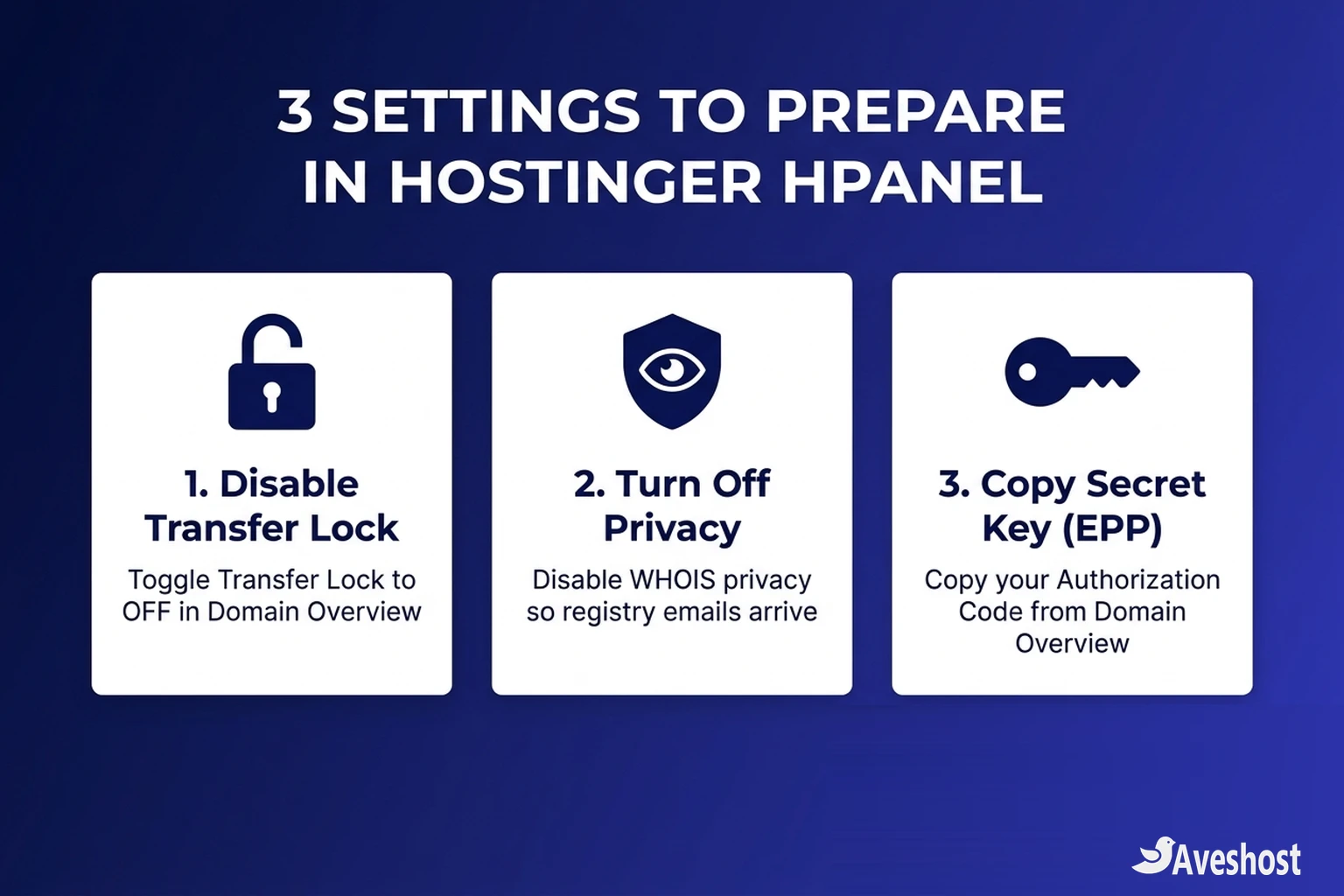
By default, Hostinger enables a registrar lock (clientTransferProhibited) on domains to block unauthorized transfers. You should disable both Transfer Lock and Privacy Protection before initiating an outbound transfer:
1. Go to Domain Overview: In hPanel, open Domains → Manage → Domain Overview.
2. Toggle Transfer Lock to OFF: Locate the Transfer lock switch and toggle it off so the domain status changes to unlocked.
3. Toggle Privacy Protection to OFF: Directly on the same Domain Overview screen, switch Privacy Protection off so the registry can verify your registrant contact details and deliver transfer confirmation emails.
Step 3: Copy Your EPP Code (Secret Key) from Hostinger
To prove you are the authorized owner of the domain, you need the domain’s EPP code—which Hostinger labels as the Secret Key or Authorization Code in hPanel.
1. Locate the Secret Key / Authorization Code field: Stay on the Domain Overview page in hPanel and scroll to the domain details section.
2. Reveal and copy the code: Click the eye icon or Get Code / Show button next to Secret key (EPP code). Copy the full string exactly as displayed—including any symbols, numbers, and uppercase or lowercase letters—with no extra spaces at the start or end.
Step 4: Submit Your Domain Transfer Order on Aveshost
With your domain unlocked in hPanel and your EPP Secret Key copied, you are ready to transfer a domain from Hostinger into your Aveshost account:
1. Open the Aveshost Domain Transfer portal: Visit the Aveshost Domain Transfer page (or go to Aveshost Domains and choose Transfer).
2. Enter your domain and EPP code: Type your domain name (for example, yourcompany.com), paste the Secret Key from Hostinger into the Authorization Code box, and click Add to Cart.
3. Choose privacy and nameserver settings: On the configuration screen, enable ID Protection if you want WHOIS privacy re-applied automatically once the transfer completes, and verify the nameservers your domain should use.
4. Complete checkout: Sign in or create your Aveshost account and complete payment. Your transfer order includes a 1-year registration extension added to your current expiration date.
Step 5: Approve the Transfer Email and Verify Your Live DNS
Once your order is submitted on Aveshost, the central registry notifies Hostinger to release the domain:
• Approve the outbound transfer email: Check your registrant email inbox for a transfer confirmation message. If Hostinger or the registry includes an instant approval link, click it to fast-track the release. Otherwise, standard ICANN transfers complete automatically within 5 to 7 calendar days.
• Track progress in your Aveshost dashboard: In your Aveshost client area under Domains → My Domains, the status will switch from Pending Transfer to Active as soon as the registry finishes the handover.
• Verify DNS, SSL, and other domains: Confirm your DNS records match your Step 1 backup and verify that your SSL certificate is active. If you manage domains at other registrars as well, see our guides on transferring a domain from Squarespace, transferring from GoDaddy, transferring from Namecheap, or our general domain transfer guide.
Ready to Move? Transfer Your Domain to Aveshost Today
When you transfer a domain from Hostinger to Aveshost, you get predictable renewal pricing, full DNS control, and unified management for your domain, hosting, and business email.
Unlock your domain in hPanel, copy your Secret Key, and start your transfer on the Aveshost Domain Transfer page today. Need a hand checking your DNS records or migrating your website? Contact Aveshost Support anytime.
Frequently asked questions
How long does it take to transfer a domain from Hostinger to Aveshost?
A standard domain transfer from Hostinger to Aveshost takes between 5 and 7 calendar days to complete once submitted. If Hostinger sends an outbound transfer approval email to your registrant inbox and you approve it immediately, the transfer can finish much faster.
Where do I find the EPP code (Secret Key) in Hostinger hPanel?
Log in to Hostinger hPanel, go to Domains, click Manage next to your domain, and open Domain Overview. Scroll to the Secret key (or Authorization code) field and click the show/eye icon to view and copy your EPP code.
Will I lose my remaining domain registration time when transferring from Hostinger?
No. When you transfer a standard domain (such as .com, .net, or .org) to Aveshost, all of your remaining registration time carries over and an extra 1 year (12 months) is added to your current expiration date.
Why can't I turn off Transfer Lock in Hostinger?
Under ICANN rules, Hostinger cannot unlock a domain that was registered or transferred within the last 60 days, or a domain that has recently undergone a registrant contact change lock. Wait until the 60-day window passes, then toggle Transfer Lock off.
Does transferring my domain from Hostinger cause website or email downtime?
No. Your existing nameservers and DNS records remain active while the transfer is pending. By backing up your A, CNAME, MX, and TXT records beforehand and matching them in Aveshost’s DNS Manager, your website and email stay online with zero downtime.