Following a strict vibe coding security checklist is the single most important step between building a working prototype in Cursor, Lovable, Bolt.new, v0, or Google Antigravity and launching that application to real users and paying customers.
AI coding assistants are designed to make your prompt work on the first try. When an error blocks a database query or API call during prototyping, an AI agent will often take the path of least resistance: disabling Row-Level Security (RLS), writing a permissive USING (true) policy, or placing a secret API key directly inside a client-side VITE_ or NEXT_PUBLIC_ environment variable.
The result is an application that looks polished in your browser but leaves every customer record, Stripe webhook, and OpenAI billing quota exposed to anyone who opens Chrome DevTools. Below is the complete engineering checklist to audit and lock down your vibe-coded app before launch.
Table of Contents
Why Vibe-Coded Apps Often Ship with Critical Vulnerabilities
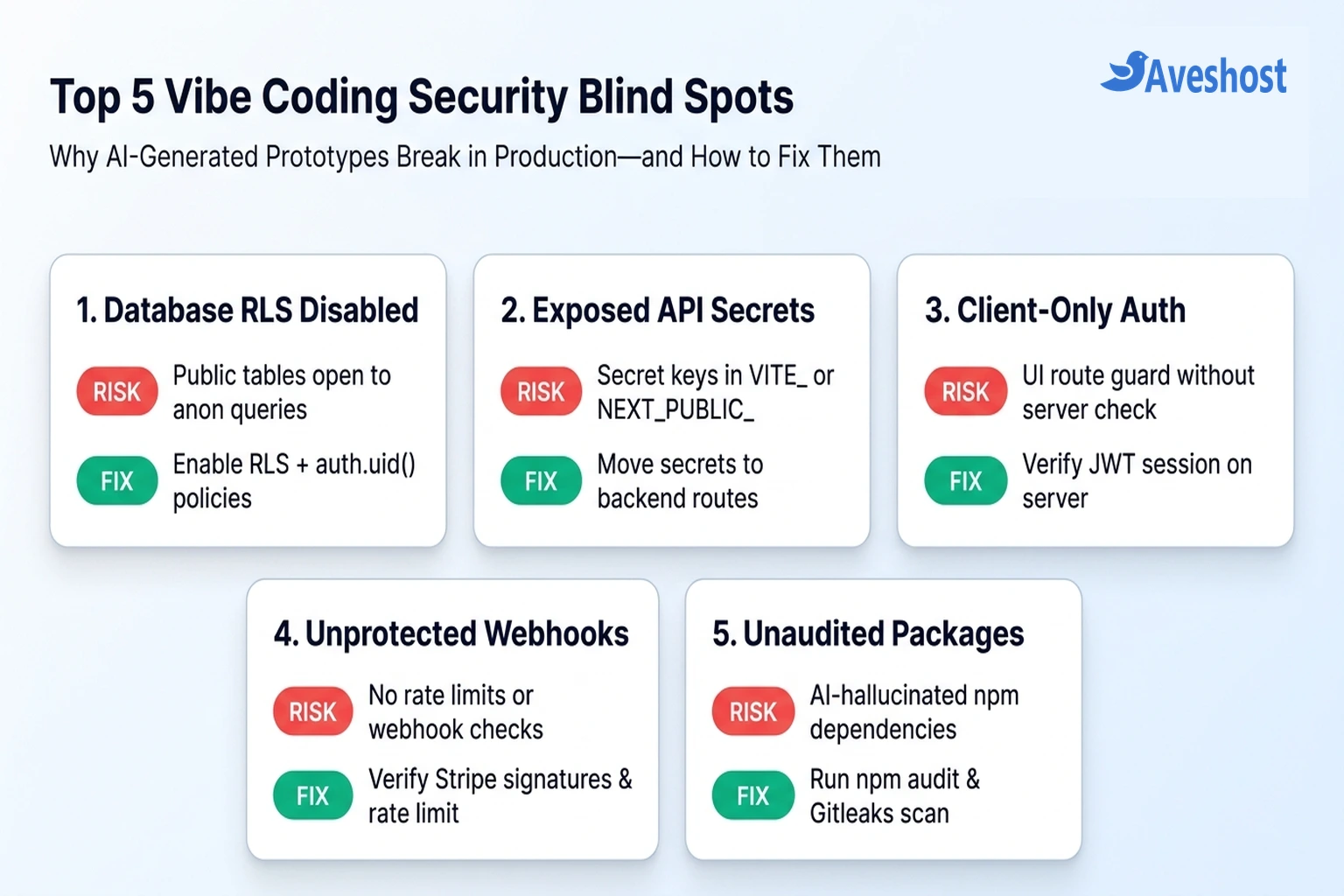
When you build an application through natural-language prompts, the AI optimises for visible UI feedback rather than zero-trust backend architecture. Unless you explicitly prompt for security constraints—and verify the generated SQL and server code yourself—five predictable vulnerabilities appear across almost every vibe-coded project:
| Vulnerability Category | What the AI Assistant Often Generates | Real-World Impact at Launch | Mandatory Pre-Launch Fix |
|---|---|---|---|
| 1. Database Row-Level Security (RLS) | Creates tables via SQL migrations without enabling RLS, or adds ‘Allow all’ policies to stop permission errors | Anyone with your public Supabase anon key can read, edit, or wipe every user’s data from browser DevTools | Enable RLS on every public table and scope SELECT, INSERT, UPDATE, and DELETE to auth.uid() |
| 2. Exposed Secret API Keys | Prefixes OpenAI, Stripe, or Supabase service_role keys with VITE_ or NEXT_PUBLIC_ so frontend fetch() calls work | Attackers extract your secret keys from the production JavaScript bundle in seconds and drain your API credits | Move all secret-key API calls into server routes or Edge Functions and rotate any exposed keys |
| 3. Client-Only Auth Theater | Hides ‘/dashboard’ or ‘/admin’ behind a React router check while leaving the underlying API endpoints unauthenticated | Unauthenticated users or regular accounts can call admin and billing endpoints directly via curl or Postman | Validate the user’s JWT session and role on every backend API route, Server Action, and database query |
| 4. Unverified Payment Webhooks | Creates a ‘/api/webhook’ route that trusts incoming JSON payloads without checking cryptographic signatures | Anyone can send a fake ‘checkout.session.completed’ POST request to unlock paid plans for free | Verify the raw request body against ‘stripe-signature’ (or Paystack HMAC) before updating account tiers |
| 5. Unthrottled AI & Auth Endpoints | Exposes LLM chat, image generation, or OTP endpoints with zero per-user or per-IP rate limiting | A single bot script can trigger thousands of OpenAI/Anthropic calls and rack up hundreds of dollars in minutes | Enforce strict rate limits, daily per-user token quotas, and hard billing caps on all external AI APIs |
1. Strip Secret API Keys from Your Frontend Bundle and Git History
The fastest way a newly launched vibe-coded app gets compromised is through leaked credentials in client-side JavaScript. Modern frontend frameworks bundle any environment variable starting with VITE_ (Vite/Lovable), NEXT_PUBLIC_ (Next.js), or REACT_APP_ directly into the public browser build.
Understand Public vs. Secret Keys: Your Supabase URL and SUPABASE_ANON_KEY (or Stripe publishable key pk_live_...) are designed to be public, provided Row-Level Security is enabled. By contrast, your SUPABASE_SERVICE_ROLE_KEY, OPENAI_API_KEY, ANTHROPIC_API_KEY, STRIPE_SECRET_KEY (sk_live_...), and database connection strings (postgresql://...) must never touch the browser.
Before deploying your app to cPanel hosting, DirectAdmin, or a cloud VPS, build your production bundle locally and scan both your compiled dist/ or .next/ output and your Git commit history:
# 1. Check if any secret keys were accidentally prefixed for the browser
grep -rnE "(VITE_|NEXT_PUBLIC_|PUBLIC_).*(SECRET|SERVICE_ROLE|OPENAI|ANTHROPIC|PRIVATE|DATABASE_URL)" . --exclude-dir=node_modules

# 2. Build the production frontend and search the compiled JS assets for common key prefixes
npm run build
grep -rnE "(sk-[a-zA-Z0-9]{20,}|sk_live_[a-zA-Z0-9]+|eyJhbGciOiJIUzI1NiIsInR5cCI6IkpXVCJ9)" dist/ .next/ 2>/dev/null

# 3. Verify .env files are ignored and never tracked in Git history
git log --all --full-history -- "**/.env*"

# 4. Run Gitleaks to catch hardcoded tokens across all commits
npx gitleaks detect --source . --verbose
Crucial Rule: Removing a leaked API key in a new Git commit does not erase it from previous commits. If a secret key was ever committed to a repository or shipped in a frontend build, revoke and rotate that key immediately inside your provider’s dashboard.
2. Audit Supabase Row-Level Security (RLS) and Storage Buckets
Whether you use Supabase Cloud or self-host Supabase on a VPS, the database is the most common blind spot in vibe coding. When an AI coding assistant creates tables using raw SQL migrations (rather than the Supabase Table Editor UI), PostgreSQL leaves Row-Level Security disabled by default.
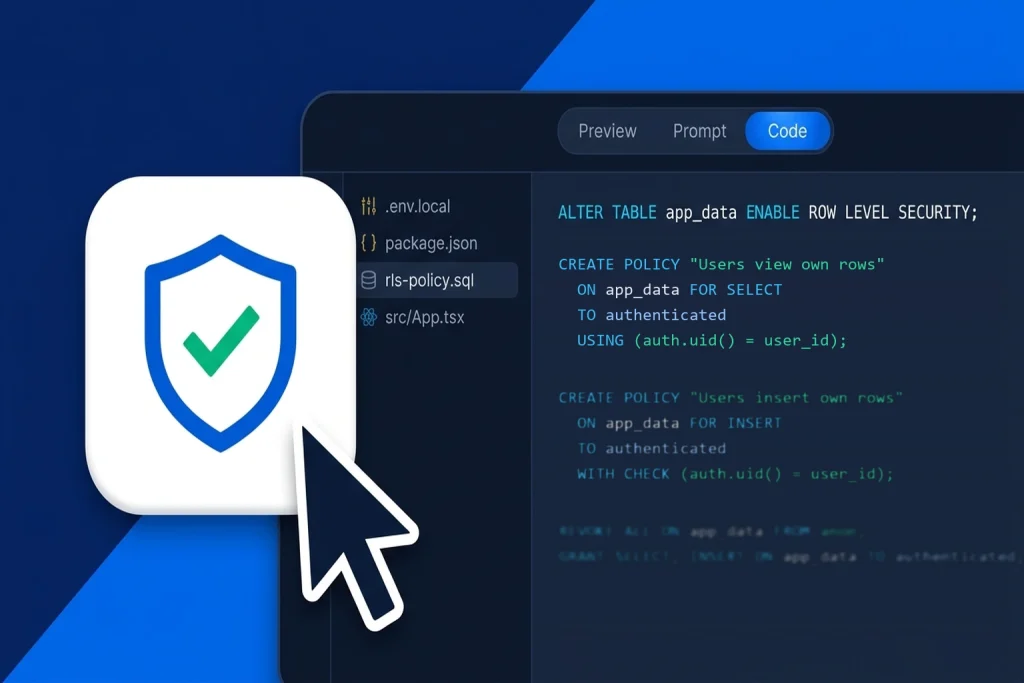
Even worse, when an AI assistant encounters a permission error while testing a feature, it will frequently generate a policy like CREATE POLICY "Allow all" ON public.profiles FOR ALL USING (true);. That single line makes every row in the table readable and writable by anyone on the internet using your public anon key.
Run this diagnostic query in your Supabase SQL Editor (or via psql) before launch to uncover every unprotected table and overly permissive policy:
-- 1. Find any table in the 'public' schema where Row-Level Security (RLS) is DISABLED
SELECT schemaname, tablename, rowsecurity
FROM pg_tables
WHERE schemaname = 'public' AND rowsecurity = false;

-- 2. Find dangerous RLS policies that grant unrestricted access ('true') to anon or public roles
SELECT schemaname, tablename, policyname, roles, cmd, qual, with_check
FROM pg_policies
WHERE schemaname = 'public'
  AND (qual = 'true' OR with_check = 'true');

-- 3. Example: Lock down a user-owned table with explicit per-operation RLS policies
ALTER TABLE public.projects ENABLE ROW LEVEL SECURITY;

CREATE POLICY "Users can view their own projects"
  ON public.projects FOR SELECT
  TO authenticated
  USING ((SELECT auth.uid()) = user_id);

CREATE POLICY "Users can insert their own projects"
  ON public.projects FOR INSERT
  TO authenticated
  WITH CHECK ((SELECT auth.uid()) = user_id);

CREATE POLICY "Users can update their own projects"
  ON public.projects FOR UPDATE
  TO authenticated
  USING ((SELECT auth.uid()) = user_id)
  WITH CHECK ((SELECT auth.uid()) = user_id);
Perform the Two-User Cross-Tenant Test: Never trust SQL policies on paper alone. Create two test accounts (User A and User B), copy User A’s bearer token from the browser network tab, and attempt to fetch or update User B’s rows directly via REST or the Supabase JS client. Also inspect storage.buckets and storage.objects so private user uploads (invoices, IDs, or avatars) are not sitting in a public bucket without path-scoped RLS.
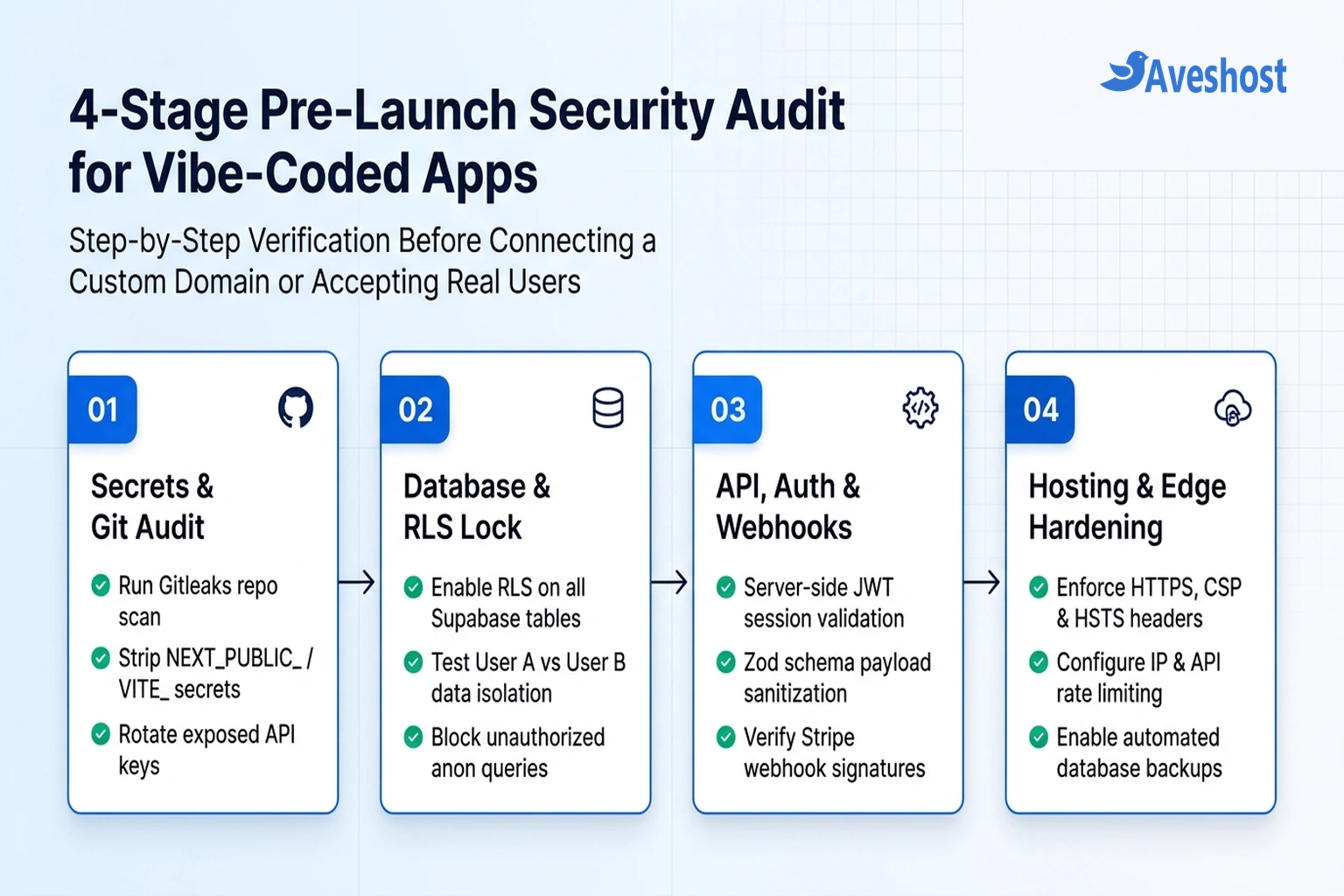
3. Replace Client-Side Auth Theater with Server-Side Verification
When you ask an AI coding tool to “add an admin dashboard that only admins can see,” it will almost always create a React or Next.js check such as if (!user || !user.isAdmin) return <Redirect to="/login" />;.
That protects the visual component in a normal browser, but it is pure authentication theater if the backend API route or database table does not enforce the exact same check. An attacker can simply inspect your compiled JavaScript bundle, find the hidden endpoint URL (such as POST /api/admin/refund or a direct Supabase table update), and invoke it directly.
1. Verify Sessions on Every Server Route: Every Next.js API route, Server Action, Express handler, or Supabase Edge Function must extract the session token from the request header/cookie and verify it cryptographically on the server (using supabase.auth.getUser() rather than trusting unverified client-side session payloads).
2. Never Let Users Self-Assign Roles or Plan Tiers: Check your INSERT and UPDATE logic on tables like profiles or subscriptions. If a user can run supabase.from('profiles').update({ role: 'admin', plan: 'pro' }).eq('id', user.id) from the browser, your column privileges are too broad. Store billing tiers and roles in a separate table that only your backend service_role webhook handler can modify.
4. Verify Payment Webhooks, Rate-Limit AI Endpoints, and Validate Inputs
If your vibe-coded app accepts payments (via Stripe, Paystack, or Lemon Squeezy) or calls paid LLM APIs (OpenAI, Anthropic, Gemini), you must protect the endpoints that cost you money or grant paid access.
Always Verify Webhook Signatures: AI assistants frequently write webhook handlers that parse req.body.type === 'checkout.session.completed' and immediately upgrade the user’s database record. Without cryptographic signature verification, anyone can send a forged JSON payload to your webhook URL. Always verify the raw request body against the provider’s signature header and enforce rate limits on expensive routes:
import Stripe from 'stripe';
import { z } from 'zod';

const stripe = new Stripe(process.env.STRIPE_SECRET_KEY!);

// 1. Strict Zod schema for user-submitted AI prompt payloads
const PromptSchema = z.object({
  prompt: z.string().trim().min(1).max(2000),
  projectId: z.string().uuid()
});

// 2. Always verify the raw cryptographic signature on payment webhooks
export async function handleStripeWebhook(rawBody: Buffer, signatureHeader: string) {
  const webhookSecret = process.env.STRIPE_WEBHOOK_SECRET!;
  // Throws an error immediately if the payload was forged or tampered with
  const event = stripe.webhooks.constructEvent(rawBody, signatureHeader, webhookSecret);

  if (event.type === 'checkout.session.completed') {
    const session = event.data.object as Stripe.Checkout.Session;
    // Safely provision paid plan using server-only service_role client
  }
}
Set Hard Spend Limits and Schema Validation: Alongside code-level rate limiting (for example, limiting each authenticated user to 20 AI generations per hour), configure a hard monthly spend cap inside your OpenAI, Anthropic, or Google Cloud billing console so a traffic spike or infinite loop in your AI code cannot generate a surprise four-figure invoice.
5. Audit AI-Installed Dependencies and Production Security Headers
AI agents install npm and Python packages rapidly—and occasionally hallucinate package names that do not exist or have been registered by attackers (a supply-chain risk known as slopsquatting). Before deploying your app to production, run four final checks on your dependencies and web server:
1. Audit and Lock Dependencies: Inspect package.json line by line to confirm every package is a real, actively maintained library you actually use. Run npm audit to patch high-severity CVEs, and deploy using npm ci so production installs the exact versions pinned in package-lock.json.
2. Disable Debug Logs and CORS Wildcards: AI-generated backends often set Access-Control-Allow-Origin: * and leave verbose console.log(req.body) statements that leak passwords, tokens, or personal data into server logs. Restrict CORS to your exact production domain.
3. Configure HTTP Security Headers: Ensure your Nginx, Caddy, or cPanel `.htaccess` configuration returns Strict-Transport-Security (HSTS), X-Content-Type-Options: nosniff, X-Frame-Options: DENY, and a sensible Content-Security-Policy (CSP).
4. Automate Database Backups Before Launch: Even with strict RLS, one bad AI-generated migration can drop a production column. If you run your own database, set up automated daily dumps and off-site retention using our guide on how to back up and restore self-hosted Supabase.
Deploying Your Vibe-Coded App on Production-Ready Hosting
Once your application passes every item on this vibe coding security checklist, choose a hosting environment that matches your architecture rather than leaving production data on temporary preview URLs.
If your vibe-coded project is a static React/Vite frontend connected to an external backend, you can deploy it in minutes on Aveshost Web Hosting with free AutoSSL, DDoS protection, and isolated account security. For full-stack Next.js apps, Docker containers, remote MCP servers, or self-hosted Supabase backends that require complete firewall control (UFW), Nginx reverse-proxy rate limiting, and dedicated resources, deploy on an Aveshost Self-Managed Linux VPS or high-speed Ghana VDS.
Frequently asked questions
Is vibe-coded software safe to launch in production?
Yes, provided you treat AI-generated code as an untrusted first draft and run a structured pre-launch security audit. Once you enable and test database Row-Level Security (RLS), move all secret API keys to server-side routes, validate JWT sessions on the backend, and verify payment webhooks, a vibe-coded app can be just as secure as traditionally written software.
Is it safe to expose my Supabase anon key in a Lovable or Vite frontend?
Your Supabase anon (publishable) key is designed to be safe in client-side code ONLY if Row-Level Security (RLS) is enabled with strict policies on every table in your public schema. However, your Supabase service_role key bypasses all RLS rules and must never be placed in frontend code or prefixed with VITE_ or NEXT_PUBLIC_.
How do I check if my AI coding assistant leaked an API key into Git?
Run ‘npx gitleaks detect –source . –verbose’ and ‘git log –all –full-history — “**/.env*”‘ in your project terminal. If a secret key was ever committed in an earlier commit, deleting the file in a new commit does not make it safe—you must revoke and rotate the key in your provider’s dashboard immediately.
Can I ask Cursor, Claude, or Lovable to perform the security audit for me?
Using a second AI prompt (or Lovable’s built-in security scanner) to review your codebase is a helpful first pass for catching obvious issues, but it should never replace deterministic checks. Always run the SQL queries against pg_tables and pg_policies, test cross-user access with two separate accounts, and inspect your compiled dist/ bundle yourself.
What is the biggest billing risk when launching an AI-powered vibe-coded app?
Unthrottled API endpoints that call OpenAI, Anthropic, or Gemini without authentication or rate limiting. If a bot discovers an unprotected ‘/api/chat’ route, it can send thousands of requests per minute. Always require an authenticated session, enforce per-user rate limits, and set a hard monthly spend limit in your AI provider’s billing settings.