When you run your own backend on a VPS, knowing how to back up and restore self-hosted Supabase is the single most important operational skill between a five-minute recovery and permanent data loss.
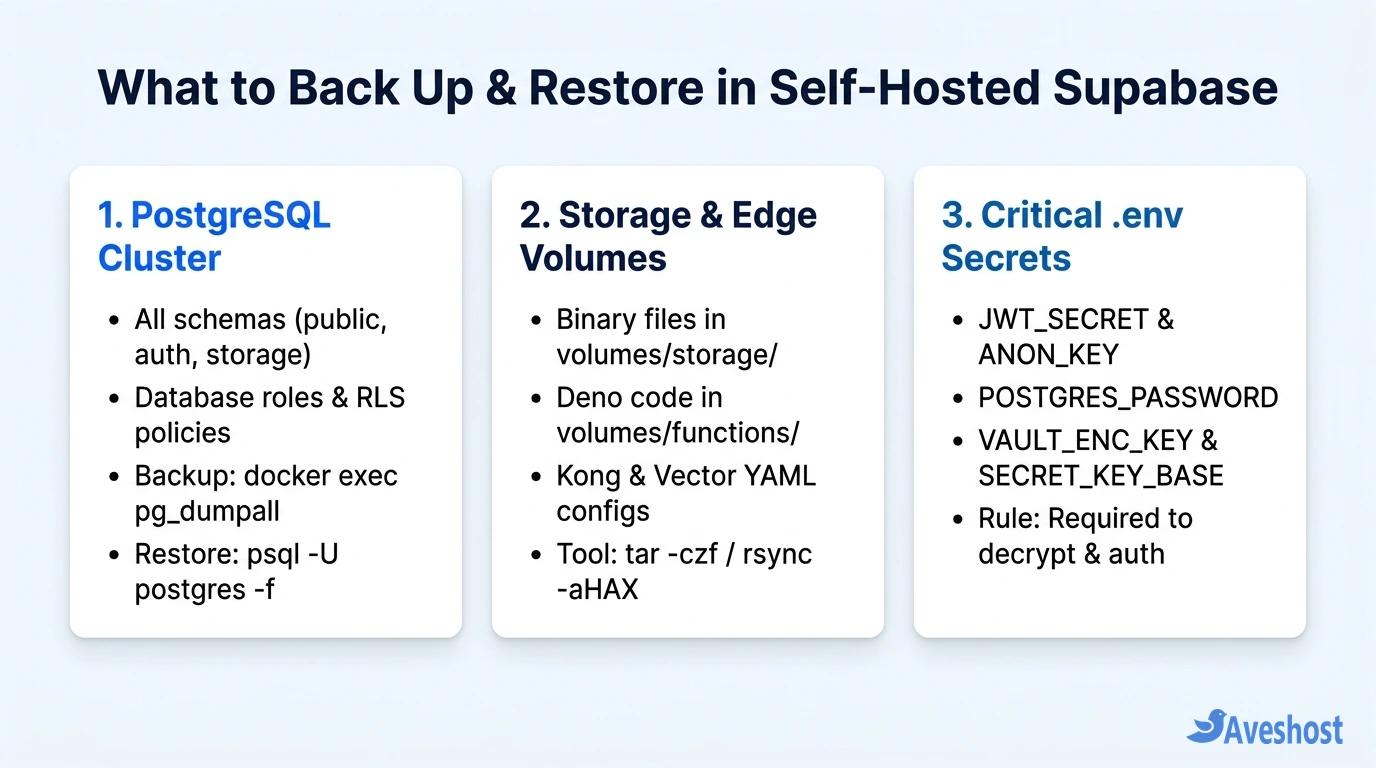
Unlike managed cloud platforms that snapshot your cluster behind the scenes, a self-hosted Supabase Docker stack splits your application state across three separate locations on disk: the PostgreSQL database container (supabase-db), the local Storage and Edge Functions directories (volumes/storage and volumes/functions), and your runtime encryption secrets (.env).
Key Takeaways: Never rely on copying raw /var/lib/postgresql/data files while PostgreSQL is running, as active write-ahead logs (WAL) can corrupt a live filesystem copy. Instead, use docker exec -i supabase-db pg_dumpall -U postgres --clean to capture consistent SQL dumps, archive volumes/storage with tar, back up your .env secrets (JWT_SECRET and VAULT_ENC_KEY), and sync encrypted archives off-server every night using rclone and cron.
Table of Contents
What You Must Back Up in a Self-Hosted Supabase Stack
Whether you deployed your instance from scratch using our guide on how to self-host Supabase on a VPS with Docker and HTTPS or recently migrated from Supabase Cloud to a self-hosted VPS, backing up only your public database tables is not enough for a full restore.
To reconstruct a self-hosted Supabase project on a fresh Aveshost Self-Managed Linux VPS or Fully Managed VPS, your backup pipeline must capture three decoupled layers:
| Supabase Component | Default Path / Container on VPS | What It Contains | Recommended Backup Tool |
|---|---|---|---|
| PostgreSQL Cluster | supabase-db container | public, auth.users, storage.objects, RLS policies & roles | docker exec -i supabase-db pg_dumpall |
| Storage Binary Volume | /opt/supabase/docker/volumes/storage | Actual uploaded user files (avatars, PDFs, media) | tar -czf or rclone sync (if using S3) |
| Edge Functions & Gateway Config | /opt/supabase/docker/volumes/functions & api | Deno TypeScript Edge Functions & kong.yml routing | tar -czf archive alongside Storage |
| Environment & Vault Secrets | /opt/supabase/docker/.env | JWT_SECRET, ANON_KEY, POSTGRES_PASSWORD & VAULT_ENC_KEY | Encrypted off-server copy (openssl / gpg) |
Step 1: Back Up the PostgreSQL Database (pg_dumpall vs pg_dump)
Inside the official Supabase Docker Compose stack, PostgreSQL relies on several interconnected schemas (public, auth, storage, realtime, supabase_functions, and vault) along with specialized database roles (anon, authenticated, service_role, and authenticator).
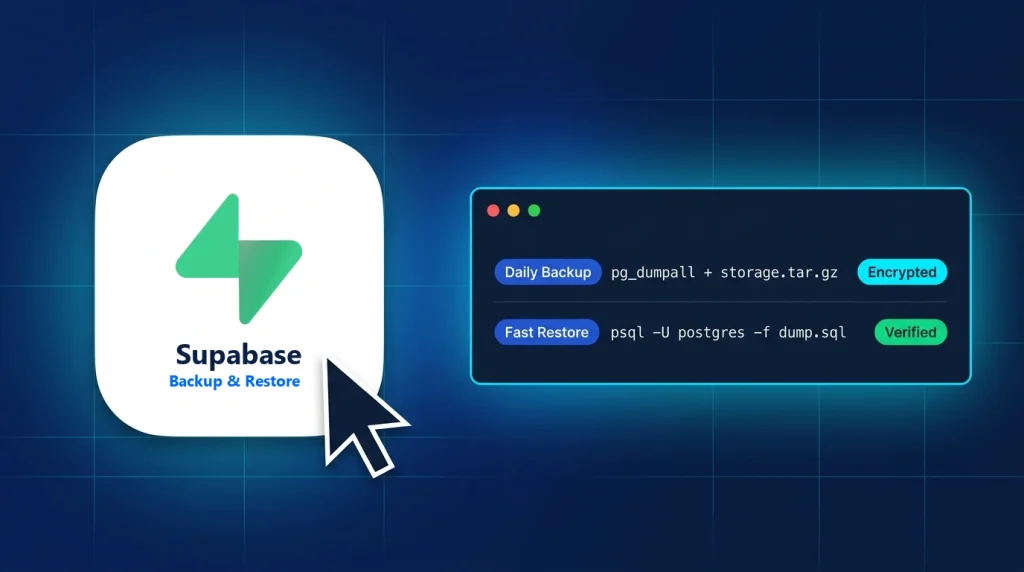
Using pg_dumpall -U postgres --clean inside the supabase-db container captures every database role, extension, schema, table, and Row-Level Security (RLS) policy in a single portable stream. Always pass -i (interactive stdin) rather than -t (pseudo-TTY) to docker exec so Docker does not inject carriage-return (\r\n) characters that corrupt compressed .sql.gz archives:
# Create a dedicated backup directory on your VPS
sudo mkdir -p /opt/supabase-backups/db /opt/supabase-backups/volumes

# Dump the entire Supabase PostgreSQL cluster (roles + all schemas) and compress
docker exec -i supabase-db pg_dumpall -U postgres --clean \
  | gzip -9 > /opt/supabase-backups/db/supabase_db_$(date +%Y%m%d_%H%M%S).sql.gz

# Verify the compressed archive integrity
gzip -t /opt/supabase-backups/db/supabase_db_*.sql.gz && echo "Database archive OK"
Because pg_dumpall runs inside a single repeatable-read transaction per database, it produces a consistent snapshot without requiring you to stop your Supabase containers or take your web application offline.
Step 2: Back Up Storage Volumes, Edge Functions, and .env Secrets
Remember that the storage.objects table in PostgreSQL only stores file paths and access metadata—the raw binary files live inside /opt/supabase/docker/volumes/storage (unless you configured an external S3 bucket). Likewise, your Deno Edge Functions and Kong API routing live inside /opt/supabase/docker/volumes/.
Critical warning about .env and VAULT_ENC_KEY: If your application uses Supabase Vault (pgsodium) to encrypt API keys or secrets inside PostgreSQL, those rows are encrypted using the VAULT_ENC_KEY and SECRET_KEY_BASE defined in your /opt/supabase/docker/.env file. If you lose your .env file, a restored database cannot decrypt its own Vault secrets.
Archive your storage, functions, and api volumes and encrypt a copy of your .env file using openssl:
# 1. Archive Storage binary files, Edge Functions, and Kong API config
sudo tar -czf /opt/supabase-backups/volumes/supabase_volumes_$(date +%Y%m%d_%H%M%S).tar.gz \
  -C /opt/supabase/docker volumes/storage volumes/functions volumes/api

# 2. Encrypt your .env file with AES-256 before storing it off-server
sudo openssl enc -aes-256-cbc -pbkdf2 -salt \
  -in /opt/supabase/docker/.env \
  -out /opt/supabase-backups/volumes/supabase_env_$(date +%Y%m%d).env.enc \
  -pass pass:'YourStrongBackupPassphrase'
Step 3: Automate Nightly Off-Server Backups with Cron and Rclone
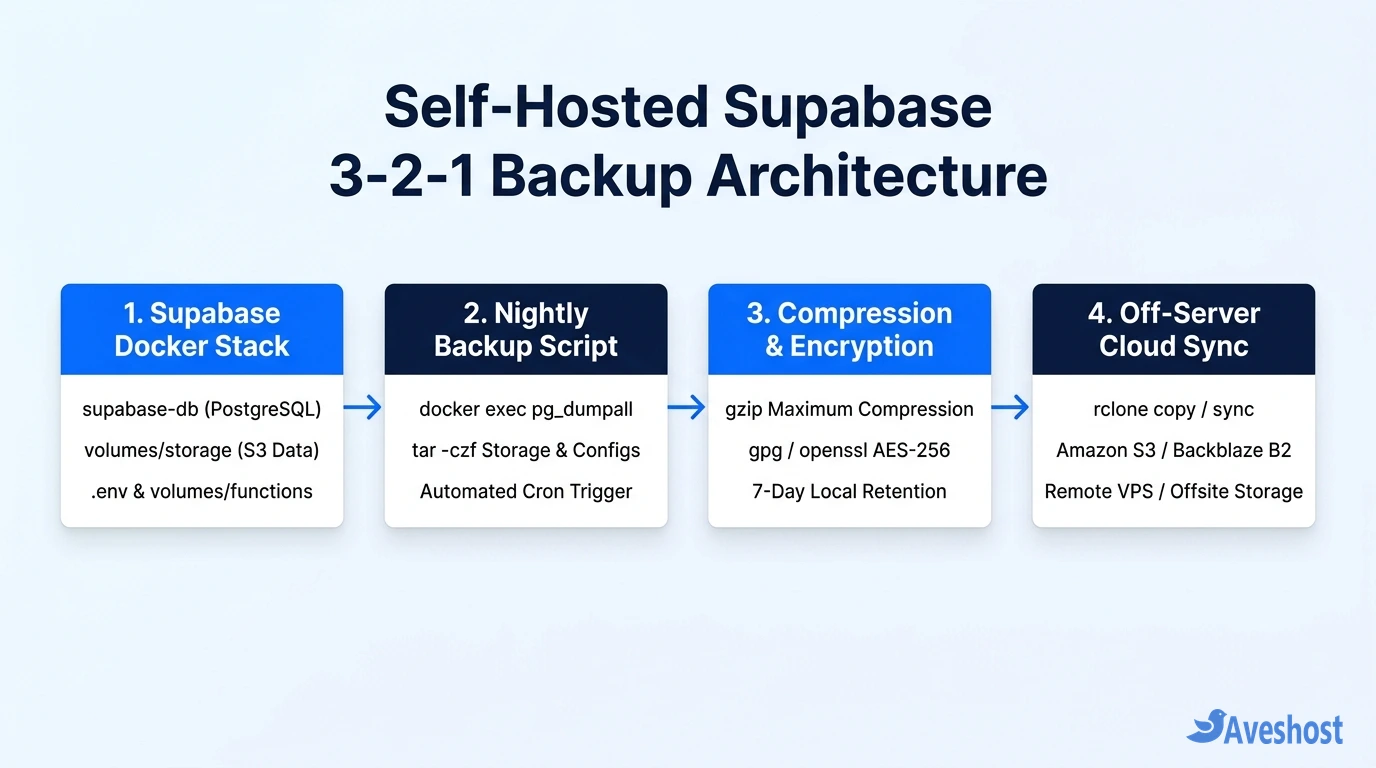
Storing backups solely on the same VPS disk that runs your database violates the 3-2-1 backup rule: if the server’s filesystem is accidentally deleted, both your live database and your backups disappear together. By pairing a bash script with rclone, your VPS will automatically push each nightly backup to an S3-compatible bucket (AWS S3, Cloudflare R2, Backblaze B2) or a secondary storage server.
Create /usr/local/bin/supabase-backup.sh with automatic 7-day local retention and remote cloud syncing:
#!/usr/bin/env bash
set -euo pipefail

BACKUP_ROOT="/opt/supabase-backups"
SUPABASE_DIR="/opt/supabase/docker"
TIMESTAMP=$(date +%Y%m%d_%H%M%S)
RETENTION_DAYS=7
RCLONE_REMOTE="s3-backup:my-supabase-backups"

mkdir -p "$BACKUP_ROOT/db" "$BACKUP_ROOT/volumes"

# 1. Dump PostgreSQL cluster
docker exec -i supabase-db pg_dumpall -U postgres --clean \
  | gzip -9 > "$BACKUP_ROOT/db/supabase_db_$TIMESTAMP.sql.gz"

# 2. Archive Storage & Edge Function volumes
tar -czf "$BACKUP_ROOT/volumes/supabase_volumes_$TIMESTAMP.tar.gz" \
  -C "$SUPABASE_DIR" volumes/storage volumes/functions volumes/api

# 3. Sync to off-server cloud storage via rclone
rclone copy "$BACKUP_ROOT/db/supabase_db_$TIMESTAMP.sql.gz" "$RCLONE_REMOTE/db/"
rclone copy "$BACKUP_ROOT/volumes/supabase_volumes_$TIMESTAMP.tar.gz" "$RCLONE_REMOTE/volumes/"

# 4. Prune local archives older than 7 days
find "$BACKUP_ROOT/db" -type f -mtime +$RETENTION_DAYS -delete
find "$BACKUP_ROOT/volumes" -type f -mtime +$RETENTION_DAYS -delete

echo "[$(date --iso-8601=seconds)] Supabase backup completed: $TIMESTAMP"
Make the script executable with sudo chmod +x /usr/local/bin/supabase-backup.sh and schedule it in root’s crontab (sudo crontab -e) to run every night at 02:00 UTC: 0 2 * * * /usr/local/bin/supabase-backup.sh >> /var/log/supabase-backup.log 2>&1.
Step 4: How to Restore Self-Hosted Supabase on a New or Existing VPS
Whether you are recovering from a bad schema migration or rebuilding onto a new Ubuntu machine (see our guide on how to migrate a Linux VPS to a new Ubuntu server), restoring your self-hosted Supabase stack follows a strict sequence so active API containers do not lock database tables or overwrite files mid-restore.
1. Restore .env and start only PostgreSQL: If you are restoring onto a brand-new VPS, clone the Supabase Docker repository into /opt/supabase/docker, decrypt and place your original .env file into /opt/supabase/docker/.env, and start the stack once.
2. Stop the API and Storage containers while leaving supabase-db running: This prevents PostgREST, GoTrue, or Realtime from holding open connections while psql drops and recreates schemas.
3. Restore the PostgreSQL dump and extract the Storage volumes: Run the following commands on your VPS:
cd /opt/supabase/docker

# 1. Stop API/Storage services while keeping supabase-db running
docker compose stop rest auth storage realtime functions kong studio

# 2. Decompress and pipe the SQL backup into PostgreSQL
gunzip -c /opt/supabase-backups/db/supabase_db_20261107_020001.sql.gz \
  | docker exec -i supabase-db psql -U postgres -d postgres

# 3. Restore Storage binary uploads, Edge Functions, and Kong config
sudo tar -xzf /opt/supabase-backups/volumes/supabase_volumes_20261107_020001.tar.gz \
  -C /opt/supabase/docker/

# 4. Bring the full Supabase Docker stack back online
docker compose up -d
Step 5: Verify Your Restored Instance and Run Recovery Drills
An untested backup is only a wish. After running docker compose up -d, run these three quick checks to confirm every Supabase service recovered cleanly:
1. Check container health and database row counts: Run docker compose ps to confirm all containers report (healthy), then run docker exec -i supabase-db psql -U postgres -d postgres -c "SELECT count(*) FROM auth.users;" to verify your user accounts and application tables.
2. Test authentication and Storage downloads: Sign in with an existing user account from your frontend application and load a protected image or document from a Storage bucket to confirm both storage.objects metadata and the underlying files in volumes/storage match.
3. Schedule quarterly restore drills: Once every quarter, spin up a temporary Aveshost Linux VPS, run your restore script from your off-server rclone bucket, and verify your recovery time objective (RTO). If you are also comparing managed and self-hosted disaster recovery options, check our complete guide to Supabase alternatives.
| Restore Issue / Symptom | Root Cause | How to Fix It |
|---|---|---|
| syntax error at or near “\r” during psql restore | Backup was created with docker exec -t (TTY enabled) | Always use docker exec -i (without -t) or strip CR with tr -d ‘\r’ |
| 401 Invalid JWT on all existing client sessions | Restored VPS .env has a different JWT_SECRET than original | Restore the original JWT_SECRET, ANON_KEY, and SERVICE_ROLE_KEY in .env |
| Storage API returns 404 even though storage.objects rows exist | volumes/storage archive extracted to wrong parent folder | Extract with -C /opt/supabase/docker so files land in volumes/storage/ |
| pgsodium / Vault decryption errors after restore | VAULT_ENC_KEY or SECRET_KEY_BASE changed in .env | Restore the exact original .env file and restart supabase-db |
Frequently asked questions
Can I back up self-hosted Supabase by simply copying the volumes/db/data folder?
Not while the database is running. Copying raw PostgreSQL data files (volumes/db/data) while supabase-db is active can capture half-written pages and uncommitted Write-Ahead Log (WAL) segments, resulting in a corrupted database on restore. Always use docker exec -i supabase-db pg_dumpall -U postgres for live logical backups, or stop the database container completely before taking a filesystem snapshot.
Why should I use docker exec -i instead of docker exec -it when running pg_dumpall?
Passing the -t (pseudo-TTY) flag causes Docker to translate Unix line feeds (\n) into carriage-return line feeds (\r\n) in the redirected output stream, which corrupts binary streams and COPY blocks inside your SQL file. Using docker exec -i (without -t) keeps the output stream 100% clean.
What happens if I lose my /opt/supabase/docker/.env file?
Your .env file contains JWT_SECRET, POSTGRES_PASSWORD, SECRET_KEY_BASE, and VAULT_ENC_KEY. If you lose JWT_SECRET, you must generate new ANON_KEY and SERVICE_ROLE_KEY tokens and redeploy your frontend; if you lose VAULT_ENC_KEY, any secrets encrypted inside Supabase Vault (pgsodium) cannot be decrypted.
How do I back up Supabase Storage if I use an external S3 bucket instead of local volumes?
If your self-hosted Supabase Storage container is configured with STORAGE_BACKEND=s3 pointing to AWS S3, Cloudflare R2, or MinIO, your uploaded files are not stored in volumes/storage. Instead, run rclone sync between your production S3 bucket and a separate backup bucket right after your nightly pg_dumpall job so your database metadata and S3 objects stay in sync.
Does pg_dumpall require downtime on my self-hosted Supabase VPS?
No. Both pg_dump and pg_dumpall take a consistent MVCC snapshot of your PostgreSQL tables without locking reads or writes, meaning your live web application stays online while the nightly backup runs.