Cloud repatriation starts with a business question: are you paying for capabilities your startup needs, or for complexity that no longer fits the application? An always-on website or predictable SaaS workload can have different requirements from a service that expands rapidly across regions.
Moving from AWS to a high-performance VPS can simplify the infrastructure budget and give your team more direct control. The decision still needs a proper comparison: a server subscription must cover the performance, recovery and operational work previously supplied by your cloud architecture.
This playbook explains how to evaluate that move, build a realistic cost model, benchmark the target and migrate in stages. Our free migration service helps you plan the move with our team and focus on running your product.
- Move suitable workloads, not necessarily your entire AWS account.
- Compare total operating cost and equivalent recovery requirements.
- Benchmark your application; vCPU and RAM labels are only a starting point.
- Rehearse the cutover and keep a rollback plan until the new system is stable.
Table of Contents
What is cloud repatriation?
Cloud repatriation traditionally describes moving workloads from a public cloud back to private or owned infrastructure. In a broader hosting conversation, it also covers moving an application from a hyperscaler to a simpler hosting environment such as a VPS or dedicated server.
Our VPS is a cloud VPS: your application continues to run on cloud infrastructure. Moving from AWS to Aveshost changes the provider and package while giving you a simpler monthly subscription, root access and a generous included traffic allowance.
For example, a startup could move its application and background workers to a VPS while retaining an object-storage service and transactional email provider. Another might move only development environments first. Both approaches can reduce the migration scope while revealing the true operating costs.
Why startups consider moving from AWS to VPS
1. A steadier budget for steady demand
An hourly compute price is only one part of a cloud bill. Storage, snapshots, network transfer, public addresses, observability and supporting services can add separate charges. A predictable subscription and a stated transfer allowance can make planning easier when resource demand stays relatively stable.
AWS is not inherently unpredictable: its rates are documented, and budgets, usage analysis and architecture choices help control spending. The question is whether your team benefits enough from the services and flexibility to justify the complete cost.
2. Less infrastructure to coordinate
A small product may not need a complex arrangement of separate networking, orchestration and service components. A simpler deployment can make incidents and release processes easier to understand. Containers, automated deployments and infrastructure documentation still matter on a VPS; simplicity should not mean manual, undocumented changes.
3. More control over the application environment
Root access lets a capable team tune packages, workers, database settings and the operating system. That control can be valuable for a steady application. It also creates responsibility: someone must manage updates, security, capacity and recovery. Managed hosting can help with the server layer, but application correctness still belongs to the product team.
For startups with steady workloads, our cloud VPS offers a practical way to simplify hosting and reduce the base monthly cost. Start with your AWS usage and let us help select a package that supports your product.
Which workloads are good candidates?
| Workload | Potential VPS fit | What to check first |
|---|---|---|
| Always-on website or application | Consistent demand and a portable stack | Peak usage, database load and recovery needs |
| Background workers | Predictable processing with manageable queues | Retry behaviour, schedules and burst capacity |
| Development and staging | Straightforward deployment and modest traffic | Isolation, access and how often environments are needed |
| Heavy managed-service dependency | Requires a more detailed replacement plan | Data migration and equivalent service functionality |
| Highly variable global demand | May favour elastic or hybrid infrastructure | Regional latency, scaling speed and failover |
A mature monolith with known traffic can be easier to move than a system built around many provider-specific services. Before deciding, list the services the application calls, the data each holds and the operational work each performs. Portability means replacing behaviour, not only copying code.
Start with portable, steady workloads to realise the value of our cloud VPS quickly. Where your application uses specialised AWS services, our team can help plan which components to move and which to retain during the transition.
AWS vs our self-managed cloud VPS: monthly cost comparison
Our self-managed cloud VPS combines a fixed monthly subscription with SSD storage and an included traffic allowance. For an always-on website or application, this gives you a clear route to reducing the base hosting cost and simplifying your budget.
The comparison below uses published USD prices checked on 12 October 2026: Linux/Unix EC2 t3.large On-Demand in US East (Northern Virginia), running for 730 hours, and our monthly Cloud VPS 2 package.
| Item | AWS EC2 t3.large | Our self-managed Cloud VPS 2 |
|---|---|---|
| Base price | $0.0835 per hour | $15.51 per month |
| Monthly base amount at 730 hours | $60.96 for compute | $15.51 subscription |
| CPU allocation | 2 vCPUs | 4 vCores |
| Memory | 8 GiB | 8 GB |
| Storage | EBS billed separately | 100 GB SSD included |
| Traffic | AWS transfer rates and allowances apply | 32 TB traffic allowance |
| cPanel / DirectAdmin | Not included in compute price | Not included |
| AWS website migration | AWS transfer arrangements apply | Free migration service arranged through our support team |
Our subscription is $45.45 per month lower—about 74.6% below the EC2 compute amount in this example. The AWS figure covers compute; storage and applicable transfer or other services are additional. Our package includes the listed SSD capacity and traffic allowance.
Sources: AWS T3 specifications and pricing, EC2 billing and transfer details and our self-managed cloud VPS packages. AWS uses On-Demand pricing here rather than Spot, Reserved Instances or Savings Plans. Use your active billing arrangement, required services and tax treatment when calculating your own savings.
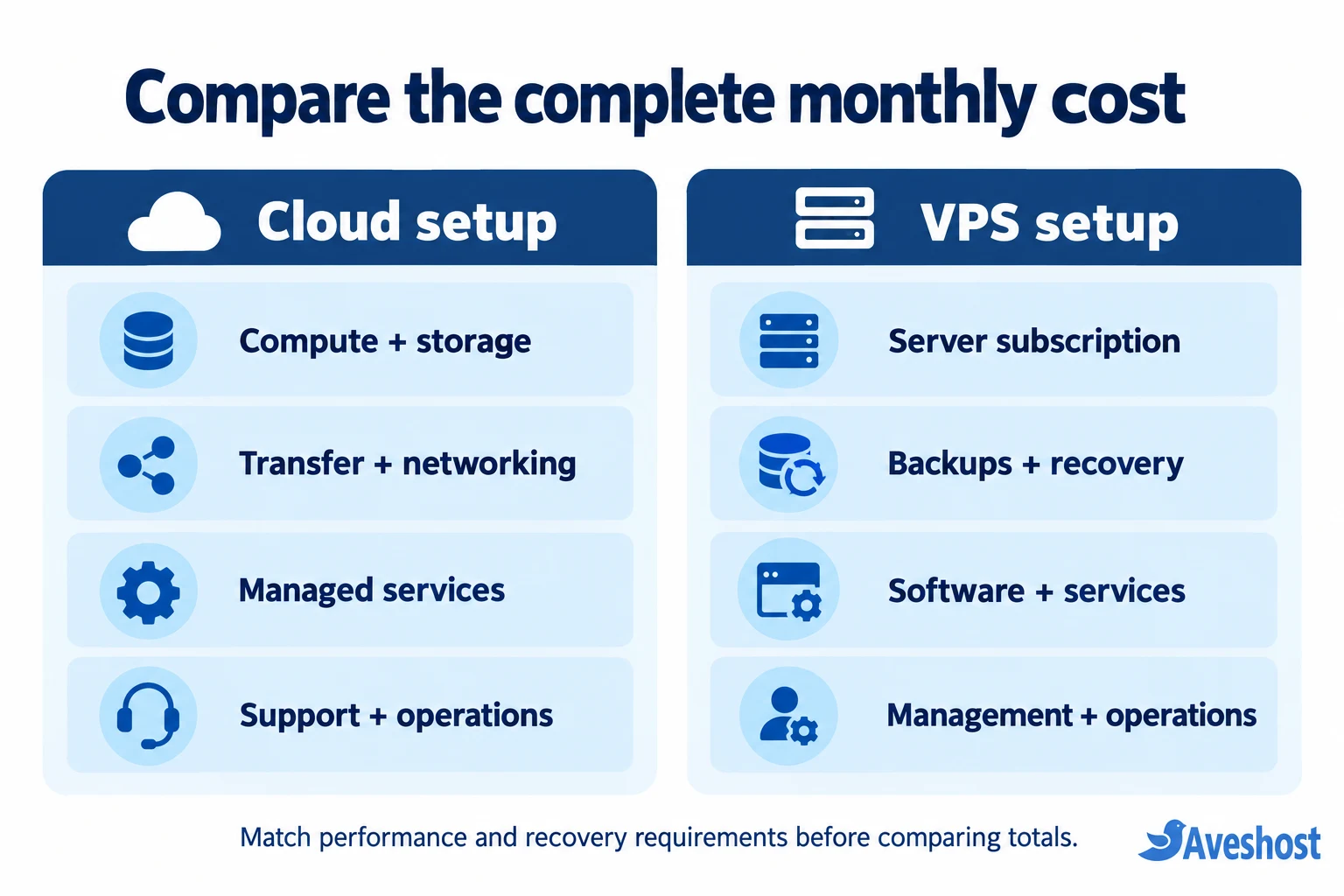
Add the AWS charges attributable to your website and compare them with your selected cloud VPS subscription, retained services, backups and operational requirements. Our team can help select the package around your traffic, application and growth plans.
Plan transfer with a generous included allowance
Cloud VPS 2 includes 32 TB traffic. Review the allowance and service terms for your selected location with us when planning media delivery, backups or a data-heavy application. AWS also offers an eligible exit-related transfer waiver; contact AWS support before exporting data to arrange the applicable process.
Ready to simplify your infrastructure budget? Send our team your AWS setup and request a free migration arrangement.
How to benchmark a high-performance VPS
“High-performance” should describe measured application behaviour. Two offers with the same vCPU and memory count can differ in processor generation, CPU scheduling, storage performance, network limits and contention. Ask whether CPU capacity is shared or dedicated and assess the target under sustained load.
- Run the same application release, runtime settings and representative database on the candidate system.
- Measure normal demand, peak concurrency and background work together.
- Record p50, p95 and p99 response times, throughput and error rates.
- Track CPU, memory, disk latency, database queries and network throughput.
- Test a backup restore and a service restart; performance includes recovering successfully.
Use an isolated test environment you control. Start with an anonymised data copy and avoid sending uncontrolled load to production or third-party APIs. Test critical workflows such as authentication, purchases, uploads and scheduled jobs rather than relying on a synthetic homepage score.
Agree acceptance criteria before testing. For example, the application must sustain the expected peak with headroom, stay within your response-time target and recover within the business’s required window. A benchmark that ignores the database or recovery path can make an unsuitable server look attractive.
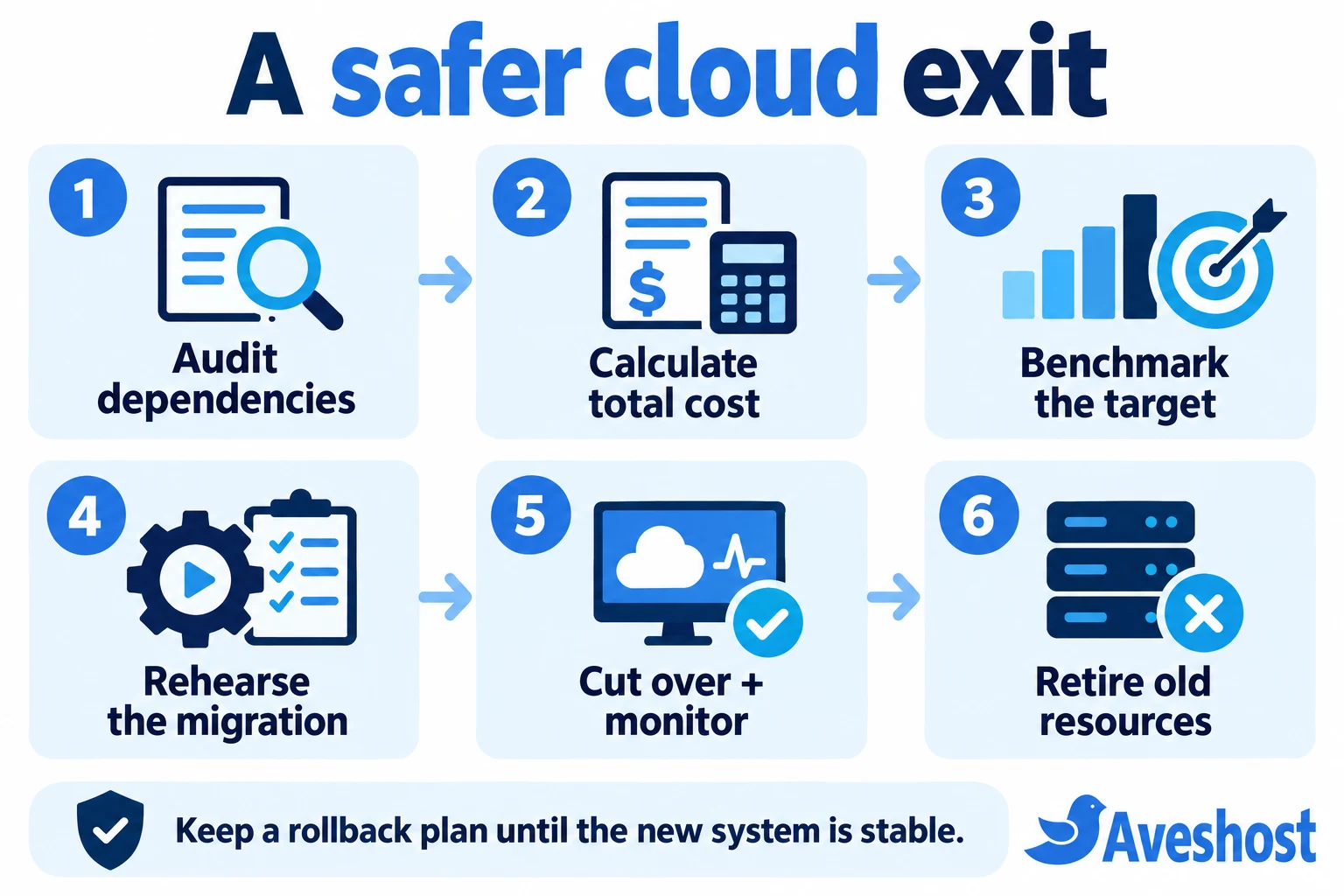
The AWS-to-VPS migration playbook: 8 steps
Step 1: audit dependencies and ownership
Inventory instances, databases, object storage, DNS, certificates, secrets, queues, scheduled tasks, logs and outbound integrations. Record who owns each component and its replacement or retention decision. Identify provider-specific APIs and any dependencies on local disks or instance identities.
Separate portable components from those requiring redesign. Confirm licensing, data handling and customer obligations before moving information to a different provider or location.
Step 2: define capacity and recovery requirements
Size from observed workload, not the largest instance you once provisioned. Include memory for the database and workers, storage growth and usable headroom. Define recovery point objective—the acceptable amount of lost data—and recovery time objective—the acceptable outage duration.
Our team can help match your cloud VPS deployment to your availability and recovery requirements. Plan backups, replication and failover for your application as part of the migration design.
Step 3: build and secure the target
Provision the chosen server and install a reproducible environment. Restrict administration, apply updates, configure firewalls, secure secrets and enable monitoring. Establish off-server backups and test a restore before moving customer traffic.
Agree which tasks the provider manages and which your team owns. Keep deployment credentials and recovery access organised. For web traffic, follow our Cloudflare protection tutorial for proxy, HTTPS and application-aware security controls.
Step 4: replace or retain supporting services
Choose replacements for managed services deliberately. A database installation needs backups, patching and recovery procedures; a queue needs durable processing and retry handling. Keep a cloud service if replacing it would add disproportionate risk or engineering work.
Measure connections to retained services. Moving the application away from its database can introduce latency and transfer costs even when the VPS itself performs well.
Step 5: rehearse data movement
Perform an initial copy and measure transfer and restore time. For databases, choose an export or replication method supported by the engine and version. Validate counts, permissions, encoding and key application records. Test uploads, generated files and background jobs too.
Write a cutover runbook that identifies the final synchronisation, who pauses writes, who changes routing and who approves recovery. Decide which side becomes authoritative; avoid two systems accepting independent writes with no reconciliation plan.
Step 6: benchmark and test end to end
Run the acceptance tests on the target and compare the results with production. Verify email delivery, webhooks, payment sandbox flows, authentication and third-party allowlists. Check certificates and scheduled tasks. A healthy process on a server does not prove the full product works.
Set monitoring alerts and a clear rollback trigger. Record the measurements so the decision is based on evidence rather than the impression that a page “feels faster.”
Step 7: cut over with a data-aware rollback
Plan DNS changes in advance and account for resolver caching and long-lived connections. Pause or redirect writes as required, complete the final sync, change routing and monitor the new system. Prevent duplicate workers from processing the same queue or sending the same notifications.
If the target accepts new writes, rolling DNS back alone can lose or strand data. Your rollback plan must address those writes and the current authoritative database. Keep the old environment available for the agreed validation window without running conflicting jobs.
Step 8: retire old resources and verify the bill
After acceptance and a tested recovery path, review the old environment for chargeable volumes, snapshots, addresses, load balancers and other services. Remove resources through a documented decommissioning process when retention and recovery requirements allow it.
Check the next bills and compare realised operating costs with the model. Include retained AWS services, monitoring and staff time. A successful migration delivers sustainable value and reliable operations, not only a lower compute line item.
When a hybrid setup is the better choice
A hybrid architecture can move the predictable workload while keeping valuable cloud capabilities. This may suit a startup that wants simpler application hosting but still benefits from a managed database, specialist processing or object storage.
Keep frequently interacting components near each other where practical. Budget for cross-provider transfer and measure connection latency, failures and troubleshooting effort. Hybrid can reduce replacement work, but an unnecessarily fragmented architecture may undo the simplicity you wanted.
Self-managed or fully managed cloud VPS: choose your setup
Our self-managed cloud VPS is the starting point for developers moving from EC2: root access, SSD storage and control over your application stack. Choose our fully managed cloud VPS if you want a bundled hosting control panel.
| Feature | Our self-managed cloud VPS | Our fully managed cloud VPS |
|---|---|---|
| Platform | Cloud VPS infrastructure | Cloud VPS infrastructure |
| Included control panel | No cPanel or DirectAdmin | cPanel or DirectAdmin included |
| Workflow | SSH and your deployment tools | Control panel with server-management support |
| Example resources | Cloud VPS 2: 4 vCores, 8 GB RAM, 100 GB SSD, 32 TB traffic | Starter: 4 vCores, 8 GB RAM, 100 GB SSD, 32 TB bandwidth |
| AWS website migration | Free; arrange with support | Free; arrange with support |
Choose our self-managed cloud VPS when you do not need a bundled control panel. Choose our fully managed cloud VPS when you want cPanel or DirectAdmin and server-management support. Tell us which panel and application you use so we can arrange the right setup.
Our cloud VPS hosting uses SSD storage and redundant data-centre infrastructure. Your application continues to run in a cloud hosting environment while you gain a straightforward package and monthly subscription. We can help plan capacity, backups and recovery around your business requirements.
We offer free website migration from AWS to Aveshost with no additional migration service fee. Contact our support team to arrange your move. Your hosting subscription and remaining AWS charges are separate from our free migration service.
Make your move to our cloud VPS a success
- Choose the package from actual CPU, RAM, storage and traffic requirements.
- Include application dependencies and integrations in the transfer plan.
- Validate backups, payments, email, uploads and scheduled jobs.
- Agree final data synchronisation and recovery with the migration team.
- Review the next AWS bill and retire resources you no longer need.
Move to our cloud VPS with a clear plan, a predictable hosting package and help from our team. Request your free AWS website migration and share your current setup and preferred transfer window.
Frequently asked questions
What does cloud repatriation mean?
Cloud repatriation means moving workloads from a public cloud to another operating environment. That can include private infrastructure, colocation or a VPS provider. A VPS migration can change the billing and management model without moving the application to hardware you own.
How much can I save by moving from AWS to our cloud VPS?
Our Cloud VPS 2 is $15.51 per month compared with $60.96 for 730 hours of Linux EC2 t3.large On-Demand compute in the published-price example. That is about 74.6% lower for the compared base amounts. Calculate your final saving from your required services and active billing arrangement.
Do we offer free migration from AWS?
Yes. We offer free website migration from AWS to Aveshost with no additional migration service fee. Contact our support team to arrange the transfer and choose the right cloud VPS package. Hosting subscriptions and remaining AWS charges are separate.
Does a VPS replace every AWS service?
No. A virtual server does not automatically replace managed databases, object storage, queues, identity services or regional failover. Map dependencies and choose a suitable replacement or retain those services where they add value.
How do I compare VPS and EC2 performance?
Run the same application and representative data under comparable load. Measure response-time percentiles, throughput, errors, CPU, memory, storage latency and database behaviour. Test recovery and peaks as well as normal traffic.
Will moving from AWS cause downtime?
The result depends on application design, data volume and the cutover method. Rehearse replication or final synchronisation, establish a write boundary and prepare rollback. Do not promise zero downtime without validating the specific migration process.
What is the difference between our self-managed and fully managed VPS?
Our self-managed cloud VPS does not include cPanel or DirectAdmin. Our fully managed cloud VPS includes cPanel or DirectAdmin alongside server-management support. Choose self-managed for SSH and your deployment tools, or fully managed when you want a bundled hosting control panel.
Can I keep some services on AWS?
Yes. A hybrid setup can retain useful cloud services while moving the steady application workload. Include cross-provider latency, transfer charges, security and troubleshooting complexity in the decision.