A gym management website in Ghana can organise monthly dues, send payment reminders and show staff which memberships are current. Members get a clear place to renew through MoMo, while the gym keeps payment records linked to the correct person and billing period.
For a fitness centre in East Legon, Dzorwulu, Kumasi or another growing community, this removes much of the work of comparing screenshots, notebooks and mobile-wallet messages. The portal becomes a shared record for members, reception and the person reconciling payments.
The practical MoMo workflow automates invoices, reminders and status updates while the member authorises each payment. This guide explains that setup with WordPress, WooCommerce and a supported Ghanaian gateway. It also covers membership rules, reception checks and the safeguards needed before you rely on the system each month.
Table of Contents
Plan your gym management website in Ghana
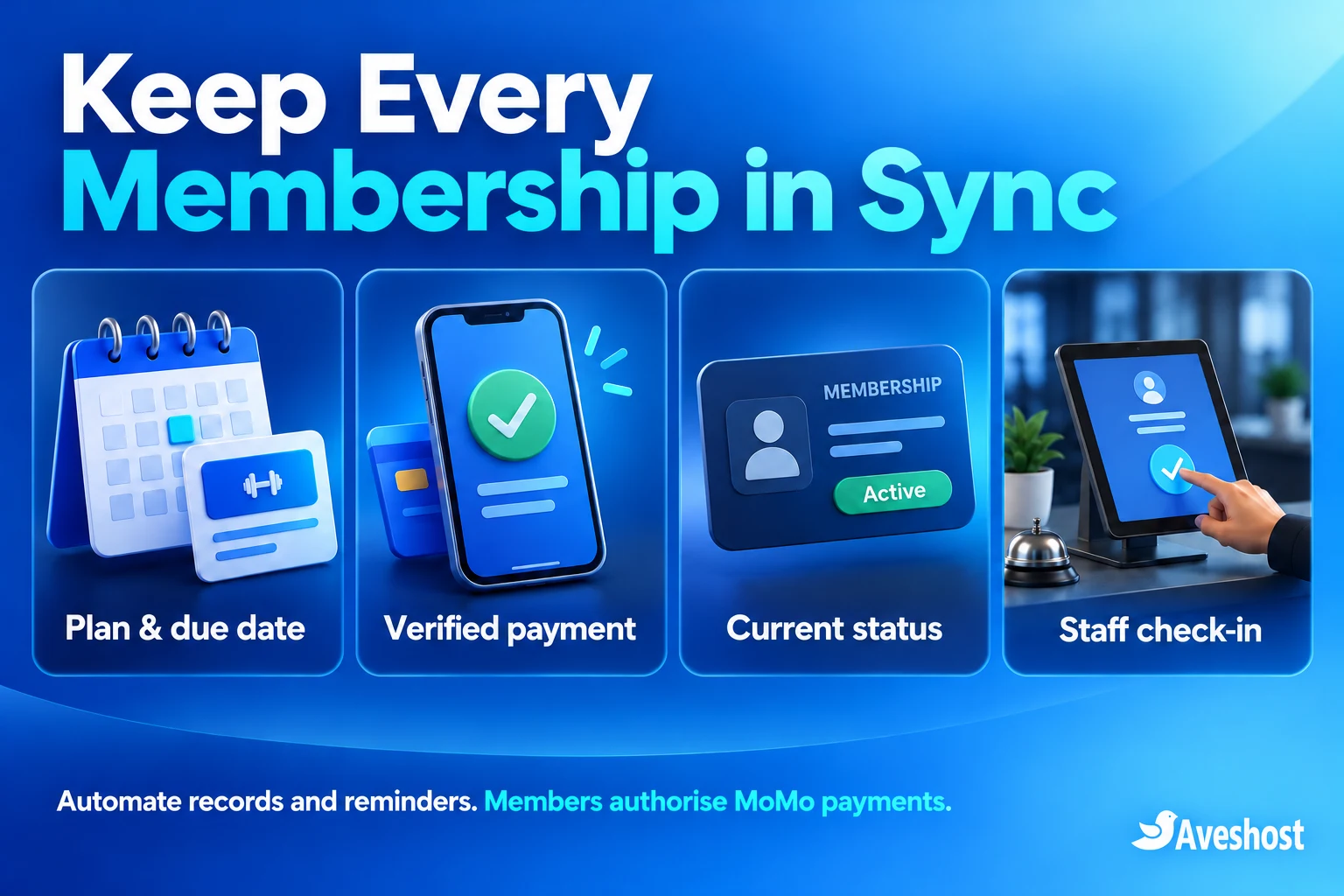
Build around one member record, one billing schedule and an auditable payment history. Each renewal should identify the member, plan, amount due and period covered. Staff should be able to answer “Is this membership current?” without searching through private messages.
Separate three activities: billing, membership entitlement and attendance. Billing records money due and received. Entitlement decides which services the member can use. Attendance records a visit. A receipt alone does not implement a turnstile integration or reserve a space in a limited-capacity class.
| Stage | Member experience | Gym record |
|---|---|---|
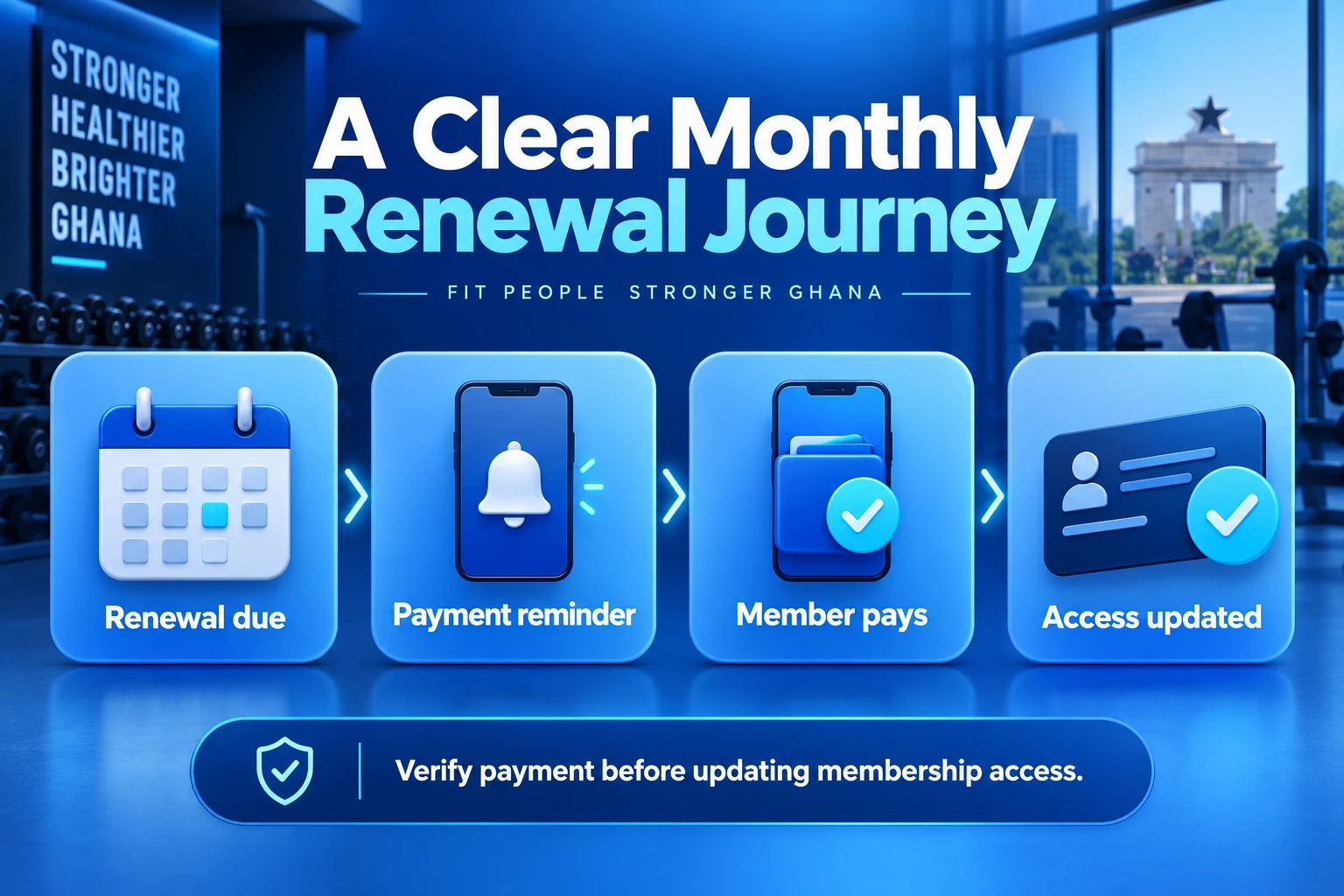
| Renewal approaches | A clear due notice | Current plan and next payment |
| Payment becomes due | Invoice or account payment link | One renewal order for that cycle |
| MoMo authorisation | Member approves payment on their phone | Transaction remains pending until verified |
| Payment succeeds | Receipt and updated membership status | Correct renewal linked to the member |
| Arrival | Staff check the current record | Visit recorded through the gym workflow |
Choose an owner for exceptions. Someone must review delayed payments, disputed renewals, account corrections and cancelled memberships. Automation reduces repetitive work; a visible exception queue keeps unusual cases from becoming arguments at reception.
Understand what MoMo renewal automation covers
At the time of writing, Paystack’s Subscriptions documentation lists card payments and Direct Debit in Nigeria as its supported subscription channels. Ghanaian MoMo is not included in that automatic-debit feature. A successful MoMo checkout does not create permission to debit the wallet every month.
Use automatic billing records with member-authorised renewals for the MoMo route in this guide. The portal generates the amount due, sends the member to the correct payment step and applies a verified result. The member still approves the payment using the gateway’s supported flow.
WooCommerce distinguishes automatic renewal charging from manual renewal payments. Its payment-gateway guide explains that supported WooCommerce gateways can process member-paid renewal orders. Check the exact gateway, payment channel and extension versions used on your site.
If you later add automatic card billing or another provider’s mandate-based product, confirm eligibility, consent requirements and integration support separately. Do not advertise automatic monthly MoMo deductions based only on a payment button or a provider’s general recurring-billing description.
Define membership plans and billing rules
Define the membership offer before installing plugins. List the facilities included, opening-hour restrictions, coaching sessions, class entitlements and whether a joining fee applies. A standard gym-access plan and a personal-training package may need separate schedules and capacity rules.
Choose a billing model: a month from each member’s joining date, a common monthly renewal day, or a fixed period such as 30 days. These produce different expiry and payment behaviour. Show the chosen period clearly and test month-end joins rather than treating every month as exactly 30 days.
| Rule | Decision to document |
|---|---|
| Billing period | Rolling month, fixed days or a common renewal schedule |
| Amount | Full dues, joining fee and any applicable charges |
| Late payment | When access pauses and how the member renews |
| Cancellation | Whether access continues through the paid period |
| Freeze or pause | Who approves it and how billing and access change |
| Plan changes | When the new plan begins and how any price difference is handled |
For illustration, a plan costing GH₵250 per month creates a GH₵250 renewal obligation for its defined period. A separate GH₵50 joining fee should be labelled separately from the recurring dues. These are demonstration amounts, not Aveshost prices or an offer from a real gym.
Decide how late payments affect the schedule. Paying an overdue invoice can settle an existing period rather than starting a fresh month from today. If the gym wants a different restart policy, configure and test that rule explicitly before telling members what their payment buys.
Keep a fair, visible process for freezes, refunds and membership changes. Record approvals and explain any limits before purchase. Avoid promising unlimited classes when class bookings have their own capacity or cancellation rules.
Build the member portal and hosting foundation
Register a business-owned domain through our domain services and keep renewal and recovery contacts current. Create a recognisable branded sender for receipts and support. Members should know they are paying the gym they joined.
Choose hosting for member logins, checkout, scheduled jobs and database activity. Discuss your expected membership volume and peak renewal traffic with our team through web hosting or WooCommerce hosting. A more customised application can be assessed for a managed VPS.
Install WordPress and WooCommerce, enable HTTPS and use a lightweight mobile-friendly theme. Build pages for Plans, Join, Member Account, Contact, Membership Terms and Privacy. Keep the renewal route prominent in the member account rather than hiding it in a long public page.
The approach below uses the paid WooCommerce Subscriptions extension for billing schedules. WooCommerce Memberships is a separate paid extension for optional online member benefits and access rules. Neither is included automatically with WooCommerce core, and neither alone is a complete physical-gym management or door-control system.
Budget for licences, setup, payment fees, messaging and ongoing maintenance as well as hosting. A dedicated IP can be assessed for a specific application requirement; it does not create payment compatibility or replace HTTPS and account security. Keep backups and restoration requirements in the project scope.
Configure monthly renewal orders
In WooCommerce, create the membership billing product as a Simple subscription, mark it Virtual when shipping is unnecessary and set the price with a one-month interval. Add a sign-up fee only where the gym charges one. Check the amount and schedule shown in checkout and the member account.
Under WooCommerce → Settings → Subscriptions, enable manual renewals. For a portal intended to use member-paid MoMo renewals throughout, also enable Turn off automatic payments. WooCommerce’s renewal-process guide describes the manual invoice workflow.
The current Subscriptions settings update makes the automatic-payment switch depend on accepting manual renewals first. Labels can vary by extension version; verify both settings and confirm that the subscription record shows Manual Renewal. Do not rely on the gateway name alone.
Keep the first launch to one or two clearly defined plans. Create a test member, complete the initial purchase and inspect the resulting subscription, next payment date and account view. Verify that the renewal order requests only the amount intended for that cycle, without charging the joining fee again.
Use a reliable scheduled-task setup and monitor failed or overdue actions. Renewal creation, email and status transitions depend on background processing. A quiet website must still run its scheduled work; arrange the appropriate server scheduler with your administrator rather than relying only on visitor traffic.
Connect MoMo payments and verify each renewal
Set up an eligible Ghanaian Paystack merchant account and follow its WooCommerce integration guide. Install the recommended gateway, configure test keys under WooCommerce → Settings → Payments and add the webhook address supplied by the plugin to the merchant dashboard.
Use GHS for the Ghanaian checkout and enable the supported Mobile Money channel. Test the initial subscription purchase and payment of an existing renewal order separately. A gateway working for an ordinary shop order does not establish that your complete membership workflow is configured correctly.
Paystack’s payment-channel documentation covers the phone-authorisation stage. Keep the renewal pending until the provider result is verified. A screenshot, a member’s message or the browser return page does not establish that the dues were received.
For custom integrations, follow the provider’s webhook validation guidance, match the reference, amount and currency to the correct renewal order and apply the result once. Repeated notifications must not add extra months of access or issue duplicate receipts.
Before asking someone to retry an uncertain payment, reconcile its existing reference. Keep delayed results and unmatched payments in a staff review queue. A successful transaction belonging to another member or an older invoice must not settle the wrong renewal.
Record cash and other approved offline payments through a controlled staff process with a receipt and audit trail. Reconcile them with the outstanding renewal before sending further reminders. Avoid creating a second paid order for the same cycle.
Keep membership status and gym access aligned
Treat access as a defined business rule. The member must have a valid plan, the required paid period and any applicable approved status. A long payment history does not prove that the current period is covered.
If you use WooCommerce Memberships, connect the relevant membership plan to the subscription product. Its Subscriptions integration ties membership behaviour to subscription status. For example, a subscription on hold can pause the associated membership, while pending cancellation can preserve access through the paid period.
Test your intended late-payment and grace-period policy against that behaviour. A grace period or special front-desk override needs deliberate implementation and a record of who authorised it. Do not give staff instructions that contradict the actual portal status.
Keep cancellations separate from unpaid dues. A member cancelling future renewals may still have access for the period already paid. A freeze may require billing and entitlement adjustments together. Review these cases using the subscription status guide and the configured membership rules.
Physical check-in needs its own controlled staff screen or gym-system integration. A membership plugin can protect online content, but it does not automatically control a door, turnstile or attendance terminal. Build that connection only after the billing and entitlement records are dependable.
Send useful SMS and WhatsApp payment reminders
Start with email invoices and receipts, then add SMS or WhatsApp for timely reminders. Keep every message linked to the member’s current renewal order. A useful notice identifies the gym, amount due, renewal period and a secure route to the member account.
Use a short schedule, such as one advance notice, one due notice and a limited overdue follow-up. These are example workflow choices, not built-in promises. Check the paid, cancelled and paused states before each message, and suppress duplicates when payment arrives.
For SMS, our Ghana SMS integration guide compares three provider options. Choose an event-aware connector or a tested integration for renewal records. A generic WordPress SMS plugin does not automatically understand subscription dates or successful renewal payments.
For WhatsApp automation, use the official WhatsApp Business Platform or an approved provider and follow its current opt-in, template and messaging requirements. Check the official platform documentation for the chosen integration. Adding a WhatsApp chat link alone does not create automated payment reminders.
For example: “Your gym renewal is ready. Amount due: GH₵250. Sign in to your member account to review and pay. If you have already paid, contact reception with your booking or invoice reference.” Adapt the wording to your actual account route and renewal policy. Do not include a member’s private details in a shared message.
Use a recognisable business domain for account links and keep transactional messages separate from optional promotions. Do not request wallet PINs, OTPs or card details in a reminder. A member should complete authorisation only through the supported payment flow.
Give reception a dependable membership record
Give reception a restricted view showing member identity, plan, current entitlement, relevant expiry or renewal information and any approved override. Keep full payment administration with authorised staff. Reception should not need a shared WordPress administrator password.
Use a member number or optional QR code to locate the record. A QR image is an identifier, not proof of payment or current access. The staff screen must retrieve the current entitlement and prevent unauthorised users from viewing member records.
If you track attendance, record check-ins separately from billing changes. Scanning a member card must not mark a renewal paid. Define who can correct a mistaken check-in and who can adjust membership dates, with an audit record for each change.
Prepare a clear process for a member arriving while a payment is unresolved. Staff should check the existing transaction, avoid duplicate collection and apply the gym’s documented temporary-access policy. A payment problem should be handled privately rather than discussed in front of other members.
Import existing members carefully. Match each person to a unique record, verify the paid-through period and avoid creating arrears or fresh charges from incomplete spreadsheets. Reconcile the opening balances before activating reminder automation.
Protect member accounts and payment records
Protect administrator accounts with two-factor authentication and give staff only the permissions they need. Keep WordPress, extensions and payment tools maintained. Our website security checklist explains the wider account, update and recovery controls.
Store gateway secrets in protected server-side configuration. Use the payment provider’s supported checkout rather than collecting wallet credentials in your own form. Restrict exports and logs so they do not expose contact details, transaction secrets or complete member lists.
Collect only the information needed for membership administration. Medical history, body measurements and coaching notes require a separate purpose and restricted handling; they should not sit in a general reception payment view. Explain how members can update their contact details and raise account concerns.
Keep independent backups of the database, website files and essential configuration. Set the recovery plan around the number of payments and account changes you can afford to lose. Rehearse restoration with live charges and outgoing messages disabled, then reconcile with the payment provider before resuming automation.
Monitor scheduled jobs, failed emails, webhook errors, unresolved payments and backup results. Assign someone to respond to those alerts. Hosting capacity, a dedicated IP and a security plugin do not replace a working operational process.
Test the complete renewal cycle before launch
Test beyond the first checkout. A monthly dues system succeeds when the next renewal is correct, the member can pay it and reception sees the resulting access. Use fictional members and test payments in staging before launching the workflow.
| Test case | Required result |
|---|---|
| Initial MoMo purchase | Correct plan, amount and first entitlement |
| Next renewal becomes due | One renewal order with the intended schedule |
| Successful member-paid renewal | Verified payment updates the correct member once |
| Failed or delayed payment | Clear pending state and controlled review |
| Duplicate provider event | No extra period or duplicate receipt |
| Late payment | Paid period follows the stated policy |
| Cancellation or freeze | Billing, access and reminders stay aligned |
| Month-end join or schedule change | Customer-facing dates match the configured model |
| Offline payment | Receipt and renewal reconciled before reminders |
| Restore or scheduler outage | Recovery preserves an accurate payment and access record |
Check the portal on a phone using ordinary mobile data. Keep plan descriptions, account access and payment buttons readable. Optimise public images, but exclude member accounts, checkout and payment endpoints from full-page caching so one member never receives another person’s information.
Launch with a small group and review the first complete renewal cycle. Measure unpaid invoices, payment delays, reminder delivery and front-desk disputes. Improve the process before connecting access hardware or importing the entire membership list.
Ready to automate gym membership payments in Ghana? Explore our WooCommerce hosting and business domains, or discuss your fitness-centre portal with our team. Bring your plans, billing rules, member count and messaging needs so we can plan a suitable setup.
Frequently asked questions
What does a gym management website in Ghana need?
It needs clear plans, member accounts, billing schedules, verified payment records, renewal reminders and a reliable way for staff to check current entitlement.
Can Paystack automatically debit a Ghanaian MoMo wallet every month?
Its documented Subscriptions channels do not include MoMo auto-debits. The flow in this guide automates renewal records and reminders while the member authorises each MoMo payment.
What can the gym automate with MoMo renewals?
It can generate the renewal obligation, send a payment notice, reconcile the verified result, issue a receipt and update access according to the configured rules.
Does WooCommerce include subscriptions and memberships for free?
WooCommerce core does not include these complete features. Subscriptions and Memberships are separate paid extensions with different responsibilities.
Should I use a monthly plan or a 30-day plan?
Choose the model that matches the gym’s offer and show it clearly. Calendar-month billing and fixed-day access can produce different renewal dates.
What happens when a member pays late?
Apply the published policy and configured schedule. Settling an overdue invoice does not automatically mean a fresh month starts from the payment day.
Can the portal send SMS or WhatsApp reminders?
Yes, through a suitable integration tied to current renewal records. WhatsApp automation also needs the official platform or an approved provider and its applicable messaging requirements.
Does a membership plugin control a gym turnstile?
No. Physical access hardware needs a separate tested integration with the current entitlement record.
Can reception accept cash payments too?
Yes, with an authorised recording and reconciliation process that settles the correct renewal and prevents duplicate collection or reminders.
Can Aveshost help build the gym portal?
Yes. Contact our team with your membership plans, billing rules, payment requirements and staff workflow to discuss the website and hosting setup.