
An e-learning website in Ghana can give your WASSCE or BECE revision classes a permanent home: organised lessons, practice quizzes, learner progress and MoMo checkout on your own domain. Instead of manually sending every paid learner a video link, you can connect verified payments to course access.
For independent tutors, remedial schools and private teaching teams, this means greater control over branding, course structure and the learner relationship. Self-hosting still involves hosting, software, payment processing and maintenance costs. The goal is a sustainable classroom that is easy to use on a phone and reliable when a whole class logs in.
This guide covers two routes: WordPress with LearnDash for tutors who want a familiar website and checkout, and Moodle on a VPS for teams that need a more configurable learning environment. We also explain how to sell online courses in Ghana with MoMo without confusing one-time payments with automatic subscription renewals.
Table of Contents
Plan an e-learning website in Ghana around your learners
Start with one clearly defined offer. A BECE Mathematics revision course, a WASSCE English writing workshop or a private-candidate subject package is easier to organise than a site promising every subject at once. State the level, topics, teaching schedule and support included before collecting payment.
- Define the audience: BECE candidates, school candidates, private candidates or adult learners.
- Divide lessons into topics with a short explanation, worked example and practice activity.
- Decide whether access lasts for a term, a fixed number of days or a specified course period.
- Publish the price in Ghana cedis, the access period, refund terms and your support contact.
- Include one sample lesson so learners can assess the teaching style before enrolling.
For example, a tutor could offer a six-week algebra revision package for GH₵120, including recorded explanations, weekly quizzes and a scheduled group question session. That is an illustrative course price, not an Aveshost product. The sales page should explain exactly what the learner receives and when access ends.
Use the current syllabus appropriate to the examination and learner level. Create your own practice questions and solutions, or use material you have permission to reproduce. Present your site as an independent tuition service unless you have formal authorisation to use an institution’s identity or endorsement.
Choose LearnDash or Moodle for your online classes
| Option | Best fit | What to budget for |
|---|---|---|
| WordPress + LearnDash + WooCommerce | A tutor selling structured courses through a branded website | Hosting, a valid LearnDash licence and any paid extensions |
| Moodle on a VPS | A school or teaching team needing detailed activities, roles and reports | VPS resources, administration, integration and backups |
LearnDash is a paid WordPress LMS plugin. Moodle LMS is open-source software, but its deployment and operation need time and technical expertise. Neither route automatically includes every MoMo gateway, protected streaming feature or recurring billing option.
For a first course business, we recommend the WordPress route when your team is comfortable with WordPress and WooCommerce. Choose Moodle when its learning features meet a specific requirement and you have someone responsible for the server. Keep the initial plugin list small, and test the payment integration before building a large course catalogue.
Your learners should not have to understand the software behind the site. Give them a simple path: choose a course, create or sign in to an account, pay, then open their lessons.
Choose hosting for lessons, quizzes and peak enrolment
An LMS behaves differently from a brochure website. Students log in, save answers and request personalised course pages. Size hosting around simultaneous activity, especially timed quizzes, rather than the total number of registered accounts.
Our managed WordPress hosting provides a convenient foundation for a WordPress learning site. Discuss your LearnDash, WooCommerce and peak-user requirements with us so the plan suits your workload. Our self-managed cloud VPS gives developers root access and SSD storage for a customised Moodle environment.
| VPS starting option | Monthly price | Resources | How to use it |
|---|---|---|---|
| Cloud VPS 2 | GH₵170 | 4 vCores, 8 GB RAM, 100 GB SSD, 32 TB traffic | A pilot Moodle classroom; test your actual quiz load |
| Cloud VPS 3 | GH₵300 | 6 vCores, 12 GB RAM, 200 GB SSD, 32 TB traffic | More capacity for growing classes and background tasks |
| Cloud VPS 4 | GH₵420 | 8 vCores, 24 GB RAM, 300 GB SSD, 32 TB traffic | Additional headroom for a busier learning platform |
Rates and product information were reviewed at the time of writing. These are starting options, not fixed student-capacity promises. Keep separate budget lines for the domain, LMS licence where applicable, payment fees, video delivery, off-server backups and technical maintenance.
A self-managed VPS puts operating-system updates, application security and recovery in your team’s hands. Our fully managed VPS plans include DirectAdmin at no additional cost. Discuss your LMS deployment and application-support needs when choosing the service.
Set up your domain, HTTPS and tutor accounts
Register a memorable domain name for your teaching business and connect it to the hosting account. A short academy name is easier to share than a long address. You can keep the main website on the domain and put a separate Moodle installation on a learning subdomain.
- Enable HTTPS across the website, learner dashboard and checkout.
- Create separate administrator and teacher accounts; do not share one administrator login.
- Use strong passwords and multi-factor authentication for privileged accounts.
- Set the site timezone to Africa/Accra and show class times clearly.
- Configure transactional email and test account verification, password recovery and enrolment notices.
Use a professional address such as support@yourdomain for learner enquiries. Our business email service can support your organisation’s communication. Keep payment keys private and separate from publicly visible lesson pages or downloadable files.
Before you upload course materials, create a staging site or test environment. This is where you check plugin updates and checkout changes without interrupting a class.
Build your first paid course with LearnDash
Install WordPress, a lightweight theme and your licensed LearnDash plugin. Add WooCommerce for checkout and install the official LearnDash WooCommerce integration from your LearnDash account or add-ons screen. Check that all components support the WordPress and PHP versions on your site.
Build one course first. Add sections, lessons, a quiz and clear completion rules. Give each lesson a useful title, concise explanation and specific task. Set assessment timing and pass marks around the teaching goal, then review the course as a learner.
For checkout managed by WooCommerce, use LearnDash’s Closed course access mode. This lets the external purchase process control enrolment. Avoid Open mode for material intended to remain behind the paywall.
- Create a WooCommerce product for the course and set its Ghana cedi price.
- Mark a course-only product as virtual so checkout does not request shipping.
- Associate the product with the intended LearnDash course or group.
- Link the course enrolment button to the product or checkout page.
- Require a learner account and review the order-status rules that grant or remove course access.
The LearnDash WooCommerce documentation explains product associations and enrolment status settings. Grant access only for the paid statuses you use; unpaid, failed and cancelled orders should not unlock a course. Configure refunds and access expiry deliberately, then test each case.
Keep checkout fields relevant. If a parent pays for a child, make it clear which learner account receives the course. A payment email address and a student login are not necessarily the same identity. For help with the storefront basics, follow our step-by-step guide to starting an online store in Ghana.
Connect MoMo payments to automatic course enrolment
Paystack offers an official WooCommerce payment plugin with support for Ghanaian Mobile Money payments. Complete merchant activation and confirm the channels enabled for your account. Set the store currency to Ghana cedis (GHS).
- Install the Paystack WooCommerce Payment Gateway from the WordPress plugin directory and activate it.
- Open WooCommerce → Settings → Payments → Paystack and enable the gateway.
- Start in test mode using test credentials from your Paystack account.
- Configure the HTTPS webhook URL shown by the integration in the Paystack dashboard.
- Test payment, order updates and course access with an ordinary learner account before enabling live mode.
MoMo payment may need the customer to approve a prompt on their phone. A pending response is not a successful payment. Keep the order pending until the gateway confirms success, and show a clear message that explains what the learner should do next.
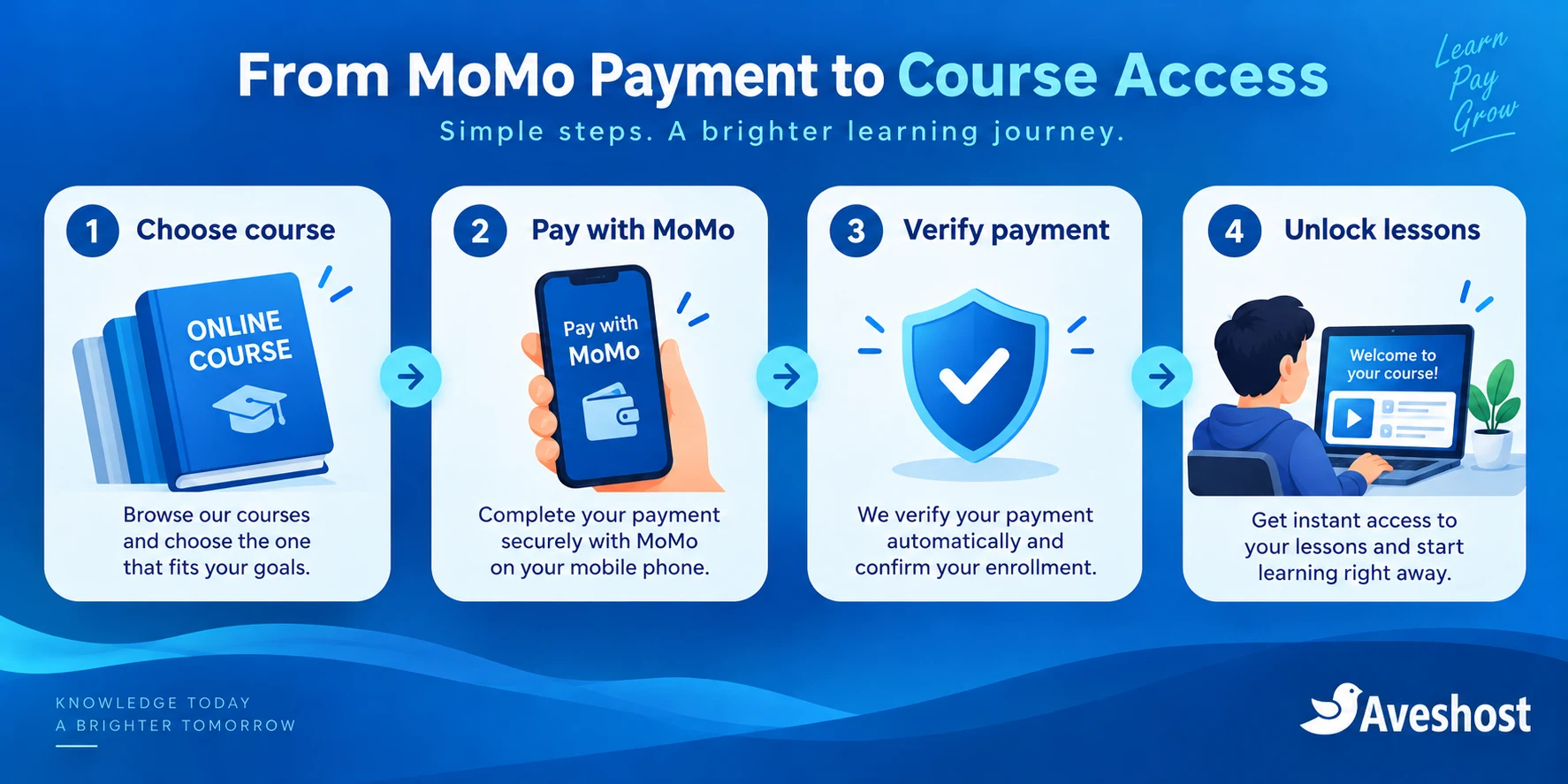
The safe access flow is: learner chooses course → checkout creates order → payment provider confirms payment → integration updates the order → LMS grants access. For a custom integration, verify the transaction on the server, match the amount, currency and reference, validate webhook authenticity and process each successful payment once. Paystack’s webhook documentation explains signed events and retries. A browser redirect or payment screenshot must not be the only evidence used to unlock lessons.
Automatic enrolment is different from automatic recurring MoMo billing. Paystack’s Subscriptions API documents card and Nigerian direct-debit support, rather than automatic MoMo renewal. For MoMo learners, start with a one-time course purchase or a renewal that the learner actively authorises. Define the access period and send a reminder before it ends.
Using monthly course access requires an access-expiry mechanism as well as payment collection. If you add subscription extensions, confirm the gateway, renewal method and LMS behaviour together. Do not sell an “automatic MoMo subscription” simply because the checkout accepts MoMo once.
Host Moodle on VPS in Ghana: the deployment checklist
To host Moodle on VPS in Ghana, use a supported Moodle release and match its documented software requirements. The following checklist uses Moodle 5.2 as a specific example. Other releases can have different requirements; choose the release with your required plugin support and maintenance plan.
The Moodle 5.2 release requirements specify PHP 8.3 or 8.4, a 64-bit PHP build, the sodium extension and max_input_vars of at least 5000. Database options include MariaDB 10.11 or newer, MySQL 8.4 or newer, or PostgreSQL 16 or newer. Match the current point-release requirements rather than combining an arbitrary PHP package with an old database.
- Prepare the VPS, install security updates and configure SSH access and the firewall.
- Install a supported web server, PHP runtime and database; keep database access private.
- Download Moodle from its official source and create a dedicated database account.
- For Moodle 5.1 and newer, configure the web document root to the Moodle public directory.
- Place moodledata outside every web-accessible directory and give the application only the permissions it needs.
- Complete installation, enable HTTPS, configure mail and run the environment checks.
- Set up CLI cron, backups and monitoring before admitting students.
Follow the official Moodle installation guide for the selected version’s directory layout. Keep production program files protected from modification by the web-server process, while allowing the data directory to receive uploads. Do not solve permission errors by making the entire installation publicly writable.
Moodle requires background jobs for scheduled work. Its cron guidance recommends running cron every minute using the appropriate command-line PHP version. Verify the CLI script path in your installed release, run it once as the application user, then schedule it and watch for failed tasks. A functioning homepage does not prove that notifications, cleanup and background processing are working.
For paid Moodle courses, Paystack maintains a Moodle enrolment plugin repository, and its code includes GHS currency support. Its published version metadata does not establish compatibility with every modern Moodle release. Have your developer validate the exact release, directory changes, security and payment behaviour in staging before using it with live learners.
After compatibility is confirmed, enable the Paystack enrolment method, configure test credentials, choose GHS and add the paid method to the course. Check that guest access or an alternative self-enrolment route cannot bypass the intended paywall. If no maintained connector fits your release, arrange a reviewed custom integration or use the WordPress route. Do not keep an unsupported LMS online to accommodate an old payment plugin.
Deliver video lessons without slowing down your classroom
Video delivery is often the biggest bandwidth decision. Keep the LMS focused on lessons, progress, quizzes and access checks. For a growing video library, use a dedicated media-delivery design rather than making the same small VPS serve every high-bitrate video and timed quiz.
For illustration, a 30-minute lesson streamed at an average 1 Mbps uses about 225 MB per complete viewing, before delivery overhead. One hundred complete views use about 22.5 GB. Multiple lessons, repeat views and higher quality add up quickly. Concurrent streams also consume network throughput; the size of a traffic allowance alone does not determine streaming capacity.
- Split long recordings into shorter topic-based lessons.
- Offer suitable lower-resolution options and readable accompanying notes.
- Provide captions or transcripts so learners can revise without repeatedly streaming a video.
- Use authenticated delivery or short-lived signed media links when you need to restrict paid videos.
- Keep live-class hosting separate from the LMS when the live platform has different capacity requirements.
A protected lesson page does not automatically protect a public video URL. Unlisted videos can be shared, and no paywall can prevent all screen recording. Choose the level of protection appropriate to your budget and content value. Test playback on ordinary Ghanaian mobile connections rather than only on office Wi-Fi.

Protect student records and your teaching materials
Collect only the student information needed to deliver the course. Keep attendance, grades, payment references and contact details accessible to the staff who need them. Avoid public lists that expose children’s names, phone numbers or results. Explain what information you collect, how you use it and how a parent or learner can contact you.
Provide an age-appropriate registration and guardian-contact process for younger learners. Separate billing details from teaching permissions. A tutor who marks quizzes does not need access to all payment credentials or hosting settings. Review teacher accounts when staff leave, and keep administrator activity traceable.
Use your own recorded lessons, licensed resources and authorised question material. Do not upload leaked examination papers or advertise guaranteed results. If you reference past questions, confirm your right to reproduce and sell access to them. Present worked solutions clearly and correct errors when learners report them.
Install LearnDash and other paid plugins using valid licences. Avoid nulled themes, pirated LMS plugins and unknown PHP scripts: altered packages can contain backdoors that expose learner records, disrupt checkout and consume server resources. Keep software updated and test changes on staging.
Keep quizzes fast and backups recoverable
Quiz deadlines can create a sudden burst of database activity. Load-test the actual student workflow in staging: sign in, open a quiz, save answers and submit. A fast public homepage says little about the speed of a logged-in assessment.
- Monitor CPU, available RAM, storage and database response times during a pilot class.
- Enable appropriate PHP opcode caching and tune worker limits around available memory.
- Use application-supported object or session caching where it helps; keep cache services private.
- Exclude checkout, account pages, personal progress and quiz responses from public full-page caching.
- Track background task queues and mail delivery instead of only checking the web page.
Moodle’s performance recommendations discuss measuring bottlenecks and tuning the application, database and cache layers. Start with measurements, then adjust the resource that is limiting the experience. For WordPress, our guide to making a WordPress website load faster provides a useful foundation; keep its caching advice aligned with your LMS and checkout.
Back up the database, application configuration and uploaded course files as a coordinated set. For Moodle this includes moodledata; for WordPress it includes uploads and the database. Protect backup credentials and retain at least one copy outside the production server. Test a restore into a separate environment and confirm course access, quiz records and lesson files are recovered.
Automatic backups are valuable only when recovery works. Set an alert for missed backups and failed scheduled tasks. Plan maintenance outside class hours and tell learners how to reach support if access fails.
Test the full learning journey before you launch
| Test | Expected result |
|---|---|
| Unpaid learner opens paid course | Course remains locked |
| Successful test payment | Correct learner receives the purchased course |
| Cancelled or failed payment | No paid access is granted |
| Pending MoMo payment | Clear pending status; no premature enrolment |
| Repeated payment notification | No duplicate access or purchase record |
| Refund or access expiry | Access follows your published rules |
| Parent pays for learner | The intended learner account receives access |
| Learner password recovery | Secure recovery email arrives |
| Quiz on a phone | Answers save and submit correctly |
| Backup restore | Lessons, learner records and access rules recover |
Use ordinary learner accounts for testing. Administrators often have access regardless of a paywall, so testing only as an administrator can hide a broken enrolment rule. Start with test payments, then organise a controlled live payment check with the account owner and reconcile the transaction before opening public enrolment.
Launch with a small pilot group and gather feedback on registration, phone playback and payment instructions. Add courses once the core journey works. A useful course page, dependable lessons and responsive tutor support create a stronger foundation than a large unfinished library.
Ready to launch your online classroom? Explore our managed WordPress hosting for a WordPress LMS or our cloud VPS plans for a custom Moodle deployment. Discuss your project with our team and share your course format, expected simultaneous learners, payment needs and video plan.
Frequently asked questions
Can Ghanaian tutors accept MoMo payments for online classes?
Yes. A supported payment gateway can collect MoMo payments and connect confirmed purchases to course enrolment. Test the gateway and LMS together before launch.
What is the easiest way to build an e-learning website in Ghana?
For tutors familiar with WordPress, LearnDash with WooCommerce and a supported MoMo gateway is a practical route. Moodle suits teams needing a more configurable learning environment.
Is LearnDash free?
LearnDash is a paid WordPress plugin. Budget for its valid licence, hosting and any additional extensions required by your course business.
Can I host Moodle on VPS in Ghana?
Yes. Choose a supported Moodle release, matching PHP and database versions, suitable resources and a plan for updates, cron and backups.
Does Paystack have a Moodle enrolment plugin?
Paystack has an enrolment plugin repository with GHS support. Confirm compatibility and payment security for your chosen Moodle release before production use.
Can MoMo renew my course subscription automatically?
One-time MoMo checkout does not establish automatic recurring billing. Paystack’s documented subscription methods cover cards and Nigerian direct debit; use an authorised renewal flow for MoMo.
Will a payment screenshot unlock a course?
Course access should follow verified payment status from the gateway, rather than a screenshot or browser redirect alone.
Can I keep all lesson videos on the LMS server?
You can for a suitably sized setup, but a growing library needs a video-delivery and bandwidth plan. Separate media delivery when it competes with quizzes and course pages.
How much does a starter Moodle VPS cost?
Our Cloud VPS 2 is GH₵170 per month at the time of writing, with 8 GB RAM and SSD storage. Test the real workload before deciding capacity.
Can Aveshost help with an online classroom and payment setup?
Yes. Contact our support team with your courses, expected simultaneous learners, MoMo integration needs and video-delivery requirements.