To add delivery zones and fees to your Ghanaian online store, configure geographic Shipping Zones in your e-commerce dashboard, attach clear flat-rate or pickup methods to each zone, and group heavy or fragile products into Shipping Classes so the cart calculates the right cedi total before the customer pays with Mobile Money or a bank card. Instead of pausing every sale to call a dispatch rider for a quote, your checkout page shows accurate delivery options immediately.
Unclear delivery pricing is one of the fastest ways to lose an online order in Ghana. When a shopper in East Legon, Tema, Kumasi, or Takoradi adds an item to their cart and sees either an unexpectedly high blanket rate or no clear explanation of how their parcel will arrive, they abandon the checkout and return to asking questions in chat. Worse, if your website undercharges for outer-suburb or bulky deliveries, the difference comes straight out of your product margin.
Key takeaways for Ghanaian store owners: First, standard international postal-code shipping rules do not fit Ghana, because buyers navigate by region, neighbourhood, and landmark rather than ZIP codes. Second, breaking metropolitan areas into clear inner-city, extended-metro, and outer-zone tiers keeps rider fees fair for both central and suburban customers. Third, using product shipping classes prevents a bulky appliance or large hamper from being charged at a motorbike parcel rate. Fourth, whether you collect delivery fees upfront via Mobile Money or let the buyer pay the rider on arrival, the checkout label must state the arrangement explicitly.
Table of Contents
Why Ghanaian Online Stores Need Custom Delivery Zones and Fees
Most e-commerce platforms are built around Western addressing systems where every street has a five-digit or alphanumeric postal code that couriers scan automatically. In Ghana, online shoppers rarely use traditional postal codes at checkout; they identify their location by administrative region, town or suburb name (such as Osu, Spintex, Madina, Adum, or Anaji), and a nearby landmark or GhanaPostGPS digital address.
Out of the box, WooCommerce Shipping Zones recognise Ghana’s 16 regions—such as Greater Accra, Ashanti, Western, Central, Eastern, and Northern. However, a single flat delivery rate for an entire region rarely matches how local dispatch bikes and courier services actually price their trips.
For example, if your shop or studio is in Dzorwulu, sending a motorbike rider to Cantonments or Airport Residential costs far less than sending that same rider to Tema Community 25, Kasoa, or Dodowa. If you set one uniform Greater Accra fee, central buyers feel overcharged while outer-corridor orders force you to top up the rider’s fare from your own profit.
Designing practical delivery zones and fees solves this mismatch. By combining region-level zones with clearly named sub-zone rate options or neighbourhood dropdowns, you give customers predictable checkout pricing while protecting your margins on every dispatch.
Structure Your Delivery Zones Around How Ghanaian Couriers Charge
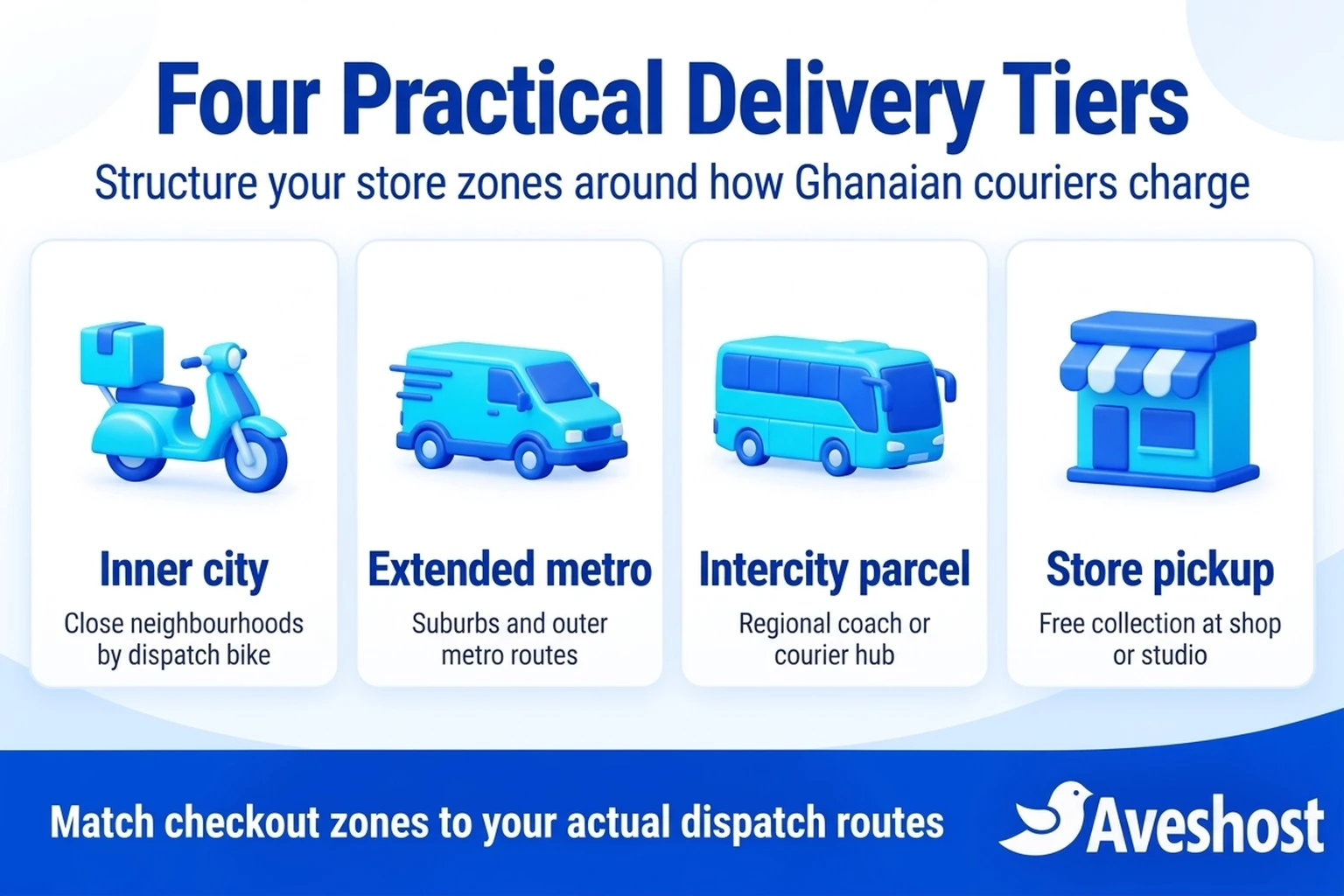
Before opening your WordPress dashboard, map out how packages actually leave your business. Most Ghanaian retail stores—whether they sell fashion, electronics, skincare, books, or food items—rely on a combination of four fulfilment channels: local motorbike dispatch riders, outer-metro courier runs, intercity bus or parcel terminals (such as VIP Jeoun, STC, or OA terminals and domestic courier networks), and customer self-collection.
Rather than listing fifty separate suburb rates that confuse shoppers on a phone screen, group your coverage into four or five transparent tiers. When you structure your delivery zones and fees around real transport routes, both your checkout menu and your daily rider handoff stay simple.
The table below shows an illustrative framework for an Accra-based online store. Adjust the geographic boundaries to match your actual base—for instance, a Kumasi-based merchant would make central Kumasi (Adum, Ahodwo, KNUST, Asokwa) Tier 1 and treat Accra as an intercity regional destination.
| Delivery Tier | Example Areas Covered (Accra Base) | Typical Fulfilment Method | Example Checkout Fee Structure |
|---|---|---|---|
| Tier 1: Inner City Metro | Osu, Labone, Cantonments, Airport, Dzorwulu, Ridge, East Legon | Same-day or next-day dispatch motorbike | Lower flat rate (for example, GH₵25–GH₵35) |
| Tier 2: Extended Metro Suburbs | Spintex, Madina, Adenta, Achimota, Dansoman, Weija, Haatso | Standard metro dispatch bike or scheduled zone run | Mid-tier flat rate (for example, GH₵40–GH₵50) |
| Tier 3: Outer Greater Accra & Surrounds | Tema, Kasoa, Prampram, Amasaman, Oyibi, Dodowa | Outer-corridor rider or next-day courier van | Outer-zone flat rate (for example, GH₵55–GH₵75) |
| Tier 4: Regional Cities & Intercity Hubs | Kumasi, Takoradi, Cape Coast, Tamale, Ho, Sunyani, Koforidua | Bus terminal parcel service or nationwide door-to-door courier | Intercity flat rate covering terminal drop-off plus parcel waybill |
| Tier 5: Store or Studio Pickup | Customer collects directly from your shop or pickup point | In-person handover during stated opening hours | GH₵0 (Free collection with pickup instructions) |
Step-by-Step: How to Add Delivery Zones and Fees in WooCommerce
If your website runs on WordPress and WooCommerce—such as a store hosted on Aveshost WooCommerce Hosting—you can configure your core shipping rules without buying paid extensions. Follow this exact sequence inside your WordPress admin area.
Step 1: Enable shipping calculations and set your store location. Go to WooCommerce → Settings → General. Set your base country and region (for example, Ghana — Greater Accra), set your currency to Ghanaian cedi (GH₵), and under Shipping location(s) select Ship to all countries you sell to or Ship to specific countries only (choosing Ghana). Save your changes.
Step 2: Create your primary metropolitan Shipping Zone. Navigate to WooCommerce → Settings → Shipping → Shipping zones and click Add zone. According to the official WooCommerce Shipping Zones guide, WooCommerce checks zones from top to bottom and assigns the buyer to the first zone that matches their address. Name your first zone Greater Accra Delivery and select Ghana — Greater Accra under Zone regions.
Step 3: Add clearly named Flat Rate methods inside the zone. Click Add shipping method, select Flat rate, and click Continue. Because WooCommerce allows you to add multiple Flat Rate instances inside the same zone, you can create separate, clearly labelled options for inner-city, extended-metro, and outer-corridor areas—for example: Central Accra Dispatch (Osu, Airport, East Legon, Dzorwulu) – GH₵30, Extended Accra (Spintex, Madina, Adenta, Achimota, Dansoman) – GH₵45, and Outer Zone (Tema, Kasoa, Amasaman, Prampram) – GH₵60. These figures illustrate the setup; enter the actual cedi rates your dispatch partners charge.
Step 4: Create your Regional Intercity Shipping Zones. Return to Shipping zones and add zones for the other regions of Ghana. If your courier or bus terminal parcel rate to Ashanti, Central, Western, and Eastern regions is the same, you can group those regions into a single zone named Southern & Middle Belt Regional Delivery and attach two options: VIP / STC Terminal Parcel Pickup and Nationwide Door-to-Door Courier. Create a separate zone for Northern, Upper East, Upper West, Savannah, and North East regions if your courier charges a higher long-distance rate.
Step 5: Add Local Pickup where applicable. Inside your home city zone, click Add shipping method and choose Local pickup. Rename the method title so buyers know where they are collecting from—for example, Free Pickup at Our East Legon Studio (Mon–Sat, 9am–5pm)—and set the cost to 0.
Following these five steps ensures that as soon as a shopper selects their region at checkout, your delivery zones and fees appear in plain language with no hidden surprises.
Suburb Dropdowns vs Multiple Flat-Rate Options: Which Works Best?
When configuring delivery zones and fees for Greater Accra or Kumasi, store owners usually choose between two checkout designs: showing two or three descriptive Flat Rate radio buttons inside the region zone, or replacing the standard Region/City field with a specific neighbourhood dropdown list.
Descriptive Flat Rate radio buttons are the simplest to maintain. The customer selects Greater Accra as their region and then picks the radio button that lists their suburb group. Because it uses native WooCommerce core features, it never breaks during plugin updates. The only drawback is that a hurried shopper in Tema might accidentally select the cheaper Central Accra radio button.
If you notice customers frequently selecting a cheaper inner-city tier for an outer-zone address, you can prevent that by adding custom Ghanaian city/suburb states or a lightweight WooCommerce cities plugin that turns the checkout dropdown into specific neighbourhoods (such as Accra – East Legon, Accra – Spintex, Tema – Community 1 to 25, Kumasi – Adum). That way WooCommerce matches the exact suburb automatically and shows only one valid delivery rate.
Handle Heavy, Bulky or Multi-Item Orders With Shipping Classes
A motorbike dispatch box easily carries three dresses, a pair of shoes, or a smartphone box for one flat fee. It cannot carry a standing fan, a microwave, a 25kg bag of rice, or a fragile multi-tier cake. If your online store sells both small and large products, charging a single flat rate across your entire catalogue will lose money every time a customer orders a bulky item that requires a car or mini-van.
WooCommerce solves this through Product Shipping Classes. Go to WooCommerce → Settings → Shipping → Shipping classes and create classes that reflect the vehicle or handling required—for example, standard-bike-parcel and bulky-car-delivery.
Next, open each bulky product in your catalogue, click the Shipping tab inside the Product data box, and assign it to the bulky-car-delivery class. When you return to your Flat Rate method settings inside each Shipping Zone, you will see new cost fields for each class.
You can also use WooCommerce’s built-in quantity shortcode [qty] inside any Flat Rate cost field. For example, if your courier charges a base rate of GH₵40 plus GH₵10 for each heavy carton in the order, entering 40 + ( 10 * [qty] ) in the bulky class cost field automatically calculates GH₵60 when a buyer orders two cartons, or GH₵50 when they order one. Setting calculation type to Per class: Charge shipping for each shipping class individually or Per order: Charge shipping for the most expensive shipping class lets you control how mixed carts behave.
Upfront Delivery Payment vs Paying the Dispatch Rider on Arrival
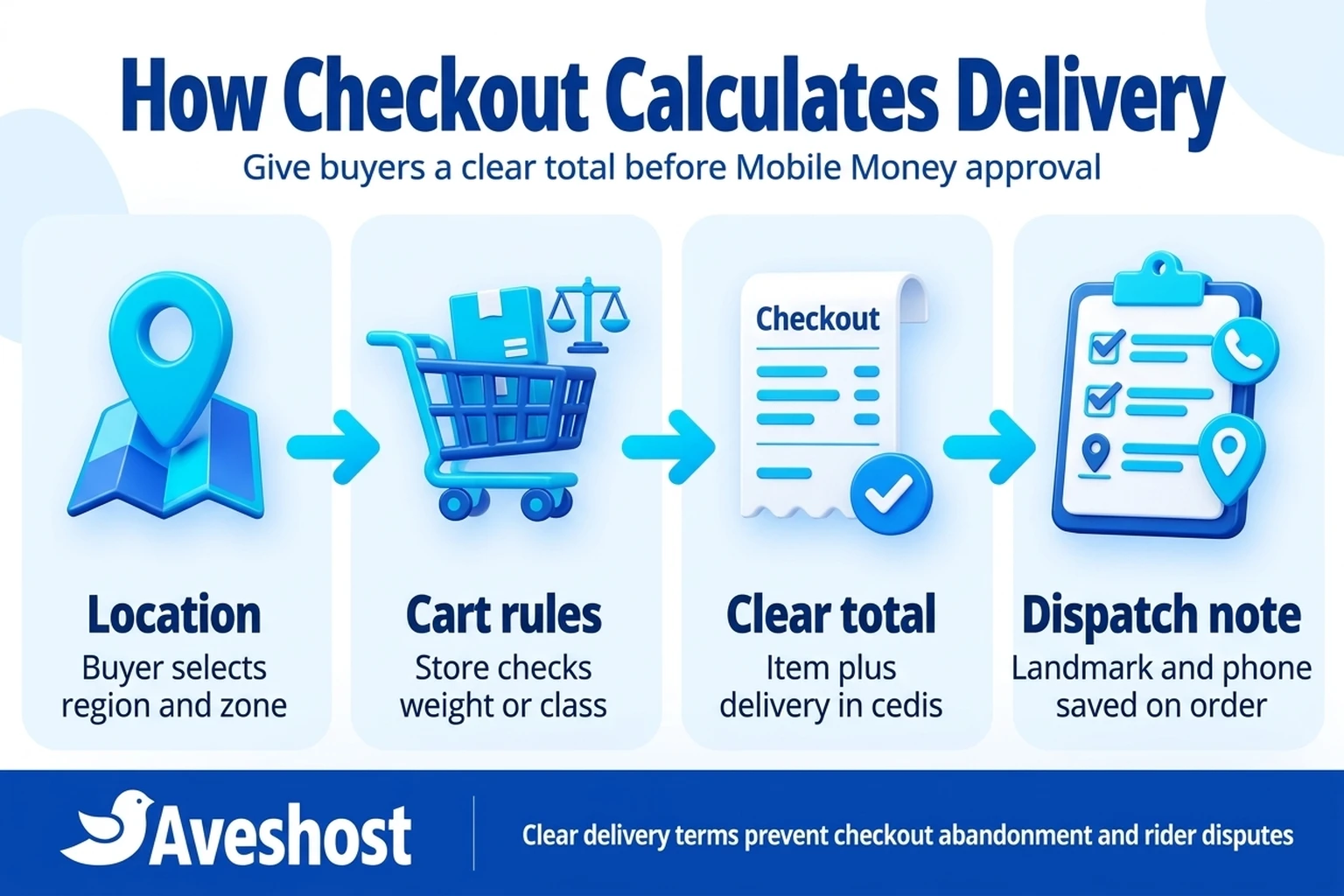
In Ghana, merchants use two different commercial models for collecting delivery money: charging for both the product and delivery upfront at checkout, or charging only for the product online while the customer pays the dispatch rider directly upon delivery.
Charging for the item and delivery together in one verified Mobile Money or card transaction is the cleanest workflow for standard zones. When you connect your checkout to a licensed processor—as detailed in our guide on how to accept MTN MoMo payments on your website in Ghana—the gateway collects the combined product and shipping total and marks the order paid. The rider simply hands over the package at the gate without haggling over fares or looking for cash change.
However, if you use third-party on-demand riders whose fares fluctuate with traffic or distance, you may prefer to let the buyer pay the rider on arrival for outer suburbs. If you choose that approach, never leave the shipping method labelled simply as “Flat rate” or “Free” when the cost field is set to zero. Rename the shipping method title explicitly—for example: Dispatch Bike Delivery (Rider Fee Paid Directly on Arrival)—so the customer understands that their online Mobile Money payment covers the goods only.
Clear checkout wording protects your brand from the most common delivery complaint in Ghanaian online shopping: a customer who paid online believing delivery was included and then refuses to pay the rider at their gate.
| Collection Model | How It Works at Checkout | Best Suited For | Operational Caution |
|---|---|---|---|
| Prepaid Delivery (Item + Delivery Paid Online) | Zone flat rate is added to the cart total and paid via MoMo or card | In-house riders, contracted couriers with fixed zone cards and intercity bus parcels | Review your zone rates periodically so fuel or courier adjustments do not erode margins |
| Item Paid Online, Rider Paid on Arrival | Checkout charges GH₵0 for shipping with a clear label stating rider fee is paid on delivery | Bespoke distances, variable third-party bike apps or unmapped outer towns | State an estimated fare range in your delivery policy so the buyer is prepared |
| Free Delivery Above an Order Threshold | WooCommerce Free Shipping method unlocks when cart reaches a set cedi minimum | High-margin fashion, cosmetics or bundle promotions in metro zones | Restrict free shipping to standard bike parcels in metro zones, not heavy regional cargo |
| Cash or MoMo on Delivery for Entire Order | Buyer places order online and pays for both product and delivery upon arrival | Established repeat customers or verified local office deliveries | Carries higher risk of uncollected parcels and wasted rider trips if unconfirmed |
Set Up Intercity Bus Terminal (VIP / STC) and Nationwide Courier Rates
When you turn your Instagram business into an online store in Ghana, orders quickly arrive from outside your home city. A customer in Kumasi, Takoradi, Sunyani, Cape Coast, or Tamale wants to buy from your Accra storefront and needs to know how the package will travel.
Most Ghanaian online stores offer two intercity choices inside their regional Shipping Zones: Bus Terminal Parcel Delivery (sending the package via VIP Jeoun, STC, or OA parcel offices for the customer to pick up at their local station) and Door-to-Door Courier Delivery (using a domestic courier company that delivers to the buyer’s workplace or home).
When calculating your intercity delivery zones and fees, remember that a bus terminal shipment actually has two cost components: the local dispatch rider fare from your shop to the Circle, Asafo, or Achimota terminal, plus the parcel office waybill fee charged at the counter. For example, if your local rider charges GH₵25 to drop parcels at the terminal and the parcel office charges GH₵30 for a standard package, setting your Intercity Bus Terminal Parcel flat rate to GH₵55 covers the complete leg (or less if you batch five regional orders into a single morning terminal run).
Always add a short note on your checkout or order confirmation page explaining that once the parcel is booked at the terminal, your team will send the buyer the waybill photo, bus or parcel reference number, and driver/office contact via SMS or WhatsApp.
Capture Landmarks, GhanaPostGPS and Active Phone Numbers at Checkout
Accurate delivery zones and fees get the order paid, but accurate address details get the parcel delivered. Standard WooCommerce checkout fields ask for Street address, Apartment/suite, and Postcode / ZIP—fields that often leave Ghanaian buyers unsure what to type.
Customise your checkout fields so shoppers give your dispatch rider the exact information needed on the road:
First, make the Postcode / ZIP field optional or relabel it as GhanaPostGPS Digital Address (Optional). Leaving a strict postal-code validation rule enabled can block Ghanaian customers from completing checkout.
Second, relabel the Address line 1 and Order notes placeholders to prompt for a Popular Landmark—for example: Area / Street & Popular Landmark (e.g., Near East Legon Melcom, opposite the shell station). Riders in Accra, Tema, and Kumasi navigate primarily by landmarks and active phone calls.
Third, require an active Ghana mobile number and consider adding a secondary recipient phone field if your store sells gifts, cakes, or surprise packages. Connecting automated WordPress SMS order alerts ensures the buyer receives an immediate text message confirming their selected delivery zone, total paid, and expected dispatch window.
Use Free Delivery Thresholds Without Hurting Your Profit Margin
Offering free delivery on orders above a certain cedi amount is a proven way to increase average cart value. According to WooCommerce’s Free Shipping documentation, you can add a Free shipping method inside any specific Shipping Zone and set Free shipping requires… to A minimum order amount.
The key in Ghana is to restrict free delivery to the zones and product sizes where your margin can absorb the rider cost. For example, if your average product sells for GH₵180 and a metro dispatch ride costs GH₵35, setting a Free Metro Delivery on Orders Over GH₵500 rule inside your Greater Accra zone encourages customers to buy three items instead of one.
Do not enable that same unconditional free shipping rule inside your distant regional courier zone if heavy intercity waybills cost GH₵120, or you will lose money on bulky regional orders. Because WooCommerce configures methods per Shipping Zone, you can offer free shipping over GH₵500 in your home city while keeping standard paid flat rates for intercity cargo.
How Automated Delivery Zones Save Time and Prevent Lost Orders
Configuring structured delivery zones and fees takes less than an afternoon, yet it changes your daily store operations immediately. Consider an illustrative example of a Ghanaian online store processing 100 orders a month across Greater Accra, Kumasi, and Takoradi.
When delivery fees are quoted manually in chat, staff spend roughly 8 to 10 minutes per order asking for the buyer’s location, checking rider availability, quoting the fare, and waiting for the customer to send a second Mobile Money transfer for delivery. Across 100 monthly orders, that manual back-and-forth consumes 15 hours of staff time and frequently causes buyers to abandon their cart when replies take too long.
Furthermore, if guessing delivery fares in chat leads to undercharging by just GH₵15 on 30 outer-zone orders a month, the business quietly loses GH₵450 every month in unrecovered rider subsidies. Hosting a fast WooCommerce store on Aveshost WooCommerce Hosting (which starts at GH₵30 per month on Woo Basic; check current billing terms and renewal rates at checkout) costs a fraction of the money lost to manual quoting errors and abandoned checkouts. If you run a larger dispatch operation with your own fleet of riders, you can also explore our guide on how to build a courier and delivery tracking portal in Ghana.
Build a Fast, Reliable Online Store With Aveshost
When customers tap through to your checkout page, your delivery zones and fees, product stock counts, and Mobile Money payment prompt should load in seconds. Slow hosting or misconfigured checkout forms frustrate mobile shoppers right at the moment they are ready to pay.
At Aveshost, we provide the hosting, domain, and technical foundation for growing Ghanaian e-commerce brands. Start with Aveshost WooCommerce Hosting or shared web hosting, payable in Ghana cedis via Mobile Money or card. If you want our team to build your online store, structure your Accra and regional delivery zones, and connect your verified payment gateway for you, visit our web design services page or contact our support team today.
Frequently asked questions
How do I add different delivery fees for different areas of Accra in WooCommerce?
Inside WooCommerce → Settings → Shipping → Shipping zones, open your Greater Accra zone and add multiple Flat Rate shipping methods with clear neighborhood labels (such as Central Accra, Extended Metro Suburbs, and Tema / Outer Greater Accra), or install a custom Ghanaian suburb dropdown list so checkout matches each neighborhood automatically.
Why does WooCommerce say 'No shipping options were found' at checkout?
That message appears when the customer’s selected country or region does not match any of your active Shipping Zones, or when a matching zone has no enabled shipping methods inside it. Always configure a fallback rule under ‘Locations not covered by your other zones’ so no Ghanaian region is left without a delivery option.
Should I make the Postcode / ZIP field optional for a Ghanaian online store?
Yes. Most shoppers in Ghana do not use postal codes and will either type 00233 or abandon the form if strict ZIP validation fails. Make the Postcode field optional or relabel it for a GhanaPostGPS digital address, and rely on Region, Suburb, and Popular Landmark fields instead.
Can customers pay for both the product and the delivery fee together with MTN MoMo?
Yes. When you configure flat-rate delivery zones and fees in WooCommerce, the selected delivery fee is added to the cart subtotal automatically. Your payment gateway (such as Paystack or Flutterwave) then charges the combined cedi amount in a single Mobile Money prompt.
What if I want the customer to pay the dispatch rider directly on arrival?
Add a Flat Rate method with the cost set to 0 and rename the method title clearly—for example, Dispatch Rider Delivery (Pay Rider Directly on Arrival). Never leave a zero-cost method labelled simply ‘Flat rate’ or ‘Free’, as buyers will expect free delivery.
How do I charge more for heavy or bulky items that need a car instead of a motorbike?
Create a Product Shipping Class (such as bulky-car-delivery) under WooCommerce → Settings → Shipping → Shipping classes, assign your heavy items to that class, and enter an additional cedi fee for that class inside each zone’s Flat Rate settings.
How should I set up VIP or STC bus parcel delivery for customers outside Accra?
Create a Regional Shipping Zone covering the relevant regions and add a Flat Rate method titled Intercity Bus Parcel (VIP / STC Terminal Pickup). Set the fee to cover both the local rider drop-off to the terminal and the parcel office waybill charge.
Can I offer free store pickup alongside paid delivery zones?
Yes. Add the native WooCommerce Local pickup shipping method to your home city zone, set its cost to zero, and include your shop or studio area and pickup hours in the method title so customers can choose between delivery and self-collection.
How do I offer free delivery on large orders without losing money on distant regions?
Because WooCommerce shipping methods are assigned per zone, add the Free shipping method (with a minimum order amount in GH₵) only inside your local metropolitan zone while keeping paid flat rates on intercity and bulky zones.
Does Aveshost help set up WooCommerce delivery zones and Mobile Money checkout?
Yes. If you order Aveshost’s web design service alongside our WooCommerce hosting, our team can configure your product catalogue, Ghanaian delivery zones and fees, checkout landmark fields, and verified Mobile Money gateway integration.