Fake hosting renewal emails are one of the most common traps targeting businesses, schools, NGOs and online stores in Ghana. The message usually arrives with an urgent subject line claiming your domain name, website hosting, SSL certificate or business mailbox will be suspended within hours unless you click a button and pay immediately.
Because a website outage or lost email address can disrupt customer orders and daily operations, busy owners and finance teams sometimes act on the warning before checking whether the invoice is real. Depending on how the scam is built, clicking that link can expose your control-panel password, redirect a Mobile Money or card payment to a fraudster, or trick you into transferring your domain to an overpriced third party.
In this guide, we explain how to tell the difference between a genuine billing reminder and a scam, how criminals gather domain details to make their messages look convincing, the seven warning signs to check before you pay, and the exact verification workflow your business should follow for every hosting or domain invoice.
Table of Contents
Why Fake Hosting Renewal Emails Target Ghanaian Businesses
Every active website leaves public technical footprints. Anyone can see your domain name, inspect your public DNS records or nameservers, and—for many generic domain extensions—look up registration and expiry information using public directory tools such as ICANN Lookup. Automated scripts run by scammers scan these public records daily and match them with contact email addresses listed on company websites, social media pages and business directories.
When an attacker knows your actual domain name (for example, yourcompany.com or yourbrand.com.gh) and sees which nameservers or email provider you use, they do not need to hack your server to send a convincing lure. They simply insert your domain name and company branding into a template that imitates your hosting provider, domain registrar or webmail platform.
In Ghana, these scams are especially effective when responsibilities are split across several people. A business founder may pay the invoices, an external web designer may have set up the original hosting account, and an administrative assistant or accountant may monitor the general info@ or accounts@ mailbox. When an urgent suspension warning lands in that shared inbox on a busy Friday afternoon, the person reading it may not know the real renewal cycle or which provider actually hosts the site.
Understanding how business email compromise works in Ghana helps put this risk in context. Fraudsters rely on artificial time pressure to bypass normal financial checks—hoping you will click the link in the email rather than logging into your billing portal independently.
Three Types of Hosting and Domain Renewal Scams to Know
Not all renewal scams ask for the same thing. Before your team reviews a suspicious notice, it helps to distinguish the three main patterns targeting website owners: credential phishing, payment diversion and deceptive domain slamming.
1. Credential phishing (account takeover): The email claims your hosting account, cPanel, DirectAdmin or business webmail is about to be deactivated, or that an automatic renewal payment failed. Its button leads to a spoofed login page designed to steal your client-area password, webmail credentials or one-time verification code. Once inside, the attacker can hijack mailboxes, upload malicious files or lock you out of your domain.
2. Direct payment fraud (fake invoices): The message attaches a fabricated PDF invoice or links to a lookalike checkout page requesting a card payment, bank transfer or Mobile Money payment to an unrelated account. For example, a scammer might send a fake invoice for GH₵1,450 claiming your annual business hosting and SSL package is overdue today. These figures illustrate a typical lure; your real billing amount and due date only exist inside your authenticated hosting portal.
3. Domain slamming and bogus SEO listings: Some notices come from unfamiliar companies sending official-looking bills for “Domain Name Listing” or “Search Engine Renewal.” Hidden in the fine print is an admission that the notice is a solicitation, not a bill, or an authorisation to transfer your domain away from your current registrar at several times the normal domain name price in Ghana. Furthermore, ICANN is a global technical coordinator and never bills domain owners directly; any email claiming you must pay ICANN to keep your domain is fraudulent.
| Scam Pattern | What the Message Claims | What the Attacker Wants | Safe Verification Action |
|---|---|---|---|
| Credential phishing | Card declined, account suspended or mailbox password expiring today | Your client portal, control panel or webmail login and OTP | Never click the email link; type your host URL in a new browser tab |
| Fake renewal invoice | Urgent hosting or domain bill with a payment link or new MoMo/bank details | Direct Mobile Money, card or bank payment to a fraudster | Check active invoices inside your authenticated billing portal first |
| Domain slamming notice | Official-looking renewal notice from a registrar or directory you do not use | Unauthorised domain transfer or payment for a useless listing | Verify your real Sponsoring Registrar and ignore third-party solicitations |
| Designer or support impersonation | WhatsApp or email saying your site will go offline unless you send MoMo now | Fast Mobile Money transfer without an official portal invoice | Call your designer on a known number and verify the host invoice directly |
7 Red Flags in Fake Hosting Renewal Emails
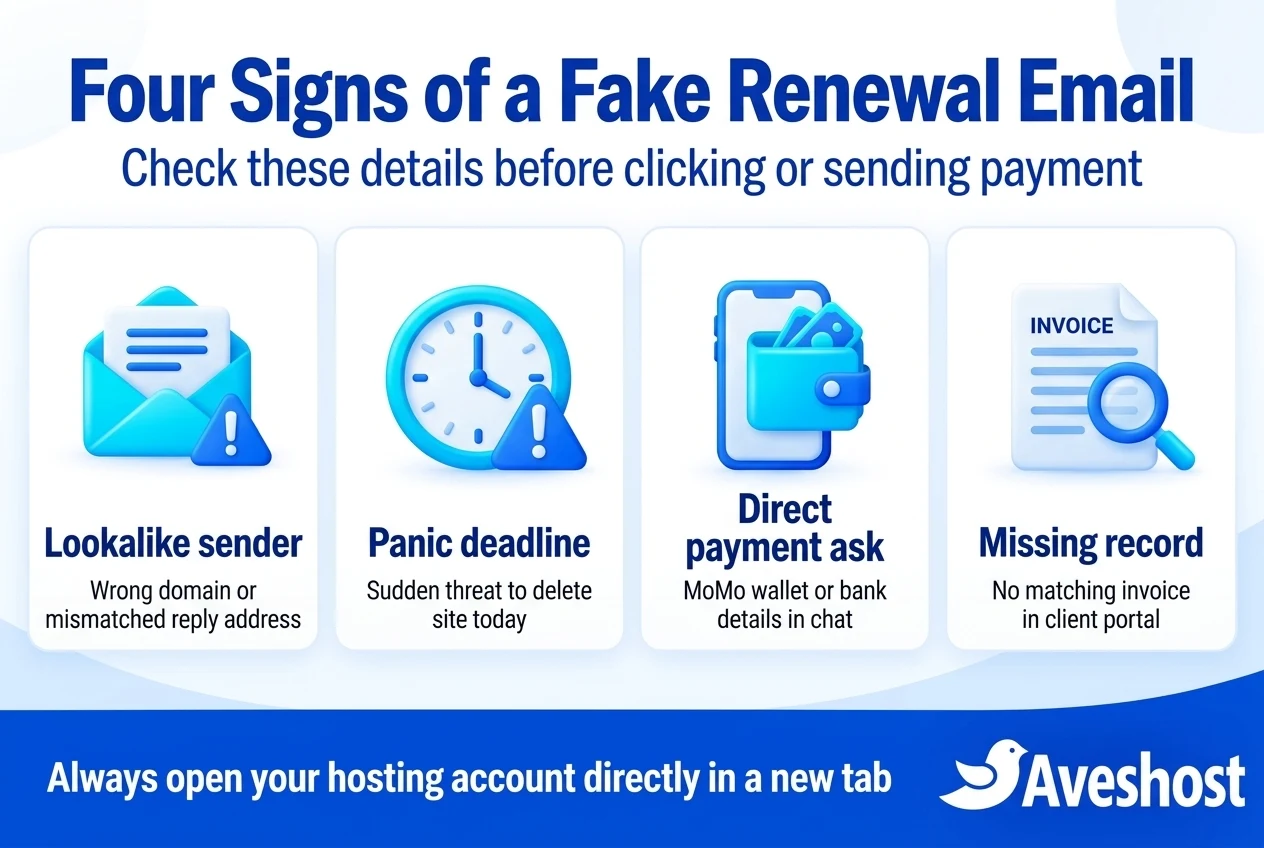
Fraudulent notices often copy official logos, colours and legal footers, so you should never judge an email solely by how neat it looks. Instead, train yourself and your staff to check seven concrete technical and commercial signals whenever a hosting or domain notice arrives.
1. A mismatched sender or Reply-To address: On mobile phones, email apps often show only the sender’s display name—such as “Billing Support” or a hosting company’s name. Tap or expand the header to inspect the full email address between the angle brackets. Scammers frequently send from unrelated domains, free webmail accounts, compromised third-party websites, or lookalike domains with an extra hyphen or swapped letter.
2. Links that point to an unfamiliar web address: Hover your cursor over any “Pay Invoice” or “Keep My Domain” button without clicking it (or long-press gently on mobile only if your mail app previews the URL safely, though opening a separate browser tab is always safer). If the link points to a strange domain, a URL shortener, or a cloud-storage file rather than your provider’s official client portal, treat it as malicious.
3. Panic deadlines without prior reminders: Reputable hosting providers send structured renewal notices well ahead of an expiry date, matched to a numbered invoice in your client area. A sudden message claiming your website and all backups will be permanently erased in two hours unless you pay immediately is designed to cause panic.
4. Requests for direct Mobile Money transfers, PINs or OTPs: Legitimate hosting payments in Ghana follow a structured gateway flow inside your account. As explained in our official Mobile Money payment guide, you select an unpaid invoice in the client portal and complete the prompt through the integrated checkout. We never ask you to send funds to a personal Mobile Money wallet in chat, and no legitimate support team will ever ask for your Mobile Money PIN, password or one-time passcode.
5. Missing or fabricated invoice numbers and service details: Generic phishing emails often say “Your domain name is expiring” without naming the specific hosting plan, billing cycle or invoice number—or they invent a random reference number that does not exist in your account history.
6. Vague add-ons or inflated pricing in foreign currency: Many global phishing templates quote arbitrary US dollar figures for services you never ordered, such as “DNS Traffic Protection” or “Directory Submission Renewal.” If your business uses hosting billed in Ghana cedis, an unexpected foreign-currency demand from an unknown billing system is an immediate warning sign.
7. Unexpected attachments or QR codes: Some attackers attach a ZIP file, an HTML file disguised as an invoice, or a PDF containing a QR code (“quishing”) that directs your phone’s camera to a phishing page outside your computer’s security filters.
How Legitimate Hosting Renewal Notices Compare With Scams
When you know how your actual hosting and domain billing works, spotting an impostor takes less than a minute. With Aveshost web hosting and domain services, every renewal notice corresponds to an active service and a numbered invoice stored inside your Aveshost client area.
Use the comparison table below as a quick reference for your finance team or office administrator whenever a domain, hosting or email billing message arrives.
| Check Point | Legitimate Aveshost Renewal Notice | Typical Fake Renewal Email or Scam |
|---|---|---|
| Where the invoice lives | Always visible inside my.aveshost.com under Billing / My Invoices | Only exists in the email link, attachment or chat message |
| How you access your account | You can open my.aveshost.com directly in a new tab and see the exact same invoice | Requires clicking the email’s special button or scanning its QR code |
| Service and domain details | Lists your exact registered domain, hosting package and billing period | Often vague, or lists bogus add-ons and unfamiliar registrar names |
| Payment method | Paid through the authenticated client portal via supported MoMo, card or official billing instructions | Demands transfer to a personal MoMo number, crypto address or unfamiliar checkout URL |
| Credential & PIN safety | Never asks for your password, OTP or Mobile Money PIN via email, phone or chat | Pressures you to enter login credentials on a linked page or share an OTP/PIN |
Step-by-Step: How to Verify a Hosting or Domain Renewal Safely
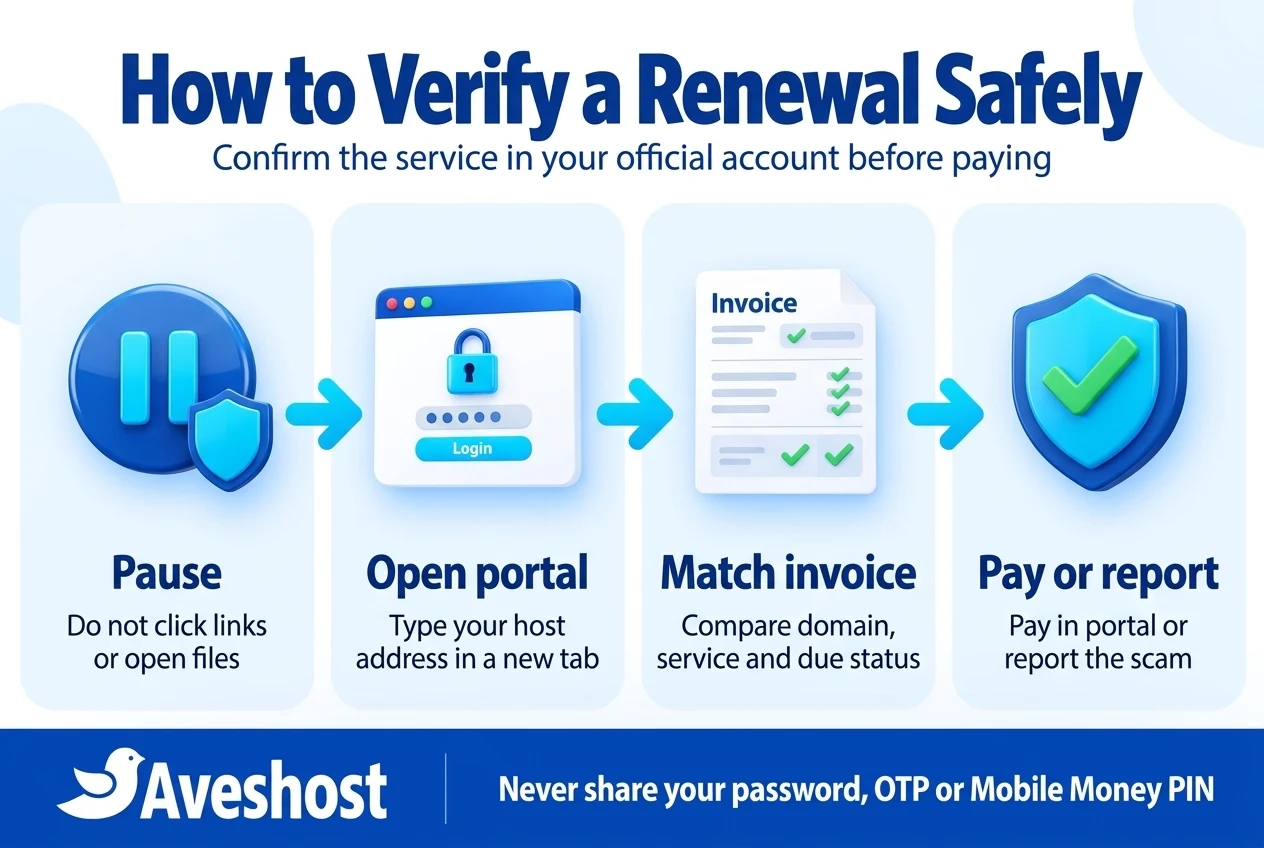
Whenever you receive an email, SMS or WhatsApp message about an expiring domain, hosting plan, SSL certificate or business mailbox, follow this four-step verification habit before taking any action.
Step 1: Pause and do not click anything in the message. Do not click “Renew Now,” “Update Payment Method,” or “Unsubscribe.” Do not open attached HTML or archive files, and do not reply to the sender. Leaving the message untouched prevents accidental credential entry or malicious downloads.
Step 2: Open a fresh browser tab and log in independently. Type my.aveshost.com directly into your browser’s address bar—or use your saved browser bookmark—and sign in to your client portal. If your domain or hosting is managed by another provider, navigate to that provider’s official website manually rather than through the email.
Step 3: Check your active services and invoices. Inside the client portal, inspect your Domains, Services and Unpaid Invoices sections. Check the actual next due date, the invoice number and the amount in Ghana cedis. For example, if your genuine annual hosting plan renews at GH₵420 in four months and your portal shows zero unpaid invoices, an email demanding GH₵980 today to prevent immediate deletion is a scam. (These figures are illustrative examples; always check current domain pricing and your portal invoice for your exact plan rates.)
Step 4: Pay inside the portal or report the scam. If a real invoice is due in your portal, complete payment directly inside that authenticated session. If no matching invoice exists—or if you are unsure why a notice arrived—open a support ticket from inside your client area or contact us through our official support page and share the details of the suspicious email so our team can confirm.
Watch Out for Webmail Password-Expiry and SSL Certificate Traps
Not every renewal scam asks for money up front. Two of the most widespread variations targeting Ghanaian businesses disguise themselves as urgent technical renewals: webmail password-expiry alerts and SSL certificate expiration warnings.
In a webmail trap, an email claiming to come from “Webmail Administrator” or “Mail Server Support” warns that your [email protected] password will expire today and that incoming customer emails are stuck in a queue. It gives you a blue button reading “Keep Same Password” or “Release Pending Messages.” When you click it, a page displaying your email address already pre-filled asks for your current password. As soon as you submit it, the attacker logs into your real mailbox, reads your financial correspondence and sends fake payment instructions to your customers or suppliers.
We do not send unsolicited emails asking you to click an external link to “keep the same webmail password” or “release held messages.” Mailbox passwords and storage quotas are managed directly inside your authenticated hosting control panel (cPanel or DirectAdmin) or your business email dashboard.
Similarly, scammers send urgent notices claiming your website’s SSL security certificate has expired and visitors will see a dangerous browser warning unless you pay an inflated renewal fee on their link. Before reacting, check your website directly in your browser and inspect your hosting account—many modern hosting plans include automated SSL certificates managed by your host, and any paid SSL certificate you ordered will appear in your official client portal.
Four Fake Hosting Renewal Email Scenarios Every Ghanaian Business Should Recognise
Seeing how these scams play out in daily business operations makes it much easier for your team to spot them under pressure. Below are four illustrative scenarios based on common attack patterns reported by SMEs in Accra, Kumasi, Takoradi and Tema.
Scenario 1: The Friday afternoon “Account Suspension” email to accounts@: A logistics company receives an email at 4:15 PM on a Friday claiming its .com domain and website hosting will be terminated at midnight due to a failed card charge. The email includes a “Update Billing / Pay With Mobile Money” button. Because the managing director is in a meeting, the accounts officer clicks the link, enters the company’s billing login, and is then prompted to pay GH₵1,150 to an unfamiliar checkout page. Had the officer opened the real hosting portal directly in a separate browser tab, they would have seen that the company’s annual hosting was already paid and not due for another seven months.
Scenario 2: The “Domain Registry Listing” invoice sent to a school or NGO: A private school administrator receives a formal PDF attachment titled “Annual Domain Name & Search Visibility Renewal” quoting a fee equivalent to GH₵2,400. Buried in tiny text at the bottom of the page is a line stating that the document is an optional solicitation for a third-party directory and not an invoice from the school’s registrar. Checking the domain’s real status in the school’s hosting portal avoids paying thousands of cedis for a service the school does not need.
Scenario 3: The WhatsApp “Hosting Support” impersonator: A boutique online store owner receives a WhatsApp message from an unknown number using a copied hosting company logo as its profile picture. The sender claims the store’s server database is overloaded and demands an immediate GH₵600 Mobile Money transfer to a personal wallet number to keep the checkout online over the weekend. Legitimate hosting providers never collect emergency server upgrade fees through personal WhatsApp wallets; all genuine upgrades and renewals generate an official invoice inside your client portal.
Scenario 4: The compromised freelance designer thread: An attacker compromises a freelance web designer’s personal email account, searches the inbox for past website projects, and replies inside a real email thread to a Ghanaian clinic owner: “Hello, your annual website hosting and domain renewal is due today—please send GH₵850 to our new Mobile Money agent number below.” Because the message arrives inside an old conversation, the clinic owner trusts it. Calling the designer on a known phone number—or checking the clinic’s direct hosting account—immediately reveals that the payment destination was changed by an impostor.
Clarify Who Owns and Pays for Your Domain and Hosting
Many Ghanaian SMEs fall for fake hosting renewal emails because the business owner does not know which email address is registered as the primary billing contact, or whether their freelance web developer registered the domain in the developer’s own account.
Take fifteen minutes to create a clear internal record of your website infrastructure. Every business should document four facts and share them with whoever approves payments:
1. Where the domain name is registered: Confirm the registrar, the exact renewal cycle, and that the domain is registered under the business owner’s official contact details. If you are unsure how domain registration works, read our guide on why your business needs its own domain name in Ghana.
2. Where the website and email are hosted: Record the official client portal URL (such as my.aveshost.com) and the authorised company email address associated with that account.
3. Who receives genuine billing reminders: Ensure your client area lists an active company billing email and phone number that you actually monitor, rather than an old personal address or a former contractor’s inbox.
4. How your designer or IT partner bills you: If an agency manages renewals on your behalf, agree in advance whether you pay the hosting provider directly in the portal or pay the agency against a verified agency contract. Confirm any changes by calling the agency on a known phone number.
How to Protect Your Team From Fake Hosting Renewal Emails
Spotting individual scams is much easier when your accounts and internal payment rules are hardened. Combine user awareness with four technical and operational controls recommended in our website security checklist for Ghana:
Enable multi-factor authentication (MFA) everywhere: Turn on two-factor authentication for your hosting client portal, your control panel, your domain registrar account and every business mailbox. As CISA’s MFA guidance for small businesses notes, strong MFA adds a vital barrier if an employee is ever tricked into typing a password on a spoofed page.
Authenticate your own domain’s email (SPF, DKIM and DMARC): Properly configured SPF, DKIM and DMARC records in your DNS help protect your domain from being forged by spammers and improve how your mail server evaluates incoming messages. Keep anti-spam filtering active on your business mailboxes so known phishing templates are quarantined before they reach staff.
Use a saved bookmark for billing portals: Bookmark https://my.aveshost.com/login.php on the computers used by the business owner and finance lead. Make it a company rule that domain and hosting renewals are only paid by logging in through that bookmark.
Keep renewal funds and reminders organised: Check your upcoming renewal dates in the client portal a few weeks in advance so a genuine renewal never catches your team by surprise—and a fake emergency notice never looks believable.
What to Do Immediately if You Clicked a Link or Paid a Scammer
If you or a staff member already interacted with a suspicious renewal email, fast and calm action limits the damage. What you do first depends on what was shared:
If you clicked the link but did not type anything: Close the browser tab immediately. Do not download or open any file the page tried to serve. Run a security scan on the device and make sure your browser and operating system are updated.
If you entered your hosting or email password on the page: Use a clean, trusted device to open your genuine hosting portal or webmail login directly. Change the exposed password immediately, revoke active sessions where supported, and enable two-factor authentication. If you used that same password on any other account, change it there too. Check your mailbox settings for any unauthorized forwarding rules or reply-to changes that an attacker may have added, as highlighted in Ghana’s Cyber Security Authority account-hijacking advisory. Open a support ticket with us immediately so we can inspect your account logs and help secure your services.
If you sent a Mobile Money, card or bank payment: Contact your Mobile Money operator or bank immediately through its official fraud reporting number. Provide the transaction reference, timestamp, amount and beneficiary details to request urgent tracing or restriction where available. If you entered card details on a phishing site, ask your bank to block and replace the card immediately.
Preserve evidence and report in Ghana: Keep the original email (including its full headers), screenshots of the fake page, payment receipts and wallet or account numbers. Report the incident to Ghana’s Cyber Security Authority (CSA). According to the CSA’s official advisories and phishing guidance, you can report cybercrime incidents via call or SMS to 292, WhatsApp at 0501603111, or email at [email protected]. Confirm current reporting channels on the official CSA website and never pay anyone who messages you claiming they can “hack back” your funds for a fee.
Keep Your Domain, Hosting and Business Email Safe With Aveshost
Managing your website should be predictable and transparent. When you consolidate your domain registration, .gh domain, web hosting and business email in one Aveshost client account, you no longer have to guess which company is supposed to bill you or when your services are due.
Every active service, renewal date and cedi invoice is clearly listed inside your Aveshost client area, where you can pay securely with Mobile Money or card and verify payment status in real time. And if you ever receive an email or message about your domain, hosting or webmail that looks slightly unusual, do not click it—contact our support team and we will verify your account status right away.
Frequently asked questions
How can I tell if a hosting or domain renewal email is fake?
Do not rely on logos or formatting. Check the actual sender email address, hover over links without clicking to see where they lead, and open your hosting provider’s client portal independently in a new browser tab. If there is no matching unpaid invoice inside your official account, the email is a scam.
Does Aveshost ever ask for a Mobile Money PIN or password to renew a service?
No. We never ask for your account password, one-time verification code (OTP) or Mobile Money PIN by email, phone, SMS or WhatsApp. Legitimate renewals are initiated inside your authenticated client portal at my.aveshost.com.
How do scammers know my exact domain name and when it expires?
Domain names, public website links, DNS nameservers and many domain registration expiry records are publicly queryable on the internet. Scammers use automated tools to collect this public data and insert your real domain name into phishing templates.
Does ICANN send domain renewal invoices to business owners?
No. ICANN coordinates the global domain name system and never bills domain owners directly. Domain renewals are always billed through your accredited domain registrar or hosting provider.
What is domain slamming?
Domain slamming is a deceptive practice where an unrelated company sends a notice that looks like a renewal invoice for your domain. Paying it either buys a useless directory listing or authorises transferring your domain to a different registrar at inflated prices.
Are webmail password-expiry emails real?
Unsolicited emails telling you to click a link to keep your current email password or release held messages are credential-phishing scams. Manage mailbox passwords and storage only by logging into your official hosting control panel or business email dashboard directly.
What should I do if I entered my password on a fake renewal page?
Open your real hosting or email portal on a trusted device immediately, change the password, enable two-factor authentication, and check for unauthorized email forwarding rules. Contact your hosting provider’s official support team right away so they can review your account security.
What should I do if I already sent Mobile Money to a fake hosting invoice in Ghana?
Call your Mobile Money provider or bank immediately through its official fraud line with the transaction ID, amount and recipient details. Preserve the email and payment screenshots, notify your hosting support team, and report the fraud to Ghana’s Cyber Security Authority (call/SMS 292, WhatsApp 0501603111 or email [email protected]).
Can I move my domain and hosting into one Aveshost account to simplify renewals?
Yes. Consolidating your domain registration, web hosting and business email under one Aveshost client account gives you a single dashboard at my.aveshost.com to track expiry dates and pay genuine cedi invoices.
Does a padlock icon on a payment page prove the renewal link is legitimate?
No. The browser padlock only means the connection between your browser and that website is encrypted (HTTPS). Scammers routinely put valid SSL certificates on phishing websites. Always check the actual domain name in your browser’s address bar.