To accept MTN MoMo payments on your website in Ghana, your business needs an approved merchant account, a secure website with HTTPS and an integration that verifies each transaction before an order is marked paid. Simply typing a Mobile Money number on a page and asking buyers to send screenshots on WhatsApp creates reconciliation delays, missed orders and avoidable disputes.
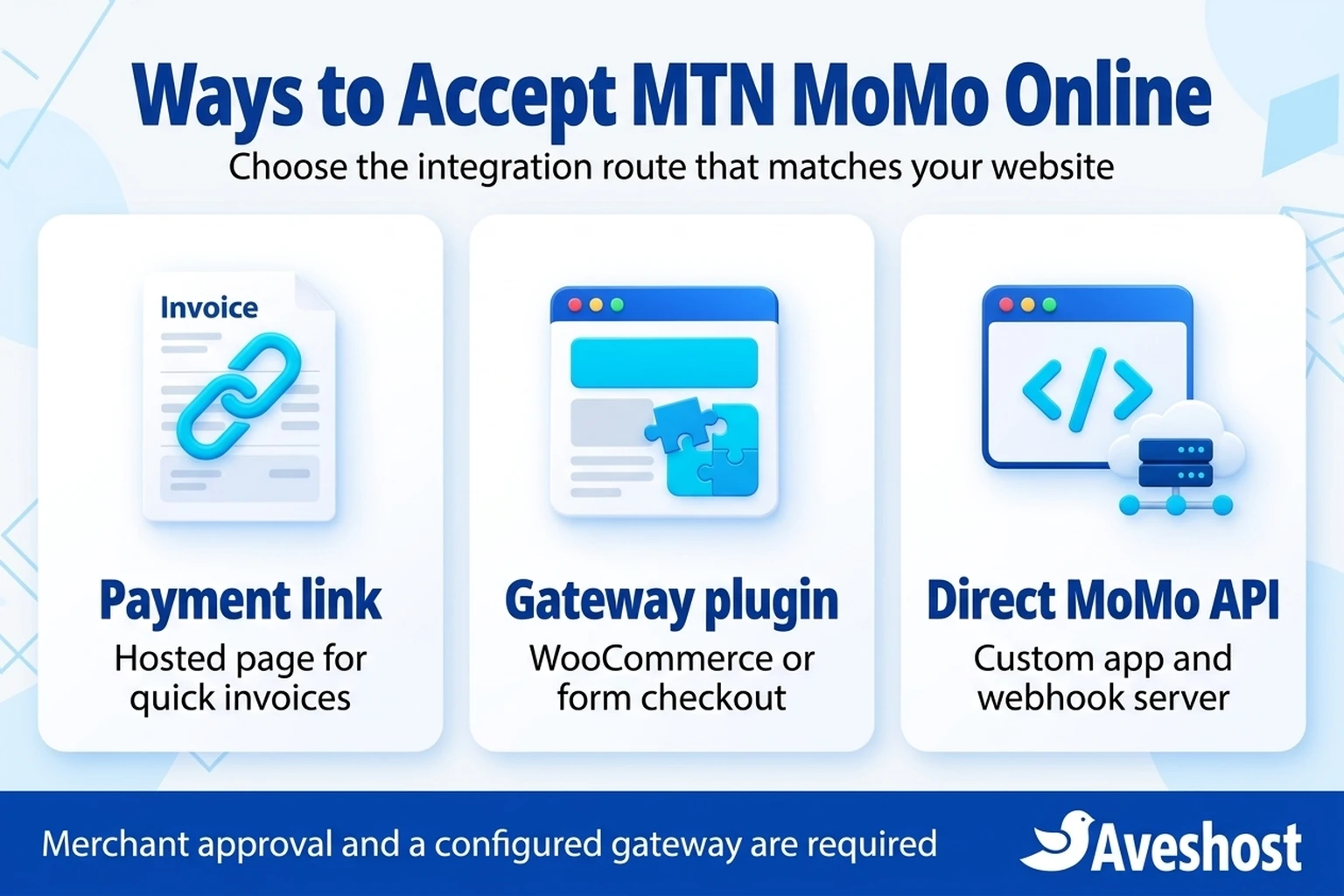
Most Ghanaian businesses connect MTN Mobile Money through one of three routes: hosted payment links for service invoices, a licensed payment gateway plugin on WordPress and WooCommerce, or a custom integration using a gateway API or the MTN MoMo API. Each route has different onboarding rules, technical dependencies and maintenance responsibilities.
At Aveshost, we host business websites, online stores and custom applications across Ghana. This guide explains how online MTN MoMo collections work from checkout to bank or wallet settlement, how to compare the three integration routes, how to calculate collection fees and hosting costs in Ghana cedis, and how to configure and test your checkout safely. All monetary figures below are Ghana cedi examples that illustrate the calculation rather than current merchant quotations.
Table of Contents
How online MTN MoMo website payments work
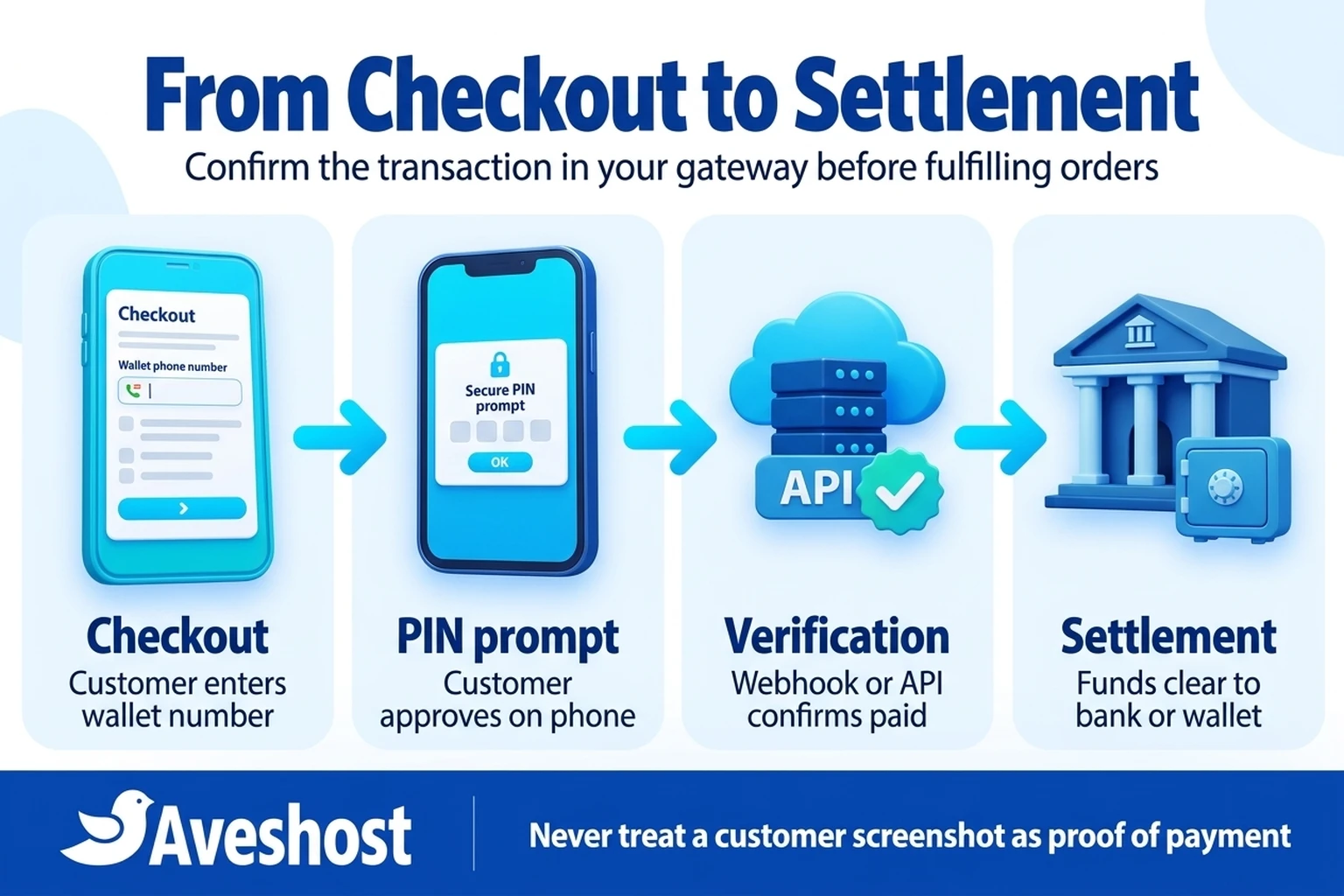
An online MTN Mobile Money payment is a verified digital request rather than a manual peer-to-peer transfer. When a customer reaches your website checkout, they enter their MTN phone number and submit the order. Your payment gateway or API sends a collection request to MTN, which triggers an authorisation prompt on the customer’s handset or through their USSD wallet menu.
Once the customer approves the debit with their Mobile Money PIN, MTN processes the wallet transaction and notifies the gateway or your callback endpoint. Only after your website verifies that confirmed transaction record against the expected order amount and reference should the order status change from pending to paid.
Keep four stages separate in your operations: checkout submission, customer PIN authorisation, gateway payment confirmation and merchant settlement. A customer clicking your checkout button has only started an order, and a successful payment in your gateway dashboard is still separate from the later payout into your business bank account or settlement wallet.
Understanding this flow prevents the most common operational mistake in Ghanaian e-commerce: dispatching goods or unlocking digital downloads before the payment processor has confirmed the collection.
Compare the three ways to add MTN MoMo to a website
Your first decision is choosing the integration method that fits your website platform and technical team. Most businesses do not need to build a direct telecom integration from scratch when a licensed payment gateway already bundles MTN MoMo alongside other local networks and bank cards.
Route one is a hosted payment page or payment link provided by a licensed gateway. You generate a payment page inside your merchant dashboard and link to it from a button on your website or send it with an invoice. This requires minimal code, though it does not automatically update a multi-item shopping cart unless connected through webhooks.
Route two is an e-commerce or form plugin on a self-hosted WordPress website, such as connecting WooCommerce to Paystack or Flutterwave. Installing the plugin is free, but merchant approval and a configured gateway are required before live payments work. Our comparison of Paystack, Flutterwave and Hubtel for Ghanaian websites explains how these providers differ on WordPress support, fees and settlement.
Route three is a direct API integration—either against a gateway’s REST API or directly against the MTN MoMo API. Direct MTN MoMo API integration suits software teams building custom web applications with dedicated backend servers, webhook queues and status-polling workers, rather than a standard retail store.
| Integration route | Best suited for | Technical setup required | Channels included |
|---|---|---|---|
| Hosted payment link or button | Service deposits, consultations and simple single-item payments | Merchant account approval and a button link on your website | MTN MoMo plus other channels enabled on your gateway account |
| WordPress and WooCommerce gateway plugin | Online stores, digital downloads, bookings and multi-item carts | Paid web hosting, HTTPS, WooCommerce and live gateway API keys | MTN MoMo, other local wallets and cards supported by the gateway |
| Custom gateway REST API | Bespoke web portals, school systems and SaaS platforms | Custom backend code, signed webhook handler and transaction verification | All channels enabled on the gateway merchant profile |
| Direct MTN MoMo Open API | Custom fintech or enterprise platforms needing direct telecom endpoints | VPS or cloud backend, sandbox/production credentials, callback listener and polling worker | MTN Mobile Money only unless other providers are integrated separately |
Prepare your business documents and merchant approval
No plugin or code snippet can collect live MTN MoMo payments without merchant compliance. Payment aggregators and telecom operators in Ghana require Know Your Customer (KYC) and business verification before enabling live collections and settlements.
Before starting technical setup, gather your business registration documents, tax identification details, valid national identification for directors or proprietors, and a verifiable business bank account or registered merchant wallet in the company’s name. If your business operates in a regulated sector, the processor may request additional licences.
Your website itself is part of the compliance review. Reviewers typically check that your domain loads over HTTPS, displays clear product or service descriptions with prices in Ghana cedis, provides working contact details and includes refund, delivery and privacy policies.
If your business currently sells only in chat or on a free trial builder subdomain, setting up your own domain and hosting first makes merchant verification much smoother. Compare your options in our guide to free versus paid website hosting in Ghana.
Set up MTN MoMo on WordPress and WooCommerce
For most Ghanaian retail shops, pharmacies, fashion brands and digital creators, WordPress with WooCommerce on paid hosting is the most practical way to accept MTN Mobile Money online. You control your product catalogue, order database and customer emails while the gateway processes the payment.
Start by installing WordPress and WooCommerce on a hosting plan with an active SSL certificate. Next, install the official plugin for your chosen gateway, such as the Paystack WooCommerce Payment Gateway from the WordPress plugin directory. Remember to separate free software from a live financial service: downloading the plugin costs nothing, but you must still hold an approved merchant account.
Inside your gateway dashboard, confirm that Mobile Money is enabled under your payment channels. Copy your Test Public Key and Test Secret Key into the WooCommerce payment settings first, and copy the plugin’s webhook URL back into your gateway dashboard so asynchronous payment confirmations reach your store.
Once test transactions update order statuses properly, switch the plugin from Test Mode to Live Mode using your Live API keys, and run a small real MTN MoMo purchase to confirm the complete customer experience from prompt to order receipt. You can also compare platform ownership in our WooCommerce versus Shopify in Ghana guide.
When to use the direct MTN MoMo API or a custom backend
Some businesses build custom web applications in Node.js, Python, PHP or Go where a standard WooCommerce plugin does not apply. In those cases, your engineering team can integrate either a payment aggregator’s REST API or the official MTN MoMo API.
With the direct MTN MoMo Collections product, your server initiates a Request to Pay call with a unique reference ID, amount, currency and payer wallet number, then awaits completion. As detailed in MTN’s callback documentation, your system should support both asynchronous callback notifications and active status polling, because a customer may approve the PIN prompt while your callback endpoint is briefly unreachable.
Never mark an order paid solely because an unauthenticated HTTP request hit your callback route. Store the incoming event safely, then query the provider’s status endpoint or verify the cryptographic webhook signature against your saved order reference, expected currency and exact cedi amount.
If your developers need a dedicated environment to test webhooks and status workers before going live, follow our step-by-step MTN MoMo API staging server guide using a Linux VPS.
Separate payment confirmation, screenshots and settlement
Moving from manual MoMo transfers to website checkout requires clear internal rules for your staff. When customers pay manually, sellers often ask for a screenshot of the SMS debit alert on WhatsApp. Do not accept screenshots as proof of payment: images can be edited, forwarded twice or sent when a transaction actually failed or reversed.
With a properly integrated website checkout, your source of truth is the verified transaction record in your payment gateway dashboard and the matching webhook confirmation in your website’s order log. Train your fulfilment team to check the gateway reference ID and confirmed paid status before releasing stock or booking a service slot.
Also distinguish payment confirmation from fund settlement. When a customer completes an MTN MoMo checkout at 8:00 pm, the gateway confirms the payment immediately so you can prepare the order, while the collected funds may settle into your bank account or merchant wallet on the next working day or according to your processor’s settlement schedule.
If your business combines website product pages with WhatsApp customer service, see our WhatsApp shop versus your own website guide for practical ways to answer buyer questions in chat while keeping payment verification inside your website checkout.
Handle subscriptions, deposits and failed MoMo prompts
Not every online payment is a one-time retail purchase. Gyms, software services, schools and membership clubs in Ghana often ask whether MTN MoMo can charge customers automatically every month. Separate automatic invoice generation from automatic wallet collection.
Unless your payment provider has specifically approved and enabled a recurring Mobile Money mandate or tokenised debit product for your merchant account, standard MoMo checkout requires the customer to authorise each payment with their PIN. For example, the Paystack WooCommerce plugin documentation notes that automatic subscription renewals apply to Mastercard and Visa cards, whereas other payment channels place the renewal order on hold so the customer logs in to approve the next payment.
Design your checkout around real handset behaviour as well. An MTN MoMo push prompt can time out if the customer has poor network reception, is on a phone call, enters the wrong PIN or has insufficient wallet balance. When a prompt expires, your website should keep the order pending and allow the buyer to retry payment without re-typing their entire delivery address.
If a customer states they were debited on their phone while your website still shows pending, do not ask them to pay a second time immediately. Check the transaction status in your gateway dashboard or run a status query first so you can reconcile late network callbacks cleanly.
Calculate gateway fees, settlement and hosting costs in Ghana cedis
Budgeting for online MTN MoMo collections requires combining per-transaction processing fees with your annual website infrastructure costs. At the time of writing, Paystack’s Ghana pricing page lists 1.95% for local collections with no monthly integration fee, while Flutterwave’s Ghana pricing page lists 2% for Mobile Money collections excluding applicable taxes.
Consider a clear arithmetic example in Ghana cedis. Suppose your online store processes GH₵15,000 in MTN MoMo orders during a month. At a 1.95% collection fee in this example, the processing fee is GH₵292.50, leaving GH₵14,707.50 before any applicable taxes or transfer charges. At a 2% collection rate in the same example, the fee is GH₵300, leaving GH₵14,700.
Now add the fixed website infrastructure needed to run that store reliably: for example, an annual WooCommerce or web hosting plan at GH₵600 per year (GH₵50 per month) and a custom domain renewal at GH₵220 per year. These figures illustrate the calculation; always check your gateway merchant schedule and current hosting invoice.
Check whether your business will absorb the gateway fee inside your product price or display an itemised service charge where permitted by your merchant agreement and local rules. Clear totals at checkout reduce cart abandonment.
| Cost item (example figures) | How it is billed | Example calculation in Ghana cedis |
|---|---|---|
| Gateway MoMo collection fee | Percentage deducted per successful transaction | On GH₵100 order: GH₵1.95 at 1.95% (net GH₵98.05) or GH₵2.00 at 2% (net GH₵98.00) |
| Monthly store volume example | Percentage across total confirmed monthly sales | On GH₵15,000 monthly MoMo sales: GH₵292.50 at 1.95% or GH₵300.00 at 2% |
| Website or WooCommerce hosting | Recurring annual or monthly hosting invoice | Example GH₵600/year (works out at GH₵50/month) for hosting, SSL and email |
| Custom domain name | Annual domain registration and renewal | Example GH₵220/year to keep your branded web and email address active |
What your web hosting needs for reliable MoMo checkouts
Even the best payment gateway cannot complete orders if your website times out when a webhook arrives. Online checkout requires consistent server uptime, valid SSL/TLS certificates, current PHP and database versions, and enough memory to run WooCommerce without dropping connections.
When a customer approves an MTN MoMo prompt on their phone, the payment processor sends an HTTPS POST request to your website’s webhook URL. If your hosting server is asleep on a free tier, blocked by a misconfigured firewall or out of PHP worker processes, that webhook can fail and leave paid orders stuck in pending status.
Ensure your domain’s HTTPS certificate renews automatically so webhook deliveries are never rejected due to an expired certificate. Also configure transactional email delivery (with SPF, DKIM and DMARC) so order confirmation receipts reach customers immediately after payment.
Protect your store administration as well: use strong unique administrator passwords, restrict who can edit payment gateway settings or settlement bank details, and keep independent off-site backups alongside your host’s scheduled server backups.
Step-by-step launch checklist before taking live payments
Before announcing your new checkout to customers, run through a structured launch check so every technical and operational step is verified. Start in sandbox or test mode and confirm that your checkout form validates Ghanaian phone numbers cleanly and displays order totals in Ghana cedis.
Next, verify that your webhook URL is registered in the gateway dashboard, returns an HTTP 200 response and updates the matching order only after signature or API status verification. Test both a successful payment and a cancelled or timed-out prompt to confirm that unpaid orders never trigger fulfilment.
After switching to live API keys, place a real small-value MTN MoMo order from an ordinary customer phone. Confirm that the USSD/app PIN prompt appears promptly, the website updates the order to paid, the customer receives a receipt email and the transaction appears in your gateway settlement queue.
Finally, document the reconciliation routine for your staff: who checks the gateway dashboard each morning, how refunds are authorised and how bank or wallet settlements are matched against your accounting records.
Host your MTN MoMo website or store with Aveshost
At Aveshost, we provide the hosting foundation Ghanaian businesses need to run fast, dependable online checkouts. Our WooCommerce hosting and WordPress hosting plans include NVMe SSD storage, free Auto SSL, LiteSpeed performance, domain-matched business email and automated backups so your checkout pages and webhook endpoints stay responsive.
If you are launching a service website with payment links, our shared web hosting plans give you an affordable starting point, while developers building custom Node.js or Python MTN MoMo API listeners can deploy on our self-managed VPS hosting with full root access.
You can also pay for your own Aveshost hosting and domain invoices in Ghana cedis using Mobile Money by following our Mobile Money payment guide. Where your invoice payment method uses manual submission, set a renewal reminder so your domain and SSL stay active year-round.
If you want us to build your e-commerce store or need help choosing the right hosting plan for your payment workflow, contact Aveshost support or explore our professional web design service. We will help you launch a checkout your customers can trust.
Frequently asked questions
Can I accept MTN MoMo payments on my website without a registered business?
Most licensed payment gateways and telecom merchant services require identity and business verification before enabling live collections and settlements. Check the specific onboarding tier of your chosen gateway before launching.
Should I integrate the MTN MoMo API directly or use a payment gateway like Paystack or Flutterwave?
Most online stores and service websites in Ghana should start with a licensed payment gateway because it provides ready-made WordPress/WooCommerce plugins and supports MTN MoMo alongside other wallets and bank cards. Direct MTN MoMo API integration is best reserved for custom software teams with dedicated backend servers.
Is the Paystack or Flutterwave WooCommerce plugin free to use?
Downloading and installing the WordPress plugin is free, but you must have an approved merchant account with the gateway and pay the applicable per-transaction collection fee on live payments.
Why doesn’t the MTN MoMo PIN prompt appear on the customer’s phone sometimes?
Common causes include an incorrect phone number format, temporary mobile network congestion, an active voice call or a pending USSD session. Good checkouts let the customer retry or dial the provider’s USSD approvals menu to complete a pending prompt.
Can I use a customer’s WhatsApp screenshot of an MTN MoMo SMS as proof of payment?
No. Screenshots can be altered or reused. Always verify that the transaction status is marked paid inside your payment gateway dashboard or verified webhook log before fulfilling the order.
Does MTN MoMo go straight into my bank account when a customer pays on my website?
When you use a payment gateway, the payment is confirmed immediately at checkout while the actual funds are settled to your linked business bank account or settlement wallet according to the gateway’s settlement schedule, such as the next working day.
Can I charge automatic monthly subscriptions with MTN MoMo on WooCommerce?
Standard Mobile Money checkouts require the customer to authorise each payment with their PIN. Unless your provider has enabled a specific recurring mandate product for your account, subscription renewals generate an invoice that the customer must log in and approve manually.
Do I need HTTPS (SSL) on my website to accept MTN Mobile Money?
Yes. Payment gateways and modern browsers require HTTPS encryption to protect checkout data and deliver webhook notifications securely. Aveshost shared and WordPress hosting plans include free Auto SSL.
Can I accept MTN MoMo payments on a free website hosting plan?
Most free website builders block third-party checkout plugins and custom webhook endpoints unless you upgrade to a paid commerce plan. A paid shared or WooCommerce hosting plan gives you full plugin support and reliable webhook handling.
What should I do if a customer says MTN debited their wallet but my website shows the order as pending?
Look up the transaction reference in your payment gateway dashboard first or trigger a status verification check. If the gateway confirms the payment succeeded, update the order; if it failed or reversed, share the gateway status reference with the customer before asking for another payment.