
A courier tracking website in Ghana gives customers a place to check delivery progress without calling your dispatcher for every update. Whether you operate a small rider network in Accra, serve shops in Tema or manage deliveries across several towns, your portal can keep parcel records, status changes and customer notifications in one workflow.
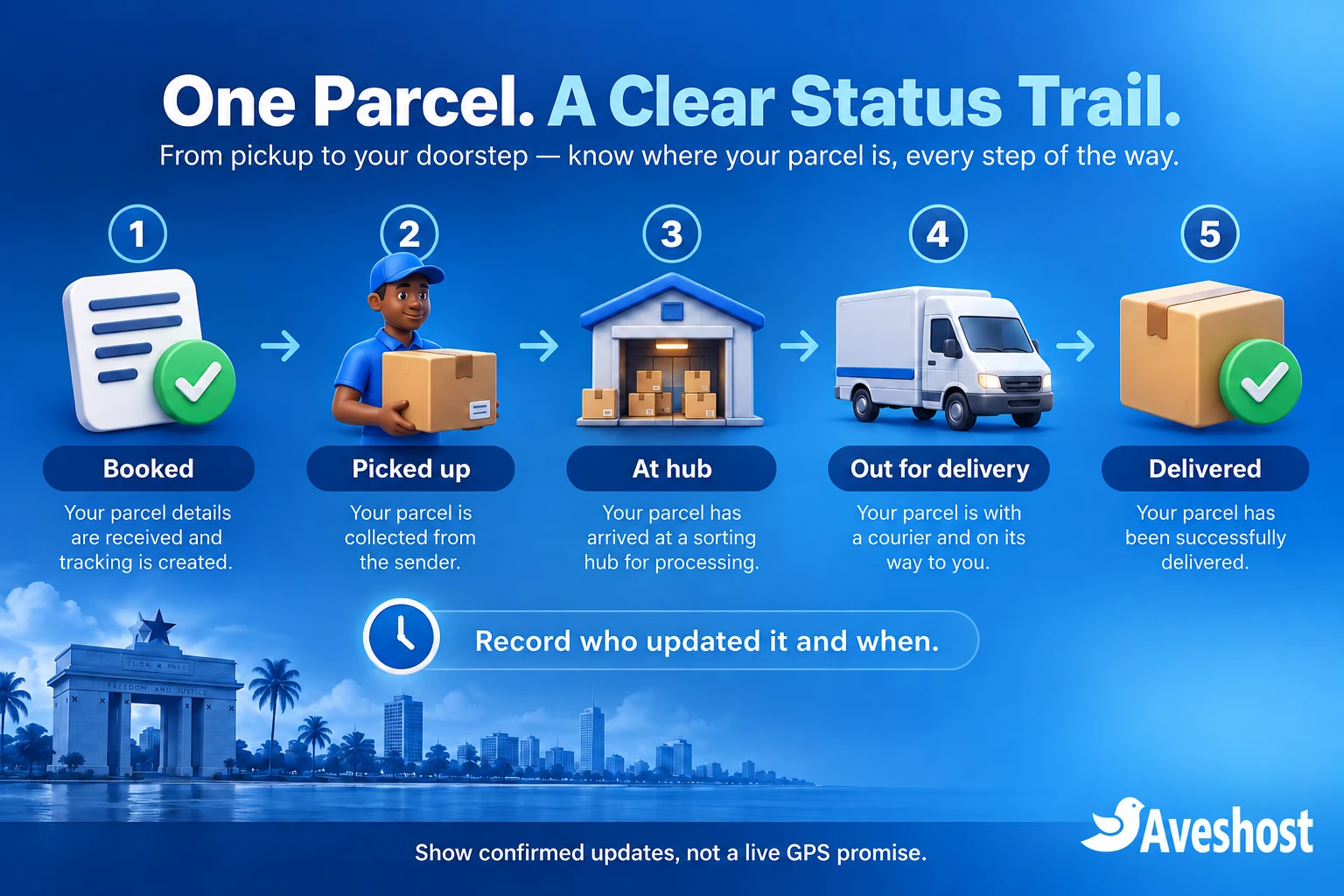
Start with reliable milestone tracking: booked, picked up, out for delivery and delivered. A tracking page shows the latest confirmed event. It does not automatically show a rider’s live position, predict an arrival time or confirm that a parcel has reached the recipient.
This guide uses WordPress and WPCargo for a practical starting point, with a separate integration plan for Ghanaian SMS alerts. It explains which functions come from the core plugin, where paid extensions or development are needed, and how to keep personal delivery information out of public results.
Table of Contents
Plan your courier tracking website in Ghana
Choose the problem you want the first version to solve. A customer tracking page, an internal dispatch board and a live fleet management system are different products. For a small independent courier, a useful first release is a parcel register, clear status history, controlled staff access and transactional SMS notifications.
| Function | First-release approach |
|---|---|
| Customer tracking | Look up a parcel and show a limited status timeline |
| Dispatch administration | Create records, assign responsibility and correct errors |
| Rider updates | Use a tested restricted interface, or relay updates to a dispatcher |
| Notifications | Send selected confirmed events through an SMS provider |
| Delivery evidence | Keep authorised proof and exception records privately |
List your delivery areas, normal operating hours and how customers contact support. Make service descriptions specific: same-day delivery within selected areas is different from a guaranteed arrival time. Publish terms covering unsuccessful attempts, returns, complaints and prohibited items.
Check your operating requirements with the Postal and Courier Services Regulatory Commission. Building a website does not replace the licensing and operational responsibilities that apply to your courier business. Keep the digital project connected to the way your dispatch operation actually works.
Design the parcel status workflow
Agree the meaning of each status before choosing colours or designing a dashboard. “Booked” means the details exist; it should not tell the customer that a rider has collected the parcel. “Delivered” should follow your completion and evidence procedure, rather than a convenient button press.
| Status | What it should mean | Who confirms it |
|---|---|---|
| Booked | A delivery request has been recorded | Dispatcher |
| Picked up | The parcel has been collected from the sender | Authorised rider or dispatcher |
| At hub | Received at an actual sorting or transfer point | Hub staff; omit this stage if you have no hub |
| Out for delivery | Assigned for the final delivery attempt | Dispatcher or authorised rider |
| Delivered | Recipient handover confirmed under your process | Authorised rider with required evidence |
| Attempted / Returned / Cancelled | An exception with a recorded reason | Staff member with appropriate authority |
Record the event time, staff identity and a short operational note. Keep internal remarks separate from the customer message. “Recipient requested another attempt tomorrow” can be useful operationally; a full telephone conversation, home access instruction or private dispute belongs in restricted records.
Add rules for corrections and delayed submissions. A late update should preserve when the event happened and when the server received it. Do not erase the earlier history simply to make the timeline look tidy. If an older event arrives after delivery, it should not move the current parcel back to “Picked up”.
Choose WordPress tools and budget for extensions
WPCargo Track & Trace provides core shipment management, a tracking form, shipment history and email notifications. It is a practical WordPress option for a small portal. Install the current supported version and confirm compatibility with your WordPress, PHP, theme and extension versions in staging.
The free core is the starting point. Frontend Manager, proof of delivery and SMS features are separate parts of the product ecosystem. WPCargo’s Proof of Delivery extension lists Frontend Manager and Custom Field add-ons as additional requirements. Budget for the complete dependency set, licences, renewals and setup work before buying.
When comparing parcel tracking software in Ghana, test the permissions and workflows your operation needs. Searching for a dispatch delivery script for WordPress can produce attractive demos with very different feature sets. Check the rider interface, permission boundaries, updates, documentation and support, then test them yourself. Avoid pirated scripts, nulled plugins and unlicensed themes; a backdoor in the portal can expose customer information and consume server resources.
A custom application becomes useful when you need stricter assignment rules, a dedicated offline rider app, complex merchant billing or integrations that the supported extensions do not provide. That is a separate development project. Start with a clear requirements list rather than treating a tracking plugin as a complete dispatch platform.
Set up your domain and hosting
Use a business-owned domain and a clear address such as track.yourbusiness.com. Keep the domain, hosting and SMS accounts under the business’s control. Our domain search helps you choose an available name; use a short hostname that customers can recognise in a message.
A small WordPress portal can start on a suitable hosting plan. Our managed WordPress hosting includes SSD storage, SSL and staging tools. Select capacity for parcel records, concurrent lookups, staff sessions and any uploaded evidence. Keep a test environment separate from live deliveries.
For custom workers, APIs or application services, explore our self-managed Linux VPS plans. They come with SSD storage and root access. Your administrator handles the operating system, application deployment and worker processes on a self-managed service; agree management requirements if you need help running it.
Plan backups and background processing at the same time as hosting. A tracking page can be lightweight while the queue behind it still needs reliable execution. If your SMS integration uses scheduled jobs, configure a supported server-side scheduler or worker and monitor it; low website traffic should not prevent alerts from being processed.
Use HTTPS throughout and individual staff accounts. Exclude tracking results and authenticated dashboards from shared page caching. Test cache and CDN behaviour so one customer’s lookup is never served as someone else’s result.
Install WPCargo and create a tracking page
Install WordPress in your staging environment, choose a lightweight theme and enable HTTPS. In the dashboard, open Plugins → Add New, search for WPCargo Track & Trace, confirm the official listing and install and activate it. Use fictional test parcels while building the site.
Under WPCargo → General Settings, configure your status names, branding and tracking page. The official general settings guide documents the status list and Track Page setting. Use labels your team understands, and keep those names consistent with your notification mapping.
Create a page called “Track Your Parcel” and place this in a WordPress Shortcode block:
[wpcargo_trackform]WPCargo also documents [wpcargo_trackresults] for a results page. Follow its shortcode reference when using a separate form and result layout. Confirm the selected Track Page and test the complete lookup instead of relying on the presence of a form alone.
Add the tracking page to your navigation, together with service areas, delivery terms and support information. Keep it out of public use until you have completed the result privacy checks below. A working shortcode does not establish that the default output is appropriate for your customers.
Create the first parcel and its history
In the WordPress dashboard, open Shipments → Add Shipment. Add the sender and recipient details your operation needs, the origin and destination, relevant parcel information and the initial status. WPCargo’s shipment creation guide explains its standard fields and generated shipment title.
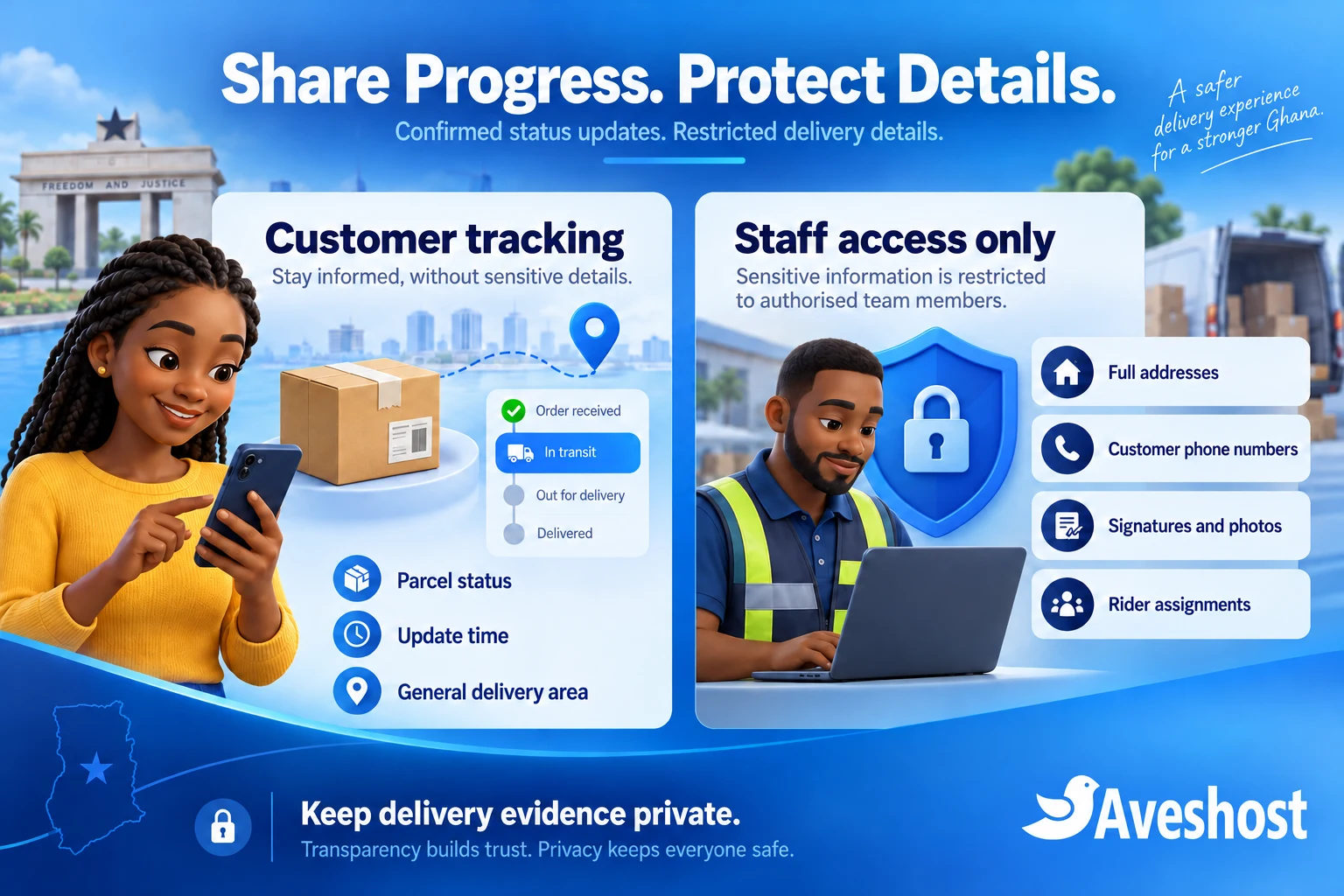
Capture enough address information for a successful handover: a valid digital address where available, locality, landmark, contact number and necessary delivery instructions. Keep these operational details restricted. A customer tracking timeline usually needs a general area such as “Tema”, not the full destination.
Use a unique customer-facing reference. Built-in automatic numbering should be reviewed for predictability before an anonymous lookup goes live. A sequential reference such as DEL-1001 is easy to enumerate. Have your developer configure a cryptographically random reference, enforce uniqueness and check that the selected plugin field and lookup actually use it.
Keep your internal record ID separate from the customer reference if needed. A random reference reduces guessing but remains a bearer secret: someone who receives it may be able to look up the parcel. Sensitive details need authenticated access or a separate verification step, rather than relying on a difficult-to-guess number alone.
Save the test parcel, find it through the tracking page and add a pickup event. Confirm that the visible status and history agree. If a merchant order created the request, store that order reference as a link between systems; an order confirmation does not mean the parcel has been picked up.
Protect customer details in tracking results
Design the customer result as a deliberately limited view: tracking reference, current status, timestamp and a general operational area. Keep full names, telephone numbers, detailed addresses, signatures, photos, rider assignments and private remarks out of anonymous responses.
WPCargo documents server-side result template customisation, including the shipper and receiver section. Use a child theme or supported extension mechanism and build the allowed public view for your installed version. If Custom Field add-ons are enabled, follow their corresponding template guidance too. Keep these changes under version control.
Removing a section with CSS only hides it on screen; it can still be present in the response. Check the HTML, network responses, print views, alternate result routes and downloads. The result should omit private data before it leaves the server. Re-test the view after plugin and theme updates.
Add rate limits and generic failed-lookup messages, and protect dashboards with login and authorisation checks. Turn off shared caching for result responses. Use noindex directives where appropriate and keep parcel results out of sitemaps, but remember that search directives are not access controls.
Tracking references can leak through URLs, analytics, browser history, support screenshots and forwarded SMS messages. Use a restrictive referrer policy, keep advertising and unnecessary analytics off the result page, and avoid logging complete tracking links. For higher-risk deliveries, require an account or a properly implemented verification step.
Give dispatchers and riders the right access
For the first pilot, a trained dispatcher can maintain records while riders report confirmed events through your existing operational channel. This keeps the workflow small while you test the portal. It does not require every rider to receive WordPress administrator access.
For direct rider updates, evaluate WPCargo Frontend Manager with the required driver and proof-of-delivery extensions. The documented role capabilities vary by extension and administrator configuration. Verify access with real test accounts before distributing credentials.
Your acceptance requirement should be clear: a rider sees only assigned work and the fields needed to complete it. Test read access and update access separately, including direct URLs and altered record identifiers. A hidden menu is not sufficient protection. If the selected extensions do not enforce your requirements, commission the necessary access checks before launch.
Keep dispatcher, rider, merchant and administrator accounts separate. Limit who can reassign parcels, change delivery addresses, override a completed status or delete records. Record the acting user and retain a correction trail. Remove access promptly when a rider or contractor leaves.
Check the interface on affordable phones and mobile data. Test what happens when a submission times out: riders need a clear acknowledgement before treating an update as saved. Do not promise offline synchronisation unless you have implemented and tested it. Riders should stop safely before using the portal.
Connect parcel updates to SMS alerts
Choose an SMS provider that fits your delivery workflow and budget. Our guide to Arkesel, mNotify and Hubtel compares three SMS providers in Ghana and explains how to connect them to WordPress. Review their account setup, sender ID approval, message charges and delivery coverage before choosing. Connecting SMS alerts to WPCargo shipment events requires a compatible connector or a tested integration.
WPCargo publishes an SMS integration for Twilio. For a Ghanaian provider such as Arkesel or mNotify, obtain a verified compatible connector or build and test an adapter. Do not describe either provider as natively supported by WPCargo unless the installed connector explicitly provides that integration.
The adapter should create a notification only after a genuine status event is saved. WPCargo documents the wpcargo_after_save_shipment hook, but an ordinary save is not automatically a new status event. Your developer must inspect the installed version, compare previous and current state and account for every enabled update path.
Use this as an integration design, not copy-and-paste plugin code:
Confirmed status event saved
  -> Create one notification record for event + recipient + channel
  -> Queue the approved SMS template
  -> Send through the provider from the server
  -> Store provider reference and submission outcome
  -> Reconcile delivery reports and uncertain results
Keep notification creation durable and unique. A repeated save or callback should not send another copy. Put a failed submission into a monitored retry process with bounded backoff. If a request times out after the provider may have accepted it, reconcile the outcome rather than blindly sending again. Confirmed duplicates can cost money and confuse customers.
| Event | Example SMS content |
|---|---|
| Picked up | Your parcel {reference} has been collected. Track its progress: {tracking_link} |
| Out for delivery | Your parcel {reference} is out for delivery today. Check the latest status: {tracking_link} |
| Attempted delivery | We could not complete delivery of parcel {reference}. Contact our dispatch team to arrange the next step. |
Use the recipient contact appropriate to that notification, normalise Ghanaian numbers to the provider’s required format and validate them before sending. Keep full addresses, access instructions, payment credentials and sensitive parcel contents out of SMS. Separate transactional alerts from promotional campaigns.
Store API keys securely on the server, outside browser code and public repositories. Use approved sender details and check both the HTTP result and the SMS provider’s response. API acceptance, handset delivery and parcel delivery are three different events.
Begin with controlled test recipients and monitor queued, submitted, failed and delivery-reported messages. Track message segments and credit balance; long or Unicode messages can change billing. For more background, see our WordPress SMS integration guide.
Record proof of delivery and handle exceptions
Define what evidence confirms a handover: the recipient’s acknowledgement, a permitted signature or an appropriate delivery photo under your policy. The proof-of-delivery add-on supports signature capture and driver delivery updates with its listed dependencies. Verify exactly what your installed package records and where those files are stored.
Evidence must remain behind authorised access, including the file itself. A private dashboard can still expose a signature through an unrestricted media URL. Test direct access while logged out and from another merchant or rider account. Store only what is necessary, explain the purpose and apply a retention period.
If you introduce a delivery code, make it short-lived, attempt-limited and verified on the server. Bind it to the correct parcel and delivery attempt, prevent reuse and do not treat access to a phone number as complete proof of identity. A code is a separate workflow to implement; the core tracking form does not supply it.
Keep collection of cash-on-delivery funds separate from proof of delivery. Record amounts, receipts and reconciliation without storing customer payment PINs or wallet credentials. A “Delivered” event does not establish that the merchant has received settlement.
For failed attempts, record a structured reason and agree the next step. Preserve who authorised a return or address change. When a customer disputes a completed delivery, staff should be able to review the original event and evidence without exposing it through the public tracking page.
Test, launch and maintain your portal
Run a pilot with fictional parcels first, then a small group of controlled live deliveries. Use ordinary rider, dispatcher and merchant accounts rather than testing everything as an administrator. Include a phone on a separate internet connection.
| Test | Required outcome |
|---|---|
| Correct and incorrect references | Limited results for valid lookups; safe failure for invalid ones |
| Unassigned parcel access | Riders and merchants cannot read or update another account’s work |
| Private field inspection | Addresses, contacts and evidence absent from anonymous HTML and downloads |
| Repeated status save | One intended notification, with no duplicate sending |
| SMS timeout or provider rejection | Recorded outcome, controlled retries and staff visibility |
| Lost mobile connection | No false confirmation that an unsaved rider update succeeded |
| Delivered and corrected events | Consistent current status with an auditable history |
| Backup restoration | Records, configuration and private evidence recover successfully |
Back up the WordPress database, application files, protected evidence and integration configuration. Encrypt independent copies and test a restoration away from the live portal. Disable SMS sending in the restored test environment so recovery exercises do not notify customers.
Monitor uptime, failed logins, queue age, API errors, storage growth and SMS balance. Alert someone who can act when the queue stops moving. Review supported software updates in staging and check the tracking result customisations before applying them to production.
Address the applicable responsibilities under Ghana’s Data Protection Act, 2012 (Act 843). Publish a privacy notice, control staff access, review your processors and set retention rules using the Data Protection Commission’s guidance. A hosting plan or tracking plugin does not establish compliance by itself.
After launch, measure how often customers use tracking, how quickly staff record events and how many delivery-status calls still reach dispatch. A lightweight portal succeeds when its information is trustworthy. Improve update discipline before adding a live map or more complicated automation.
Ready to build your courier tracking website in Ghana? Explore our WordPress hosting, Linux VPS plans and business domains, or discuss your delivery portal and SMS integration with our team. Share your parcel volume, rider workflow and customer access requirements so we can plan the right setup.
Frequently asked questions
Can I build a courier tracking website in Ghana with WordPress?
Yes. WordPress with a supported tracking plugin can provide a starting point. Plan permissions, privacy, notifications and operational updates before launch.
Does a tracking portal show live rider GPS automatically?
No. This guide uses confirmed status events. Live GPS needs a separate location collection, mapping and access-control design.
Is every WPCargo feature included in the free plugin?
No. Rider dashboards, proof of delivery and SMS functions can require paid extensions, dependencies or custom development.
Can I connect Ghanaian SMS providers to shipment updates?
Yes, through a verified compatible connector or a tested server-side adapter. Do not treat a generic SMS plugin as a complete shipment integration.
Should the public result display customer addresses and phone numbers?
No. Keep anonymous results limited to appropriate status information and put operational details behind authorised access.
Is a random tracking reference enough to protect sensitive records?
No. It reduces guessing, but anyone holding the reference may be able to use it. Sensitive records require stronger access controls.
Should riders receive WordPress administrator accounts?
No. Give each rider a restricted account and test access to assigned work, including direct requests.
Does an accepted SMS request mean the parcel was delivered?
No. API acceptance, SMS delivery reporting and physical parcel delivery are separate events.
Do I need a VPS for a small tracking portal?
A suitable WordPress hosting plan can support a small launch. A VPS is useful for custom APIs, workers or workloads needing more control.
Can Aveshost help build the portal and connect SMS alerts?
Yes. Contact our support team with your parcel volume, rider access needs and preferred SMS provider to discuss the project.