
Learning how to prepare your online store for AI shopping agents is quickly becoming the highest-ROI technical upgrade in e-commerce. Instead of typing short keywords into a search bar and clicking through ten product tabs, millions of buyers now ask autonomous assistants—including ChatGPT Shopping, Google AI Mode, Perplexity Shopping, and Microsoft Copilot—to research, compare, and purchase products on their behalf.
Unlike human shoppers who are persuaded by lifestyle banners and clever slogans, AI shopping agents evaluate online stores like deterministic data engines. When a shopper prompts an assistant to “Find waterproof trail running shoes under GH₵ 1,500 in stock with 3-day shipping and free 30-day returns,” the agent parses structured product feeds, on-page JSON-LD schema, and live inventory APIs in milliseconds.
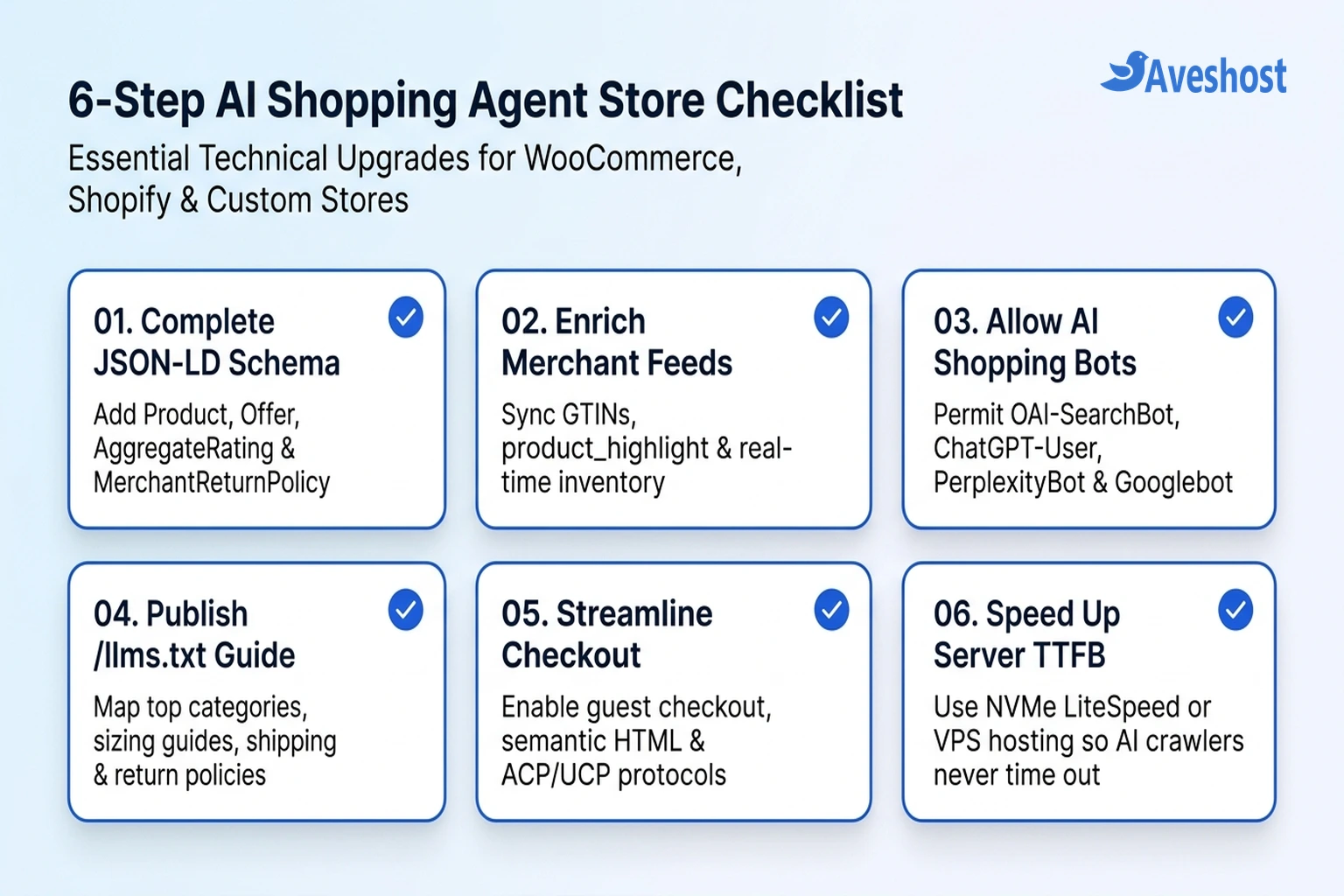
If your product pages hide specifications inside images, serve outdated stock counts, block AI search crawlers, or force mandatory account creation at checkout, AI shopping agents simply skip your store and recommend a competitor. This step-by-step guide walks you through the exact six-part technical checklist to make your WooCommerce, Shopify, or custom online store ready for agentic commerce.
Table of Contents
How AI Shopping Agents Discover, Compare, and Buy Products
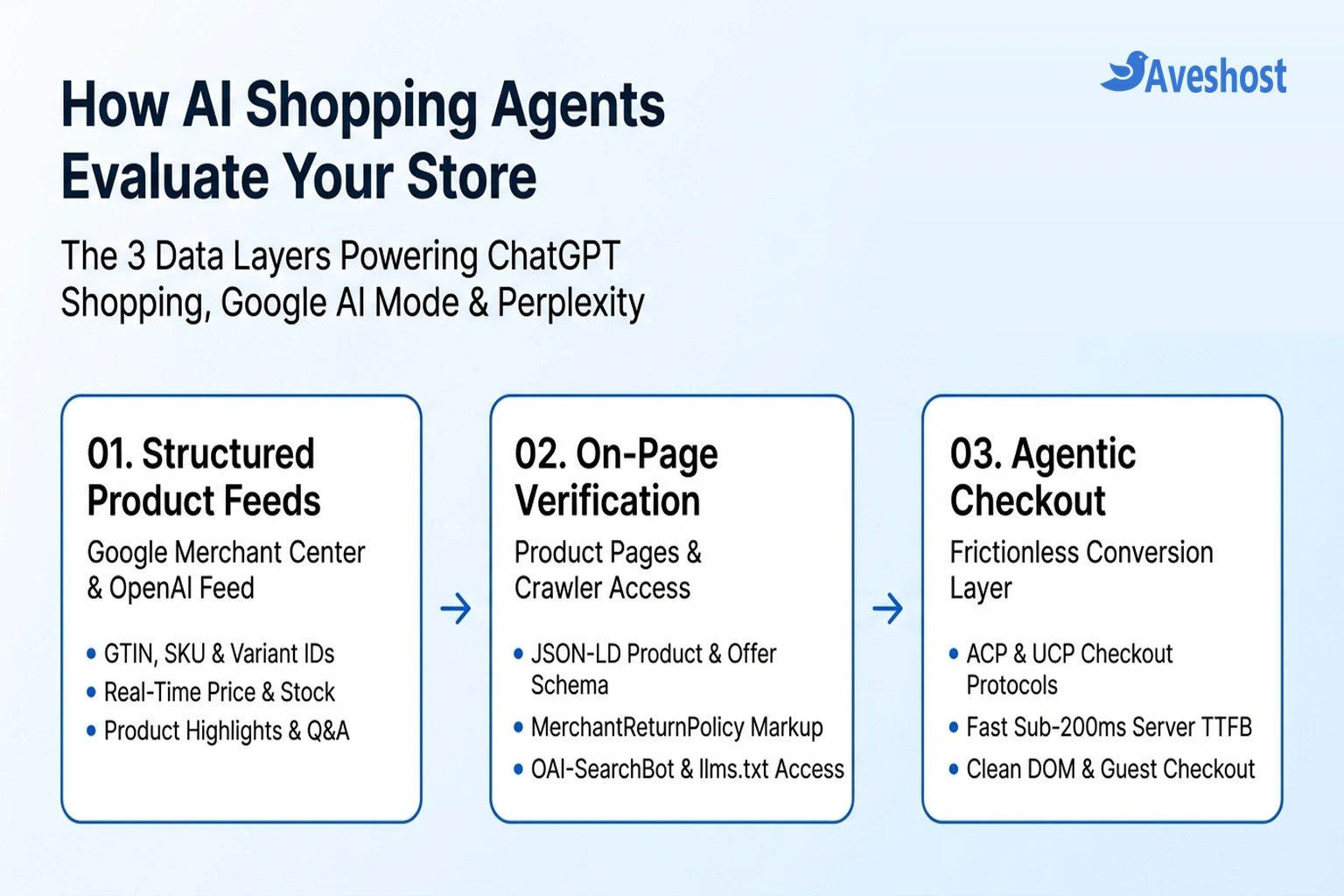
Traditional e-commerce SEO focused on ranking category pages for broad two- or three-word queries. By contrast, AI shopping agents operate across three connected technical layers: structured merchant feeds, live on-page schema verification, and agentic checkout protocols.
When a user asks an AI assistant for a product recommendation, the model translates that conversational prompt into a strict set of filtering constraints—such as price ceiling, exact dimensions, compatibility, shipping region, return window, and verified customer rating. It then queries its underlying commerce index (such as Google’s Shopping Graph or OpenAI’s merchant product feeds) and sends a live verification bot to your product detail page (PDP) before displaying a recommendation card or initiating checkout.
Understanding what each major AI shopping platform reads from your store is the first step toward optimizing for them:
| AI Shopping Platform | Primary Crawler / User-Agent | Primary Product Data Source | Checkout & Purchase Mechanism |
|---|---|---|---|
| ChatGPT Shopping (OpenAI) | OAI-SearchBot & ChatGPT-User | OpenAI Merchant Product Feeds + on-page Schema.org JSON-LD | Direct merchant links or Instant Checkout via Agentic Commerce Protocol (ACP) |
| Google AI Mode & AI Overviews | Googlebot & Googlebot-Image | Google Merchant Center (Shopping Graph) + on-page Product Schema | Direct merchant product cards or native checkout via Universal Commerce Protocol (UCP) |
| Perplexity Shopping | PerplexityBot & Perplexity-User | Real-time web index, Merchant APIs, and on-page JSON-LD structured data | One-click ‘Buy with Pro’ agentic checkout or direct store checkout link |
| Microsoft Copilot Shopping | bingbot | Microsoft Merchant Center feed + Schema.org Product markup | In-chat product comparison cards linking directly to merchant PDP/cart |
Step 1: Deploy Complete Product, Offer, and Return Policy JSON-LD Schema
Most e-commerce themes output only bare-bones Product schema—typically just the product title, image, and price. While that was enough for classic Google rich snippets, AI shopping agents require deeper structured data to answer follow-up buyer questions without hallucinating.
Specifically, every product detail page on your store should output valid JSON-LD containing:
1. Global Identifiers (sku, gtin13 / gtin14, mpn, and brand): AI agents use GTINs and MPNs to match your product across review sites and verify that your store sells the authentic model requested by the shopper.
2. Live Pricing and Stock Status (Offer): Include exact price, priceCurrency, availability (https://schema.org/InStock), and itemCondition. Never let cached schema show InStock if the variant is sold out in your database.
3. Shipping and Return Terms (OfferShippingDetails and MerchantReturnPolicy): AI shopping agents heavily favor stores that explicitly declare delivery transit times, shipping rates, and return windows in machine-readable schema.
Here is a production-ready JSON-LD template showing the complete structure AI shopping agents look for on a product page:
{
  "@context": "https://schema.org/",
  "@type": "Product",
  "name": "AeroPulse Pro 65W GaN USB-C Laptop Charger",
  "image": [
    "https://example.com/images/aeropulse-65w-front.webp",
    "https://example.com/images/aeropulse-65w-ports.webp"
  ],
  "description": "Compact 65W GaN fast charger with dual USB-C PD 3.0 ports and 1 USB-A port. Compatible with MacBook Air/Pro, Dell XPS, iPad Pro, and iPhone.",
  "sku": "AP-GAN-65W-BLK",
  "mpn": "AP65GAN-2026",
  "gtin13": "0850012345678",
  "brand": {
    "@type": "Brand",
    "name": "AeroPulse"
  },
  "additionalProperty": [
    { "@type": "PropertyValue", "name": "Total Wattage", "value": "65W" },
    { "@type": "PropertyValue", "name": "Ports", "value": "2x USB-C PD 3.0, 1x USB-A QC 3.0" },
    { "@type": "PropertyValue", "name": "Weight", "value": "128g" }
  ],
  "aggregateRating": {
    "@type": "AggregateRating",
    "ratingValue": "4.8",
    "reviewCount": "342"
  },
  "offers": {
    "@type": "Offer",
    "url": "https://example.com/products/aeropulse-pro-65w-gan-charger",
    "priceCurrency": "USD",
    "price": "39.00",
    "priceValidUntil": "2026-12-31",
    "itemCondition": "https://schema.org/NewCondition",
    "availability": "https://schema.org/InStock",
    "shippingDetails": {
      "@type": "OfferShippingDetails",
      "shippingRate": {
        "@type": "MonetaryAmount",
        "value": "0.00",
        "currency": "USD"
      },
      "deliveryTime": {
        "@type": "ShippingDeliveryTime",
        "handlingTime": { "@type": "QuantitativeValue", "minValue": 0, "maxValue": 1, "unitCode": "DAY" },
        "transitTime": { "@type": "QuantitativeValue", "minValue": 2, "maxValue": 4, "unitCode": "DAY" }
      }
    },
    "hasMerchantReturnPolicy": {
      "@type": "MerchantReturnPolicy",
      "applicableCountry": "US",
      "returnPolicyCategory": "https://schema.org/MerchantReturnFiniteReturnWindow",
      "merchantReturnDays": 30,
      "returnMethod": "https://schema.org/ReturnByMail",
      "returnFees": "https://schema.org/FreeReturn"
    }
  }
}
If you run WooCommerce with Rank Math SEO or a dedicated schema plugin, verify that your global shipping and return policies are populated so they inject automatically into every product’s Offer graph.
Step 2: Enrich Your Merchant Feeds with Conversational Attributes
Feeding clean data into Google Merchant Center, Microsoft Merchant Center, and OpenAI’s Merchant Product Feed is essential because AI shopping agents rely on feeds for instant multi-store comparisons before they ever crawl individual webpages.
To win visibility when shoppers ask complex, multi-constraint questions, upgrade your product feed beyond basic titles and prices:
1. Populate product_highlight and product_detail: In Google Merchant Center, add 4 to 6 concise bullet points under product_highlight (for example, “Charges MacBook Air to 50% in 30 minutes”) and structured key-value pairs under product_detail (exact materials, dimensions, compatibility, and power ratings). LLMs lift these structured attributes verbatim when building comparison tables.
2. Map Every Variant with item_group_id: Never lump multiple sizes, colors, or capacities into a single generic feed item. Give every purchasable SKU its own direct URL with pre-selected variant parameters (such as ?attribute_pa_color=black&attribute_pa_wattage=65w) linked by a shared item_group_id.
3. Enable Automatic Item Updates & Real-Time Inventory Sync: If your feed says an item costs GH₵ 450 and is in stock, but your live page shows GH₵ 520 or Out of Stock, AI shopping agents penalize your merchant trust score and drop your listings. Use API-based feed synchronization (rather than a static CSV uploaded once a week) and turn on Automatic Item Updates in Google Merchant Center.
Step 3: Replace Vague Marketing Copy with Fact-Dense Specifications
Human copywriting often relies on emotional, open-ended phrases like “built for all-day comfort” or “whisper-quiet performance.” AI shopping agents cannot match vague adjectives to a buyer’s prompt when the buyer asks for “an ergonomic office chair supporting up to 300 lbs with adjustable 4D armrests” or “a portable generator under 55 dB.”
Audit your top-selling product pages and apply three formatting rules:
1. Pair Every Feature Statement with a Measurable Number: Replace “lightweight design” with “weighs 128 g (4.5 oz)”; replace “fast shipping across Ghana” with “same-day dispatch in Accra and 1–2 business day delivery nationwide.”
2. Include Explicit Compatibility and ‘Best For’ Blocks: Add a clean HTML specification table and a short bulleted list stating exactly who the product is built for, what devices or standards it is compatible with, and what is included in the box.
3. Add Product-Level FAQs: Place 3 to 5 genuine buyer questions and direct answers on the product page (or inside your Merchant Center question_and_answer feed attribute) addressing sizing, warranty coverage, power voltage, and return eligibility.
Step 4: Allow AI Shopping Bots in robots.txt and Publish an /llms.txt Catalog Guide
Many store owners who configured aggressive bot rules or AI training controls in robots.txt accidentally blocked the very search and user-action crawlers that power AI shopping recommendations.
Remember the distinction between AI model training bots and AI search/shopping bots: you can block foundation model training using __usage_ai-training or Google-Extended while explicitly allowing OAI-SearchBot, ChatGPT-User, PerplexityBot, and Googlebot to read your product catalog and verify live prices:
Add the following rules to your store’s robots.txt file so AI shopping agents can index your products while staying out of private cart and checkout endpoints:
# Allow AI search & shopping agents to crawl public product and category pages
User-agent: Googlebot
User-agent: OAI-SearchBot
User-agent: ChatGPT-User
User-agent: PerplexityBot
User-agent: bingbot
Allow: /
Disallow: /cart/
Disallow: /checkout/
Disallow: /my-account/
Disallow: /*?add-to-cart=*

# Optional: Opt out of foundation model training while keeping AI shopping visibility
User-agent: __usage_ai-training
Disallow: /

Sitemap: https://yourdomain.com/sitemap_index.xml
Alongside robots.txt, publish a concise /llms.txt file at your domain root that gives AI agents a clean Markdown map of your store’s primary product categories, sizing charts, shipping zones, and return policies:
Step 5: Streamline Checkout and Server Speed for Autonomous Agents
Discovery is only half the equation. As protocols like OpenAI’s Agentic Commerce Protocol (ACP), Google’s Universal Commerce Protocol (UCP), and browser-based buying agents roll out across e-commerce platforms, your checkout flow and hosting infrastructure must handle machine-speed transactions without breaking.
1. Keep Guest Checkout Enabled: Autonomous browser agents cannot solve complex visual puzzle CAPTCHAs or complete mandatory email-verification loops just to view shipping costs. Always allow frictionless guest checkout and use invisible, non-interactive bot protection (such as Cloudflare Turnstile in non-interactive mode) rather than puzzle challenges that block legitimate ChatGPT-User requests.
2. Use Semantic HTML and Accessible Cart Controls: Browser-based shopping agents navigate your DOM using accessibility trees (aria-label, <button type="submit">, and standard <select> or <input> variant selectors). Avoid burying size or color selectors inside unmarked <div> elements that require custom hover events to trigger.
3. Deliver Sub-200ms Server TTFB: When an AI shopping agent compares five online stores in real time, it enforces a strict 2-to-3-second fetch timeout. If your WooCommerce database takes 2.5 seconds just to generate the initial HTML response, the agent times out and drops your product from the buyer’s shortlist.
Running your store on high-frequency NVMe infrastructure—such as Aveshost WooCommerce Hosting with LiteSpeed Enterprise caching and Redis object cache, or an Aveshost Linux VPS for high-concurrency catalogs—ensures your product pages, JSON-LD schema, and REST/MCP APIs respond instantaneously when AI shopping agents query your store. Once your store is optimized, track your AI referral conversions and measure your AI Overviews and AI Mode visibility in Google Search Console.
# Example Store (/llms.txt)
> Official product catalog, shipping policy, and customer support reference for AI shopping assistants.

## Core Product Categories
- [USB-C GaN Chargers](https://example.com/category/gan-chargers): 30W to 140W fast chargers with full technical specs.
- [Power Banks](https://example.com/category/power-banks): Airline-approved TSA-compliant laptop power banks.

## Store Policies & Fulfilment
- [Shipping Policy](https://example.com/shipping-policy): Free US shipping on orders over $35; 2–4 business day delivery.
- [Returns & Warranty](https://example.com/returns): Free 30-day returns and 24-month replacement warranty.
- [Live Product Feed (XML)](https://example.com/feeds/google-merchant.xml): Updated hourly with live stock and USD pricing.
Frequently asked questions
What are AI shopping agents and how do they work?
AI shopping agents are autonomous assistants—such as ChatGPT Shopping, Google AI Mode, Perplexity Shopping, and Microsoft Copilot—that research, compare, and purchase products on a buyer’s behalf. Instead of browsing visual layouts like humans, they query structured merchant product feeds, on-page Schema.org JSON-LD markup, and live checkout APIs to match exact buyer constraints.
Does blocking AI training bots in robots.txt hide my store from AI shopping agents?
Not if you configure your rules carefully. You can block foundation model training crawlers using __usage_ai-training while explicitly allowing search and shopping crawlers—specifically OAI-SearchBot, ChatGPT-User, PerplexityBot, Googlebot, and bingbot—so your products still appear in AI shopping recommendations.
Which Schema.org markup is most important for AI shopping agents?
Every product page should include complete JSON-LD Product markup with nested Offer, AggregateRating, Brand, OfferShippingDetails, and MerchantReturnPolicy objects, along with global product identifiers (gtin13/gtin14, mpn, and sku) and additionalProperty technical specifications.
How do I get my WooCommerce or Shopify store listed in ChatGPT Shopping and Google AI Mode?
Ensure OAI-SearchBot and Googlebot are allowed in your robots.txt, submit a real-time synchronized product feed to Google Merchant Center and OpenAI’s merchant feed program, and maintain 100% price and stock parity between your feed and on-page Product schema.
What is the Agentic Commerce Protocol (ACP) and Universal Commerce Protocol (UCP)?
The Agentic Commerce Protocol (backed by OpenAI and Stripe) and Google’s Universal Commerce Protocol are open standards that allow AI shopping agents to verify live inventory, pass tokenized payment credentials securely, and complete in-chat or automated checkouts without exposing raw credit card details.