Seeing “Duplicate, Google chose different canonical than user” in Google Search Console means Googlebot found two or more pages with identical or nearly identical content, saw your rel="canonical" tag, and decided to ignore it in favor of a different URL.
Because a canonical tag is a strong hint rather than an absolute command, Google overrides your preference whenever other signals—like 301 redirects, internal links, HTTPS vs HTTP, or XML sitemaps—point to a different version of the page, or when two separate pages look too similar to deserve separate index entries.
In this guide, you will learn how to inspect Google-selected canonical vs User-declared canonical, understand Google’s canonical signal hierarchy, fix conflicting server and CMS rules, and consolidate duplicate URLs cleanly.
Table of Contents
What “Duplicate, Google Chose Different Canonical Than User” Means
When Google crawls multiple URLs that return the same—or nearly the same—content, it groups them into a single canonical cluster and picks one representative URL to show in search results. If your page includes a <link rel="canonical"> tag pointing to URL A, but Google indexes URL B instead, Search Console flags URL A under Duplicate, Google chose different canonical than user.
This status is closely related to—but distinct from—other indexing exclusions covered in our guide on diagnosing “Crawled—Currently Not Indexed” in Search Console. Here, Google is explicitly telling you that another URL won the cluster.
| Canonical Signal (Strongest to Weakest) | How Google Treats It | Common Mistake That Triggers Overrides |
|---|---|---|
| 1. 301 Permanent Redirects | Strongest consolidation signal; transfers link equity | Leaving http://, www, or non-trailing-slash variants returning 200 OK |
| 2. rel=”canonical” Link Tag | Strong hint inside HTML <head> or HTTP header | Using relative paths or pointing canonicals across conflicting redirects |
| 3. Internal Links | Shows which URL your own site treats as primary | Menus or post links pointing to ?utm_ or old URL variants |
| 4. XML Sitemaps | Baseline hint of preferred indexable URLs | Listing non-canonical, redirected, or parameterized URLs in sitemaps |
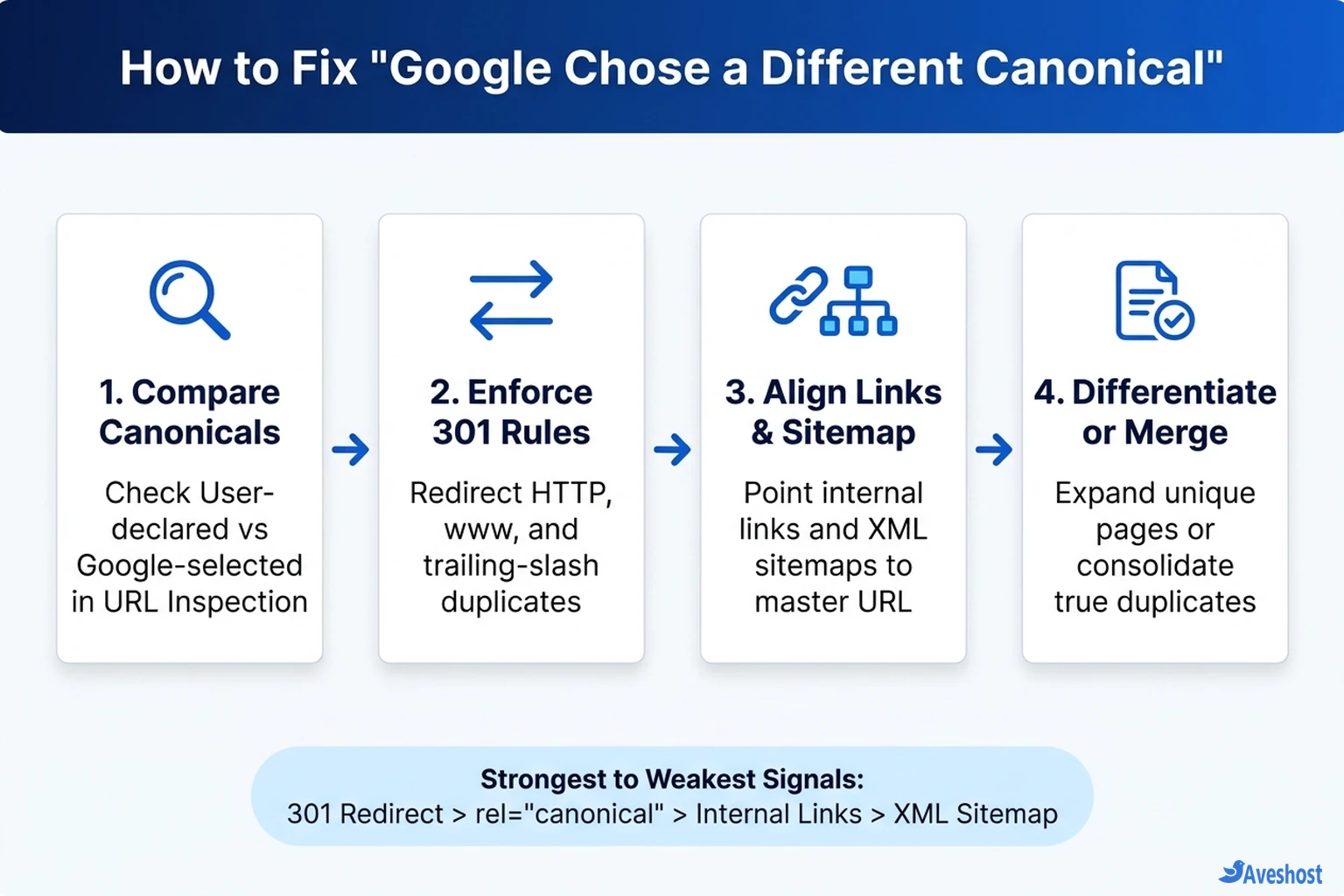
Step 1: Compare User-Declared vs Google-Selected Canonicals
Before changing any tags or redirects, open Search Console → Indexing → Pages, click Duplicate, Google chose different canonical than user, and inspect a few affected URLs in the URL Inspection tool.
Pay attention to two lines in the Indexing section: User-declared canonical (what your HTML tag asks for) and Google-selected canonical (what Google actually indexed). Surprisingly often, Google picked the better URL—for example, choosing https:// over http://, or dropping tracking parameters.
If Google’s chosen URL is already the clean version you want ranked, do not fight it—simply update your internal links and XML sitemap to match Google’s selection. If Google picked the wrong URL (such as a parameter variant or a staging subdomain), follow the four-step consolidation workflow below.
Common Causes and Exact Fixes for Duplicate URL Problems
According to the official Google Search Central guide on consolidating duplicate URLs, canonical signals work best when every layer of your stack agrees. Fix whichever mismatch applies to your site:
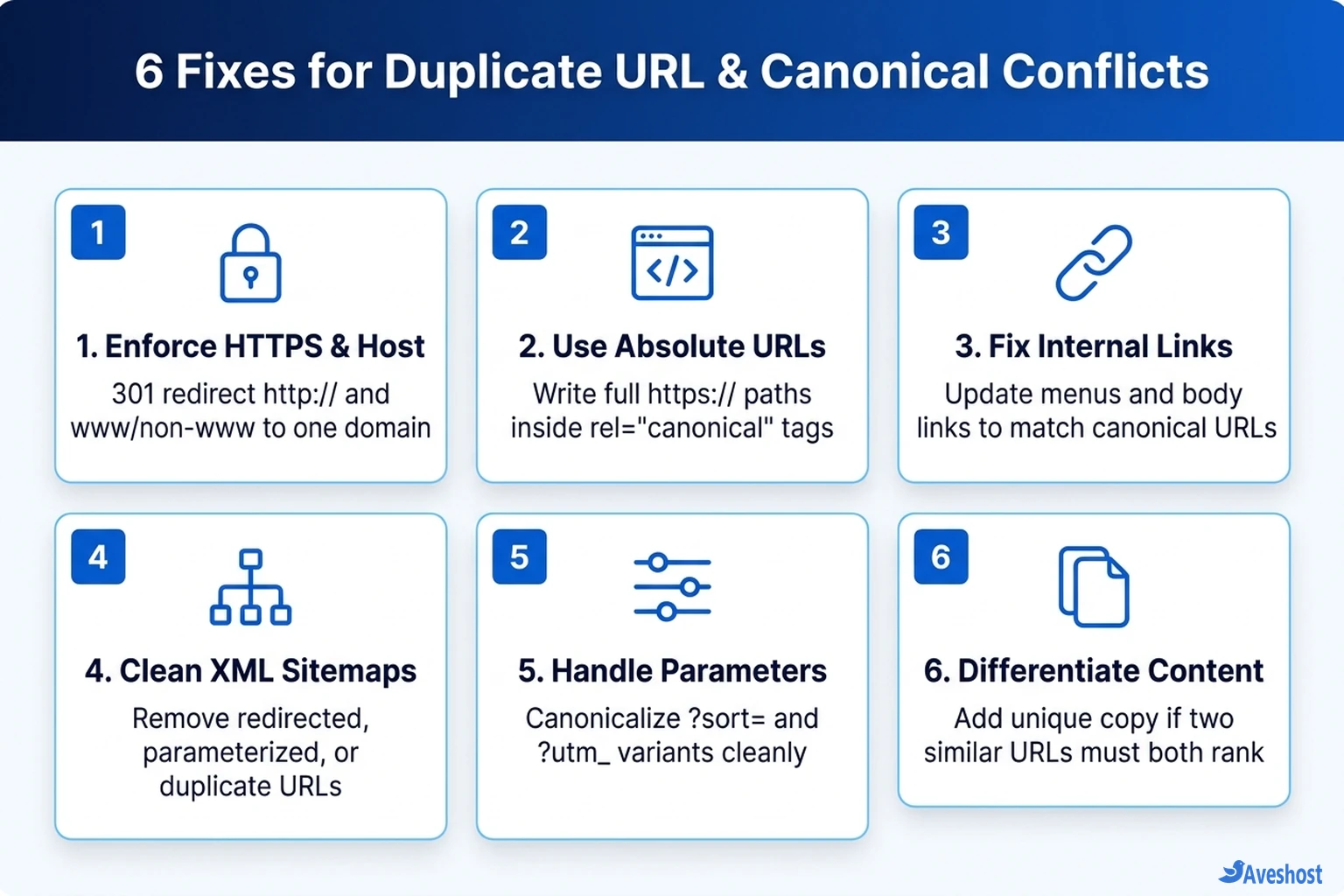
• 1. HTTP vs HTTPS, www vs non-www, and Trailing Slashes: If both https://example.com/guide and https://www.example.com/guide/ return 200 OK, Google may pick the opposite host or slash format from your canonical tag. Enforce one canonical host and trailing-slash convention with a server-level 301 permanent redirect.
• 2. Query Parameters and Filter URLs: E-commerce sorting, pagination, and tracking parameters (?sort=price, ?utm_campaign=) create thousands of duplicate URLs. Ensure parameterized views output an absolute canonical tag pointing to the clean base URL and never appear in your XML sitemap.
• 3. Conflicting Internal Links & Sitemaps: If your canonical tag points to URL A, but your navigation menu or XML sitemap lists URL B (or URL A redirects to URL B), Google will ignore your canonical tag. Audit your menus, breadcrumb schema, and generated sitemaps so every link uses the exact canonical URL.
• 4. Near-Duplicate Pages That Should Both Rank: Sometimes two distinct pages—like city landing pages or similar product models—share 80% of the same template copy. If Google collapses them into one canonical cluster, differentiate the pages with genuinely unique copy, specs, FAQs, and media.
# Apache (.htaccess): force HTTPS and non-www in a single 301 redirect
RewriteEngine On
RewriteCond %{HTTPS} off [OR]
RewriteCond %{HTTP_HOST} ^www\.example\.com$ [NC]
RewriteRule ^(.*)$ https://example.com/$1 [L,R=301]
Verify Server Redirects, Monitor Search Console, and Host Cleanly
After updating your 301 redirects, canonical tags, and sitemaps, verify your headers with curl -IL so you are certain duplicates redirect in a single hop rather than chaining. You can also track canonical anomalies at scale by automating Search Console reports with n8n or querying URL Inspection data through Google Search Console MCP.
Finally, whether you run WordPress or custom web apps on shared web hosting, fully managed VPS hosting, or self-managed VPS hosting with Aveshost, enforce HTTPS and your primary hostname at the web server level—and if you deploy static or hybrid React apps, check our guide on Next.js static export vs server hosting so trailing slashes and canonicals stay consistent.
# Verify single-hop 301 redirects and inspect the HTML canonical tag
curl -ILs https://www.example.com/your-page/ | grep -iE "^HTTP/|^location:"
curl -s https://example.com/your-page/ | grep -i 'rel="canonical"'
Frequently asked questions
Why did Google choose a different canonical than the one I declared?
A rel=”canonical” tag is a strong hint, not a strict directive. Google overrides it when stronger signals—such as 301 redirects, internal links, HTTPS preference, or XML sitemaps—point to a different URL, or when two pages have nearly identical content.
Is Duplicate, Google chose different canonical than user hurting my SEO?
If Google selected the clean, intended URL (for example, HTTPS without tracking parameters) and you want duplicates consolidated there, it usually does not hurt rankings. It becomes a problem when Google indexes a parameter URL, staging link, or wrong page instead of your primary URL.
Should I use a 301 redirect or a rel="canonical" tag for duplicate URLs?
Use a 301 permanent redirect when the duplicate URL does not need to remain accessible (such as http://, non-preferred www/non-www, or retired pages). Use a rel=”canonical” tag when the duplicate URL must still load for users (such as ?sort= filters or ?utm_ tracking links).
Should canonical tags use relative or absolute URLs?
Always use full absolute URLs (including https:// and your exact canonical hostname) inside rel=”canonical” tags and XML sitemaps to prevent protocol or host misinterpretation.
How long does it take Search Console to update after fixing canonical conflicts?
Once you align your 301 redirects, internal links, canonical tags, and XML sitemap, you can click Request Indexing on key URLs. Google typically recrawls and updates the Page Indexing report within a few days to a couple of weeks.