
AmailPlus is our business email workspace for professional, domain-based communication. It brings email, calendars, contacts, and Drive together, so you can manage client conversations and everyday work from one web interface.
A proposal sent from [email protected] gives customers a consistent way to recognise your company. A calendar keeps the follow-up on your schedule. A saved contact makes the next conversation easier, while Drive gives your team a place for the supporting files. AmailPlus connects these practical parts of the workday.
Key highlights
- Use your own domain for a professional email identity.
- Keep email, calendars, contacts, and files together.
- Choose a package by email accounts, mailbox storage, Drive storage, and aliases.
- Protect access with two-factor authentication and configure email authentication for your domain.
- Get help from our 24/7 support team with setup, migration, and troubleshooting.
Table of Contents
What is AmailPlus?
AmailPlus is a hosted business email service and connected workspace backed by Aveshost. Instead of using a personal address for company correspondence, you create addresses that match your domain, such as [email protected] or [email protected].
The service hosts your business mailboxes, and webmail provides the interface for reading, composing, searching, and organising messages. Calendar, contacts, and Drive sit alongside email to support scheduling, relationships, and file management. Storage and account allowances depend on your package.
Your domain identifies the business; email hosting handles its messages. You can use business email before launching a website, and you can host your website and email separately. If you need a name for your business, start with our domain search. For a technology brand, our guide to choosing between .ai and .com can help you weigh the options.
What can you do with AmailPlus?
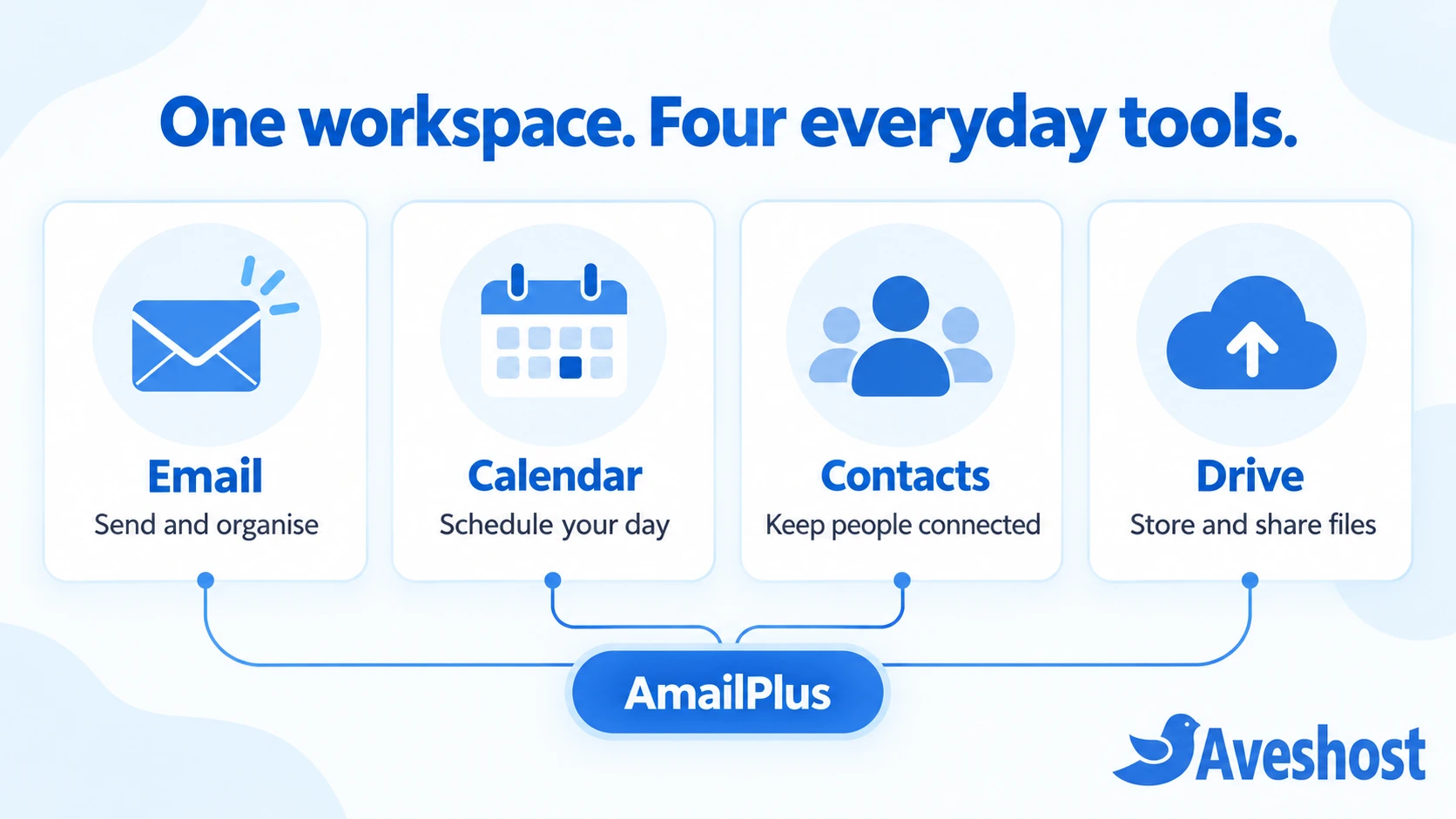
Email: organise conversations and send professionally
Use folders to separate projects, customers, invoices, or suppliers. Search helps you find previous conversations, and the conversation view can group related messages. When composing, you can add attachments from your computer or Drive, format a clear reply, and choose an available signature.
For example, a consultant can keep the client brief, proposal, and approval thread together instead of searching through an inbox used for personal subscriptions. A retailer can organise order questions separately from supplier messages. Our webmail guide explains the main controls.
Calendar: put follow-ups and meetings on a schedule
Use calendar tools for appointments, project deadlines, and planned follow-ups. Shared calendars support team coordination, making it easier to organise availability and company events. Set clear event names and check the time zone when working with people in different locations.
Contacts: keep business relationships organised
Save the details you need to contact clients, suppliers, and colleagues. A shared company directory helps people find the right colleague, while organised contacts reduce the need to search old messages for an address. Keep records current and avoid storing unnecessary personal information.
Drive: store and share work files
Drive provides storage for business files alongside your email workspace. Keep frequently used proposals, brochures, or project documents organised, and attach files from Drive when composing a message. Check access permissions before sharing a document and keep mailbox storage separate from Drive storage in your planning.
These tools cover communication, scheduling, contacts, and files. If your team also needs a particular spreadsheet editor, video-meeting system, or specialist business application, review those requirements separately when choosing your software stack.
Who should use AmailPlus?
AmailPlus suits businesses that want branded email and practical workspace tools without making every customer conversation depend on a personal account. It can serve a solo professional, a small company, a growing organisation, or a distributed team.
| Business type | A practical use |
|---|---|
| Freelancer or consultant | Send proposals from a branded address and schedule client follow-ups. |
| Agency or service team | Give colleagues their own accounts and organise client correspondence. |
| Online store | Separate order, supplier, and customer-service conversations. |
| Growing company | Add account capacity and maintain a consistent email identity as the team expands. |
Consider the people who need independent inboxes, not just the number of addresses you want to display. A single owner may manage several role addresses through aliases. Several employees usually need separate accounts, even if they work on the same customer relationships.
Seven benefits of AmailPlus for your business
1. A consistent professional identity
An address on your own domain connects each message to your business name. Use it on proposals, invoices, your website, and customer communications so people see the same identity throughout their relationship with you. A branded address supports recognition; clear, helpful replies build the trust behind it.
2. A clearer boundary between work and personal email
Separate business correspondence from your personal inbox. This makes it easier to organise customer records and maintain a business contact address as responsibilities change. Give each person the access they need rather than sharing one password across the team.
3. Connected everyday tools
Email, calendars, contacts, and Drive keep common work tasks close together. You can review a client conversation, arrange a follow-up, and use a saved file without treating each task as an unrelated system. Establish simple naming and folder conventions so everyone can find the right information.
4. Practical account protection
AmailPlus includes anti-spam protection and two-factor authentication, with SSL/TLS for secure connections. Enable two-step verification, use a unique password, and review suspicious messages carefully. Filtering helps reduce unwanted mail, but staff still need to recognise unusual payment requests and unexpected sign-in links.
5. Better protection for your domain identity
SPF, DKIM, and DMARC help receiving servers assess whether a message is authorised to use your domain. Configure the records for the services that legitimately send your email, including any separate website or marketing system. Correct authentication supports delivery and reduces opportunities for spoofing; it does not guarantee that every message will reach the inbox.
6. Capacity that matches your business
Choose account and storage allowances that fit your team today, then review them as usage grows. More accounts help you add independent users; more mailbox storage supports a growing message history; Drive capacity serves your files. Our standard packages and custom options give you different ways to plan that growth.
7. Support when setup needs a human
Our email specialists are available 24/7 to help with setup, migration, and troubleshooting. The service also includes a 99.9% email uptime guarantee and a 30-day money-back guarantee under our service terms. You can review the offer on our business email packages page.
Mailboxes and aliases: what is the difference?
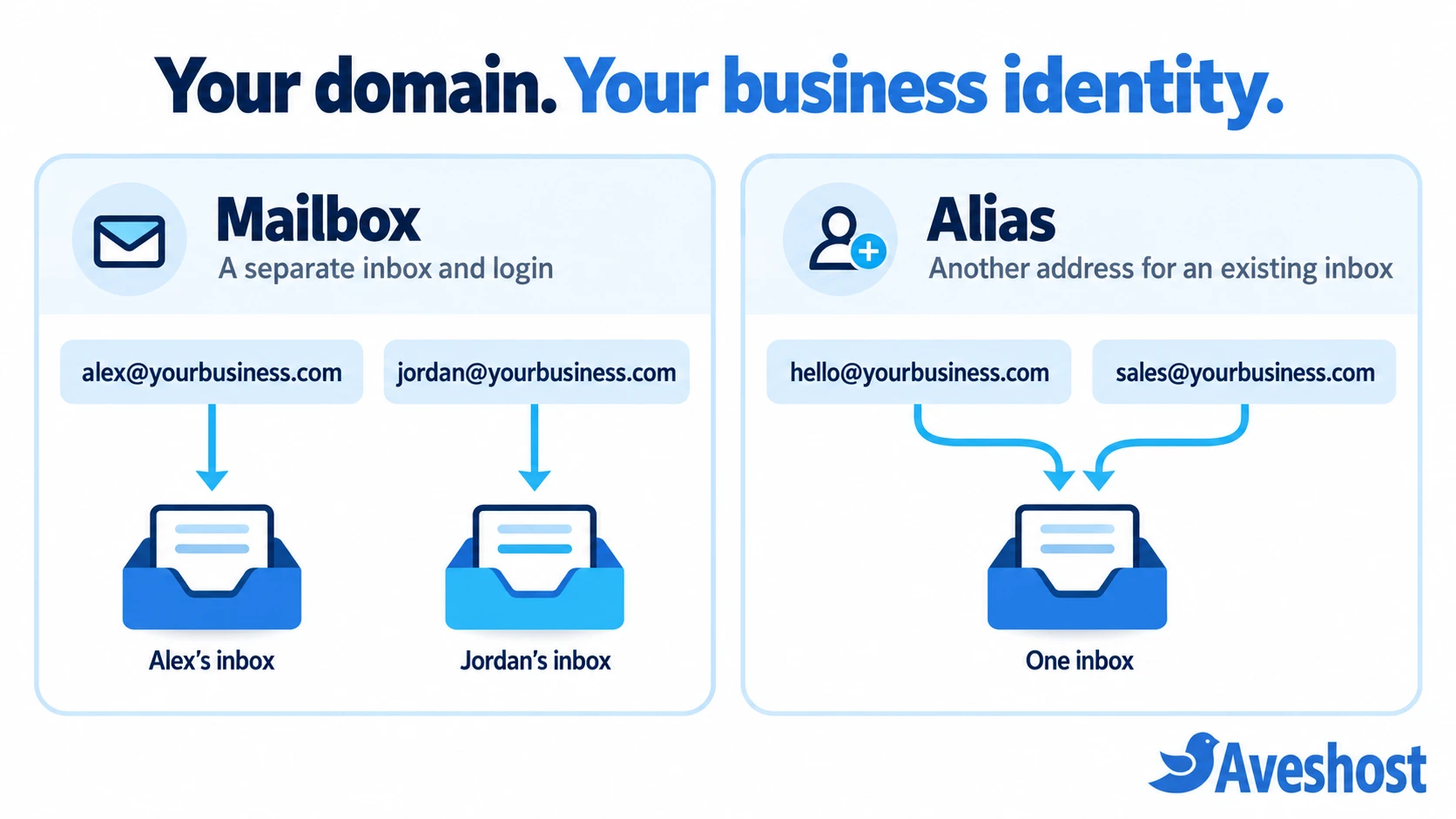
A mailbox has its own inbox and login. An alias is an additional address associated with an existing mailbox. The difference matters when choosing a plan: five aliases do not give five people independent email accounts.
Imagine a solo designer with [email protected] as the main mailbox. A [email protected] alias can give customers a friendly contact address while delivering to that mailbox. If a colleague joins and needs independent access, create a separate mailbox for that person.
Use person-based accounts for individual responsibility and role addresses for stable customer contact points. Check sender permissions and the intended delivery behaviour when setting up aliases or forwarding. A role address alone does not create a shared-inbox workflow or an additional user seat.
AmailPlus plans and pricing
Our AmailPlus packages vary by account count, storage, and alias allowance. The table shows the monthly GHS rates currently displayed on our business email packages page, checked on October 11, 2026. Select your billing period and currency and review applicable taxes at checkout.
| Plan | Displayed monthly price | Email accounts | Mailbox storage* | Drive storage* | Aliases |
|---|---|---|---|---|---|
| Starter | GH₵8 | 1 | 5 GB | 2 GB | 5 |
| Pro | GH₵20 | 4 | 30 GB | 10 GB | 20 |
| Premium | GH₵30 | 7 | 50 GB | 20 GB | 50 |
| Ultimate | GH₵3,000 | 300 | 1 TB | 500 GB | 10,000 |
*Storage figures are the allowances listed on the package page. When planning individual mailbox quotas, ask our team how the package allowance will be allocated across your accounts.
Every displayed plan includes anti-spam protection, calendar and contacts, two-factor authentication, and mobile sync. Our package page lists renewals at the same price. Keep domain registration or renewal and any additional services in your overall budget, alongside the email subscription.
If your requirements fall between standard tiers, we can help build a custom package. Account count, storage needs, and your expected growth are useful starting points for that conversation. Use our packages page to explore the options and request a quote.
Which AmailPlus plan is right for you?
Start with three numbers: how many people need their own inbox, how much email you already store, and how much file space you need. Then list role addresses and leave room for expected growth.
- Starter: a practical starting point for one person who needs a professional mailbox and a few additional contact addresses.
- Pro: consider it when up to four people need accounts and you need more mailbox and file capacity.
- Premium: consider it for a team needing up to seven accounts and the higher listed storage allowances.
- Ultimate or a custom plan: discuss larger teams, substantial storage requirements, or a specific account configuration with us.
For a three-person consultancy, account count may make Pro a useful starting point, provided the storage fits. For a two-person team with a large email archive, storage may drive the choice instead. Choose by both employee count and storage needs. An alias routes mail to an existing mailbox; each user who needs a separate inbox needs an independent mailbox.
Can you use AmailPlus on phones and computers?
Yes. You can open AmailPlus webmail in a desktop or mobile browser. Our guides also explain app-style browser shortcuts and setup with supported email clients, including Outlook, Thunderbird, Apple Mail, and the iOS Mail app.
Choose the method that suits the device. Browser access gives you the connected web workspace; an email application provides its own interface for your mailbox. Calendar and contact synchronisation may require separate configuration, so test the features your team actually needs.
For practical instructions, follow our guides for Thunderbird or iPhone and iPad Mail. Use the server settings supplied for your account rather than copying settings from a different provider.
How to get started with AmailPlus
1. Choose your domain and package
Use a domain that matches your business identity. Review the AmailPlus packages and choose the account, storage, and alias capacity you need. An existing domain can be connected even when its DNS is managed elsewhere.
2. Create your business mailboxes
Decide which people need independent accounts and which additional addresses should be aliases. Keep names simple and consistent. Record the purpose and owner of each address so customer enquiries reach the right person.
3. Connect the domain and authenticate email
Apply the required MX and authentication records where the domain’s DNS is managed. Follow our domain-connection guide and use the values supplied for your service. Preserve unrelated website records when updating email DNS.
4. Sign in and secure access
Open webmail and sign in with the full business address. Enable two-step verification using our 2FA setup guide. Add a clear signature, create useful folders, and review any forwarding rules.
5. Test the complete workflow
Send a message to an external address, reply to it, and check both directions. Test attachments, aliases, calendar invitations, and the devices your team uses. Update website contact details and customer-facing documents once the new addresses are working.
Moving from another email provider
Migration is easier when you prepare before changing delivery. List existing mailboxes, aliases, forwarding rules, and approximate mailbox sizes. Identify where contacts and calendars are stored, and agree which information needs to move.
Our team can help plan the move from an existing provider. Email messages, contacts, and calendars may use different migration or import steps. Keep the old service available during the agreed transition, check copied folders and sample messages, and confirm new mail is arriving before closing the previous account.
Timing depends on account count, data volume, source access, and DNS changes. Give us those details when arranging the migration so we can recommend an appropriate cutover. Avoid making several unrelated configuration changes at once; a planned switch makes troubleshooting simpler.
Getting help with your business email
Contact our support team for setup, domain connection, migration, account access, or troubleshooting. Include the affected address, the exact error, when it happened, and any recent changes. Never include mailbox passwords or one-time security codes in a support message.
For self-service help, explore our AmailPlus knowledge base. It covers access, domain connection, email clients, signatures, forwarding, out-of-office replies, and security.
Give your business a professional home for email
AmailPlus gives your business a branded email identity and a connected place for everyday communication. Start with the account and storage capacity you need, establish a clear mailbox structure, and protect access from the beginning.
Ready to move your conversations into a professional workspace? Explore our business email plans and choose the package that fits your team. We are here to help you get connected and make the transition work for your business.
Frequently asked questions about AmailPlus
What is AmailPlus used for?
AmailPlus is used for professional email on your own domain, organising messages, managing calendars and contacts, and storing and sharing files through Drive. It gives individuals and teams a connected business email workspace.
Is AmailPlus the same as Gmail or Google Workspace?
No. AmailPlus is our business email workspace. Gmail and Google Workspace are separate Google products. Choose according to the email, storage, collaboration, and application requirements of your business.
Can I use a domain I already own?
Yes. You can connect an existing domain by updating the required email DNS records where its DNS is managed. Your website can remain with its current host. Follow our domain-connection guide or ask our support team for help.
Do I need a website to use AmailPlus?
You need a domain for your branded email address, but you do not need a live website. Email hosting and website hosting can be configured as separate services.
Does each email alias have its own inbox?
No. An alias is another address associated with an existing mailbox. It does not create a separate inbox or user login. Choose enough email accounts for people who need independent access.
What is included in every AmailPlus plan?
The displayed plans include anti-spam protection, calendar and contacts, two-factor authentication, and mobile sync. Email account, mailbox storage, Drive storage, and alias allowances vary by package.
Can I use AmailPlus with Outlook or Thunderbird?
Yes. Our knowledge base provides setup guides for supported Outlook versions, Thunderbird, Apple Mail, and mobile email applications. Use the account settings supplied for your mailbox. Email-client setup does not automatically configure every calendar and contact feature.
Can I move my existing email to AmailPlus?
Yes. Our team can help plan a migration. Review the source provider, account access, mailbox sizes, folders, contacts, and calendars first. Email migration and contact or calendar imports may need separate steps, followed by testing.
How much does AmailPlus cost?
Our package page currently displays Starter at GH₵8 per month, Pro at GH₵20 per month, Premium at GH₵30 per month, and Ultimate at GH₵3,000 per month. These are displayed GHS rates; the selected billing period, currency, and applicable taxes determine the checkout total.
How do I access AmailPlus webmail?
Open webmail.amailplus.com and sign in with your full business email address and mailbox password. Enable two-step verification for an additional layer of account protection.