

How to buy cheap WordPress hosting in Ghana with mobile money is a very common term used by a lot of people looking to host their WordPress websites.
If you’re in Ghana and looking to launch a website or blog, WordPress is a great platform to consider.
However, finding affordable WordPress hosting can be a challenge. The good news is that Aveshost is the best hosting provider in Ghana that accepts mobile money payments, making it easier than ever to buy cheap WordPress hosting.
In this article, we’ll walk you through the process of buying WordPress hosting with mobile money, so you can get your website up and running quickly and affordably.
WordPress is one of the most popular content management systems in the world, and it is widely used by businesses and individuals alike.
In Ghana, WordPress is used extensively by bloggers, small businesses, and startups to create and manage their websites.
If you’re looking for cheap WordPress hosting in Ghana, you’re in luck.
Table of Contents
What is WordPress hosting?
Before we dive into the specifics of how to buy WordPress hosting with mobile money, let’s first discuss what WordPress hosting is.
WordPress hosting is a type of web hosting that is optimized for WordPress websites.
It typically comes with features and tools that are tailored to the needs of WordPress users. Some of the key features of WordPress hosting include one-click WordPress installation, automatic updates, and WordPress-specific security features.
WordPress hosting also offers faster load times and better performance compared to other types of hosting, as it is optimized specifically for WordPress.
In addition, WordPress hosting providers often offer support for WordPress-specific issues, which can be very helpful for those who are not familiar with the platform.
Why choose WordPress hosting?
There are several reasons why you might want to choose WordPress hosting for your website. Here are just a few:
- Customizable: WordPress hosting allows you to create a website that perfectly suits your needs. With a wide range of themes, plugins, and customization options, you can make your website look and function exactly how you want it to.
- User-friendly: WordPress is easy to use, even for those who don’t have a lot of technical expertise. The platform is designed with the user in mind, making it simple to create and manage your website.
- SEO-friendly: WordPress is a highly SEO-friendly platform, with features like clean code, responsive design, and built-in SEO tools that help your website rank higher in search engine results.
- Security: WordPress hosting comes with enhanced security features that are specifically designed to protect your website from hacks and malware. This gives you peace of mind knowing that your website is safe and secure.
- Scalability: WordPress hosting allows you to easily scale your website as your needs grow. Whether you’re starting small or planning to expand, WordPress hosting can accommodate your needs.
- Cost-effective: WordPress hosting is an affordable option for businesses and individuals who want a professional-looking website without breaking the bank. With many affordable hosting plans available, you can get started for a low cost.
- Support: WordPress hosting providers typically offer support for WordPress-specific issues, which can be a huge help if you’re not familiar with the platform. This ensures that you always have the help you need to keep your website running smoothly.
How to buy WordPress hosting with mobile money
Now that we’ve covered the basics of WordPress hosting, let’s talk about how to buy it with mobile money. Here are the steps you need to follow:
Step 1: Choose a WordPress hosting provider
The first step is to choose a WordPress hosting provider that accepts mobile money payments. There are several hosting providers in the world but the one that stands out offers affordable prices and accepts Mobile Money (MOMO) is Aveshost.
Step 2: Go to Aveshost Shared WordPress Hosting
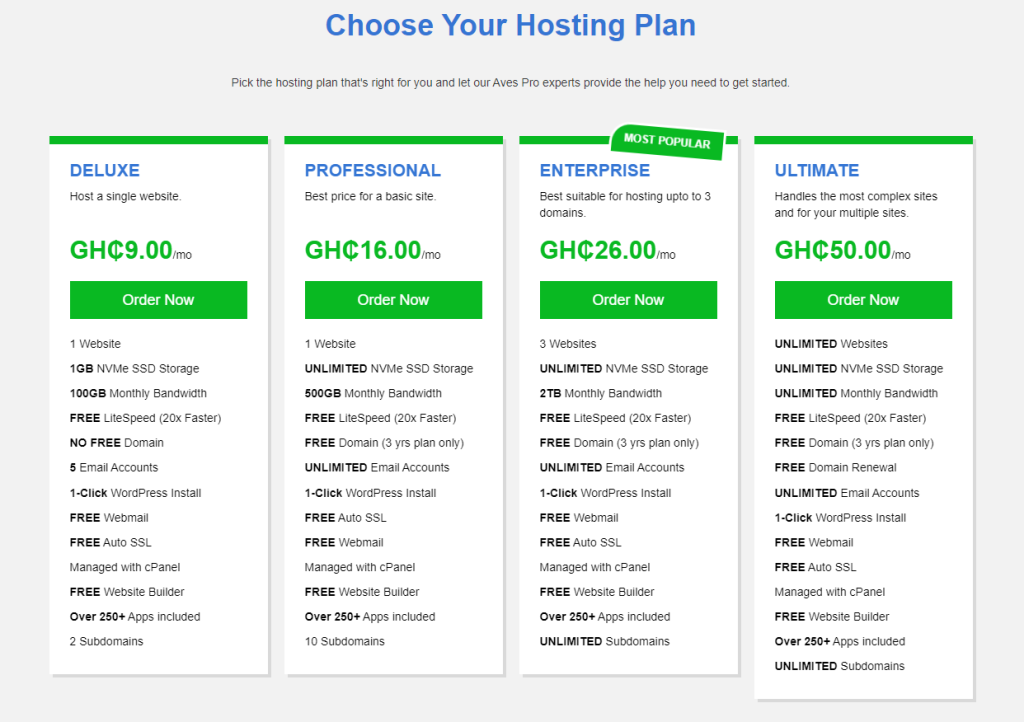
Please select one of the four hosting packages and click on “Order Now“. Three of these packages include a complimentary domain name registration for the first year.
However, please note that to take advantage of this offer, you will need to choose our three-year plan for the Professional, Enterprise, or Ultimate package.
While our Deluxe plan serves as a great starting point, we highly recommend choosing our Professional hosting plan for its unlimited storage, unmetered bandwidth, and superior WordPress optimization.
If you need to host more than one website, our Enterprise hosting plan allows for up to three websites. For businesses or developers looking to host an unlimited number of websites, the Ultimate hosting plan is the best option.
Selecting a Domain Name for Your Web Hosting Package
Upon selecting your web hosting package, you will be presented with three options on the following page: registering a new domain, transferring your domain from another registrar, or utilizing an existing domain while updating your nameservers.
When registering a domain, we recommend selecting a short, concise, easy-to-spell domain name that is easy to remember and pronounce.
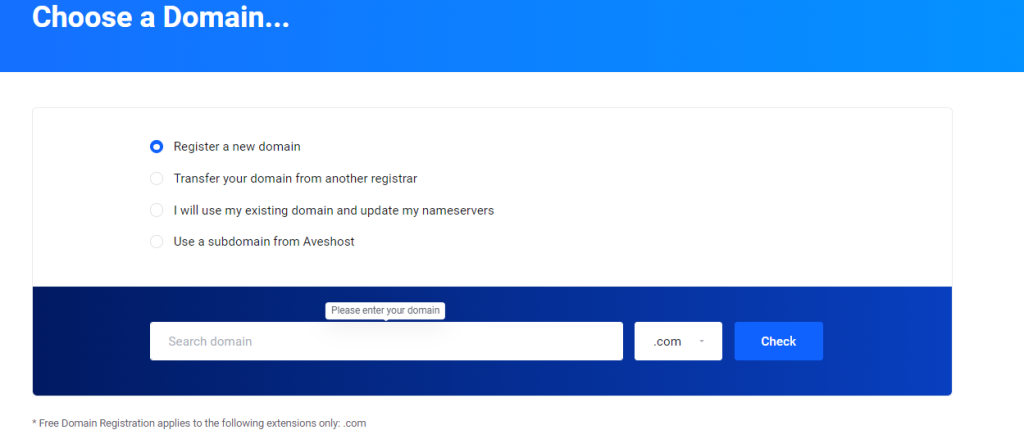
To check the availability of your preferred domain name, simply enter the name and select the extension (e.g. .com) and click “Check“. If the domain is unavailable, it means that it has already been taken, and you will need to select a different one.
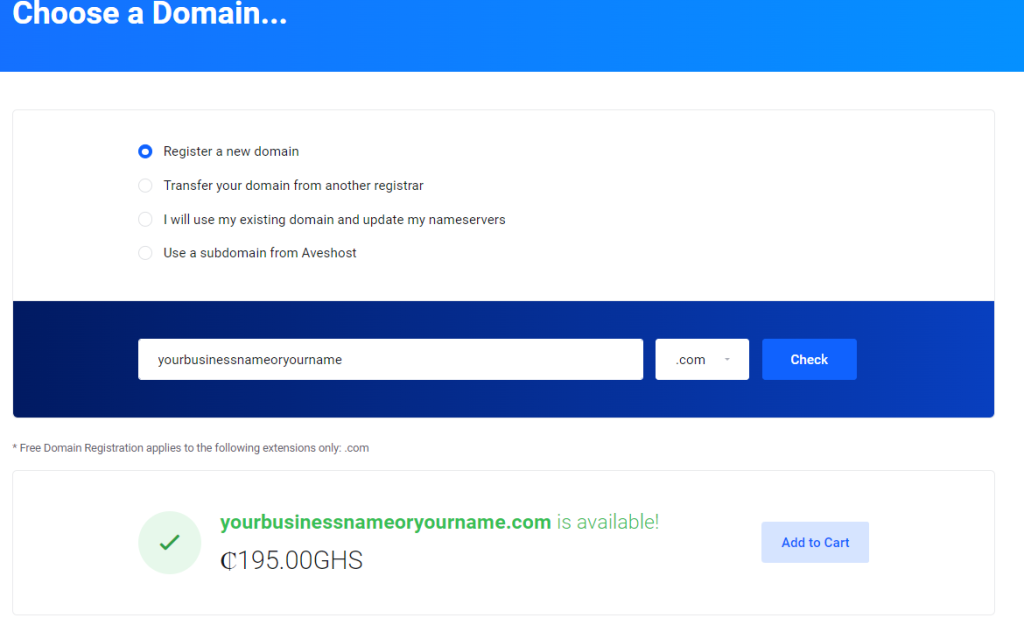
Once you have found an available domain name that you prefer, click “Add to Cart” and “Continue” to proceed to the next step.
Choosing Billing Cycle ( Web hosting duration)
In this tutorial, we have selected the Professional Package as an example.
When choosing your billing cycle, please note that selecting our three-year plan will entitle you to a complimentary domain registration.
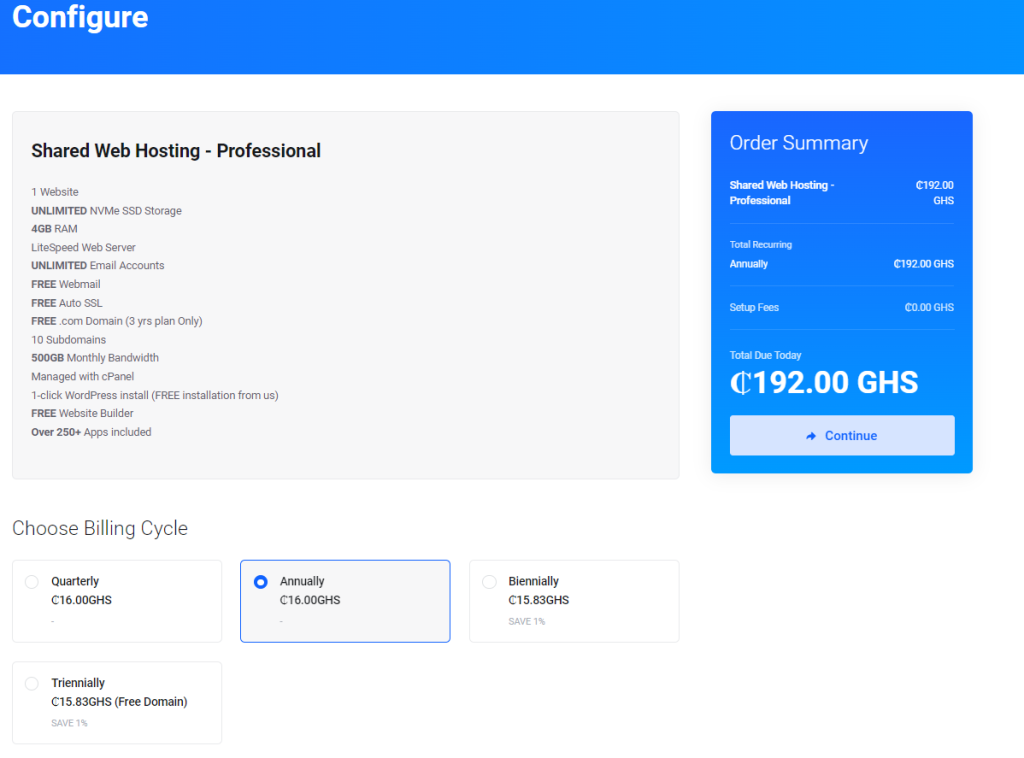
Please select your preferred billing cycle period and proceed to the next step by clicking the “Continue” button.
Domain Selection
During the checkout process, you will have the option to include additional add-ons, although they are entirely optional, and you may skip them if you choose.
We highly recommend selecting the ID Protection add-on, as it will help safeguard your personal information and decrease the amount of spam you receive in your inbox.
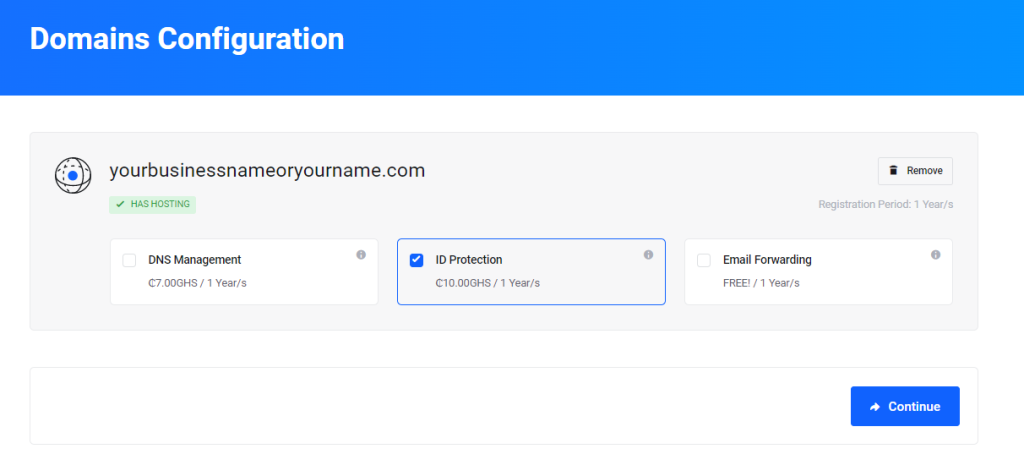
Once you have made your selections, please proceed to the next step by clicking the “Continue” button.
Review and Checkout
Before finalizing your web hosting order, please review the summary to ensure all the information is correct.
If this is your first time on Aveshost, you will need to create a web hosting account, or if you have an existing account, you can log in.
Please enter your personal details and billing information, ensuring that you have correctly entered your state or region.
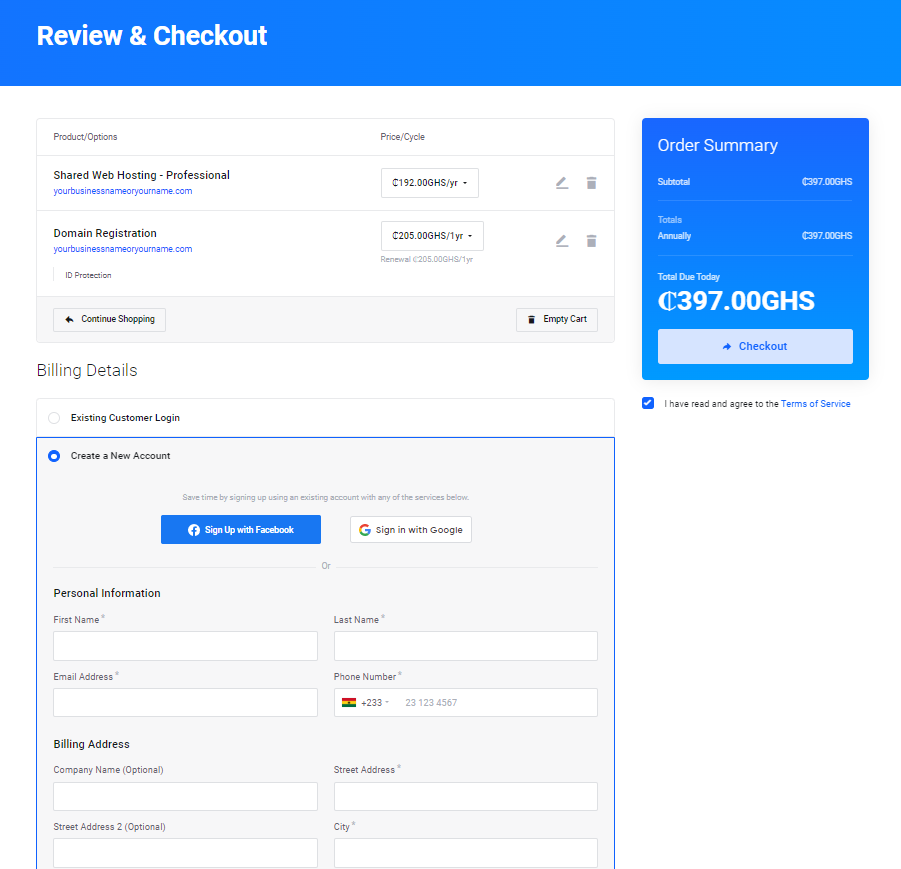
Additionally, please confirm that you have read and accepted the Terms of our Service before proceeding to click on “Checkout“.
Checkout with Mobile Money OR Credit Card
Please ensure that you have disabled any ad-blockers that may be running on your browser, as they can interfere with the PayStack Popup window from loading properly.
Next, choose whether you prefer to pay with a credit/debit card or Mobile Money. Please note that there is a processing fee of 2% for either option.
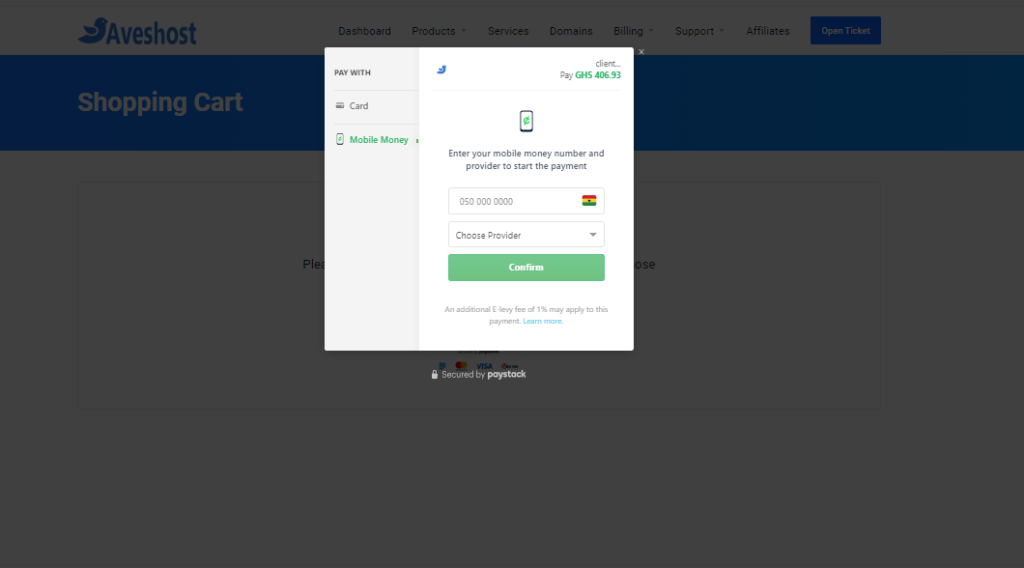
Upon completing your payment, you will be redirected back to your Aveshost Client Area or Dashboard. You will also receive an email containing your receipt and login credentials to access your cPanel.
Please note, If you did not receive your new welcome cPanel information email in your primary inbox, please check your spam or junk mail folder.
Please note that it may take up to 48 hours for your domain to propagate correctly. However, here at Aveshost, the process often takes only 10 minutes or less.
cPanel Login
You have two options to log in to your cPanel. You can either access it from your Aveshost Client Area or by visiting www.yourdomainname.com/cpanel and using the login details that were sent to your email.
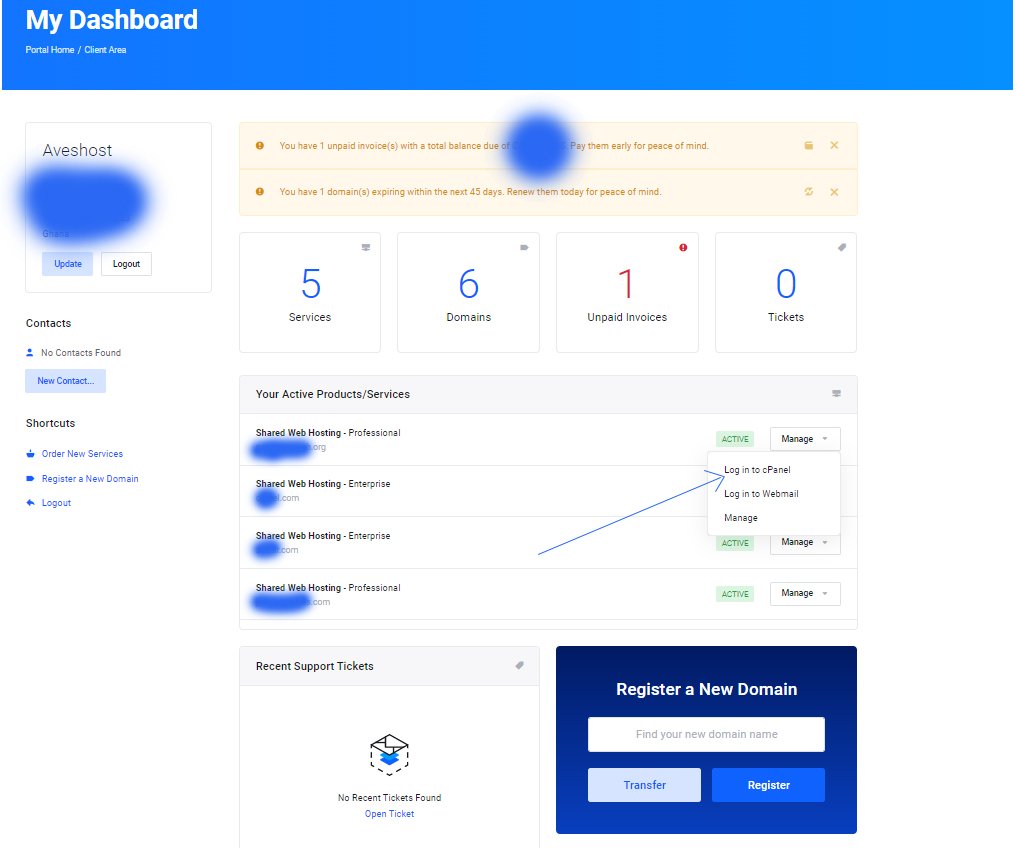
1-Click WordPress Installation
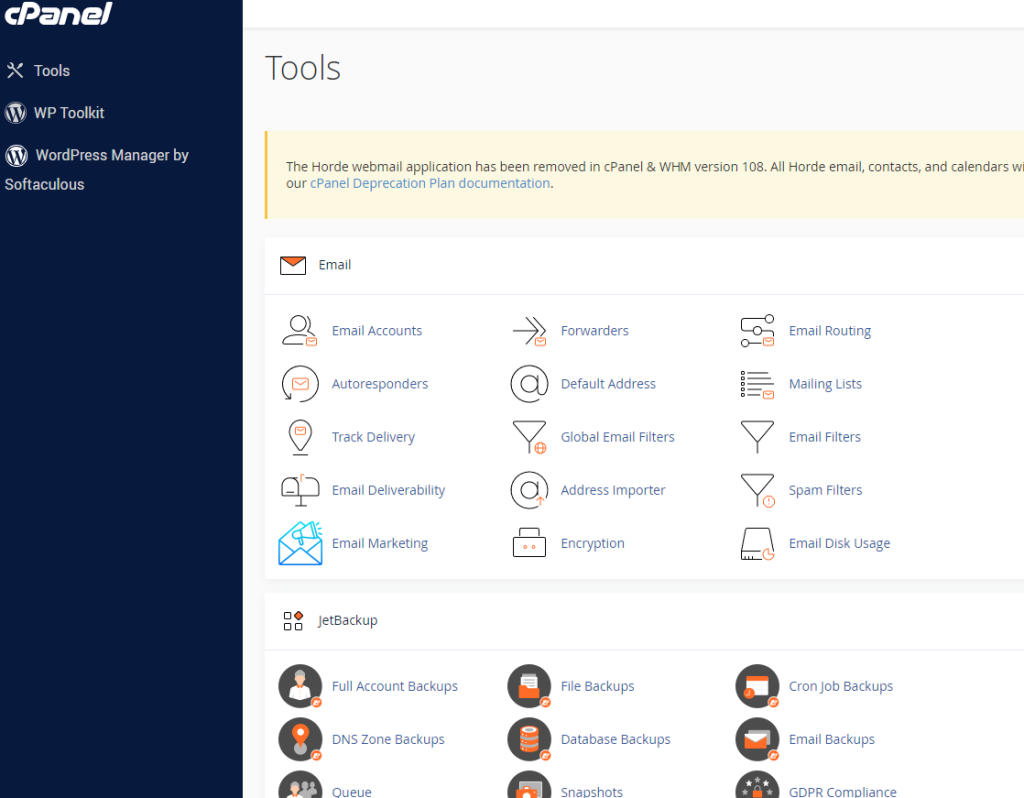
To access WordPress, you can either click on “WordPress Manager by Softaculous” on the left-hand side of your cPanel or scroll down to the bottom of the page and select “WordPress” under the Softaculous Apps Installer.
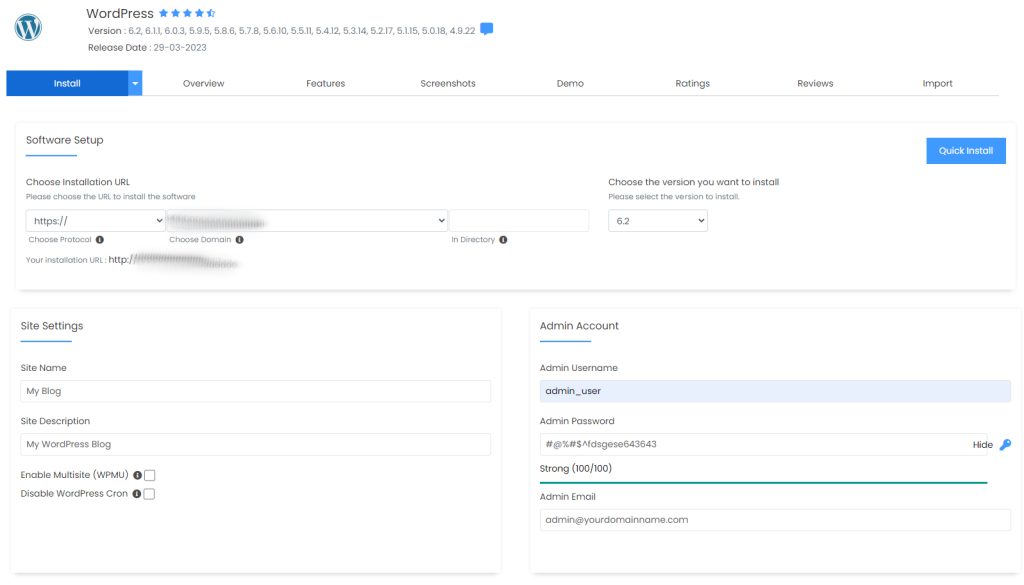
Once you are inside Softaculous, you need to click on the “Install” button to begin the WordPress installation process.
Next, you will need to choose the protocol and domain for your WordPress installation. Under the Admin Account section, enter the Admin username, strong password, and email. You can leave everything else as default, and then scroll down to click the “Install” button to complete the WordPress installation process.
Congratulations! You have successfully purchased WordPress hosting with Mobile Money and installed WordPress.
Conclusion
In conclusion, buying cheap WordPress hosting in Ghana with mobile money is now easier than ever.
With Aveshost, you can choose from a variety of hosting packages, register a domain, and pay with mobile money. The step-by-step guide provided in this tutorial can help you navigate through the process and successfully install WordPress on your website.
So, whether you are an entrepreneur, a blogger, or a business owner, take advantage of this opportunity to establish your online presence with Aveshost’s affordable and reliable WordPress hosting services.
Related:
- How to Start an Online Store in Ghana: Comprehensive Guide
- How to Start a Blog in Ghana: Comprehensive Guide
- How to Create a Business Website FREE in Ghana
- Top 5 Most Effective Strategies To Market Your Business In Ghana
- How to Speed Up Your WordPress Site
What is WordPress hosting?
WordPress hosting is a type of web hosting optimized specifically for WordPress websites, offering features like one-click installation, automatic updates, faster load times, and WordPress-specific security and support.
Why should I choose WordPress hosting for my website?
WordPress hosting is customizable, user-friendly, SEO-friendly, secure, scalable, cost-effective, and comes with WordPress-specific support, making it ideal for businesses and individuals in Ghana.
Which hosting provider in Ghana accepts mobile money payments?
Aveshost is a hosting provider in Ghana that accepts mobile money payments, making it easy and convenient to purchase WordPress hosting.
How do I buy WordPress hosting with mobile money?
To buy WordPress hosting with mobile money, choose a hosting package on Aveshost, select your billing cycle, and complete the payment using mobile money during checkout.
What hosting packages does Aveshost offer?
Aveshost offers four shared WordPress hosting packages: Deluxe, Professional, Enterprise, and Ultimate, each with different features like storage, bandwidth, and the number of websites allowed.
Does Aveshost offer a free domain name?
Yes, Aveshost offers a complimentary domain name registration for the first year with the Professional, Enterprise, or Ultimate packages when you choose a three-year billing cycle.
How do I choose a domain name for my hosting package?
Select a short, easy-to-spell, and memorable domain name. Check its availability on Aveshost by entering the name and extension, then add it to your cart if available.
What billing cycles are available for hosting plans?
Aveshost offers various billing cycles, including monthly and multi-year options. Choosing a three-year plan for certain packages includes a free domain registration.
Can I host multiple websites with Aveshost?
Yes, the Enterprise plan allows hosting up to three websites, and the Ultimate plan supports an unlimited number of websites, making them suitable for businesses or developers.
Is WordPress hosting secure?
Yes, WordPress hosting includes enhanced security features specifically designed to protect your website from hacks, malware, and other threats, ensuring your site remains safe.



This blog post provides valuable information for anyone in Ghana looking for affordable WordPress hosting options. The title itself caught my attention as it addresses a common concern among individuals who prefer using mobile money for online transactions.
Great work Aveshost, you guys did an excellent job of explaining the process of purchasing WordPress hosting using mobile money, which is particularly helpful for those of us who may not be familiar with the steps involved. The step-by-step guide is clear, concise, and easy to follow.
I appreciate the inclusion of specific recommendations for cheap hosting providers in Ghana. It’s always helpful to have options and know the different features and pricing plans available. You guys provided insights and recommendations to make it easier to make an informed decision based on individual needs and budgets.
Overall, this blog post is a valuable resource for anyone in Ghana who wants to find affordable WordPress hosting and utilize mobile money for payment. The detailed instructions and recommendations provided make the process smooth and hassle-free. Kudos to you guys for sharing this helpful information!
Keep up the great work!