
AI scraper bots can turn a quiet website into a busy server. A stream of automated requests may consume CPU, occupy application workers and increase bandwidth usage while ordinary visitors struggle to load a page. For a small business, that can mean missed enquiries, failed checkouts and a hosting account that reaches its resource limits.
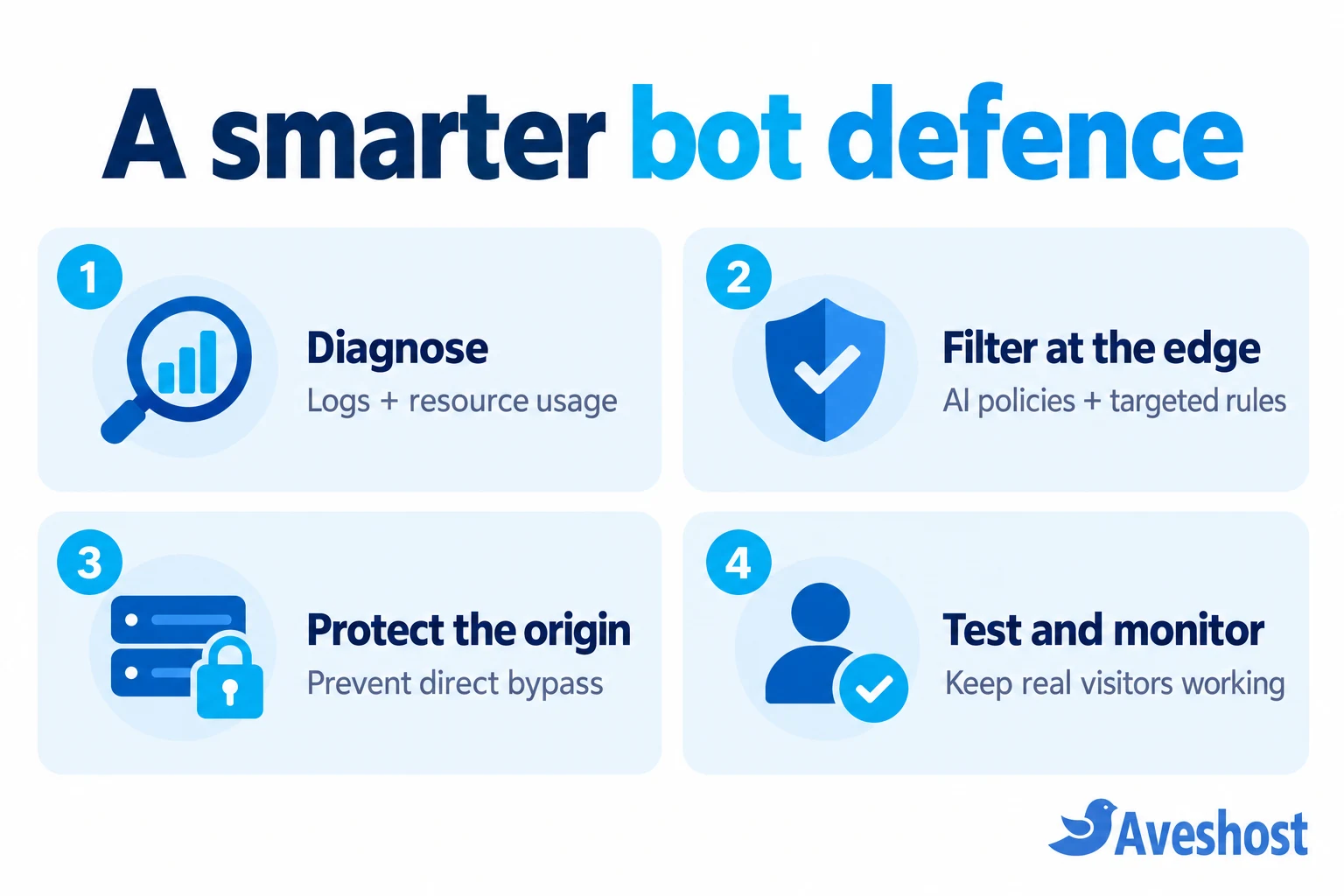
The solution starts with understanding the traffic and stopping unwanted requests before they trigger expensive work. You may have heard this described as blocking bots “at the DNS level.” The practical approach is to route your website through a security proxy, then enforce bot policies at its edge. DNS makes that route possible; the proxy and firewall do the filtering.
- Identify the cause using request logs and resource metrics, not traffic totals alone.
- Use robots.txt to communicate preferences and edge controls to enforce them.
- Proxy your website hostnames, choose a specific AI policy and protect the origin.
- Test customers, search crawlers and integrations before expanding restrictions.
Table of Contents
Why AI scraper bots can overwhelm small websites
A scraper is software that requests pages and extracts information. AI-related crawlers may collect training data, index material for AI search or fetch a page on a user’s behalf. These activities are different, and you may want a different access policy for each.
The problem is not that every automated request is harmful. It is the combination of request volume, concurrency and the cost of generating each response. A cached image is usually cheaper to serve than a page that launches database queries, runs plugins and builds a personalised response.
| Resource | How crawling can use it | What you may notice |
|---|---|---|
| CPU | Repeated application execution and database work | Slow responses and sustained high usage |
| Memory | Concurrent workers and application processes | Worker failures or resource-limit errors |
| Worker capacity | Requests occupy available PHP or application workers | New requests queue or time out |
| Bandwidth | Repeated downloads of pages, media and documents | Transfer usage rises faster than expected |
| Database | Searches, filters and uncached queries repeat | Slow queries and delayed page generation |
Imagine an illustrative shop with a product filter that creates many combinations of size, colour and price. A crawler following those URLs can generate far more requests than the shop’s normal customers. If every combination bypasses the cache, the server may rebuild similar pages thousands of times. The site does not need a large human audience to encounter this bottleneck.
A burst of traffic also does not prove that an AI company caused the outage. Traditional scrapers, vulnerability scans, broken integrations, genuine publicity, scheduled jobs and application faults can produce similar symptoms. Establish the cause before choosing a block.
How to tell whether bots are causing the slowdown
Start with the time window when the website became slow. Compare web access logs, error logs and your hosting resource graphs over that same period. Look for a change in requests per minute, frequently requested paths, response codes, bandwidth and application usage.
- Are requests repeatedly hitting search results, filters, feeds or large files?
- Do many requests arrive rapidly from one source or a changing group of sources?
- Are similar query-string combinations creating a crawl loop?
- Do traffic spikes coincide with CPU, memory or worker exhaustion?
- Are errors coming from the application, the origin connection or an edge rule?
The User-Agent header can provide a clue, but the client supplies its value. A scraper can use a browser name or impersonate another bot. Pair it with behaviour, the provider’s verified-bot information and current official crawler documentation rather than treating the header as proof.
If your site already sits behind a proxy, its edge analytics can show requests that never reach the origin. Your server logs show the requests that do. Configure trusted-proxy handling correctly before using visitor IP addresses for rules or rate limits; otherwise you may mistake the proxy’s address for every visitor.
If the site is failing now, contact our support team with the hostname, timestamps and affected paths. Use a private ticket for detailed logs. A targeted temporary rule can reduce pressure while you investigate, but keep a record of what you changed so you can reverse it.
Can you block AI scraper bots at the DNS level?
Ordinary DNS cannot inspect or block an HTTP request based on whether the visitor is an AI scraper. DNS answers a lookup for a hostname. It does not see the subsequent page request, its User-Agent, its URL path or its behaviour across the website.
Cloudflare’s proxy-status documentation explains the distinction: a DNS-only record returns your origin address, while a proxied record routes web requests through Cloudflare. The edge can then apply security rules and caching before forwarding an allowed request to your server.
| Configuration | Where web requests go | Can edge bot rules protect that hostname? |
|---|---|---|
| DNS-only record | Directly to the origin | No: web traffic bypasses the proxy |
| Proxied web record | Through the CDN/security edge | Yes, when the relevant controls are configured |
| Resolver-based DNS filtering | Filters lookups for users of that resolver | It does not control arbitrary visitors to your public website |
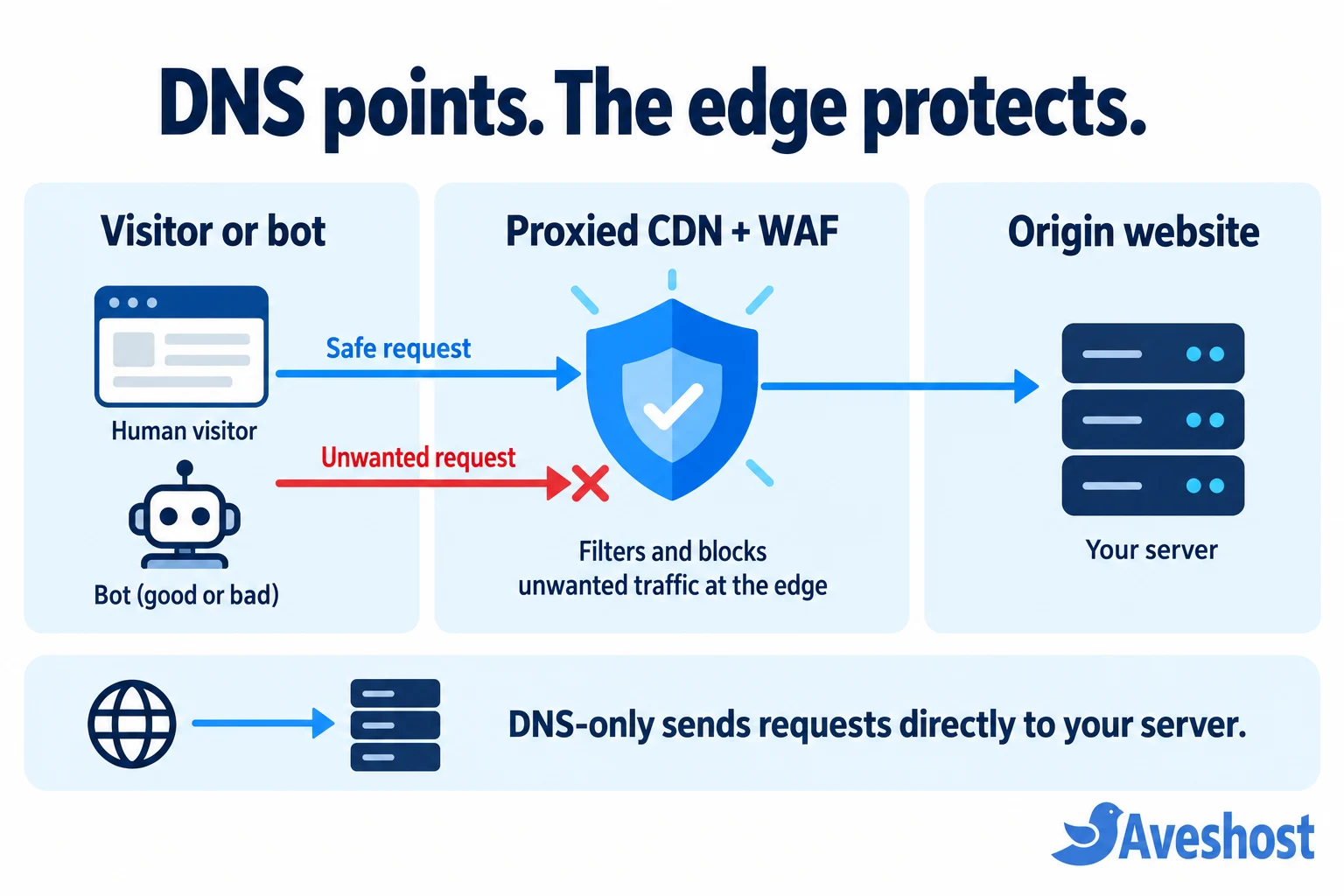
Changing nameservers is therefore only part of the setup. Your website records must be eligible for proxying and enabled as proxied, the domain must be active, and a policy must actually restrict the traffic you want to stop. A DNS service without a web proxy cannot provide the same protection.
robots.txt vs a firewall: what each one does
Use robots.txt to tell cooperative crawlers which areas they should avoid. It is useful for communicating a crawl policy, but it is not an access-control system. Google’s robots.txt guidance makes clear that crawlers can ignore the file and that a disallowed URL can still appear in search results.
The following is a template for a specific crawler, not a ready-made universal AI block. Replace the placeholder with the exact crawler token from that operator’s documentation and merge it into your existing file:
User-agent: ReplaceWithDocumentedCrawlerToken
Disallow: /
Do not replace your whole file blindly or use a blanket wildcard disallow if you want search engines to keep crawling the site. Preserve relevant rules and your sitemap reference. Where an operator has separate search and training crawlers, decide which purpose you want to restrict.
A firewall or bot policy enforces a request decision. It can reject matching traffic before your application runs. A rate limit controls excessive request frequency, while caching makes allowed requests cheaper. These tools solve different parts of the problem and work best together.
Private information needs authentication and appropriate access controls. Neither a crawler preference nor hiding a URL is a substitute for protecting confidential content.
How to block AI scraper bots with Cloudflare: 7 steps
For a detailed walkthrough of connecting your domain and configuring protection for WordPress, Laravel or a static website, follow our guide to protecting your website with Cloudflare. Then use the steps below to focus on AI scraper traffic.
1. Record your existing DNS and service settings
Save a copy of your current DNS records and identify the services that depend on them. Include the apex domain, www, application subdomains, MX records and email authentication records such as SPF, DKIM and DMARC. Check for an existing CDN or a platform-specific domain configuration before changing the route.
If DNSSEC is active, follow the provider’s migration instructions so old delegation data does not break resolution. Coordinate the change with your hosting provider when you are unsure which records serve the website or email.
2. Add the domain and review the imported records
Add the domain to Cloudflare using its onboarding flow. Compare the detected records with your saved list; an automatic scan may not find every record. Choose the plan and controls that meet your requirements and check which security controls the selected plan includes.
3. Activate the domain through the appropriate DNS setup
For the usual full-zone setup, update the authoritative nameservers at your domain registrar to the ones supplied for your zone. Wait for Cloudflare to show the domain as active and check resolution. Some supported platform or enterprise setups use a different approach; follow the instructions for your actual configuration.
4. Proxy the website hostnames
Enable the proxied status for the eligible A, AAAA or CNAME records serving your website, including www when you use it. Cloudflare represents this with an orange cloud. A grey-clouded, DNS-only web record leaves that hostname outside the web proxy.
Keep mail and non-web services configured appropriately. MX and TXT records are not proxied, and the standard web proxy is not a mail proxy. Mail-server hostnames, domain-verification records and other special records may need DNS-only status. Preserve email delivery while protecting web traffic.
5. Check HTTPS from visitor to origin
Confirm that the proxy can connect securely to the origin and that redirects work. Use Full (strict) with a suitable valid origin certificate for encrypted, validated origin connections. Resolve certificate or hostname problems rather than turning encryption down to work around them.
6. Configure your AI bot policy
In Cloudflare’s Security Settings, look for Configure AI bot policies. Its current AI bot policy documentation distinguishes Training, Search and Agent activity and offers options to block across the zone, block on pages with ads or allow the category.
If your goal is to prevent training-related crawling, select the appropriate Training restriction and review its effect on mixed-purpose crawlers. Decide separately whether AI search and user-directed fetches should remain allowed. Inspect and configure the active settings for your own zone. Dashboard labels and available tools can differ as the product changes.
7. Observe the results before adding broader rules
Review security events and origin requests after enabling the policy. Check that unwanted traffic is being stopped and that server load improves. A high block count is not enough on its own; customers still need to browse, submit forms and complete transactions.
Use targeted rules without blocking good traffic
Built-in classification is a useful starting point, but you may also need rules for abusive paths or request rates. Keep the match narrow and use the least disruptive action that meets the need. Review the current plan’s rule limits, available fields and rate-limiting behaviour before designing a rule.
| Situation | Useful starting approach | What to test |
|---|---|---|
| A documented unwanted crawler | Purpose-specific bot policy; a narrow supplementary match if needed | Search and other crawler purposes |
| Repeated expensive search or filter requests | Path-specific rate limiting and application optimisation | Normal searching and shared-IP visitors |
| Browser-like suspicious traffic | A carefully scoped challenge where appropriate | Accessibility, mobile users and legitimate sessions |
| Payment callbacks or API calls | Explicit endpoint-aware policy and authentication | Machine clients that cannot solve browser challenges |
A User-Agent block can catch a bot that identifies itself honestly, but it is easy to evade. Treat it as a supplementary filter, not a complete defence. Likewise, blocking one IP address may give temporary relief but will not cover a distributed or rotating scraper.
Set rate thresholds from observed legitimate use. Visitors behind a shared network can appear under one public IP, so a very low site-wide IP limit may reject several real customers together. Avoid applying interactive challenges to payment callbacks, webhooks, APIs or other machine-to-machine endpoints.
Do not use broad country blocks merely because a scraper appears to originate there. Target behaviour or a specific identified service where possible. Any exception for a trusted integration should be narrow enough that it does not bypass unrelated protection.
Close the direct-to-origin bypass
An edge rule only protects traffic that passes through the edge. If a scraper knows your origin IP and the web server accepts a direct connection, it may bypass the proxy. Previous DNS records, mail infrastructure or another unproxied hostname can expose that address.
Cloudflare’s origin protection guidance describes measures such as allowing its published IP ranges at the origin, authenticated origin connections and tunnels. Choose an approach your hosting environment supports.
On shared hosting, ask our team to assess the available origin controls. Do not try to impose server-wide network rules on infrastructure you do not administer. On a VPS, plan web-port restrictions with your administrator: preserve essential administration and monitoring access, account for IPv4 and IPv6, and keep the provider’s IP ranges current.
Authenticated Origin Pulls can strengthen validation of proxy-to-origin requests where supported. A securely configured tunnel is another architectural option. Merely turning on the orange cloud does not make a previously public origin address secret, and a shared proxy IP allowlist alone does not identify your individual zone.
Test origin restrictions carefully and retain a recovery path. A rule that blocks the proxy itself can take the whole website offline. If a known origin address needs to change, coordinate the migration and related services with your host.
Reduce the load on WordPress and dynamic pages
Filtering unwanted requests helps immediately, but efficient pages provide lasting headroom. For WordPress, identify uncached routes and plugins that create expensive queries. Search pages, product filters and query-string variants deserve particular attention when logs show repeated crawling.
- Use a compatible page cache for public content and confirm that it is actually serving hits.
- Keep private, logged-in, cart, checkout and account responses out of shared public caching.
- Review crawlable parameter combinations and remove unnecessary infinite URL paths.
- Optimise large media and avoid repeating expensive database work on every request.
- Keep WordPress, themes and plugins updated, and investigate slow queries or recurring errors.
A CDN does not automatically cache every dynamic HTML response. Inspect your cache configuration and response behaviour to identify which requests still reach PHP and the database. Poor caching rules can also expose personalised information, so test with separate sessions.
Cache and bot protection are complementary. A cache can reduce the work needed for allowed requests; a targeted block can stop unwanted requests altogether. Backups support recovery, but they do not prevent a traffic-driven resource spike.
Test your changes and measure the results
Make one meaningful change at a time when the incident allows it. Record the time, the rule, its intended effect and how to undo it. This makes it easier to distinguish a successful mitigation from an unrelated drop in traffic.
- Open the homepage and several deep pages on desktop and mobile.
- Test login, forms, search, checkout and account pages that your site uses.
- Confirm payment callbacks, webhooks, uptime checks and essential integrations.
- Review search crawler access and relevant search-console crawl reports.
- Compare origin requests, CPU, memory, error rate and response time before and after.
- Check alternate web hostnames and IPv6 so they do not bypass your intended route.
Look for fewer unwanted origin requests and better customer-facing performance, not just more firewall events. If CPU remains high after scraper traffic falls, investigate plugins, background jobs, database issues or another traffic source. If legitimate visitors receive new challenges or errors, adjust the specific rule rather than disabling all protection.
When better hosting or a VPS makes sense
More hosting capacity can help when legitimate demand has outgrown the application’s current resources. It should follow traffic control and optimisation, not replace them. An unrestricted crawler can consume a larger server too.
Our web hosting packages include web application firewall and DDoS protection features, alongside LiteSpeed and a cache manager. These layers support a broader defence, while a purpose-specific AI policy addresses the crawler behaviour you choose to restrict. DDoS mitigation and AI-scraper control are related operational concerns, but they are not interchangeable features.
If your workload needs more control or dedicated resources, compare our VPS options. Match CPU, RAM, transfer allowance and management needs to measured demand. Ask us about your application and proxy setup so we can help you choose the appropriate next step.
Your practical bot-protection checklist
- Confirm the cause with logs and resource metrics.
- Record DNS and email settings before making a routing change.
- Activate the proxy on every public website hostname that needs protection.
- Choose AI category restrictions deliberately, preserving useful crawling.
- Add narrow behavioural rules where the evidence supports them.
- Protect direct origin access using controls suited to your hosting environment.
- Optimise uncached pages and test the customer journey.
- Monitor origin performance and revisit rules as traffic changes.
AI scraper bots do not have to dictate your website’s availability. A clear policy, enforcement at the edge and an efficient origin give a small site a stronger defence. DNS gets requests onto the protected route; the CDN, firewall and origin controls keep unwanted traffic from consuming the resources your customers need.
If your website is struggling with unexplained traffic spikes, contact our support team with the affected hostname and time window. We can help you assess the hosting workload and plan the next step.
Frequently asked questions
Can DNS records alone block AI scraper bots?
No. Ordinary DNS records tell clients where to connect; they do not inspect website requests. With a proxied CDN, DNS sends web traffic to the provider’s edge, where bot policies and firewall rules can block requests before they reach your hosting server.
Why can a small website crash even when it has few visitors?
Automated requests may hit expensive pages faster than the application can process them. Database work, PHP workers, memory and CPU can become exhausted even when human visitor numbers remain low. Check logs and hosting metrics to identify the actual cause.
Will robots.txt stop every AI crawler?
No. robots.txt communicates crawling preferences to cooperative bots. A crawler can ignore it. Use edge rules, rate limits and appropriate origin protection when you need to enforce access restrictions.
Does changing nameservers automatically block AI bots?
No. The web hostnames must be routed through the proxy, the domain must be active and the relevant bot policy must be enabled. A DNS-only record still sends requests directly to the origin.
Will blocking AI training bots hurt my Google rankings?
A policy aimed specifically at training crawlers differs from blocking search engines. Avoid blanket bot blocks and test your search crawler access. Mixed-purpose AI crawlers may combine training and search, so review each policy’s scope before enabling it.
Should I block all bots on my website?
Usually not. Search crawlers, monitoring services, payment integrations and other useful automation may be necessary. Target unwanted categories or abusive behaviour and create narrowly scoped exceptions for services you actually use.
Can a scraper bypass Cloudflare?
It can if it knows your origin address and the server still accepts direct web requests. Ask your host to assess origin access controls. On your own server, plan firewall restrictions carefully so they preserve required administration, monitoring and non-web services.
Is a larger hosting plan enough to fix scraper traffic?
More resources can provide headroom, but unrestricted automated traffic can consume the extra capacity too. Filter unwanted requests, reduce application cost and then size hosting for legitimate demand and the remaining workload.
Do AI bots and DDoS attacks mean the same thing?
No. An AI crawler may collect content without attempting a denial of service, yet its traffic can still overwhelm a small application. DDoS describes a denial-of-service attack distributed across sources. Similar symptoms do not establish intent or identify the crawler.
What should I send support when my site slows down?
Provide the affected hostname, time window with timezone, example paths, error messages, request-rate changes and CPU or memory observations. Share relevant logs through a private support channel and remove credentials, session tokens and unnecessary personal data.