You can accept MoMo donations in Ghana through a WordPress giving page connected to a payment gateway. Church members and NGO supporters choose a fund and amount, complete the payment through MoMo or an enabled card channel, and receive a confirmation once the transaction succeeds.
A clear online giving page makes it easier to collect tithes, offerings, building-fund contributions and charitable donations without relying only on cash collections or manually matching every wallet transfer. It also gives supporters outside your usual meeting place a consistent way to contribute.
This guide uses WordPress, WooCommerce and Paystack’s official WooCommerce gateway as a practical setup for Ghana. We cover MTN MoMo, Telecel Cash, donor-chosen amounts, receipts and reconciliation. Our web hosting plans provide the website foundation; the payment gateway processes and settles the donations.
Table of Contents
How online giving works with MoMo and WordPress
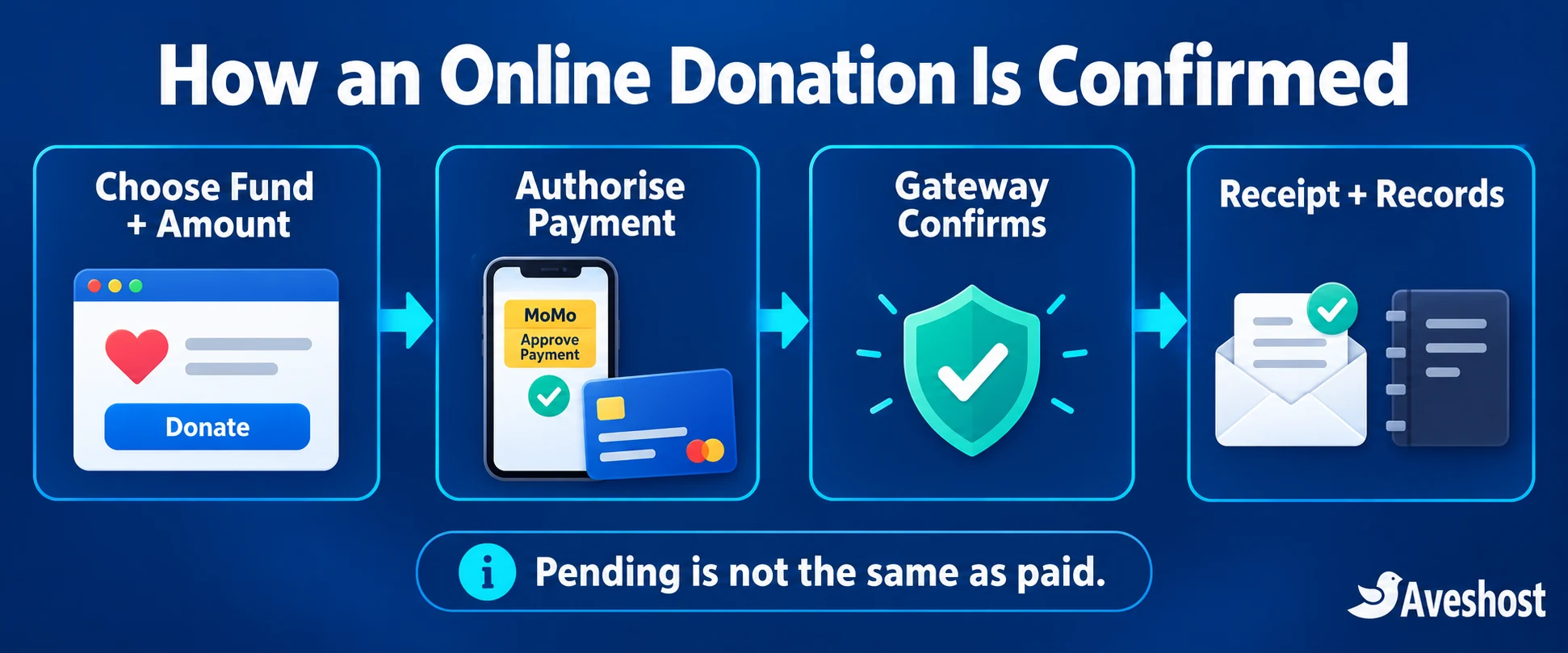
The website and payment gateway do different jobs. WordPress presents your organisation and giving options. WooCommerce records the selected contribution and its order reference. The gateway handles the enabled payment channels and reports the transaction result back to the website.
- The donor opens your genuine giving page and chooses a fund.
- The donor selects or enters an amount, with the currency clearly shown.
- The checkout sends the donor to the gateway’s secure payment interface.
- The donor authorises the payment through the selected channel.
- The gateway confirms the result, and the website updates the payment record.
- Your finance team matches receipts, gateway transactions and settlement records.
Paystack’s payment-channel documentation lists MTN, Telecel and ATMoney for Ghana. The channels donors actually see depend on the enabled account and checkout configuration. Visa and Mastercard are useful for eligible local and overseas card payments, with international acceptance enabled for the merchant account.
A MoMo donor authorises the request through the mobile-money flow. Your church, NGO, website administrator or support team should never ask the donor to send a wallet PIN or one-time code through a message or form. Payment credentials belong in the legitimate payment authorisation process.
What your church or NGO needs before starting
- An organisation-owned domain and an HTTPS-enabled website.
- Authorised people responsible for the website and the funds.
- The registration, identity and settlement details required for gateway activation.
- A giving policy that explains fund purposes, contact details and how payment questions are handled.
- A plan for receipts, financial records, access permissions and backups.
- A tested way to receive transactional email from your own domain.
Register the gateway account under the appropriate organisation and have an authorised representative complete the activation process. Keep website ownership, payment ownership and finance access aligned with your church or NGO’s governance. Review the gateway’s supported business categories and activation guidance for the documents and account type that apply.
Choose who may change payment settings, issue refunds, export donor records and view settlement details. Give people the access needed for their role. A volunteer who edits announcements does not automatically need access to payment keys or financial exports.
1. Choose a domain, hosting and trusted email
Use a domain that members and supporters can recognise, ideally the same address used for official announcements. Search our domain options, then publish the giving link consistently so donors can distinguish it from imitation pages.
Choose hosting with enough space and resources for WordPress, WooCommerce, images, backups and transactional activity. A small giving website can start on shared hosting; assess the real workload and leave room for campaign peaks.
| Our web hosting plan | Displayed monthly price | Useful resources | Planning direction |
|---|---|---|---|
| Professional | GH₵16.00 | 1 website, 10 GB NVMe storage, 2 GB RAM | A modest organisation website and giving page |
| Enterprise | GH₵32.00 | 3 websites, 50 GB NVMe storage, 3 GB RAM | More content or several organisation websites |
| Ultimate | GH₵62.00 | 4 GB RAM with the plan’s listed website and storage allowances | Additional room for a growing web presence |
These are the displayed Ghana cedi monthly rates on our web hosting page at the time of writing. Check the selected billing term and checkout total. The plans list SSL and weekly website backups; add a backup schedule appropriate to how often donation records change.
Use a domain-based address for giving enquiries and receipts, such as [email protected] or [email protected]. Our business email packages are useful when your team needs dedicated email services. Configure authenticated transactional sending for the website so confirmation messages reach donors reliably.
For a complete design and setup, explore our website design service. A good church or charity website should explain who you are, what each fund supports and how a donor can ask for help.
2. Install WordPress and WooCommerce
Install WordPress through your hosting control panel, then sign in using a protected administrator account. Enable HTTPS and confirm the site opens at the intended domain. Apply current compatible updates before configuring the payment flow.
Install and activate WooCommerce from the WordPress plugin directory. Complete the basic organisation details, choose Ghana as the location and set the store currency to Ghanaian cedi, GHS. Use a lightweight theme and review the generated cart and checkout pages.
This is a giving workflow, so remove product-shipping prompts from virtual contributions and keep the page language clear. A contribution record can be represented by a WooCommerce virtual product, but the donor-facing experience should say “Give” or “Donate” where appropriate.
Have your treasurer or accounting adviser review tax and accounting settings for your organisation. Do not copy retail tax settings blindly into a donation flow. Keep the receipt wording consistent with the actual contribution and your organisation’s recordkeeping requirements.
Build and test on staging first when you already have a live website. Protect the staging copy from public access and search indexing, and keep it in gateway test mode. Avoid copying live payment credentials or unnecessary donor data into development environments.
3. Activate your payment gateway account
Create the merchant account in your organisation’s name and complete the requested activation details. Configure the authorised settlement destination, review the enabled channels and prepare the test and live credentials. Account approval and payment-channel activation are separate from installing a WordPress plugin.
Use the gateway’s Ghana pricing and account information when planning the budget. At the time of writing, Paystack’s Ghana pricing page lists a 1.95% charge for local and international transactions, with international cards charged and settled in cedis by default. Check your current account terms and any applicable arrangements before launch.
For a simple fee illustration, a GH₵100 donation at 1.95% has a GH₵1.95 processing charge and GH₵98.05 remaining before any other applicable adjustments. Record the gross contribution, fees and net amount separately so the finance team can reconcile them.
Hosting charges, optional plugin licences, email services and payment-processing fees are separate budget items. Decide how your organisation handles costs and display the donor’s final payable amount clearly. Do not add an unexpected fee after the donor has already chosen to give.
4. Create giving funds and donation amounts
Separate the purpose of each contribution
Create a small set of clearly named giving options. For a church, these might be Tithes, Offerings, Building Fund and Community Outreach. An NGO might use Education Support, Medical Outreach or General Fund. Explain each purpose in plain language.
Record the selected fund in the contribution record so the finance team can classify it correctly. Avoid collecting everything into one vaguely labelled payment and trying to infer the purpose later from messages.
Offer fixed contribution amounts
For a straightforward first launch, create simple virtual products such as “Community Outreach — GH₵50” and “Community Outreach — GH₵100.” Enter the corresponding price, tick Virtual and publish the option. Alternatively, use a suitable variable-product setup with labelled amount choices. The WooCommerce product guide explains the product types.
These are example giving choices, not required contribution levels. Use amounts suitable for your supporters, make the purpose obvious and keep quantity handling deliberate. If quantity is not meant to multiply a contribution, configure the relevant item to be sold individually.
Let donors enter their own amount
Donor-chosen amounts are particularly useful for tithes and open-ended support. Standard fixed-price products do not create an arbitrary-amount field by themselves. Use a compatible donor-defined-price extension, such as Name Your Price for WooCommerce, when you need that feature. It is an optional paid extension.
For that route, enable the extension’s price-entry option on the virtual contribution, set a suggested amount and any intended minimum, then test the amount through cart, checkout and the final gateway charge. Keep the currency visible. Use server-validated pricing so the paid amount matches the contribution record.
If you prefer a dedicated fundraising plugin, choose one with an actively maintained Ghana-compatible gateway integration and test it end to end. Check that the donation plugin explicitly supports your chosen Ghana MoMo integration.
5. Connect the payment plugin and webhooks
Install Paystack WooCommerce Payment Gateway from the official plugin listing and activate it. In WooCommerce → Settings → Payments, open its settings, enable the gateway and start in Test Mode. Enter the matching test keys, select the checkout display option and save.
Copy the webhook URL displayed by the installed gateway settings into the payment dashboard’s API Keys & Webhooks settings. Keep it on your HTTPS domain and make it reachable. Use the URL your installed plugin provides, rather than guessing an endpoint.
The webhook allows payment updates to reach WordPress even if the donor closes the browser before returning. Keep checkout and webhook routes out of inappropriate cache or challenge rules. The maintained integration should handle its payment validation; a developer adding custom logic must validate notifications and avoid processing a transaction twice.
Keep secret keys in the gateway’s protected server-side configuration. Never publish them in a page, screenshot or shared document. Test keys and live keys are different: switching the website to live mode requires the corresponding live configuration.
Confirm the gateway works with your actual WooCommerce checkout type and current plugin versions. If a checkout-block combination is unsupported, use a supported checkout configuration and test it rather than leaving a payment method that never appears for donors.
6. Build a clear, mobile-friendly giving page
Create a page called Give, Donate or Support Our Work and put it in the main navigation. A visitor should understand the organisation, the purpose and the next action without scrolling through a long explanation.
- Organisation name and a short explanation of the giving purpose.
- Clearly labelled funds or campaigns.
- Suggested amounts and an own-amount option where configured.
- Ghana cedi currency and the final total.
- Visible supported payment methods.
- Contact details for payment questions.
- Privacy information and a clear acknowledgement or refund enquiry process.
For example: “Support our community outreach. Choose an amount in Ghana cedis and pay securely by mobile money or an enabled card. You will receive confirmation after your payment succeeds. For assistance, contact [email protected].” Replace the example address with your real monitored mailbox.
Collect the information you need for acknowledgement and reconciliation, such as a name, email and the payment-channel information required at checkout. Keep optional fields optional. Avoid forcing donors to create an account for a simple one-time contribution when your setup can support guest checkout.
Place giving choices or buttons that lead to the correct virtual contribution on this page. Keep the checkout route short and test it on a small phone. Review labels, error messages, text size and page weight, especially for supporters on mobile data.
For a QR code, encode the genuine giving-page URL and print a readable version of the domain next to it. Test the code from multiple phones. Direct people to your website rather than a changing collection of personal-wallet numbers or payment links you have not checked.
7. Test MoMo, cards and payment confirmation
Test the full flow before sharing the page widely. A successful-looking screen alone does not prove the organisation has a confirmed payment record. Check the WordPress record and gateway status together.
- A successful test payment with the intended fund and amount.
- A failed or cancelled attempt that remains unpaid.
- A duplicate callback or page refresh without a duplicate contribution.
- A donor closing the browser before returning, followed by the correct webhook update.
- Email acknowledgement delivered to the donor and notification delivered to the responsible team.
- Guest checkout and donor-chosen amounts on a mobile device.
- The correct account, currency and settlement destination in the payment dashboard.
MoMo authorisation can involve a prompt outside the browser, and donors may leave the website while completing it. Make pending status understandable. Do not tell them a contribution is successful until the gateway confirms it, and do not ask them to repeat a payment without checking the first reference.
Use gateway-provided test tools first. Once the merchant account and channels are ready, authorised staff can complete a small controlled live verification according to the organisation’s procedure. Check the actual MTN MoMo, Telecel Cash and enabled card experiences, as well as the resulting receipt and settlement record.
A WooCommerce paid order may be Processing or Completed depending on product and workflow settings. Read the payment confirmation and transaction reference to establish whether the contribution succeeded. Pending, failed and cancelled records require their appropriate treatment.
8. Launch, issue receipts and reconcile donations
Switch to live mode only after the test checklist passes and the organisation authorises launch. Publish the giving link on the official website, service materials, WhatsApp announcements and campaign pages. Use one consistent domain so supporters know where to go.
Send useful acknowledgements
A payment acknowledgement should identify the organisation, date, fund, amount and reference, with a contact for questions. Configure WooCommerce transactional messages and any donor-receipt customisation you require. Test messages for successful, pending and failed payments so their wording matches the actual status.
Distinguish a payment acknowledgement from any formal tax or other statutory certificate your organisation may issue. Have the finance team approve that wording. Do not label every automatically generated order email as a tax-deductible donation receipt.
Reconcile giving records and settlements
Match the WooCommerce contribution record to the gateway transaction reference, then match the gateway’s gross amount, fee and net settlement to the organisation’s financial records. Keep contributions separated by fund. A settlement can cover several payments, so record the relevant payout reference too.
| Record | What to retain | Why it helps |
|---|---|---|
| Website contribution | Fund, amount, date, donor acknowledgement details and order reference | Explains what the donor selected. |
| Gateway transaction | Payment reference, confirmed status, gross amount and fee | Confirms the processed payment. |
| Settlement | Payout reference, date and net amount | Matches the funds received. |
| Adjustment | Refund, reversal or dispute details and the authorised decision | Keeps the ledger accurate after changes. |
For payment questions, ask for the transaction reference and relevant non-sensitive details. Check the gateway before treating a screenshot as proof or directing the donor to pay again. Use the gateway’s documented refund process where an authorised refund is appropriate, and update the organisation’s records.
Handle recurring giving and diaspora donations
One-time MoMo authorisation and automatic recurring billing are different workflows. Do not promise that a one-time wallet payment automatically gives the organisation permission or technical ability to debit the donor every month.
For repeat MoMo giving, a reminder linked to the giving page can let the donor authorise each contribution. Automatic recurring card giving needs a supported subscription configuration and explicit donor agreement. Explain the amount, schedule, cancellation method and what happens when a payment fails.
Paystack documents its subscription functionality, and the WooCommerce gateway supports an appropriate WooCommerce Subscriptions integration. That is a separate setup from the one-time contribution flow. Validate eligibility, costs and the intended channel before adding it to the giving page.
For diaspora supporters, enable the eligible international-card channel on the merchant account and show clearly that this setup charges in Ghana cedis. Their card issuer may apply its own currency conversion. Test an authorised international-card flow and provide a helpful contact when a payment is declined.
Protect donors, payments and your website
Use HTTPS, maintained WordPress software, secure administrator access and role-based permissions. Back up both files and the database, protect the backup access and test restoration. A weekly website backup may need additional protection when donation records change daily.
Do not collect full card details or MoMo PINs in your own WordPress fields. Let the gateway’s payment interface handle the relevant authorisation. Keep donor records private and collect only the information your organisation needs. Publish a clear privacy notice and control access to exports.
Separate transactional acknowledgements from marketing. A person who gives should not silently be added to an unrelated mailing list. Use appropriate consent and unsubscribe handling for optional communications, and keep public donor recognition separate from the private finance record.
Protect the genuine giving-page link against impersonation. If a message suddenly asks members to use another domain or a personal wallet, verify through the organisation’s trusted channels. Our business email security guide explains practical phishing scenarios that also matter to churches and charities.
If you add Cloudflare or another security layer, test checkout, gateway callbacks and legitimate mobile access after applying rules. Our Cloudflare setup guide covers the website protection foundation. Keep private checkout responses out of shared caches.
Your online giving launch checklist
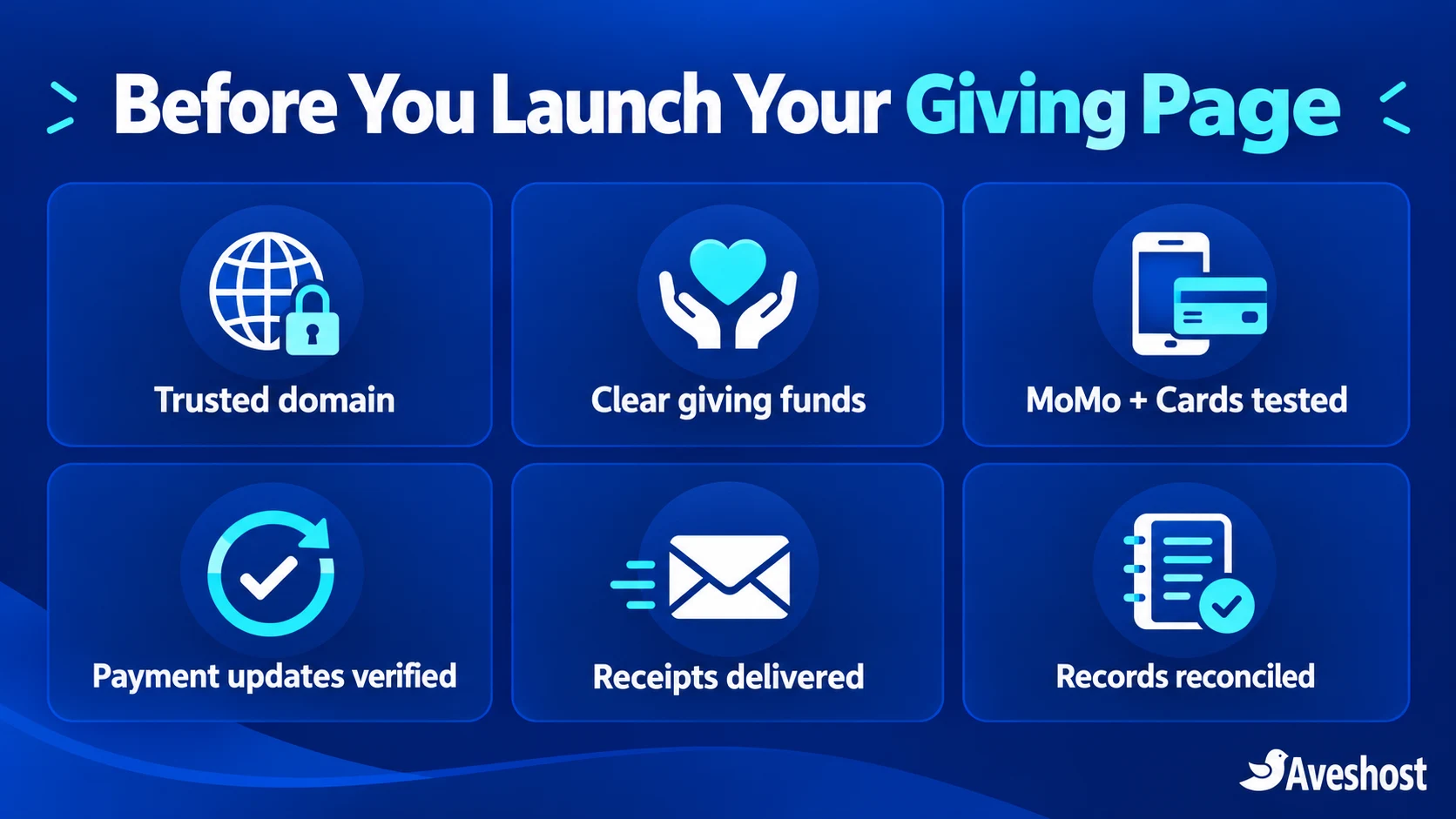
- The organisation owns the domain and merchant account.
- HTTPS works on the genuine giving and checkout pages.
- Ghana cedi amounts and fund purposes are clear.
- Merchant activation and the intended channels are ready.
- Fixed or donor-chosen pricing works through the final charge.
- Payment keys are protected and webhook updates work.
- Successful, failed, pending and duplicate scenarios have been tested.
- Acknowledgements reach donors from a trusted domain.
- The finance team can reconcile transactions, fees and settlements.
- Access, backups, privacy information and payment-help procedures are in place.
Ready to build your giving page? Start with our web hosting packages, choose your organisation’s domain and set up a trusted business email address. For a complete church or charity website, work with our website design team to create a clear, secure giving experience.
Frequently asked questions
Can a church or NGO accept MoMo donations through WordPress?
Yes. An eligible, activated payment account and compatible WordPress integration can support MoMo giving. This guide uses WooCommerce and the official Paystack gateway for a Ghana cedi contribution flow.
Can donors use MTN MoMo and Telecel Cash?
Paystack’s Ghana payment-channel documentation lists MTN, Telecel and ATMoney. Confirm the channels enabled on your merchant account and test the checkout donors will actually use.
Can members pay tithes by entering their own amount?
Yes, with a supported donor-defined-price setup. Standard fixed-price products do not add an arbitrary-amount field automatically. Configure and test a compatible extension so the selected amount matches the final payment.
Do I need a website and merchant account?
You need the website for this WordPress workflow and an eligible payment account for processing. Complete the organisation’s gateway activation, settlement and governance arrangements before receiving live payments.
Does WooCommerce automatically confirm a payment when the donor returns?
Confirmation should be based on the gateway’s verified transaction result. Configure the plugin’s webhook so the website can receive updates even if the donor closes the browser before returning.
Can overseas supporters donate by card?
Eligible international cards can be accepted when the merchant account and channel are enabled. This setup charges in Ghana cedis, and the donor’s card issuer may apply conversion. Test the intended international payment flow.
Can MoMo donations renew automatically every month?
A one-time MoMo payment does not establish automatic recurring billing. Repeat giving can use reminders and a fresh donor authorisation. Automatic recurring card giving requires a separate supported setup and explicit agreement.
What fees should we budget for?
Budget for hosting, domain, email, optional plugin licences and payment processing. Paystack’s Ghana page currently lists 1.95% for local and international transactions; review current account terms and any other applicable costs.
What should a donation acknowledgement contain?
Include the organisation, date, fund, amount, transaction reference and contact details. Match the wording to confirmed status, and have the finance team approve any formal receipt or certificate wording.
Should we collect MoMo PINs or card details on our own page?
No. Use the gateway’s legitimate payment interface and mobile-money authorisation process. Keep payment secrets out of WordPress form fields, messages, screenshots and support requests.