Seeing “Crawled—Currently Not Indexed” in Google Search Console is one of the most frustrating SEO warnings because your server did nothing wrong. Googlebot reached your URL, downloaded the HTML, and read the page—yet decided not to add it to Google’s search index.
Unlike a 404 error, a 5xx server crash, or a robots.txt block, Crawled—Currently Not Indexed is a quality, duplication, or prioritization decision. Clicking Request Indexing over and over without changing the underlying page almost never fixes it.
In this guide, you will learn how to diagnose Crawled—Currently Not Indexed systematically: separating pages you actually want indexed from noise, inspecting live rendered HTML and canonicals, fixing thin or duplicate templates, and strengthening internal links.
Table of Contents
What “Crawled—Currently Not Indexed” Actually Means
In the Google Search Console Page Indexing report, Crawled—Currently Not Indexed means Googlebot fetched your page successfully, evaluated its content and signals, and chose not to store it in the index for now. Because the page is not indexed, it cannot rank for any search queries.
Site owners frequently confuse this warning with Discovered—currently not indexed. Although both keep a page out of Google Search, they point to completely different bottlenecks:
| Search Console Status | Did Googlebot Crawl the Page? | Primary Root Cause | First Diagnostic Step |
|---|---|---|---|
| Crawled—currently not indexed | Yes (fetched and evaluated) | Content quality, duplication, canonicals, or weak internal links | Inspect URL pattern, canonicals, and unique page value |
| Discovered—currently not indexed | No (queued, not fetched yet) | Crawl budget, server capacity limits, or orphan sitemap URLs | Check server TTFB, crawl stats, and add internal links |
The 5 Most Common Causes of Crawled—Currently Not Indexed
Before editing random pages, identify which pattern explains your non-indexed URLs. Almost every Crawled—Currently Not Indexed report falls into one of five root causes:
• 1. Thin or Low-Value Content: Pages with very few words, boilerplate summaries, or content that adds no unique insight beyond what already ranks are routinely dropped after crawling.
• 2. Duplicate or Near-Duplicate Templates: URL parameters (?sort=price, ?utm_source=), print views, HTTP vs HTTPS variants, or overlapping product pages compete with each other until Google leaves extras unindexed.
• 3. Conflicting Canonical Tags: If a page declares rel="canonical" pointing to a different URL—or Google selects a different canonical because the pages look nearly identical—the non-canonical URL stays out of the index.
• 4. Weak Internal Linking & Orphan Pages: Pages buried five clicks deep or listed only in an XML sitemap lack internal link equity, signaling to Google that they are low-priority.
• 5. JavaScript Rendering or Soft-404 States: Client-side apps that fail to hydrate content quickly, or empty category/search pages returning 200 OK, often look empty to Googlebot’s rendering pass.
Step-by-Step Diagnostic Workflow in Search Console
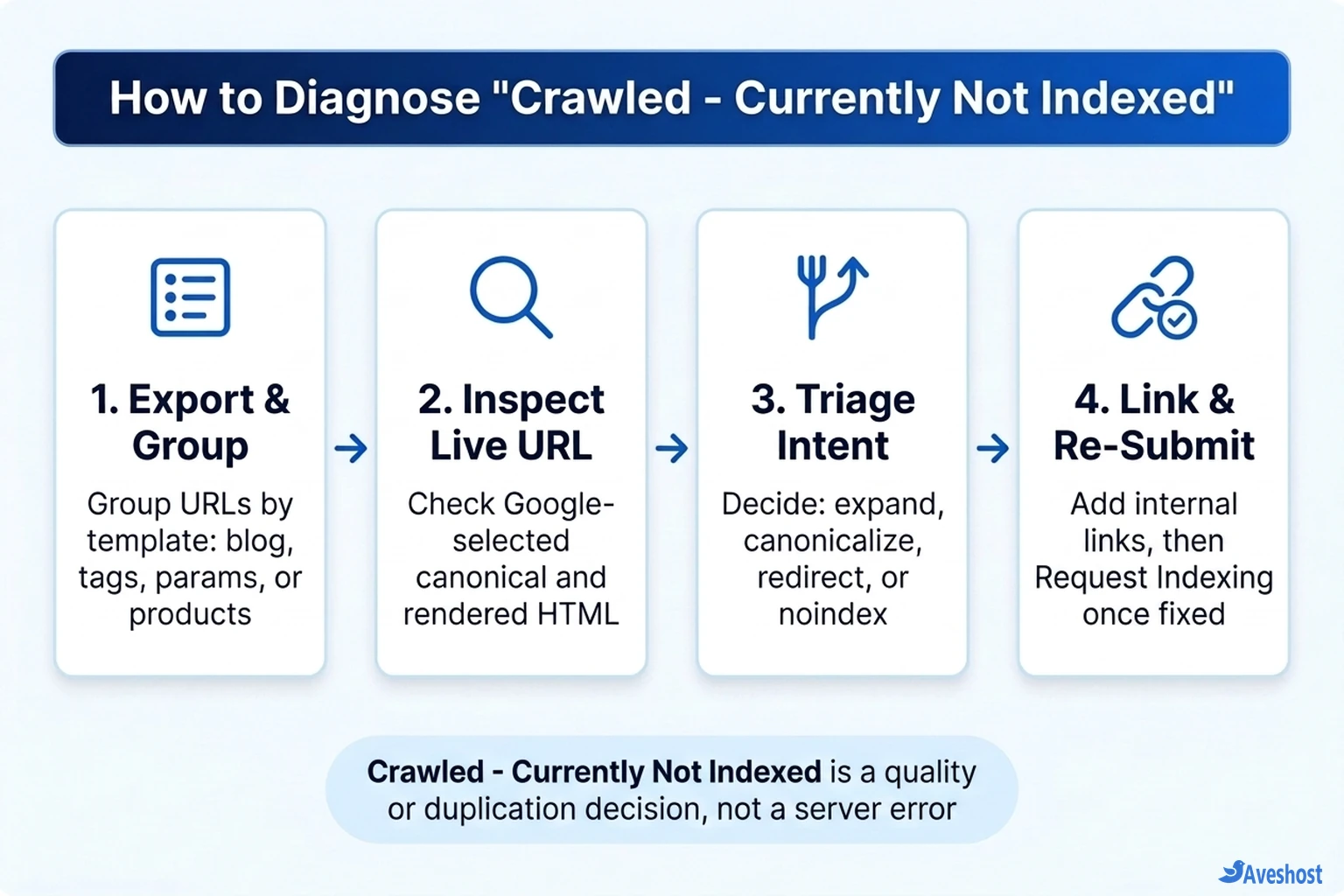
Follow a structured four-step triage instead of guessing URL by URL. Open Search Console, go to Indexing → Pages, click Crawled—currently not indexed, and export the affected URL list.
• Step 1 — Group URLs by Template: Sort the exported spreadsheet by path prefix (such as /tag/, /page/, /blog/, or query strings like ?filter=). You will usually spot immediately whether the warning hits valuable articles or low-value system URLs.
• Step 2 — Run URL Inspection & Test Live URL: Paste a few representative URLs into Search Console’s URL Inspection bar. Compare User-declared canonical against Google-selected canonical, then click Test Live URL → View Tested Page to verify Googlebot sees your full rendered text.
• Step 3 — Triage Each Group: Decide whether each URL group should be expanded and kept, consolidated with a canonical or 301 redirect, or excluded with noindex.
• Step 4 — Strengthen Internal Links & Re-Submit: Add contextual links from strong, indexed pages before clicking Request Indexing.
How to Fix Each Type of Unindexed Page
Not every URL in the Crawled—Currently Not Indexed bucket is actually broken. In fact, many healthy websites intentionally leave tag archives, pagination, and filter URLs out of Google’s index. Apply the fix that matches the page type:
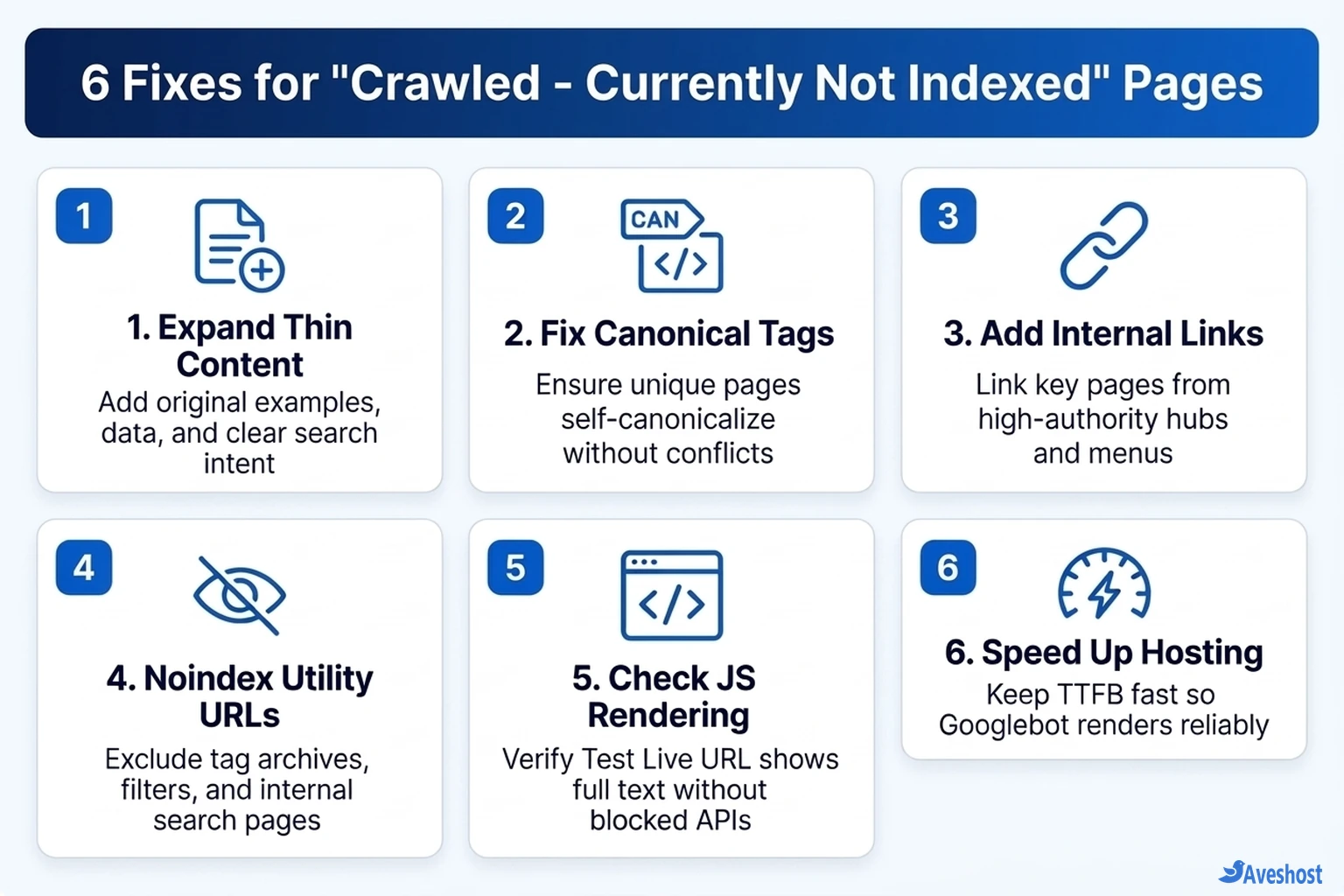
• Important Blog Posts or Service Pages: Expand thin sections with original examples, troubleshooting tables, screenshots, and clear answers to user intent. Add at least two or three contextual internal links from your highest-traffic guides—and if you track indexing trends across hundreds of URLs, see how to automate Search Console reports with n8n or query live data via Google Search Console MCP.
• Duplicate or Parameter URLs: Ensure every canonical page has a clean self-referencing <link rel="canonical"> tag, and point variant or tracking URLs back to the clean canonical URL (or redirect retired duplicates with a 301).
• Low-Value Tag, Author, or Internal Search Pages: Add a noindex, follow meta robots directive (or configure your WordPress SEO plugin to noindex thin archives) so Google stops spending crawl attention on pages you never want ranked.
• Client-Rendered JavaScript Pages: If Test Live URL shows a blank shell or missing body text, switch critical content routes to server-side rendering or static pre-rendering—our comparison of Next.js static export vs server hosting explains how rendering strategy affects SEO.
<!-- 1. Self-referencing canonical on your primary URL -->
<link rel="canonical" href="https://example.com/your-guide/" />

<!-- 2. Exclude low-value tag, filter, or internal search URLs -->
<meta name="robots" content="noindex, follow" />
How Server Performance and Hosting Support Reliable Indexing
While Crawled—Currently Not Indexed is primarily a content and site-architecture signal, slow server response times and intermittent timeouts still hurt your crawl efficiency. When Googlebot hits slow TTFB during HTML fetches or JavaScript asset rendering, pages are more likely to be rendered partially or deprioritized.
Running your website on fast NVMe infrastructure—whether shared web hosting, fully managed VPS hosting, or self-managed VPS hosting with Aveshost—keeps response times snappy so Googlebot fetches and renders every updated page cleanly.
# Verify HTTP status, redirects, and X-Robots-Tag headers as Googlebot sees them
curl -IL -A "Googlebot/2.1 (+http://www.google.com/bot.html)" https://example.com/your-page/
Frequently asked questions
Is Crawled—Currently Not Indexed an error I must fix for every URL?
No. Google intentionally excludes low-priority utility URLs such as tag archives, paginated pages, or parameterized filter URLs. Focus your fixes only on money pages, blog posts, and landing pages that you actively want to rank in search.
How is Crawled—Currently Not Indexed different from Discovered—Currently Not Indexed?
Crawled—currently not indexed means Googlebot already fetched and evaluated the page but chose not to index it due to quality, duplication, or weak internal signals. Discovered—currently not indexed means Google knows the URL exists but has not crawled it yet.
Will clicking Request Indexing fix Crawled—Currently Not Indexed?
Not by itself. Requesting indexing only puts the URL back into the crawl queue. If you have not improved the page’s content depth, internal links, or canonical tags, Googlebot will crawl it again and reach the same decision.
How long does it take for a fixed page to move from Crawled—Currently Not Indexed to Indexed?
After you expand content, fix canonicals, and add internal links, it typically takes anywhere from a few days to several weeks for Google to recrawl and re-evaluate the page. Adding links from frequently crawled pages speeds up discovery.
Can weak internal linking cause Crawled—Currently Not Indexed?
Yes. If an important page is only reachable via your XML sitemap or buried deep in your navigation, it receives minimal internal link equity. Linking to it from relevant, already-indexed articles signals to Google that the page is worth indexing.