Choosing between Devin and Cursor is no longer a simple choice between an autonomous agent and an AI editor. Both products now cover more of the software development process, from local coding to delegated cloud work. The better choice depends on how you want to work, what you need to review, and what you can afford to spend.
In this Devin vs Cursor guide, we compare current features, pricing, team workflows, code review, and deployment considerations. We also share practical examples for freelancers, agencies, and development teams building projects of different sizes.
Table of Contents
Devin vs Cursor at a glance
Choose Cursor first if your priority is working closely with AI while editing code. Shortlist Devin if your priority is assigning well-defined engineering tasks and supervising several sessions through a dedicated command center. Choose the workflow that fits how you want to supervise the work.
The distinction is less absolute than it used to be. Devin now includes a desktop editor and local agent; Cursor offers cloud agents and Projects for coordinated work. Comparing only “autonomous agent versus autocomplete” misses much of what you can buy today.
| Decision factor | Devin | Cursor |
|---|---|---|
| Product scope | Cloud agent, Desktop, CLI, and review tools | Desktop editor, CLI, cloud agents, and Projects |
| Typical starting workflow | Delegate a defined task, then inspect its work | Edit, ask, review changes, and iterate inside the editor |
| Parallel work | Command center organizes local and cloud sessions | Cloud agents plus Projects coordinate delegated tasks |
| Entry paid individual plan | Pro: US$20/month | Pro: US$20/month |
| Public team pricing | US$80/month team plan plus US$40 per full developer seat | Standard: US$40/user/month; Premium: US$120/user/month |
| Main evaluation question | Can it finish useful tasks with manageable supervision? | Does it improve your editing and review workflow? |
| Human responsibility | Requirements, review, security, merge, and deployment | Requirements, review, security, merge, and deployment |
Product features and monthly prices were checked against official sources on October 10, 2026. This is a documentation-based editorial comparison, not a controlled performance benchmark. The screenshots show public vendor websites and product demonstrations; they are not evidence that we tested the tools on a client repository.
What is Devin? Cloud delegation, Desktop, and local coding
Devin is positioned as an autonomous software engineering product. You describe a task, provide repository context, and review the result. Its cloud workflow is designed around agents that can operate in their own development environments rather than only suggesting text in your open file.
The product also includes Devin Desktop and CLI. Desktop combines a coding editor with a place to manage agent activity. The Agent Command Center organizes local and cloud sessions, including work that is blocked or ready for review. Spaces group related work and context. This is useful when managing activity becomes as important as writing the next function.
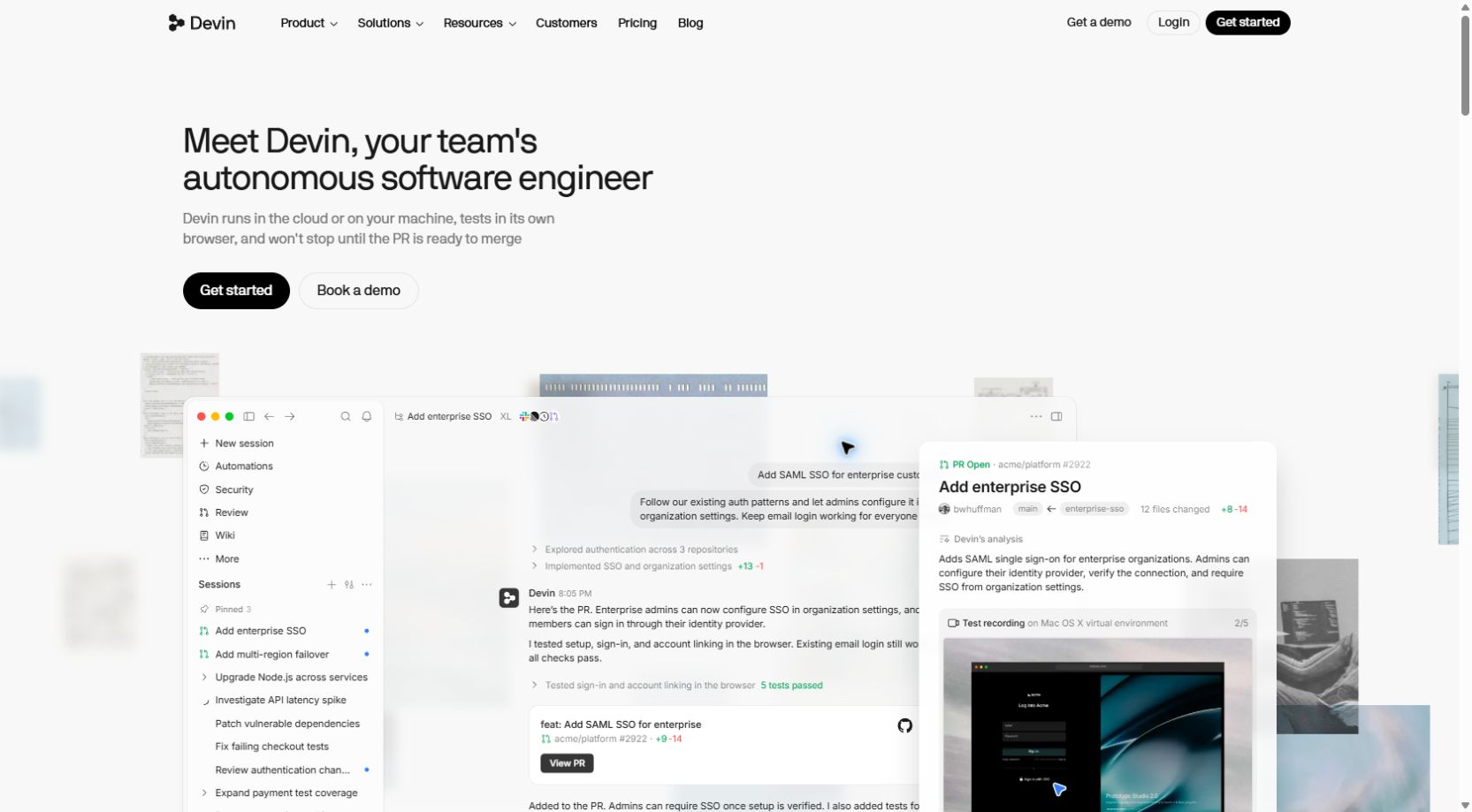
Think of a maintenance backlog: improve error messages, update a small dependency, add missing tests, and investigate a reproducible bug. Each item can become a separate task with a clear completion condition. Your role shifts toward explaining the desired behavior, answering questions, and checking the proposed change.
Devin is less compelling when the task itself is still unclear. “Fix our platform” provides little direction. “Reproduce the duplicate-order bug with this test fixture, change only the order service, and add a regression test” provides a useful boundary. Autonomous work still needs a human who understands what success means.
If you know the former Windsurf editor, note that it was renamed Devin Desktop. The current Desktop FAQ explains the transition and legacy plans. It also says the old Windsurf JetBrains plugin is in maintenance mode and points users toward Devin through ACP. Check the specific integration you need before choosing a tool on the basis of an older review.
What is Cursor? An AI editor with cloud-agent workflows
Cursor brings AI assistance into the coding environment. Its appeal starts with the short feedback loop: inspect a file, ask for an explanation or change, examine the diff, and refine the implementation while keeping the code in view. That workflow fits developers who want frequent control over the direction of a task.
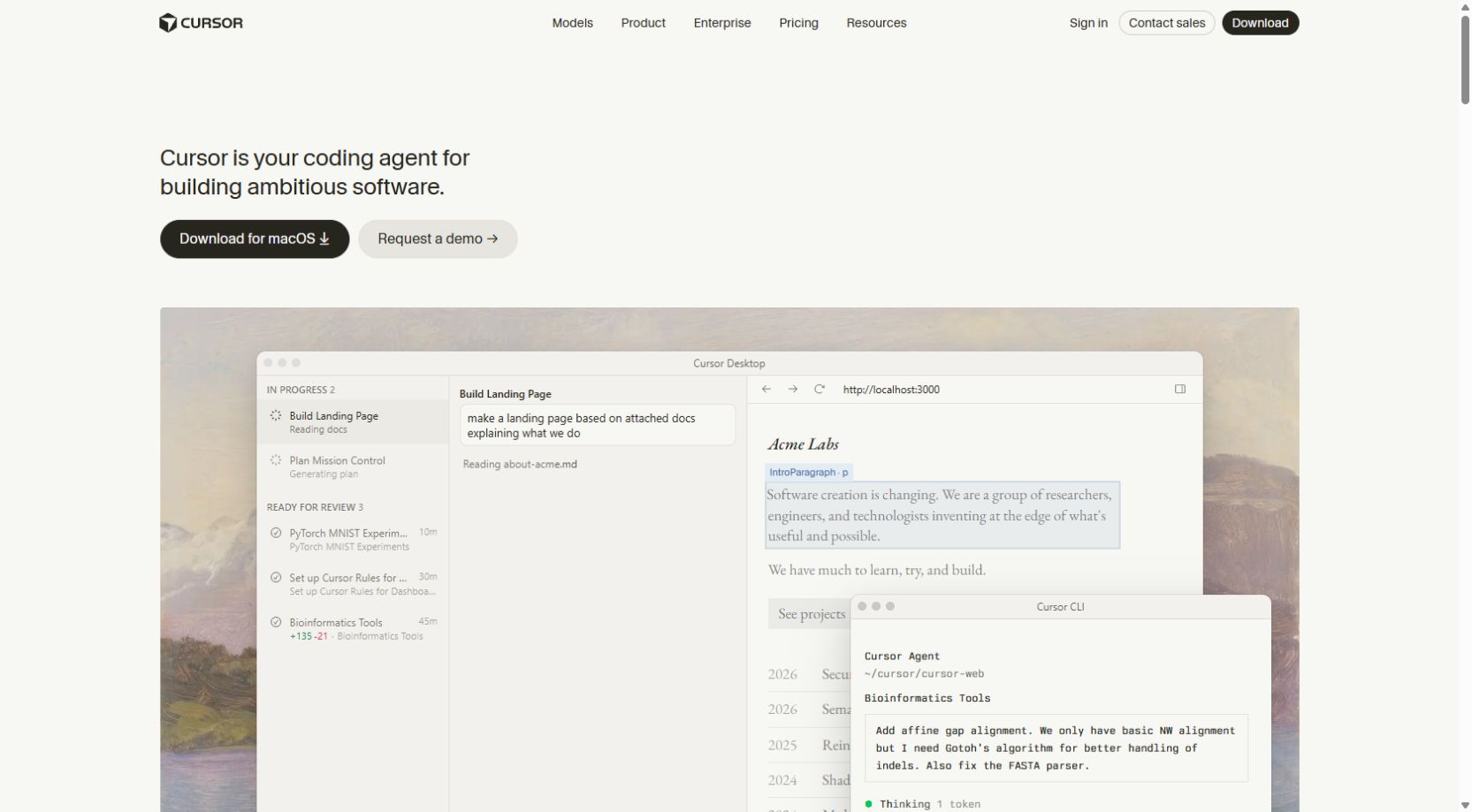
Cursor also supports work outside that immediate editing loop. Its cloud agents run in isolated development environments and can work in parallel, returning changes and artifacts for review. Environment setup, dependencies, and access permissions remain part of making those runs useful.
Cursor Projects adds a coordinator that plans and delegates to coding agents while retaining shared project context. It is available on paid plans rather than Hobby. Consequently, “Cursor cannot coordinate several agents” is an outdated way to describe the current product.
For example, you might begin by editing a checkout component interactively, then delegate a separate documentation task to a cloud agent. A larger project may need a coordinated set of tasks instead. Evaluate the actual mix you expect to use; buying an AI editor does not mean you must run every task locally.
Agent workflows: supervision matters more than the label
The useful question is how often you need to intervene. A tool that starts many tasks quickly may still consume your afternoon if every result needs extensive correction. A tool that feels slower in the first five minutes may save time if its changes are easier to understand and approve.
Interactive coding
An interactive workflow works well when requirements change as you learn. You ask why a component behaves a certain way, inspect the explanation, make a limited change, and immediately test the outcome. Cursor is a sensible first trial for this pattern. Devin Desktop also supports local coding, so compare the experience directly to assess the editor tools available to your team.
Delegated engineering tasks
Delegation works best for bounded, verifiable work: add a test around an existing behavior, implement a specified API response, or migrate a small module using an agreed pattern. Devin is a strong candidate to trial when your team wants a command-center approach to these tasks. Cursor cloud agents and Projects should also be evaluated if your team already uses its editor.
Parallel agents and Git boundaries
Parallel work creates coordination problems as well as opportunities. Two agents changing the same schema or shared component can produce conflicting design decisions even when each branch passes its own checks. Divide work by responsibility, agree on interfaces first, and nominate a reviewer for the combined result.
- Give each task its own branch or isolated worktree.
- Define which files or services it may change.
- Avoid concurrent edits to the same migration or dependency lockfile.
- Merge in a deliberate order and rerun integration tests afterward.
- Keep a visible list of blocked tasks, unanswered questions, and review ownership.
Treat autonomy as a workflow capability rather than a promise of independence. A useful agent makes its decisions and evidence inspectable. If it cannot explain what changed, what failed, and what it still needs from you, delegation becomes difficult to trust.
Large codebases: context, rules, and maintainability
Repository size alone does not tell you which AI coding tool will perform better. A small undocumented project can be harder to change safely than a large project with clear interfaces, reliable tests, and consistent conventions. The quality of available context often determines whether an agent follows your architecture or invents a competing one.
Prepare a short project guide before your trial. Describe the application purpose, important directories, setup commands, test commands, coding conventions, and areas that require extra care. Keep it specific enough to answer common questions without turning it into a second copy of your entire documentation.
- Explain where business rules belong and which layers may call each other.
- Document the supported runtime and dependency versions.
- Show a representative implementation that follows the project style.
- Identify generated files, migrations, and files the agent should avoid.
- Describe how to run a focused test and the full validation suite.
- Define what evidence must accompany a proposed change.
Devin Local supports project instructions such as AGENTS.md alongside rules and skills. Its local-agent documentation says it does not persist memories between sessions, so do not rely on a previous conversation to carry critical instructions forward. Store durable requirements in the repository or the appropriate supported configuration.
Cursor Projects retains shared context for coordinated work, but persistent context still needs maintenance. Old instructions can mislead an agent just as easily as missing ones. Remove obsolete setup steps, update architecture notes after a migration, and distinguish decisions from suggestions.
A good large-codebase trial uses a change that crosses one meaningful boundary—for example, an API handler and its validation tests—without allowing a repository-wide rewrite. Assess whether the tool finds the correct call sites, preserves established patterns, and avoids unrelated cleanup. The smaller the reviewable diff, the easier it is to spot an incorrect design decision.
Everyday editing, debugging, and developer experience
Daily convenience can matter more than an impressive long-running demo. If you spend most of your time reading code, changing small functions, navigating definitions, and debugging locally, evaluate how naturally the tool fits that rhythm. A few seconds of repeated friction can outweigh a feature you use once a month.
Try a representative working session: explain an unfamiliar function, implement a small change, inspect the diff, run a targeted test, and investigate a failure. Watch whether suggestions follow your style, whether the agent touches unrelated files, and whether you can interrupt or redirect it without losing the thread.
For debugging, provide the exact error message, reproduction steps, expected behavior, and the relevant environment. Ask the agent to distinguish observations from guesses. A plausible explanation is not a diagnosis until the failing case has been reproduced and the proposed fix changes that result.
For an online shop, a “payment successful but order pending” issue might involve delayed callbacks, duplicate events, or a mismatch between payment state and order state. An agent should investigate the existing flow and sandbox evidence rather than hide the symptom by automatically marking every order paid.
Check your preferred editor extensions, keyboard shortcuts, language tooling, and terminal workflow during the trial. Teams with a specific IDE requirement should verify the currently supported integration. Similar product names and VS Code heritage are not enough to guarantee that every extension or older plugin behaves the same way.
Our recommendation is to pick the interface you can review comfortably. If you are learning, ask for short explanations and make small changes. If you are experienced, insist on concise diffs and relevant test evidence. Neither group benefits from accepting a large patch simply because the assistant sounds confident.
Models, integrations, and customization
Do not choose between Devin and Cursor only by counting model names. Available models, routing, quotas, and cloud-agent options change. The same underlying model can behave differently when the surrounding tool gives it different context, permissions, prompts, or feedback from tests.
Choose a model appropriate to the task, then measure results. A quick explanation may not need the most expensive option. An unfamiliar migration may justify a more capable model and a longer review. The cost of repeated failed attempts can exceed the savings from a cheaper first run.
Integrations introduce another decision: what should the agent be able to see or do? Repository access may be necessary for coding. Access to issue trackers, documentation, or a test environment can improve context. Production databases, billing systems, and broad cloud credentials usually add risk beyond what a routine code task needs.
- Start with the repository and a test environment.
- Use project instructions for repeatable conventions.
- Add a skill or integration only when it solves a recurring task.
- Inspect the permissions of MCP servers and other connected tools.
- Keep credentials outside source files and prompts.
- Record which integrations are required so another developer can reproduce the setup.
Build a repeatable workflow before adding many integrations. If a task works only because one developer has an undocumented local setup, cloud delegation will be fragile. A clean setup script and realistic test fixtures often improve agent results more than another plugin.
Code quality: tests, review, and evidence
We would not declare a universal code-quality winner without running the same tasks under controlled conditions. Vendor demonstrations show what a product can do in a selected example. They do not establish which tool will work best on your repository, language, or business rules.
Judge a completed task on more than whether it compiles. Does the patch address the original requirement? Does it preserve permissions and validation? Are edge cases handled? Did it introduce unnecessary dependencies? Can the next developer understand why the change was made?
A useful review package contains the change summary, files touched, commands run, test results, remaining limitations, and any implementation dependencies. Ask for that package in the task brief. It gives you something concrete to verify rather than a generic “done” message.
Cursor offers Agent Review for change inspection, including quick and deeper review modes with different cost tradeoffs. Devin also presents review as part of its product family. Treat automated review as an additional signal; a second agent can miss the same business-rule error as the first.
A review checklist for either tool
- Read the diff before running unfamiliar commands.
- Confirm the tests exercise the changed behavior rather than only existing paths.
- Check validation, authorization, and failure handling.
- Inspect dependency additions and lockfile changes.
- Verify no credentials, real customer records, or debug logs were committed.
- Run your normal checks in a trusted environment.
- Test the user journey in staging before production.
For checkout software, include failure and retry paths, not just a successful purchase. For a school portal, test whether users can access only the records permitted by their role. For a booking application, test concurrent requests for the final available slot. These project-specific checks are more informative than a general comparison of code style.
Devin vs Cursor pricing and total cost
The table below uses public monthly US-dollar prices checked October 10, 2026. It excludes taxes, currency conversion, payment fees, additional usage, and negotiated enterprise terms. Annual billing and legacy plans may differ. Verify the current checkout before subscribing.
| Plan | Devin | Cursor |
|---|---|---|
| Free | Free: US$0, limited quota | Hobby: US$0, limited agent use |
| Entry individual | Pro: US$20/month | Pro: US$20/month |
| Intermediate individual | No directly matching public tier in this comparison | Pro+: US$60/month |
| High-usage individual | Max: US$200/month | Ultra: US$200/month |
| Teams | US$80/month team plan + US$40/month per full developer seat | Standard: US$40/user/month; Premium: US$120/user/month |
| Enterprise | Custom quote | Custom quote |
Sources: Devin pricing and Cursor pricing. These are not equivalent usage allowances. Devin describes quotas that vary with the model and task. Cursor describes included model usage and additional on-demand usage. A subscription price does not make every agent run unlimited.
A simple two-developer example
Under the displayed Devin team formula, a team plan with two full developer seats is US$80 + (2 × US$40) = US$160/month before additional charges. Two Cursor Standard seats are 2 × US$40 = US$80/month before additional charges. Compare capacity and administrative features separately alongside these subscription totals.
Two individual Pro subscriptions would have a different base cost, but they are not a substitute for team administration when your organization needs centralized billing, access management, or enforced policies. Compare the plan that actually meets your requirements.
Budget for completed work
Use this practical calculation: total tool and review cost ÷ accepted tasks. Include subscription fees, additional usage, setup time, review time, and rework. Exclude tasks that were abandoned or produced changes you could not safely accept. This turns “cheap plan” into a meaningful comparison.
Illustrative example: a developer spends US$20 on a subscription and US$10 on additional usage, then accepts ten useful tasks. The direct software cost averages US$3 per accepted task. If five tasks require an hour of correction each, the real cost is higher. These numbers demonstrate the method; they are not measured results for either tool.
If you bill clients in a different currency from the tool’s subscription, record the actual charged exchange rate and any bank fees. Avoid building a client quote around an old conversion screenshot. Set an additional-usage ceiling and check consumption early in the trial so a busy week does not become an unexpected bill.
Security, privacy, and permissions
Choose a tool only after deciding which code and data it may process. “Runs locally” can describe where commands execute without meaning every AI request stays on the device. Review the current data-handling terms for the exact product, plan, model, and integrations you will use.
Devin Local documents permissions for file operations, commands, network requests, and connected tools, along with an optional operating-system sandbox. These controls can help define a task boundary, but they still require sensible configuration. Permission to run a test should not silently become permission to alter production infrastructure.
Cursor cloud workflows also require attention to secrets and network access. Its Projects documentation notes that legacy Privacy Mode is incompatible with Projects because code is stored while agents work. Review the privacy settings for each cloud feature you enable.
The public pricing pages describe more advanced organization controls on certain team and enterprise plans. Ask the vendors which controls your proposed subscription includes, and review their documentation against your organization’s requirements. Do not infer enterprise features from the presence of a security heading on a marketing page.
- Use a sandbox or staging environment with realistic synthetic data.
- Give the agent the narrowest repository access needed.
- Keep production payment keys and customer exports out of prompts.
- Require review for destructive commands and sensitive configuration changes.
- Use separate credentials with limited scope for automation.
- Review access when a developer or contractor leaves the project.
- Retain logs and task summaries appropriate to your team’s process.
For freelancers, agree with clients before sending private repositories or confidential documents to a third-party AI service. A client may have specific requirements even if the code seems ordinary. State what tool you intend to use, what it will access, and how the proposed changes will be reviewed.
Protect the rest of your delivery workflow too. You can follow our guide to enabling two-factor authentication on your account. An AI coding subscription does not replace account security, reliable backups, or careful deployment permissions.
Which tool fits your project? Practical use cases
| Your situation | Our suggested first trial | What to verify |
|---|---|---|
| Solo developer improving an existing application | Cursor for a close editing loop | Diff quality, debugging convenience, and usage cost |
| Team with a backlog of bounded engineering tasks | Devin, alongside a Cursor cloud/Projects trial | Task completion, blocked work, and reviewer effort |
| Agency juggling multiple client repositories | The tool with the best access boundaries and coordination for your team | Client consent, repository isolation, billing, and handoff |
| Beginner learning programming | An interactive workflow with small changes | Can you explain and reproduce the code yourself? |
| Long-running feature across multiple tasks | Compare Devin Spaces/command center and Cursor Projects | Shared context, dependencies, conflict handling, and review |
| Strict enterprise controls | Plan-specific evaluation with your security team | Data handling, identity, audit, network, and deployment requirements |
Freelancers and small agencies
Imagine an agency maintaining websites for a restaurant, a school, and a retailer. The important constraint may be the number of hours available for review rather than the number of agent sessions it can launch. Start with one repository and a low-risk task before delegating work across all three clients.
Keep business requirements in the brief: delivery areas, local phone-number formats, currency display, accessibility, and the actual payment provider’s sandbox behavior. These details should come from the client and official integration documentation. The agent should not invent policies, legal text, or payment rules to fill gaps.
Developers with connectivity or budget constraints
Cloud agents can reduce dependence on keeping a laptop active throughout a run, but you still need connectivity to submit tasks and review results. Local execution is useful when your environment is available on your machine; AI-backed features may still require network access. Test the workflow under your real connection conditions before committing.
For a student or early-stage freelancer, start with a free option or one entry paid plan and a small usage budget. Spend the first week learning how to ask precise questions and verify changes. A high-priced plan is unlikely to fix unclear requirements or a missing test suite.
Teams building business-critical applications
For a fintech dashboard, health-related portal, or large commerce application, involve the people responsible for architecture, security, and operations. Trial the tools on non-production work. Decide who approves changes, which environments agents can access, and what evidence is mandatory. Convenience alone is not enough for these projects.
A practical seven-day evaluation plan
A short structured trial can answer more than a long list of features. Use the same repository snapshot, comparable task briefs, and the same acceptance checks. Log the model and relevant settings because results depend on more than the product name.
| Day | Action | Evidence to record |
|---|---|---|
| 1 | Prepare setup instructions and a safe test environment | Time to first successful build and test run |
| 2 | Ask each tool to explain a small unfamiliar module | Accuracy, useful references, and incorrect inferences |
| 3 | Implement the same bounded feature from separate branches | Accepted behavior, files changed, and intervention count |
| 4 | Fix a reproducible bug with a regression test | Reproduction evidence and whether the test catches the original bug |
| 5 | Try a small refactor or documentation task | Unrelated changes and reviewer effort |
| 6 | Test parallel or delegated work if you need it | Conflicts, blocked tasks, context loss, and review coordination |
| 7 | Review cost and maintainability | Accepted tasks, usage charges, correction time, and team preference |
An example task brief you can adapt
Task: Prevent duplicate order creation when the same sandbox payment event is received twice. Context: Use the existing order-service pattern and synthetic fixtures. Scope: Change the order service and relevant tests only. Acceptance: The first event creates one order; a repeated event creates none; a failed event does not mark the order paid. Validation: Run the focused regression test and the existing order test suite. Restrictions: Do not access production, add dependencies, or change the database schema without explaining why and obtaining review. Deliverable: A reviewable diff, test results, and remaining implementation dependencies.
This is an illustrative brief, not payment-provider integration advice. Adapt event identifiers, signatures, retries, and transaction behavior to the provider and your actual architecture. It demonstrates why clear acceptance criteria help both tools.
Score each accepted task on correctness, scope discipline, review time, and cost. Track how often you had to restate the requirement. Avoid rewarding an agent merely for producing more code. The useful outcome is a maintainable change that solves the intended problem.
If neither tool performs well, investigate the task and environment before increasing the budget. Missing dependencies, broken tests, ambiguous requirements, and unavailable services can defeat a capable assistant. Fix those inputs and rerun one representative task instead of repeatedly launching the entire backlog.
From AI-generated code to a reliable live website
Devin and Cursor help create and modify software; choosing an assistant is only part of delivering a working website. Hosting, runtime compatibility, configuration, security, and release management still determine what your visitors experience.
Start by identifying the application type. A WordPress site, a static frontend, a server-rendered application, and a Python API have different runtime and deployment needs. Confirm the required language version, build process, database, background jobs, storage, and memory before selecting a package.
You can compare our web hosting packages for website projects, or explore our managed VPS options when your application needs more control over its server environment. Confirm the exact runtime and resource requirements with our team before choosing a plan; a VPS also requires a clear operational arrangement.
- Build and test the release in staging.
- Configure environment variables outside the repository.
- Use sandbox payment credentials until testing is complete.
- Back up files and the database before a release.
- Review migrations and know how to recover if one fails.
- Configure HTTPS, error logging, and appropriate access controls.
- Test important user journeys after deployment.
- Keep a rollback plan and a person responsible for the release.
For WordPress projects, follow our guide to moving a WordPress website from localhost to a live server. After launch, our guide to improving WordPress loading speed can help you work through performance improvements.
Keep deployment credentials separate from general coding access. An agent can prepare a release checklist or build artifacts without holding unrestricted production permissions. Automate deployment only after your team can reliably test, review, and recover from the resulting changes.
Our verdict: choose the workflow you can sustain
For developers who want continuous involvement in the code, Cursor is a sensible first trial. For teams focused on delegated engineering tasks and session supervision, Devin deserves a close evaluation. Both now cover local and cloud workflows, so the final decision should come from a representative repository trial.
Choose Devin when its command-center experience makes task assignment, progress, and review easier for your team. Choose Cursor when its editing experience and available cloud workflow fit how you already build software. Consider both only if the additional subscription genuinely supports a distinct, useful role.
For freelancers and small businesses, our advice is straightforward: begin with a modest plan, define good tasks, enforce a usage budget, and review every change. Upgrade when measured work justifies it. The better AI coding tool is the one that helps you deliver correct, maintainable software at a cost you can sustain.
Frequently asked questions
Is Devin better than Cursor?
There is no universal winner. Devin is worth evaluating for task delegation and session coordination; Cursor is a sensible first trial for developers who prefer an interactive editing workflow. Both offer local and cloud capabilities. Compare accepted changes, review effort, and cost on your own repository.
What is the main difference between Devin and Cursor?
The practical starting point is workflow emphasis: Devin highlights delegated software engineering and a command center, while Cursor starts with an AI coding editor. Their capabilities overlap, including cloud agents and coordinated tasks, so the older agent-versus-autocomplete comparison is incomplete.
Does Devin have a desktop editor?
Yes. Devin Desktop includes an editor and agent-management workflows. The current official FAQ explains the transition from Windsurf and the differences between current and legacy plans. Verify your required extensions and integrations before subscribing.
Can Cursor work autonomously in the cloud?
Yes. Cursor cloud agents can work in isolated development environments, and Projects can coordinate delegated tasks on paid plans. You still need to configure the environment, provide requirements, and review the resulting changes.
How much do Devin and Cursor cost?
As checked October 10, 2026, both offer a US$20/month Pro individual plan. Devin Max and Cursor Ultra are US$200/month; Cursor also lists Pro+ at US$60/month. Usage allowances differ, and additional charges may apply. Check the official pricing pages before buying.
Which is cheaper for a two-developer team?
The displayed monthly subscription formulas produce US$160 for Devin’s US$80 team plan plus two US$40 full seats, compared with US$80 for two Cursor Standard seats. This excludes additional usage, taxes, and other charges, and the plans are not equivalent in capacity or features.
Which AI coding tool is better for beginners?
An interactive workflow with small, explainable changes is usually a useful starting point. Trial Cursor or Devin Desktop and choose the interface you can understand. Ask for explanations, run the code yourself, and avoid accepting changes you cannot explain.
Can I use Devin or Cursor for WordPress development?
You can evaluate either for editing project code, explaining errors, and preparing tests. Use a local or staging WordPress environment, preserve backups, and review PHP, plugin, theme, and database changes. Do not give an agent unrestricted access to a live website.
Are Devin and Cursor safe for private code?
Safety depends on the selected plan, data-handling terms, models, integrations, and permissions. Review the current documentation, obtain client authorization where required, and begin with limited access and synthetic data. Local command execution alone does not prove that AI requests remain on your device.
Can either tool replace a developer?
Neither removes the need for technical responsibility. People must define requirements, evaluate tradeoffs, verify behavior, approve changes, and operate the application. Agents can assist with implementation and investigation, but their output still needs review.
Can freelancers and distributed teams use these workflows?
These workflows can suit freelancers and teams working on local or global projects. Verify account availability, payment methods, connectivity, and current vendor terms for your location. Budget in your billing currency and include exchange-rate and payment fees to calculate the total in your billing currency.
Do I still need hosting after building with AI?
A public website or application needs an appropriate deployment environment. Match hosting to its runtime, database, build process, storage, and resource needs, then test in staging and prepare a rollback plan. The coding assistant and the hosting service serve different parts of delivery.