
Ghanaian news and entertainment blogs can handle massive traffic by combining page caching, a CDN, efficient WordPress code and a cloud VPS sized for peak demand. The goal is to serve most readers quickly without rebuilding every article from the database on every visit.
A breaking political story, a Black Stars match or an entertainment headline shared across WhatsApp and social media can send thousands of readers to the same page within minutes. That attention is valuable. A slow page or an unavailable website can lose the reader before your reporting, advertising or newsletter signup has a chance to work.
For publishers considering VPS hosting in Ghana, this guide explains how to build a site that is ready for those bursts. We use an illustrative newsroom scenario and practical checks you can apply to your own blog.
Table of Contents
Why viral traffic overwhelms a news website
Monthly traffic totals hide the busiest moments. A blog receiving a steady flow of visits throughout the week has a different workload from a site receiving much of its audience in one ten-minute window. The second site needs peak capacity even if its monthly total looks modest.
Every uncached WordPress request can start PHP work, query the database, load plugin code and assemble a page. If requests arrive faster than that work finishes, the queue grows. Readers wait longer, some refresh, and the extra requests increase the pressure.
An illustrative Ghanaian newsroom scenario
Imagine an Accra-based entertainment newsroom publishing an exclusive interview. The story is shared in several large WhatsApp groups, then picked up across social platforms. Most incoming readers want the same public article, while a smaller number search the site, post comments or open related stories.
On an uncached setup, the server repeatedly generates the same article. On a prepared setup, a page cache or CDN serves a reusable copy to anonymous readers. The application spends its processing capacity on publishing updates, comments and other requests that really need fresh work. The difference is how requests are handled, as well as the amount of server capacity available.
Use your own analytics and logs to identify the actual paths readers take, including homepage visits, social previews, images and mobile requests.
What 503 and 504 errors really mean
| Error or symptom | Meaning | What to investigate |
|---|---|---|
| 503 Service Unavailable | The service cannot currently handle the request; overload or maintenance may be involved. | Resource limits, PHP worker queues, memory pressure, maintenance settings and service health. |
| 504 Gateway Timeout | A gateway or proxy did not receive a timely upstream response. | Slow application or database work, upstream connectivity and queues. |
| 502 Bad Gateway | A gateway received an invalid upstream response. | Stopped PHP-FPM or application process, wrong socket or connection failures. |
| Slow page with no error | The site responds, but a component is delaying the reader. | Time to first byte, image size, scripts, ad requests and mobile rendering. |
A 504 is a timeout, not “Service Unavailable.” The 503 status reference and 504 status reference explain this distinction. Identify which layer generated the error before changing settings.
Shared hosting can support well-optimised blogs, but its account limits may become a bottleneck during concentrated demand. A cloud VPS gives you more control over resources, PHP workers, caching and monitoring. It is most effective when that extra capacity is paired with a well-configured website.
The hosting setup that handles a traffic surge
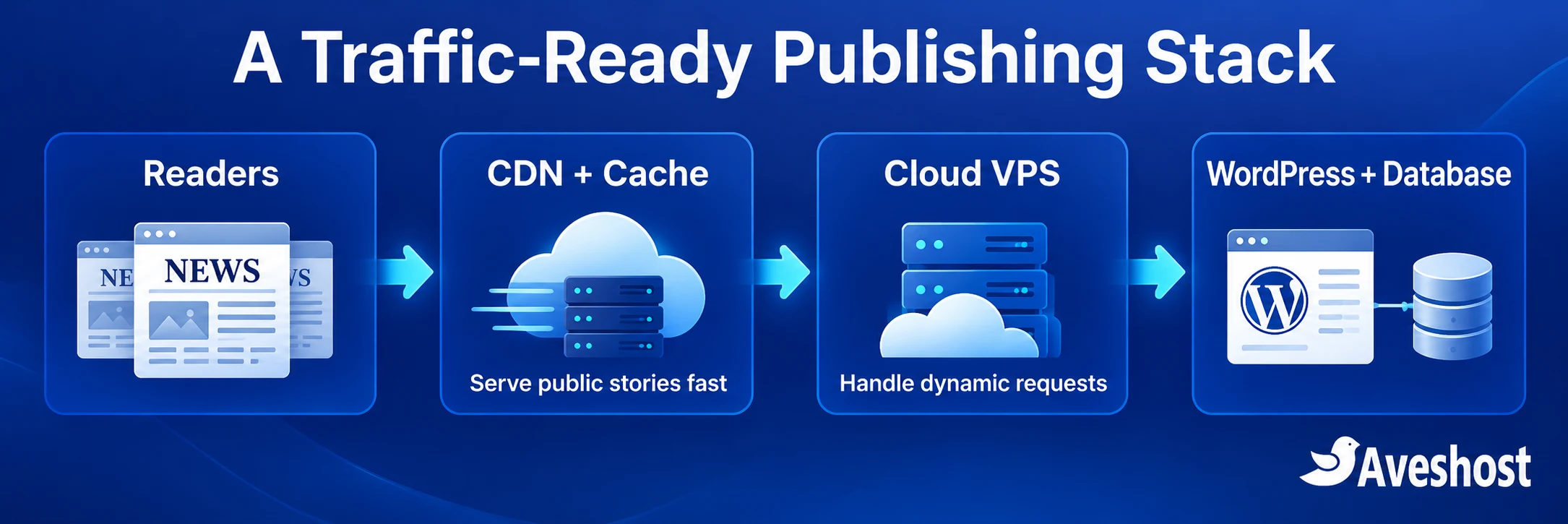
A strong publishing setup separates public content delivery from the work of generating and updating content. Readers reach a CDN or reverse proxy first. Cacheable articles and assets are served efficiently, while requests that need the application continue to your cloud VPS.
- CDN: delivers eligible cached content and static assets near readers.
- Full-page cache: reuses completed public HTML instead of running PHP for every visit.
- Web server and PHP: handle cache misses, editorial work and dynamic requests.
- Database and optional object cache: serve the data the application still needs.
- Monitoring and recovery: reveal problems early and keep a tested route back to service.
Cache layers need compatible rules and a reliable purge process. More plugins and more layers do not automatically mean more speed. Know which system owns page caching, which handles assets and how a newsroom update becomes visible at each layer.
1. Cache public stories and protect fresh content
Public articles are a good place to start because many readers receive the same content. Enable a page cache compatible with your hosting stack, then test it with an anonymous browser session. Check that repeated visits receive a cached response and that logged-in editors continue to see the correct editing experience.
Keep private and personalised requests out of shared caches
- Bypass login, administration and editor preview pages.
- Bypass authenticated sessions and pages carrying private account information.
- Keep POST requests, comment submissions and other writes out of public page caches.
- Review search, live feeds, membership pages and personalised content individually.
- Preserve query parameters that change content; do not strip them blindly.
Do not enable a blanket “cache everything” rule without these safeguards. A private preview, account page or personalised response must never become a shared cached page. Conversely, a tracking parameter should not force expensive new work for every reader when it does not change the article content. Test your actual URL and cookie behaviour.
Balance speed with newsroom freshness
Set a shorter freshness window for a rapidly changing live report and a longer one for a finished evergreen feature. When an editor updates a story, purge its URL and affected homepage, category or feed pages as required. Validate headline corrections and timestamp changes from an anonymous session after purging.
Warm the cache for important public URLs before promoting them. Avoid repeatedly clearing the entire site during peak traffic: a cold cache makes many readers request fresh generation at once. Where supported, cache locking or request coalescing helps prevent many simultaneous misses from rebuilding the same page.
For a simple origin-load estimate, suppose readers generate 100 eligible article requests per second and the edge cache serves 90% of them. Around 10 article requests per second then reach the origin. That is an illustrative calculation: origin requests = eligible requests × (1 − cache hit ratio). Images, dynamic pages, bots and cache purges add their own workload.
2. Use a CDN to reduce origin traffic
A CDN is especially useful for Ghanaian publishers serving both local readers and a diaspora audience. It reduces repeated delivery work at the origin and can shorten the path for cached assets. Your website’s actual routes, mobile networks and cache behaviour determine the experience, so measure from the locations that matter to your audience.
Cloudflare does not cache HTML pages by default in the same way it caches many static assets. Simply changing nameservers is not a complete article-caching strategy. Check the default cache behaviour, then configure appropriate public-content rules and exclusions for your plan and application.
For setup instructions, follow our guide to protecting your website with Cloudflare. Use HTTPS from the reader to the edge and from the edge to the origin. Confirm certificate validity, cache rules and challenge behaviour before a major event.
Inspect the cache status of real article and image requests, not only whether the DNS record is proxied. A cache hit shows a reusable response was served; a bypass or miss needs interpretation. Responses with session cookies, restrictive cache headers or personalised content can legitimately bypass caching.
Large video downloads and livestreams need a media delivery strategy. Embed or deliver video through a service designed for streaming rather than making every viewer download large files from the WordPress origin. Keep poster images and embed scripts light so the article remains readable on mobile data.
3. Optimise WordPress, images and the database
Make the mobile article lighter
A fast server cannot remove the cost of a several-megabyte image gallery or a collection of heavy third-party scripts. Resize images to useful display dimensions, use suitable modern formats and provide responsive sizes. Keep the main image discoverable early; lazy-load images further down the page.
Reserve space for images, adverts and embeds to reduce layout shifts. Check an actual article on a mid-range phone and a slower connection. The reader should reach the headline and story without waiting for unrelated widgets. Review advertising and analytics scripts with the same care as WordPress plugins.
Reduce expensive application and database work
Profile slow pages and queries before changing database settings. Popular-post widgets, related-story queries, internal search and repeated external API calls can add work to every request. Cache appropriate results, limit unnecessary queries and move non-urgent work away from the reader’s request path.
A persistent object cache can reuse suitable database-derived objects across requests when configured correctly. It serves a different purpose from a full-page cache. Keep a Redis or similar service private, set sensible memory limits and monitor its behaviour. Complete and test the server-side setup alongside the WordPress plugin configuration.
Review scheduled tasks, backups, image processing and bulk imports. Run heavy jobs outside expected traffic peaks and prevent duplicate jobs from overlapping. If you replace visitor-triggered WordPress cron with a system scheduler, verify scheduled posts and other tasks run reliably before disabling the original trigger.
Use supported PHP and database versions, and check compatibility in staging before upgrades. Keep themes and plugins maintained, but judge their measured workload rather than counting plugins alone. The WordPress optimisation handbook provides useful context for performance factors; your logs and tests should guide the final tuning.
Size PHP workers around memory and real demand
More PHP workers are useful only while the server can support their memory and CPU needs. Allocate memory to the operating system, database, cache and other services before deciding the PHP budget. Measure worker memory with representative requests, then increase concurrency carefully while watching response times and errors.
For illustration, a 2 GB PHP budget with workers consuming about 100 MB each suggests a theoretical ceiling of roughly 20 workers. Start below that ceiling and allow for variation. This calculation is not a server recommendation: actual worker memory, CPU demand and database capacity can differ substantially.
4. Choose a cloud VPS with room to grow
Choose capacity for the busiest expected publishing period, including cache misses, editorial activity, image uploads, the database and scheduled work. A VPS plan is a resource allocation, not a promise of a fixed number of visitors. Two blogs on the same plan can handle very different loads because their pages and cache hit rates differ.
| Our cloud VPS plan | GH₵ per month | Resources | Useful planning direction |
|---|---|---|---|
| Cloud VPS 2 | GH₵170.00 | 4 vCores, 8 GB RAM, 100 GB SSD | Growing blog with caching and a modest database |
| Cloud VPS 3 | GH₵300.00 | 6 vCores, 12 GB RAM, 200 GB SSD | More publishing activity, larger content library or more dynamic work |
| Cloud VPS 4 | GH₵420.00 | 8 vCores, 24 GB RAM, 300 GB SSD | Extra headroom for a busier newsroom and background workloads |
These are the Ghana cedi prices displayed on our self-managed cloud VPS page at the time of writing. Choose your billing options to see the current checkout total in Ghana cedis. Match the plan to a measured workload, then increase resources as demand grows.
Our self-managed cloud VPS gives your technical team root access to configure the stack. It does not bundle cPanel or DirectAdmin. If you prefer a control-panel setup, explore our fully managed VPS options and discuss your publishing requirements with us.
For publishers who need an origin hosted locally, compare our Ghana-based VPS options. Those are a separate product selection from the global self-managed plans in the table. Choose the location around your audience, application requirements and measured network performance.
When one application environment approaches its practical limits, consider separating database or background workloads, or adding application instances behind a load balancer. Shared uploads, sessions, cache invalidation and database capacity must be designed for that arrangement. Scale a working architecture rather than multiplying an existing bottleneck.
5. Filter abusive bots without blocking readers
A viral headline can attract legitimate readers and automated traffic simultaneously. Search crawlers, social preview fetchers, scrapers and login attacks do not all need the same treatment. Use logs to identify expensive repeated paths and respond to the behaviour causing load.
- Rate-limit repeated abusive login and resource-intensive requests.
- Apply appropriate firewall rules and managed protections at the edge.
- Avoid challenging every public article visitor by default.
- Allow the legitimate previews and search access your publication relies on.
- Review false positives from mobile networks where many readers can share an outward-facing IP.
A spike is not automatically a DDoS attack. Analytics, access logs and edge reports help distinguish human readership from repeated automated requests. Use our guide to controlling AI scraper traffic when scrapers are consuming resources. robots.txt communicates crawler preferences; enforcement comes from the appropriate server or edge controls.
6. Prepare, test and monitor before a big story
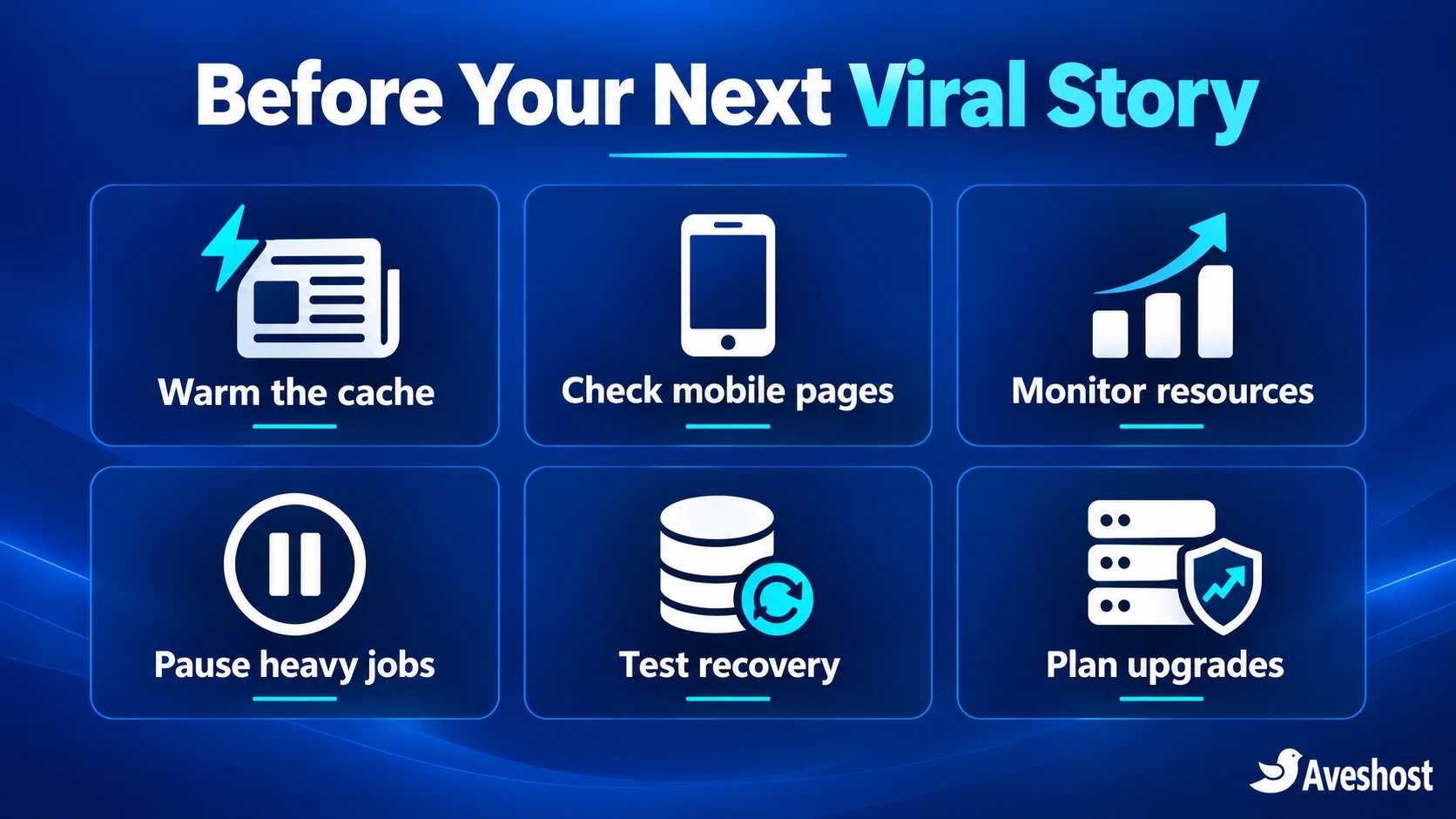
Prepare for predictable events such as an election update, a football fixture, a festival or a planned exclusive. A small newsroom can use a short checklist instead of discovering its limits during the first big headline.
- Record normal response times, error rates, origin requests, cache hit rate, CPU, RAM and disk usage.
- Test the homepage, popular article template, search and a representative dynamic action.
- Run a controlled load test against a staging environment you own, with representative content and a defined stopping point.
- Test warm-cache and cold-cache behaviour separately. Coordinate any production test with your hosting team.
- Confirm editors can publish, revise and purge content during the test.
- Verify backups and a recent restoration test; assign one person to incident decisions.
Increase test traffic gradually and stop if error rates or resource pressure cross your agreed limits. A concurrency count alone is not useful without request rates, response times and workload details. A homepage cache benchmark should not be presented as proof that search, comments and administration handle the same load.
Monitor from outside the server as well as inside it. An uptime check can detect public failures; server monitoring shows the resource pressure behind them. Include alerts for disk space, memory, slow requests, database connections and certificate expiry. Pick thresholds from your baseline so an alert gives the team time to act.
Before a planned promotion, confirm the main story is cacheable, warm its public URL, check mobile presentation and pause non-essential heavy jobs. Keep a tested way to disable a troublesome widget or plugin. Save configuration backups so changes can be reversed quickly.
What to do when a traffic spike hits
When readership surges, follow an orderly response. Changing several settings at once makes it difficult to know what helped and can create a second problem while you are handling the first.
- Identify the failing layer: edge, web server, PHP, database or browser-side assets.
- Check logs and live resource metrics; note when the incident began and which pages are affected.
- Verify caching is working and avoid unnecessary full-site purges.
- Pause non-essential imports, bulk image processing or overlapping jobs.
- Filter clearly abusive traffic with narrow rules and check reader access after applying them.
- If capacity is the bottleneck, contact our team about an appropriate resource upgrade.
- After stabilising, test the affected routes and record the cause, fix and prevention work.
Raising every timeout can make queues longer rather than remove the bottleneck. Repeated restarts can interrupt requests without addressing slow work. Use a status message if readers are affected, protect the editorial workflow and prioritise returning the most important public pages to a healthy state.
Move your growing blog to our cloud VPS
As your publication grows, our cloud VPS plans provide the resource control to build a stronger publishing stack. Bring your peak traffic patterns, storage needs, WordPress plugins, current error logs and caching setup to the planning conversation. We can help you choose an appropriate plan and discuss migration arrangements.
Prepare a migration by backing up the database and files, configuring the new environment, testing it under a temporary hostname or local hosts-file entry and checking HTTPS, media, comments and scheduled publishing. Keep the existing site available during DNS transition, and plan the final content sync so edits are not lost between servers.
After the switch, verify public requests reach the new origin, watch error rates and check cache purges. Retain the rollback copy until the new setup is stable. Do not launch a major hosting change minutes before a planned breaking story.
Ready for your next big headline? Compare our cloud VPS plans or contact our support team to plan your newsroom’s next step. Combine the right resources with caching, efficient pages and tested recovery so traffic growth becomes an opportunity for your publication.
Frequently asked questions
Why does a news blog crash when a story goes viral?
Incoming requests can exceed the capacity of the application, database or hosting account. Uncached pages repeatedly generate the same content, while slow queries, heavy plugins and background jobs can increase the pressure. Diagnose the bottleneck before changing settings.
Can a cloud VPS handle massive traffic?
A cloud VPS provides configurable resources and control over the stack. Its useful capacity depends on caching, page complexity, dynamic requests and database performance. Use load testing and monitoring to select and grow the plan.
Is shared hosting always unsuitable for a news blog?
Shared hosting can support an optimised blog within its account limits. Consider a VPS when peak demand repeatedly reaches those limits or you need more control over caching, workers and server configuration.
Does Cloudflare automatically cache WordPress articles?
Cloudflare caches many static assets by default, but HTML article caching needs the appropriate configuration. Exclude private, authenticated and write requests, and test updates and cache purging.
How do I keep breaking news fresh when caching is enabled?
Use freshness windows appropriate to the content, purge the updated story and affected listing pages, then check the result as an anonymous reader. Avoid unnecessary site-wide purges during a surge.
What is the difference between a 503 and a 504 error?
A 503 means the service is currently unable to handle a request. A 504 means a gateway or proxy timed out waiting for an upstream response. Logs and resource metrics help locate the cause.
Should Ghanaian publishers choose a server in Ghana?
A local origin can suit publications with Ghana-focused requirements. Compare our Ghana-based VPS options and measure performance for your audience. Use a CDN and efficient pages to support readers in other locations too.
How much RAM does a busy WordPress blog need?
There is no universal amount based only on visitor totals. Account for PHP workers, the database, cache, scheduled jobs and peak traffic. Measure memory use under representative requests and leave headroom.
Will a bigger VPS fix every performance problem?
More resources help when capacity is the bottleneck. Slow database queries, heavy assets and ineffective cache rules still need attention. Optimise the measured workload and upgrade resources where needed.
What should I do before migrating a growing blog?
Back up the database and files, test the new environment, plan the final content sync and DNS transition, and verify HTTPS, uploads, comments and scheduled publishing. Keep a recovery copy until the new setup is stable.