Knowing how to report a fake website or online business scam in Ghana quickly can mean the difference between stopping a fraudulent Mobile Money transfer in time and losing your money for good. Even if you spotted the scam before paying, reporting the fraudulent web address helps get the site taken offline before dozens of other shoppers, job seekers or small businesses in Accra, Kumasi, Takoradi or Tamale fall into the same trap.
Online scams in Ghana rarely rely on a single channel anymore. A fraudster may run sponsored ads on Instagram or Facebook, direct buyers to a convincing clone website with stolen product photos, and collect deposits through a personal Mobile Money wallet on WhatsApp. Because multiple platforms are involved, sending a complaint to just one place is rarely enough.
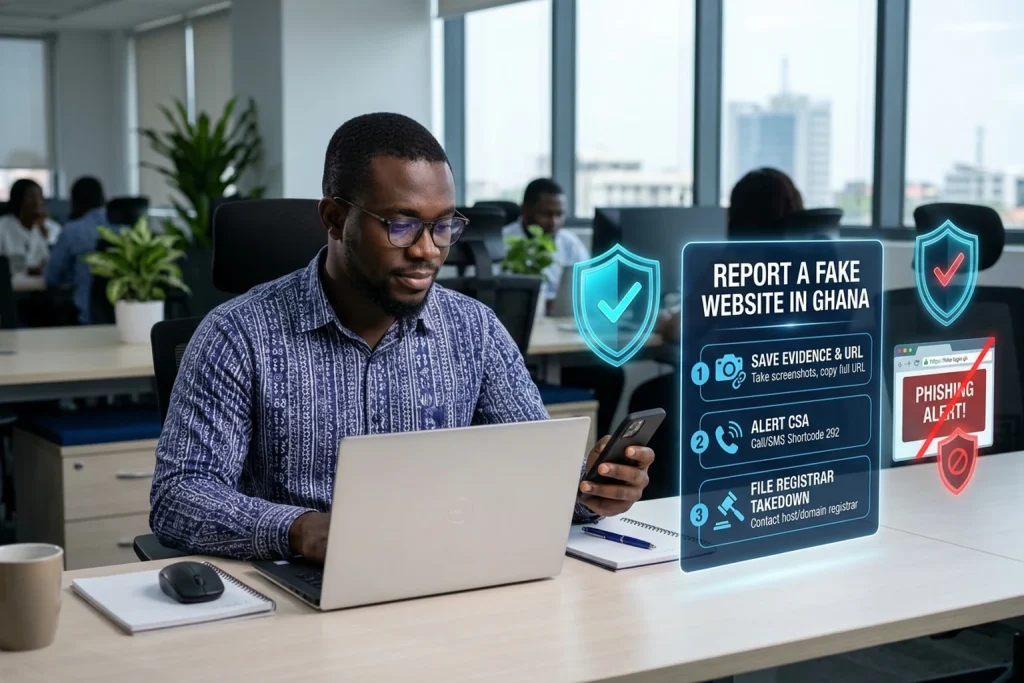
This guide walks you through the exact steps to take the moment you discover a fraudulent website or online business scam in Ghana: what to do in the first 15 minutes if you already sent money, how to preserve digital evidence before the scammer deletes their chat history, and how to file effective reports with the Cyber Security Authority (CSA), Mobile Money networks, domain registrars, Google Safe Browsing and the Ghana Police Service Cybercrime Unit.
Table of Contents
Common Types of Fake Websites and Online Business Scams in Ghana
Before you file your report, identify which type of online scam you are dealing with so you can route your evidence to the right enforcement and takedown teams:
1. Fake e-commerce stores and social-to-web delivery scams: These websites advertise smartphones, electronics, wigs, generators, building materials or wholesale clothing at steep discounts—for example, offering a refrigerator or laptop that normally sells for GH₵6,500 at an urgent ‘clearance price’ of GH₵2,200 (illustrative example). They demand a 50% or 100% Mobile Money payment upfront and block the buyer as soon as the transfer clears.
2. Brand and website impersonation clones: Fraudsters register a look-alike domain name that closely mimics a trusted Ghanaian company, hotel, school, courier or hosting provider and copy its logo and page layout. If your own company is being copied, see our dedicated guide on how Ghanaian businesses can stop fraudsters from impersonating their website.
3. Phishing login pages and fake billing notices: These pages imitate bank portals, Mobile Money verification screens, government recruitment portals or fake hosting renewal emails in Ghana to steal passwords, One-Time Passwords (OTPs), Ghana Card numbers or card details.
4. Unlicensed investment, doubling and crypto portals: Websites promising guaranteed daily or weekly returns in Ghana cedis if you deposit money into a personal MoMo wallet or merchant code, often backed by fabricated withdrawal screenshots on Telegram or WhatsApp.
5. Fake recruitment, scholarship, visa and protocol portals: Sites that imitate public institutions, mining companies, hospitals or international embassies and charge applicants an unauthorized ‘processing’, ‘medical’ or ‘appointment’ fee.
What to Do in the First 15 Minutes if You Already Sent Money
If you or your staff already sent money to a fake website or online vendor in Ghana, speed is critical. Fraudsters usually cash out or move Mobile Money funds within minutes of receiving them. Do these four things immediately—before you write long emails:
1. Call your Mobile Money network or bank fraud desk immediately:
• MTN MoMo: Dial 100 from your MTN line immediately, select the fraud/mistaken transfer option, or report the transaction inside the myMTN app. Give the agent the exact 11-digit Transaction ID, the recipient’s phone number or merchant ID, the registered wallet name, and the amount sent.
• Telecel Cash: Dial 100 from your Telecel line and report a fraudulent wallet transfer.
• ATMoney: Dial 100 from your AT line to report the transaction.
• Bank card or bank transfer: Call the 24-hour fraud hotline on the back of your debit/credit card or use your banking app to freeze the card and request a chargeback or recall.
2. Never pay a ‘recovery agent’ or ‘unlock fee’: Scammers frequently message victims from a second phone number pretending to be a telecom insider, cybersecurity officer or courier manager who can ‘reverse’ the payment or release the parcel if you send an extra GH₵200 or GH₵500 fee (illustrative example). Legitimate networks and authorities in Ghana will never ask you to send money to recover money—and they will never ask for your MoMo PIN or OTP.
3. Lock down compromised accounts: If you typed your email password, banking credentials or WordPress login into the fake website, change that password immediately from a clean device and turn on two-factor authentication (2FA).
4. Save the chat and webpage before alerting the scammer: Do not threaten the scammer in WhatsApp or Telegram before you take screenshots. If you warn them that you are reporting them, they will use ‘Delete for Everyone’ to wipe the chat history and block your number.
Evidence to Collect Before You Report a Fake Website
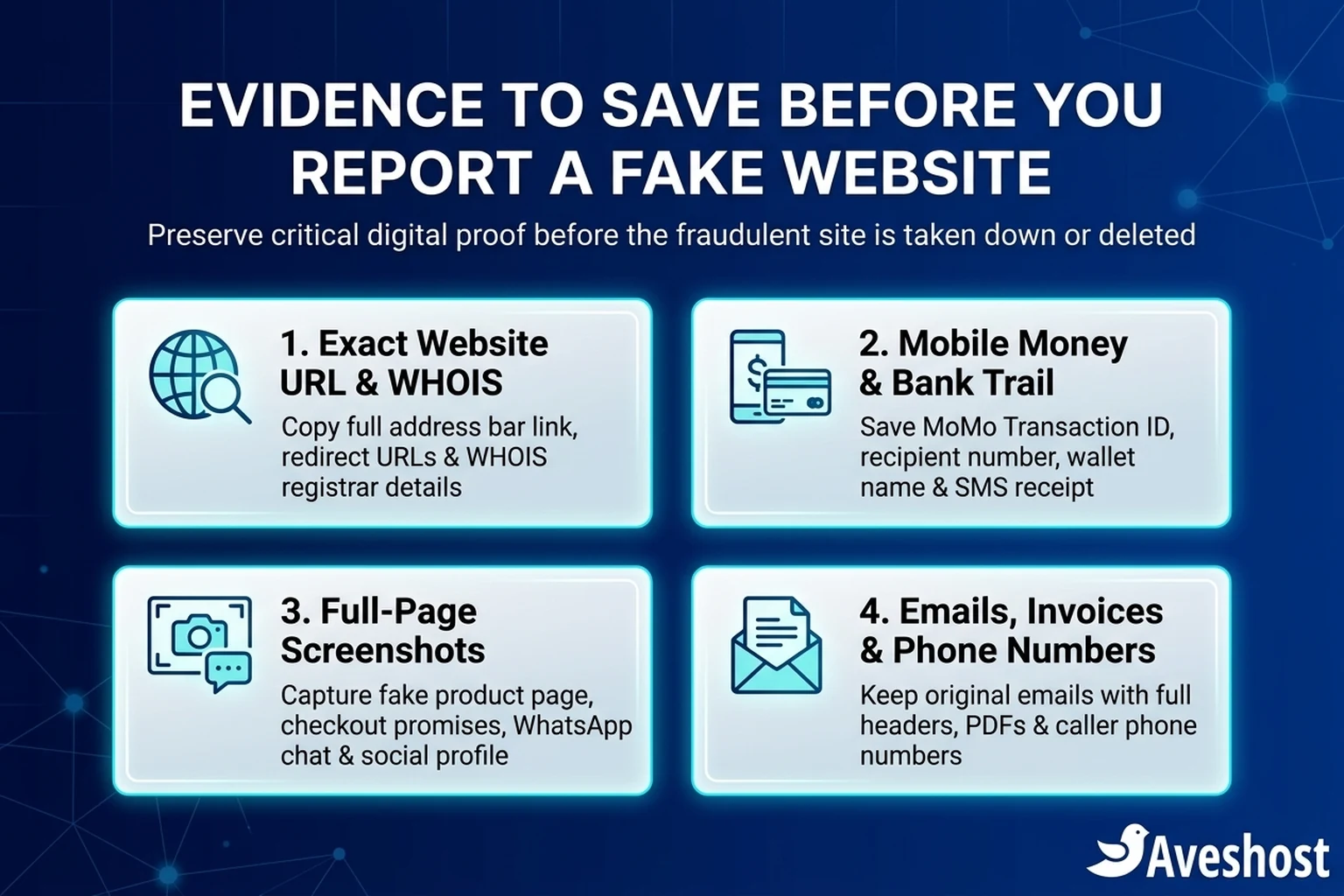
Investigators at the Cyber Security Authority, Mobile Money compliance teams and domain registrars act fastest when your report contains verifiable technical evidence rather than just a short complaint. Gather these four items into one folder on your phone or computer:
1. The exact website URL and redirect links: Copy and paste the full web address from your browser’s address bar (for example, https://example-shop-gh.com/checkout), including any short links from SMS, WhatsApp or Instagram bios that redirected you there.
2. Complete Mobile Money or bank payment proof: Save a screenshot of the official SMS transaction confirmation showing the Transaction ID, date and time, exact GH₵ amount, recipient phone number or Till/Merchant ID, and the registered name that appeared on the confirmation prompt.
3. Uncropped screenshots of the website and chats: Capture full-screen screenshots showing the fake website’s product listing, pricing, contact page, bank/MoMo payment instructions, and the full WhatsApp, Telegram or Instagram conversation (making sure the scammer’s phone number or @handle is visible at the top of the screen).
4. Original emails and file attachments: If the scam arrived by email, keep the original message in your inbox so you can export the full email headers (which reveal the actual sending server and IP address).
Where to Report a Fake Website or Online Scam in Ghana
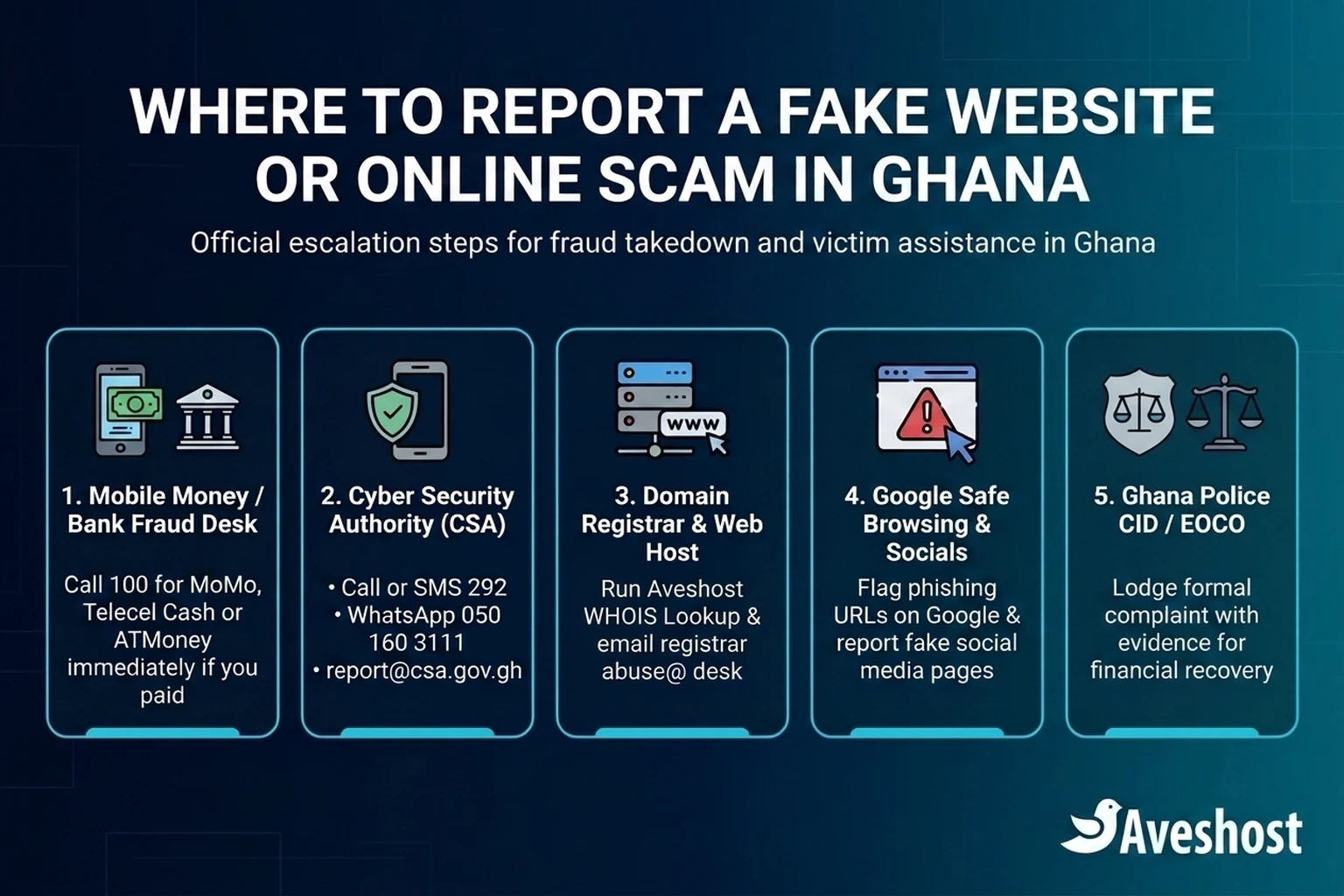
To stop both the local payment collection and the website itself, submit your evidence across the relevant official channels below. Each institution handles a different part of the response—from blocking the scammer’s MoMo wallet to shutting down the domain name.
Use this quick-reference directory to match your situation to the right authority:
| Reporting Channel | Official Contact / Portal | When to Use It | What Action They Can Take |
|---|---|---|---|
| Cyber Security Authority (CSA) Ghana — CERT-GH | Call/SMS: 292 | WhatsApp: 050 160 3111 | Email: [email protected] | App: CSA GHANA | Every fake website, phishing link, online impersonation or MoMo/cyber scam in Ghana | National incident coordination, domain/ISP alerts and public cyber advisories |
| Mobile Money Fraud Desks (MTN, Telecel, AT) | Dial 100 on your network or visit an official service centre with your Ghana Card | Immediately when a scam involves a MoMo wallet number or merchant code | Flag and freeze suspected fraudulent wallets and support police investigations |
| Ghana Police Service Cybercrime Unit / EOCO | CID Headquarters (Accra), regional CID commands, or eoco.org.gh | When you have suffered financial loss, extortion or criminal identity fraud | Criminal investigation, court orders for wallet/bank records and prosecution |
| Domain Registrar & Web Host Abuse Desk | Look up via Aveshost WHOIS Lookup (aveshost.com/whois) and email the registrar’s abuse@ address | Whenever the scam operates on a custom domain name (.com, .com.gh, .org, .net, .shop) | Suspend the fraudulent domain registration or terminate the hosting account |
| Google Safe Browsing | safebrowsing.google.com/safebrowsing/report_phish/ | For phishing pages, clone websites and fake stores | Displays a red ‘Deceptive site ahead’ warning in Chrome, Android and Google Search |
| Bank of Ghana (BoG) | bog.gov.gh (Consumer Reporting / Financial Stability) | Fake loan apps, unlicensed investment websites or bank impersonation | Regulatory enforcement and public warnings against unlicensed financial schemes |
Step 1: Report the Fake Website to the Cyber Security Authority (CSA) on 292
Ghana’s Cyber Security Authority (CSA) operates a 24-hour Cybersecurity/Cybercrime Incident Reporting Point of Contact (PoC) for citizens, residents and businesses across the country. You can contact the CSA even if you have not lost money—for example, to verify a suspicious online shop or report a phishing link targeting your customers.
Submit your report to the CSA through any of these four official channels:
• Call or SMS Shortcode: Dial or text 292 (accessible across networks within Ghana).
• WhatsApp: Send the fake website URL, screenshots and MoMo/phone numbers used by the fraudster to 050 160 3111.
• Email: Send a detailed report with your evidence attachments to [email protected].
• Mobile App: Submit the incident through the official CSA GHANA mobile app on Android or iOS.
When writing to [email protected] or WhatsApp 050 160 3111, put the exact fake domain name in the first line of your message, state clearly whether the site is impersonating an existing Ghanaian organisation or running a fake online shop, and list every phone number or Mobile Money wallet displayed on the site.
Step 2: Find the Website’s Registrar and Host Using WHOIS and File an Abuse Takedown
Every website on the internet relies on two technical providers: a domain registrar (which controls the domain name) and a web hosting provider (which stores the website’s pages). Both providers have strict Acceptable Use Policies that prohibit phishing, brand impersonation and fraudulent online stores—and they can suspend a fake website worldwide.
Here is how to find and contact them in under five minutes:
1. Run a WHOIS lookup on the fake domain: Open the Aveshost WHOIS Lookup tool (or ICANN Lookup) and enter the fraudulent domain name (for example, fake-store-example.com). If you want to understand how registration records work in detail, read our guide on who owns your business domain in Ghana.
2. Note the Sponsoring Registrar and Registrar Abuse Contact: Look at the WHOIS output for the Registrar Name, the Registrar Abuse Contact Email (typically [email protected]), and the Creation Date. A domain that was registered only a few days or weeks ago while advertising ’10 years of trusted service in Ghana’ is a classic fraud indicator to highlight in your abuse report.
3. Check the Nameservers: The WHOIS record also lists the domain’s Name Servers, which often reveal the web hosting company or DNS provider. Sending your abuse report to both the domain registrar and the hosting provider speeds up suspension.
4. What if the domain is hosted or registered through Aveshost? If your WHOIS lookup shows that a suspicious domain is using Aveshost infrastructure, contact the Aveshost support and abuse team directly with the URL and screenshots so our security team can investigate and act in line with our terms of service.
Step 3: Flag the Fake Website on Google Safe Browsing and Social Media
While the domain registrar processes your takedown request, you can protect thousands of internet users in Ghana almost immediately by reporting the URL to browser security databases and the social platforms driving traffic to the site:
1. Report the URL to Google Safe Browsing: Open Google’s official Report a Phishing Page form, paste the exact URL of the fake website, and add a brief note explaining that the page is a phishing or fraudulent store targeting users in Ghana. Once verified, Google Chrome, Mozilla Firefox, Safari and Android devices display a full-screen red warning whenever someone clicks the link.
2. Report the linked Instagram, Facebook, TikTok or WhatsApp Business account: Most fake websites in Ghana get their buyers from social media ads or bio links. Open the profile on Instagram, Facebook or TikTok, tap the three-dot menu, select Report, and choose Scam or fraud (or Pretending to be someone else if they are impersonating a legitimate business). In WhatsApp, open the chat profile, scroll to the bottom, and tap Report contact so WhatsApp receives the recent message metadata.
Step 4: File a Formal Complaint With the Ghana Police Cybercrime Unit or EOCO
If you or your company lost money to an online scam, telecom operators and commercial banks cannot simply transfer funds back out of another person’s account on your word alone—they require an official police extract or court order after your initial emergency fraud alert.
Take a printed copy of your evidence folder (screenshots, the fake website URL, your Mobile Money SMS confirmation with the Transaction ID, and your Ghana Card) to:
• The Ghana Police Service Cybercrime Unit: Located at the Criminal Investigation Department (CID) Headquarters in Accra, or report through the CID desk at your nearest regional or divisional police command.
• The Economic and Organised Crime Office (EOCO): For large-scale financial fraud, organized online investment scams or corporate payment diversion, you can also lodge a petition via EOCO’s official portal.
• The Bank of Ghana (BoG): If the fake website is an unlicensed online loan app, deposit-taking scheme or fake financial institution, report it to the Bank of Ghana.
Ask the investigating officer for the official complaint reference or police extract required by your Mobile Money network or bank to trace the recipient wallet’s KYC records.
Copy-and-Paste Template to Report a Fake Website to a Domain Registrar or CSA
When you email a domain registrar’s abuse@ desk or [email protected], a clear, factual message gets reviewed much faster than an emotional paragraph. Use this structure:
Subject: Urgent Abuse Report – Fraudulent / Phishing Website: [insert-fake-domain.com]
Body details to include:
• Reported Domain & Exact URLs: List the root domain and the specific checkout or login URL.
• Type of Abuse: State clearly whether it is Phishing, Brand Impersonation, or a Fraudulent Online Store / Advance-Fee Scam.
• Legitimate Brand Being Impersonated (if applicable): Include the official website URL and company registration details.
• Evidence Summary: Note the domain’s recent creation date from Aveshost WHOIS Lookup, the fraudulent Mobile Money numbers displayed on the page, and attach your uncropped screenshots and payment confirmation receipts.
• Requested Action: Request immediate suspension of the domain name and hosting service for violating anti-fraud and anti-phishing policies.
| Who Is Reporting | Primary Goal | Key Evidence to Attach |
|---|---|---|
| Shopper or individual who paid a fake online store | Freeze the MoMo wallet, trace the recipient and shut down the website | MoMo Transaction ID, SMS receipt, recipient phone number, product/checkout screenshots and full URL |
| Visitor who spotted a fake website before paying | Get the domain suspended and trigger browser red-screen warnings | Exact URL, WHOIS lookup details, screenshots of fake claims/prices and payment numbers listed |
| Ghanaian business owner whose website is being cloned | Immediate registrar/host takedown and customer protection alert | Proof of official domain ownership, ORC business certificate, side-by-side screenshots and WHOIS record |
How to Check if a Ghanaian Online Store Is Genuine Before You Pay
A two-minute check before you authorize a Mobile Money prompt can save you from ever needing to report a fake website:
1. Check the domain registration age on WHOIS: Run the web address through Aveshost WHOIS Lookup. If a website claims to be a well-known electronics distributor in Accra yet its domain name was registered two weeks ago, treat it with extreme caution.
2. Verify the Mobile Money registered name before entering your PIN: Legitimate Ghanaian online stores use verified checkout gateways—such as those explained in our guide on how to accept MTN MoMo payments on your website in Ghana—or an official registered company MoMo Merchant ID. If a flashy corporate website tells you to send money manually to an unrelated personal name on WhatsApp, stop and verify.
3. Look beyond the padlock icon: A green or grey HTTPS padlock in your browser only means the connection between your phone and the website is encrypted; scammers can activate free SSL certificates on fake domains in minutes. Always inspect the exact spelling of the domain name itself.
4. Confirm a real physical footprint and independent reviews: Call the landline or office number listed on the website, check whether their location can be verified independently, and look for consistent history across their official channels.
Protect Your Brand and Build Customer Trust Online With Aveshost
If you run a legitimate business in Ghana, rising online scams mean your customers are looking closely for signals they can trust. Operating strictly on Instagram DMs or personal email addresses makes it easy for copycats to impersonate you—and makes cautious buyers hesitate at checkout.
Give your customers unmistakable proof that they are dealing with your official business by registering your .com domain and .com.gh or .gh domain together, hosting your site on secure Aveshost web hosting with automatic SSL, and sending every invoice and order confirmation from a matching professional business email address. You can also follow our website security checklist in Ghana or contact Aveshost support whenever you need help securing your company’s domains.
Frequently asked questions
Where can I report a fake website or cybercrime in Ghana?
You can report any fake website, phishing link or online business scam in Ghana to the Cyber Security Authority (CSA) 24/7 by calling or texting shortcode 292, sending a WhatsApp message with evidence to 050 160 3111, emailing [email protected], or using the CSA GHANA mobile app.
What should I do immediately if I sent Mobile Money to a fake online store in Ghana?
Call your Mobile Money provider immediately (dial 100 for MTN MoMo, Telecel Cash or ATMoney) and provide the exact Transaction ID, the recipient’s phone number or merchant ID, and the amount sent so the fraud desk can flag the wallet. Then save all screenshots and file a formal report with the Ghana Police Cybercrime Unit and the Cyber Security Authority (292).
How do I get a fake website taken down from the internet?
Look up the fake domain name using the Aveshost WHOIS Lookup tool (aveshost.com/whois) to find its Sponsoring Registrar and abuse email address. Send your screenshots, the exact URL and proof of fraud to the registrar’s abuse desk, the web hosting provider, the Cyber Security Authority ([email protected]) and Google Safe Browsing.
Can I report a fake website in Ghana even if I did not lose money?
Yes. Reporting a fake website before you pay helps the Cyber Security Authority, Google Safe Browsing and the domain registrar block the site before other shoppers or businesses in Ghana are defrauded.
Does an HTTPS padlock mean a Ghanaian shopping website is legitimate?
No. An HTTPS padlock only means data sent between your browser and the site is encrypted in transit. Scammers routinely install free SSL certificates on fake domains, so you should still check the domain age on WHOIS and verify the business’s official payment details.
Can someone on social media recover my scammed Mobile Money for a fee?
No. Anyone who asks you to pay a ‘recovery fee’, ‘reversal charge’ or ‘software unlock fee’ to retrieve scammed Mobile Money is running a secondary recovery scam. Only your telecom provider, bank and law enforcement can investigate and process official recoveries.
How do I check when a suspicious website domain was created?
Enter the website’s domain name into the Aveshost WHOIS Lookup tool at aveshost.com/whois. The Creation Date field shows when the domain was registered; if a site claims years of history in Ghana but was registered only days ago, treat it as high risk.
What evidence does the Ghana Police Cybercrime Unit need for an online scam report?
Bring printed and digital copies of the full website URL, uncropped screenshots of the website and WhatsApp/social media chats showing the scammer’s phone number, your official Mobile Money or bank transaction confirmation with the Transaction ID, and your Ghana Card.
How do I report a fake website that is impersonating my Ghanaian company?
Capture side-by-side screenshots and run a WHOIS lookup on the copycat domain, then send a formal abuse takedown notice (with your ORC business registration certificate and proof of your official domain) to the fake site’s domain registrar, web host, Google Safe Browsing and the Cyber Security Authority (292).
How can legitimate Ghanaian online stores show customers they are real?
Use your own registered .com and .com.gh domain names, send messages from a matching domain business email (such as [email protected]), display a verifiable physical address and phone number, and accept payments through a verified company Mobile Money merchant account or checkout gateway.