
A free private chat server can give a Ghanaian remote team its own place for project discussions, searchable conversations and shared files. Instead of paying for every chat seat, your business can run suitable self-hosted software on a Linux VPS under a domain it controls.
For an agency in Accra, a distributed development team or a small startup working across Ghana, that means more control over the infrastructure and the way colleagues collaborate. It also means taking responsibility for accounts, server updates, backups and support.
This guide uses Mattermost Team Edition as a Slack alternative for small business teams with non-sensitive workspace needs. “Free” refers to the software licence: the VPS, domain, email delivery, backup storage and administration still have costs. The walkthrough covers a fresh Ubuntu server with PostgreSQL and an HTTPS reverse proxy; it does not set up a server on your behalf.
Table of Contents
Understand what a free private chat server includes
Self-hosting changes the cost structure. You pay for server capacity and the work required to run it. Adding another colleague may not add a software seat charge within the selected edition’s limits, but more people, files and integrations can require more resources.
| Cost or responsibility | What to budget for |
|---|---|
| Chat software | The features and limits of the edition you select |
| VPS and domain | Server renewal, domain renewal and enough storage |
| Email and mobile delivery | SMTP and any supported notification service requirements |
| Recovery | Independent protected backups and restoration tests |
| Operations | Updates, account management, monitoring and incident response |
Compare your existing collaboration bill with this full operating cost. If Microsoft 365 already supplies tools your business needs, replacing chat may not remove that subscription. If staff rely on specific Slack apps, meeting features or compliance controls, check those requirements before changing platforms.
Use a pilot to test everyday work: posting an update, finding an older decision, sharing a file and receiving a notification on a colleague’s phone. A cheaper chat service is useful when the team can actually work with it and someone can maintain it.
Choose a Slack alternative for small business teams
At the time of writing, Mattermost Team Edition is free, open source and self-hosted. It is intended for fewer than 250 activated users.
Mattermost Entry is a different free offering built from the Enterprise Edition. Its documented 10,000-channel-message history window means older channel messages remain in the database but become unavailable for viewing or search.
Rocket.Chat also offers self-managed options. Its Starter plan and basic Community edition have different capabilities and limits. Evaluate them against your required authentication, integrations and notification behaviour before choosing. This walkthrough stays with Mattermost so the installation instructions remain consistent.
For a Slack alternative for small business use, start with the functions you need today: team channels, direct conversations, search and file sharing. Treat SSO, advanced retention, compliance exports, guest controls and group calling as separate feature checks. A free edition should not be selected on the expectation that it includes every paid feature.
Size your Linux VPS and plan storage
Mattermost’s hardware guide lists a 1-vCPU, 2-GB baseline for small traditional deployments, while stressing that actual activity changes resource needs. That baseline is not a promise that every workload will run well on the smallest server. The free edition’s user scope is a separate limit.
For the single-server example here, we would plan a small pilot with at least 4 GB RAM and enough space for the operating system, PostgreSQL and file uploads. An 8-GB configuration gives more room for the database and normal growth. These are planning recommendations; measure your own team’s usage before expanding.
Our self-managed Linux VPS plans come with SSD storage and root access. Choose the plan around memory, storage and expected activity. On a self-managed service, your administrator handles the operating system and chat application. Contact us to discuss management requirements if you need help operating the platform.
File sharing can use more disk than messages. If 20 colleagues each upload 200 MB a month, that is roughly 4 GB monthly or 48 GB yearly before database growth, logs and backups. Keep working headroom, set a sensible upload limit and use your document storage system for large project archives.
Choose a subdomain such as chat.yourcompany.com. You can use an existing domain or find one through our domain search. Server location alone does not determine whether your handling of staff or client information meets Ghana’s privacy requirements.
Prepare Ubuntu and keep setup access private
Use a fresh Ubuntu 24.04 LTS, x86-64 VPS for this example. Keep the provider console available and confirm SSH key access with a sudo-capable administrator. Do not apply these firewall or installation steps blindly to a server already running other business services.
During installation, permit SSH only from your administration address where practical. Keep web access closed until the first administrator exists. Allow your actual SSH port before enabling a firewall; if you use port 22, the following fresh-server example preserves it:
sudo apt update
sudo apt upgrade
sudo apt install ufw curl ca-certificates tar postgresql postgresql-contrib
sudo ufw default deny incoming
sudo ufw default allow outgoing
sudo ufw allow 22/tcp
sudo ufw enable
sudo ufw status verbose
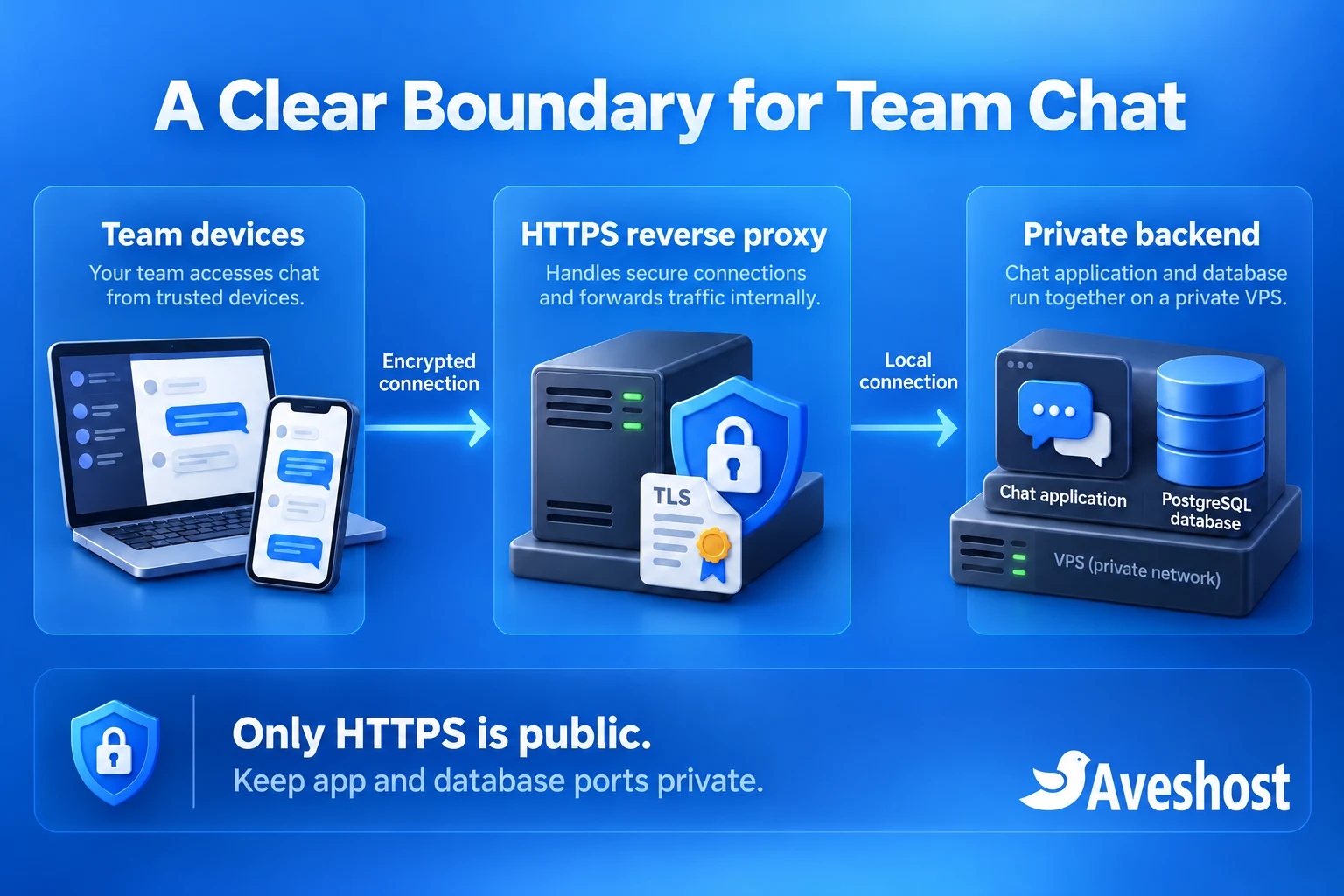
Confirm a second SSH session works before closing the first. Apply equivalent restrictions to any provider firewall. Check listening ports with sudo ss -lntp. PostgreSQL should listen locally, and the chat application will be configured to do the same. Do not expose ports 5432 or 8065 to the internet.
Point the chat hostname’s A record to the VPS. Publish an AAAA record only when IPv6 routing, access rules and the proxy are ready too. Keep administrative credentials in your password manager, separate from any documentation shared with the wider team.
Create a local PostgreSQL database
Ubuntu provides PostgreSQL through its package repositories; see the official Ubuntu installation guidance. Check the installed major version against your selected Mattermost release. PostgreSQL 16 on Ubuntu 24.04 meets the documented database minimums discussed here, including the newer v12 requirement for PostgreSQL 15 or later.
Open the local PostgreSQL administration prompt:
sudo -u postgres psqlCreate a dedicated login and an application-owned database. The password command prompts interactively, keeping the value out of the SQL example. Generate a long, unique password and store it securely:
CREATE ROLE teamchat LOGIN;
\password teamchat
CREATE DATABASE teamchat OWNER teamchat ENCODING 'UTF8' TEMPLATE template0;
\connect teamchat
ALTER SCHEMA public OWNER TO teamchat;
GRANT USAGE, CREATE ON SCHEMA public TO teamchat;
\quit
These permissions give the application control of its own database without making its login a PostgreSQL superuser. Follow Mattermost’s database preparation guidance for version-specific requirements. Keep PostgreSQL on loopback and use local password authentication; no remote database rule is needed for this layout.
Test the application credentials before configuring chat:
psql -h 127.0.0.1 -U teamchat -d teamchat -W -c "SELECT current_user;"The result should identify the teamchat role. Resolve authentication or ownership errors at this stage. Do not solve a local connection problem by opening the database to every address or changing authentication to trust all clients.
Install Mattermost Team Edition on your VPS
Use the official version archive to select a supported Team Edition release and verify the download. The reviewed example is 11.11.1 for Linux amd64. Check for newer supported security patches before deploying and use the checksum that matches your exact release and edition.
mkdir -p ~/teamchat-install
cd ~/teamchat-install
curl -fLO https://releases.mattermost.com/11.11.1/mattermost-team-11.11.1-linux-amd64.tar.gz
sha256sum mattermost-team-11.11.1-linux-amd64.tar.gz
For that exact file, the official SHA-256 is c9237b0b54dce805a63e053c0a0516511bc8a2e47e9a06dd11050c2a0d79f616. Stop if the result differs. Follow the archive’s signature verification process where required by your software supply-chain policy.
On this fresh server, extract the verified file and create a dedicated service account:
tar -xzf mattermost-team-11.11.1-linux-amd64.tar.gz
sudo mv mattermost /opt/mattermost
sudo useradd --system --user-group --home-dir /opt/mattermost --shell /usr/sbin/nologin mattermost
sudo mkdir -p /opt/mattermost/data
sudo chown -R mattermost:mattermost /opt/mattermost
The official tarball installation guide covers this deployment method. It lets us select Team Edition explicitly and manage updates on a planned schedule. The trade-off is that the administrator must track and install updates; a manual installation will not update itself.
If you prefer containers for evaluation, Mattermost also publishes a Docker Compose guide. Its documentation describes that route for testing and development and advises against production use without the required architecture. This article uses the native Linux service for the main setup.
Configure the service and create the first administrator
Edit /opt/mattermost/config/config.json with a JSON-aware editor. Merge these values into the existing objects; this excerpt is not a replacement for the complete configuration:
{
  "ServiceSettings": {
    "SiteURL": "https://chat.yourcompany.com",
    "ListenAddress": "127.0.0.1:8065"
  },
  "SqlSettings": {
    "DriverName": "postgres",
    "DataSource": "postgres://teamchat:[email protected]:5432/teamchat?sslmode=disable&connect_timeout=10"
  },
  "TeamSettings": {
    "EnableOpenServer": false
  }
}
Replace the hostname and password. URL-encode special characters in the connection-string password, or use a long randomly generated URL-safe value. The sslmode=disable value here applies only to PostgreSQL over loopback on this same host. A database on another server needs its own authenticated, encrypted connection design.
The configuration reference explains the Site URL and listen address. Binding to 127.0.0.1 prevents direct internet access to the application. Keep the config readable by the service account and protect its database credential:
sudo chmod 600 /opt/mattermost/config/config.jsonCreate /etc/systemd/system/mattermost.service with this single-host service definition:
[Unit]
Description=Private team chat
After=network.target postgresql.service
Requires=postgresql.service

[Service]
Type=notify
User=mattermost
Group=mattermost
WorkingDirectory=/opt/mattermost
ExecStart=/opt/mattermost/bin/mattermost
TimeoutStartSec=3600
Restart=on-failure
RestartSec=10
LimitNOFILE=49152

[Install]
WantedBy=multi-user.target
Start the service and inspect its response before publishing the web endpoint:
sudo systemctl daemon-reload
sudo systemctl enable --now mattermost
sudo systemctl status mattermost --no-pager
curl -I http://127.0.0.1:8065
sudo journalctl -u mattermost -n 50 --no-pager
From your own computer, create an SSH tunnel to the local app port. Replace the SSH user and server address, and add your SSH port option if it differs from 22:
ssh -L 8065:127.0.0.1:8065 youradmin@YOUR_VPS_IPOpen http://localhost:8065 on your computer and complete the initial setup. The first user receives the system administrator role, which is why the server stays closed during bootstrap. Use your own strong password, confirm access to System Console, and leave open signup disabled.
Put HTTPS in front of the chat server
Install Caddy using its official Ubuntu instructions. Run it as a system service on the host. Avoid installing another proxy on ports already used by NGINX or Apache. For this fresh single-server example, edit /etc/caddy/Caddyfile:
chat.yourcompany.com {
    reverse_proxy 127.0.0.1:8065
}
Replace the example hostname, validate and reload the proxy, then allow the web ports through the host and provider firewalls:
sudo caddy validate --config /etc/caddy/Caddyfile
sudo systemctl reload caddy
sudo ufw allow 80/tcp
sudo ufw allow 443/tcp
Caddy’s reverse proxy guide explains automatic HTTPS when public DNS and certificate validation are available. Port 80 supports HTTP redirects and certificate validation; team access should use HTTPS on 443. The app and database ports remain private. Caddy handles WebSocket proxying for live messages.
Open the real HTTPS hostname from a separate connection. Check the certificate, sign in, send a message between two accounts and test a file upload. Confirm that direct connections to the server’s ports 8065 and 5432 fail from outside. A login page on HTTPS is internet-reachable; invite-only accounts control who can use the workspace.
If your policy requires the entire chat endpoint to be reachable only through a VPN, design that private network, DNS and certificate process separately. Our private WireGuard VPN guide explains the network foundation. A subdomain containing the word “private” does not restrict network access.
Invite your team and organise project channels
Create one workspace team and a small channel structure. For an agency, useful starting channels might be announcements, daily updates, delivery and internal support, plus a private channel for each client project. Explain which discussions belong where so important decisions remain easy to find.
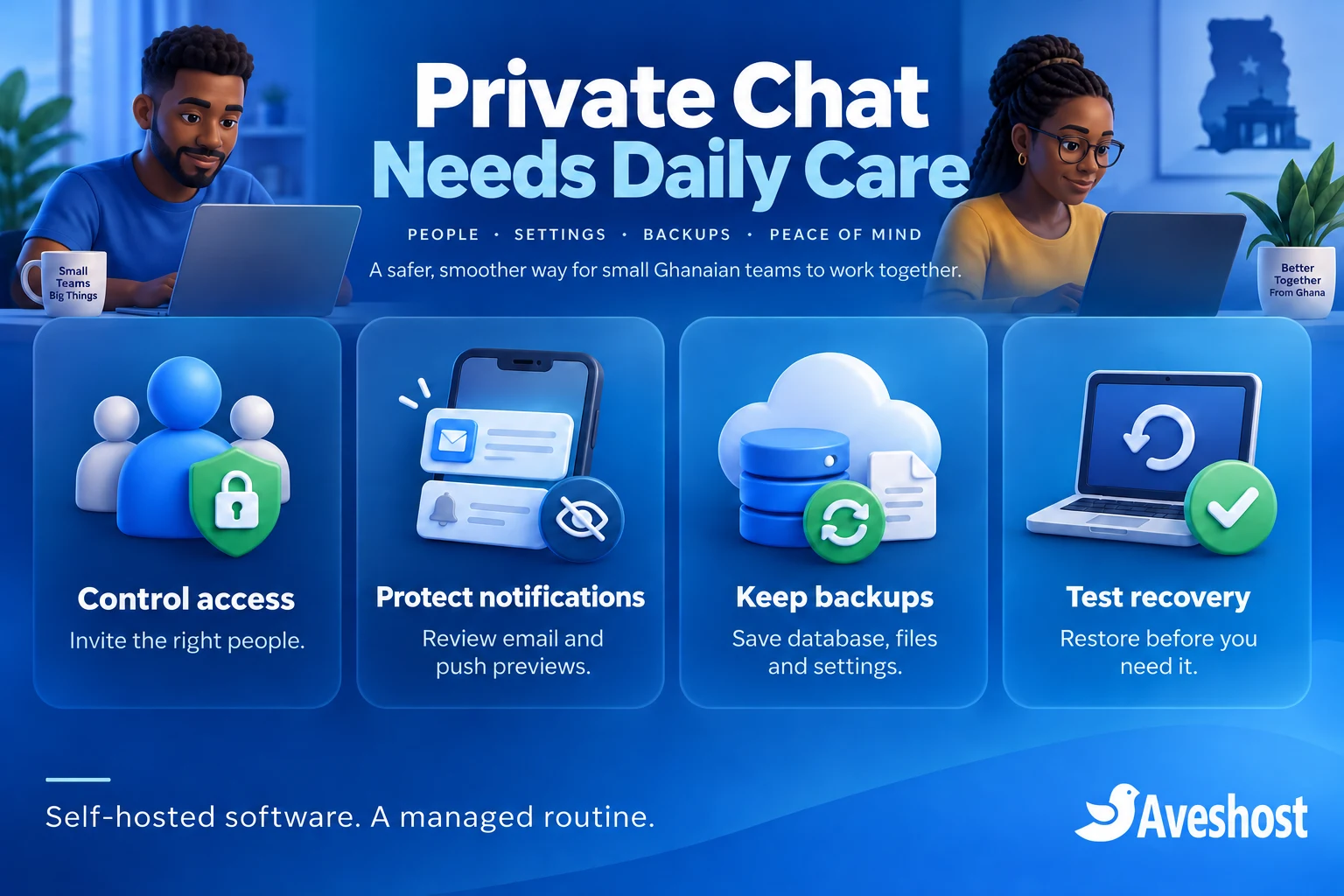
Keep Authentication → Signup → Enable Open Server disabled. The authentication settings distinguish invited registration from unrestricted signup. Test a valid invitation, an uninvited signup attempt and password reset before inviting the whole company. Enable available account protections appropriate to your edition.
A public channel is public within its permitted workspace context; a private channel restricts membership further. Test those boundaries with ordinary accounts. Keep HR, passwords, payment credentials and sensitive client records outside this basic free workspace, and never rely on a channel name alone to enforce confidentiality.
Plan departures as carefully as invitations. Deactivate a departing colleague’s system account, review active sessions and revoke their integrations or tokens. Removing someone from a team is not the same operational action as disabling their server account. Maintain a short joiner and leaver checklist with an accountable owner.
Pilot with a few colleagues before moving daily work. Check which exports your existing tools permit and what the chosen import path preserves. Keep source exports protected and retain access during the agreed transition. Do not promise that every Slack app, Teams conversation, file permission or meeting feature will migrate unchanged.
Review notifications, integrations and privacy
Configure a supported SMTP service for invitations, password resets and notifications. Use the provider’s correct port, authentication and TLS settings, then send test messages to real team inboxes. A chat system that cannot deliver password resets is difficult to support, even if normal messaging works.
Review mobile push requirements for the edition, app and notification service you select. Self-hosting the chat backend does not automatically make all mobile notification delivery private or free. Email relays, push services and external integrations can process information outside your VPS. Review message previews and keep unnecessary content out of notifications.
Use Mattermost’s security guidance to assess these data paths. This Team Edition setup uses HTTPS transport protection; it does not provide an end-to-end encryption design that hides message content from authorised server administrators. Protect host access, database credentials, backup copies and staff devices accordingly.
For a private internal chat tool in Ghana, document who administers the service, what staff information it stores, why it is needed and when it is removed. Address the applicable responsibilities under the Data Protection Act, 2012 (Act 843), using the Data Protection Commission’s guidance. Hosting software on a VPS does not itself establish compliance.
Add integrations one at a time. A webhook can copy internal conversations into another service, and a bot token can grant ongoing access. Use the narrowest permissions available, protect secrets and remove abandoned connectors. Start with ordinary team chat before connecting every project management or automation tool.
Back up, test recovery and plan updates
Treat the database, uploaded files and configuration as one recovery set. Follow the backup guidance: stop Mattermost for a clean small-server backup so database and file contents stay consistent, then protect the resulting copies off the VPS.
For this example, a basic database dump and application archive can be made during a maintenance window. The backup directory is readable only by root; these commands do not encrypt or transfer it off the server:
sudo install -d -m 700 /var/backups/teamchat
sudo systemctl stop mattermost
sudo -u postgres pg_dump -Fc teamchat | sudo tee /var/backups/teamchat/teamchat.dump >/dev/null
sudo tar -czf /var/backups/teamchat/mattermost-files.tar.gz -C /opt/mattermost config data plugins client/plugins
sudo systemctl start mattermost
Check command results and archive integrity. A pipeline can hide an earlier failure, so a successful-looking final command is insufficient; verify the dump can be read with pg_restore --list and complete a test restoration. Automate backups with checked exit codes, unique versioned names and failure alerts. The fixed filenames above are a manual example, not a retention system.
Encrypt independent copies and store recovery keys separately. Restore the database, files and configuration into an isolated test server running the matching application version. Keep outbound email and integrations disabled there. Confirm users, old messages and uploaded files are present, then record the recovery time and the latest recoverable point.
A snapshot is useful before an update, but it should not be your only recovery method. Schedule supported Mattermost and PostgreSQL updates, read upgrade notes, test a restored copy and take a fresh backup before changing production. A database migration can make a simple binary rollback unsafe; restore the matching pre-upgrade recovery set when that is required.
| Launch check | Expected result |
|---|---|
| Private bootstrap | Your administrator account exists before public access |
| Network boundary | HTTPS works; app and database ports are unreachable externally |
| Team access | Invitations work and uninvited registration is blocked |
| Daily collaboration | Messages, search, files and notifications work on team devices |
| Recovery | An isolated restoration contains expected messages and files |
| Operations | A named owner monitors capacity, backups and updates |
Ready to self host Mattermost on a VPS? Explore our Linux VPS plans or discuss your private team chat project with us. Share your team size, file usage, access requirements and maintenance needs so we can plan the right server setup.
Frequently asked questions
Is the VPS free when I use free chat software?
No. A free software licence does not cover the VPS, domain, backups, email delivery or administration.
Which free edition does this guide use?
Mattermost Team Edition. Confirm its current user scope, features and supported releases before deployment.
Is Team Edition the same as Mattermost Entry?
No. They are different offerings with different feature and history limits. Download the edition you intend to run.
Can a small Ghanaian team use a Linux VPS for chat?
Yes. Choose suitable resources and assign someone to maintain accounts, updates and recovery. Test your team’s actual workload before scaling.
Is this setup end-to-end encrypted?
No. HTTPS protects transport, but this setup does not hide message content from authorised server administrators.
Should I open Mattermost port 8065 to the internet?
No. In this layout the application listens on loopback and the HTTPS reverse proxy provides access.
Can I keep the chat service behind a VPN?
Yes, with a separate private network, DNS and certificate design. The HTTPS example in this guide exposes an authenticated endpoint on the internet.
Does a database backup include uploaded files?
No. Preserve the uploaded files and protected configuration as part of the same recovery set.
Will every Slack or Teams feature migrate automatically?
No. Verify exports, imports, integrations, permissions and meeting features before committing to a switch.
Can Aveshost help configure my team chat server?
Yes. Contact support with your team size, access policy, storage and maintenance requirements to discuss the project.