Website impersonation happens when fraudsters register a lookalike domain name or copy your logo, product photos and page layout to trick your customers, job applicants or suppliers into thinking they are dealing with your real business. In Ghana, copycat websites and spoofed landing pages are used to divert Mobile Money payments, collect fake admission or recruitment fees, and steal customer login credentials.
The damage from a copycat site goes beyond the money lost by a single buyer. When a customer in Accra or Kumasi sends GH₵800 to a scammer who copied your brand name and photos, that customer often blames your company first, posts public complaints on social media, and hesitates to trust your genuine website checkout in the future.
While no business can stop a criminal from saving a public logo image, you can make your brand much harder to impersonate, make it obvious to customers which website is authentic, and take down copycat domains quickly when they appear. This guide walks through the technical, domain and operational controls every Ghanaian business should put in place.
Table of Contents
How Website Impersonation Targets Ghanaian Businesses
Fraudsters rarely build a fake website from scratch. Instead, they use automated website-copier tools or simple page builders to clone the visible HTML, stylesheets, text and images of an established Ghanaian business in minutes. Next, they connect that cloned page to a cheap lookalike domain name and replace just two things: the contact phone number (or WhatsApp chat button) and the payment instructions.
Once the fake site is live, scammers drive traffic to it through sponsored social media ads, bulk SMS messages, search engine listings or spoofed business emails. A shopper searching for a popular electronics store, a parent paying school fees, or a graduate applying for a company vacancy clicks the link, sees familiar branding and follows the payment instructions on the page.
Because many buyers in Ghana are accustomed to completing orders via WhatsApp or transferring funds to a Mobile Money number sent in chat, scammers exploit any gap between your website and your payment process. If your real business sometimes asks customers to pay personal wallet numbers in chat, an impersonator can use that exact same habit against your buyers.
Four Website Impersonation Tactics Fraudsters Use
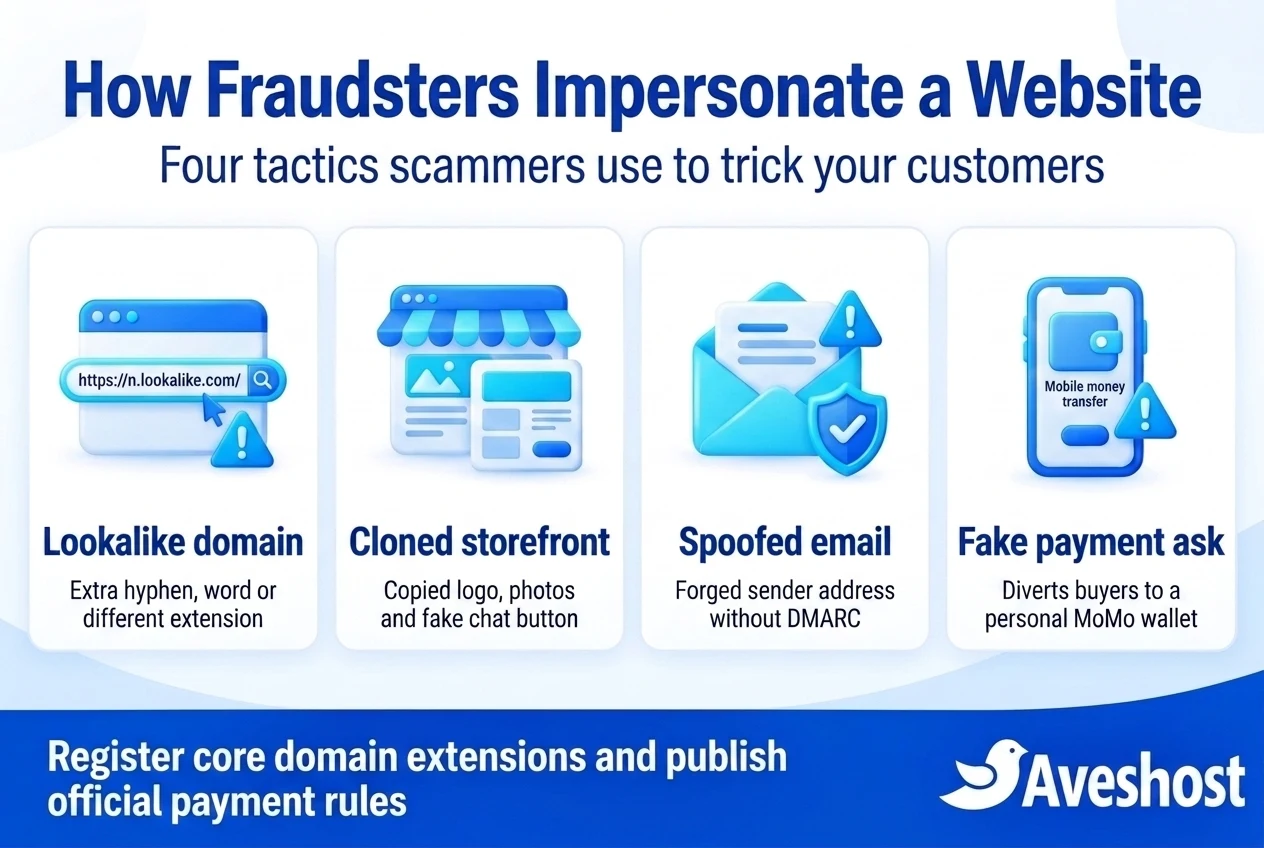
To protect your brand effectively, you need to recognise the four distinct technical routes criminals use to impersonate a company online.
1. Lookalike and typosquatted domains: The attacker registers a domain name that looks almost identical to yours at a quick glance on a mobile screen. Common tricks include adding a geographic word or hyphen (yourbrand-ghana.com or yourbrand-online.shop), swapping a single letter (such as replacing m with rn or o with 0), or registering the .com version of a brand that only owns .com.gh (or vice versa).
2. Cloned storefronts and fake portal pages: The attacker duplicates your homepage, product catalogue, hotel booking form, school admission page or courier tracking screen. They embed a live chat widget or WhatsApp link controlled by the scammer so every inquiry goes straight to their phone.
3. Subdomain takeover via dangling DNS records: Sometimes the impersonation happens on a business’s own genuine domain. If your IT team previously created a subdomain—such as promo.yourcompany.com or shop.yourcompany.com—pointing via a DNS CNAME record to an external cloud or e-commerce service and later cancelled that external service without deleting the DNS record, an attacker can register that unused external slot and display a fake page under your real domain.
4. Email domain spoofing: Even without cloning your website, criminals can send fake invoices, recruitment offers or fake hosting renewal emails that display your exact domain name in the From: line if your domain lacks properly enforced SPF, DKIM and DMARC authentication.
| Impersonation Tactic | What the Customer Sees | Underlying Vulnerability | Primary Defensive Control |
|---|---|---|---|
| Lookalike / typosquatted domain | yourbrand-gh.com or a swapped letter in the address bar | Unregistered core domain extensions or brand variations | Register .com and .com.gh/.gh variations and redirect them to your primary site |
| Cloned website + fake WhatsApp/MoMo | Copied logo and photos asking buyers to pay a personal wallet in chat | Informal chat-based payment habits that scammers can mimic | Use verified website gateway checkout and publish an official payment policy |
| Subdomain takeover (dangling DNS) | A fraudulent page hosted on an old subdomain of your real domain | Forgotten CNAME or A records pointing to cancelled third-party services | Audit authoritative DNS records quarterly and delete unused entries immediately |
| Direct email domain spoofing | Emails appearing to come from info@ or hr@ your real domain | Missing or un-enforced SPF, DKIM and DMARC records | Configure SPF, DKIM signing and an enforced DMARC policy in DNS |
Which Ghanaian Organisations Face the Highest Impersonation Risk?
Any business with a recognisable name can be targeted, but fraudsters in Ghana concentrate on sectors where customers expect to make fast advance payments, deposits or application fees:
1. Retail, fashion and electronics stores: Scammers clone product photos, run flash-sale adverts quoting 50% discounts in Ghana cedis, and demand immediate Mobile Money payment before “dispatching” goods that do not exist.
2. Schools, universities and training institutes: At the start of admission cycles, fraudsters create fake admission portals or lookalike informational pages directing parents and students to buy application forms or pay hostel deposits into personal wallets.
3. Hotels, guest houses and event venues: Copycat booking pages list real photos of resorts in Ada, Cape Coast, Aburi or Accra and collect advance reservation deposits via WhatsApp.
4. Logistics, shipping and clearing agencies: Fake courier tracking websites imitate delivery companies and demand “customs clearance” or “redelivery” fees before releasing a supposed parcel.
5. Employers, NGOs and financial institutions: Impersonators set up fake career pages or loan portals and ask applicants to pay a “processing fee,” “medical screening fee” or “collateral deposit” via Mobile Money.
Step 1: Lock Down Your Core Domain Extensions in Ghana
The most cost-effective way to prevent website impersonation is to register the obvious domain names your customers would naturally expect you to own before a scammer or competitor does.
If your business operates in Ghana and uses a .com address as its primary website, leaving the matching .com.gh or .gh domain unregistered is an open invitation for confusion. Conversely, if your primary site uses .com.gh, registering the matching .com protects customers who type your brand name with .com by habit.
You do not need to build separate websites for these extra domains. When you register defensive domains through Aveshost domain registration and .gh domain registration, you simply configure an automatic 301 permanent redirect so anyone typing the secondary domain lands safely on your official primary website.
To illustrate the economics: checking our guide to domain name prices in Ghana and current domain pricing shows that holding one or two defensive domains costs only a modest annual fee in Ghana cedis—for example, spending roughly GH₵200 to GH₵350 per year on a defensive domain is negligible compared with the cost of losing a single GH₵1,500 customer order to a lookalike site or hiring lawyers to dispute a hijacked brand name. (These figures are illustrative examples; verify current registration and renewal rates on the pricing page.)
Step 2: Harden Your Domain Registrar Account and Audit DNS
Preventing external copycats must go hand in hand with protecting your real domain and hosting infrastructure from unauthorized changes. Follow the core access controls in our website security checklist for Ghana:
Enable Registrar Lock: Ensure your domain status is set to clientTransferProhibited inside your client portal so the domain cannot be transferred to another registrar without your explicit authorisation.
Enforce Multi-Factor Authentication (MFA): Protect your billing and domain management portal (my.aveshost.com), your hosting control panel and your primary administrator email with two-factor authentication.
Audit DNS records and remove dangling subdomains: Review every A, AAAA, CNAME and TXT record in your authoritative DNS zone. If you see a subdomain pointing to an old marketing tool, an expired shop platform or a test server you no longer use, delete that DNS record immediately so an attacker cannot take over the external endpoint.
Remember what an SSL padlock does—and does not—mean: Keep valid HTTPS encryption active on your website, ideally with HSTS (HTTP Strict Transport Security) enabled so browsers always connect over HTTPS. However, educate your customers that a browser padlock alone does not prove ownership, because scammers can generate free domain-validated SSL certificates for lookalike domains too.
Step 3: Stop Domain Spoofing With SPF, DKIM and Enforced DMARC
Website impersonation frequently starts in the inbox. A fraudster sends an email that appears to come from [email protected] or [email protected], directing the recipient to click through to a newly registered copycat website.
You can block criminals from forging your exact domain name in the visible From: address by publishing three DNS authentication standards supported on Aveshost business email and hosting accounts:
1. SPF (Sender Policy Framework): Publishes a single authorised list of mail servers permitted to send email on behalf of your domain, in line with the SPF specification (RFC 7208).
2. DKIM (DomainKeys Identified Mail): Attaches a cryptographic digital signature to outgoing messages so receiving mail servers can verify the email was genuinely signed by your domain and not altered in transit.
3. DMARC (Domain-based Message Authentication, Reporting, and Conformance): Instructs receiving mail providers (such as Gmail, Microsoft 365, Yahoo and corporate mail servers) how to handle messages that fail SPF and DKIM alignment, as defined in the DMARC specification (RFC 7489).
Many businesses stop at a monitoring-only DMARC record (v=DMARC1; p=none;), which collects reports but still delivers spoofed emails to recipients. Once you have confirmed that all your legitimate email senders (webmail, website forms, invoicing software) pass SPF and DKIM, move your DMARC policy to p=quarantine and then p=reject—and apply it to subdomains too—so unauthorized emails forging your domain are blocked outright.
Step 4: Publish an Official Verification and Payment Policy Page
Give your customers, suppliers and job applicants a single, unambiguous way to verify whether a message, social media page or payment request genuinely belongs to your business. Create a dedicated section on your Contact or About page—or a standalone /verify or /official-channels page—that clearly states:
Your only official website domain(s): Explicitly write out your exact domain name (for example, “Our only official website is https://www.yourcompany.com.gh“).
Your official phone numbers and email domain: List your verified customer-service numbers, WhatsApp Business line and the exact email domain your staff use.
Your official payment rules: State clearly how customers pay you. For example, if you run an e-commerce store that accepts MTN MoMo payments on your website in Ghana through an integrated payment gateway or a registered corporate merchant name, tell buyers clearly: “We only accept payments through our official website checkout or our registered company merchant account—never send Mobile Money to a personal individual’s wallet number.”
Your recruitment or admission policy: If you are an employer, school or clinic, add a clear notice in your website footer stating that you never ask job applicants or customers to pay fees into personal Mobile Money wallets.
Step 5: How to Detect Copycat Websites and Lookalike Domains Early
Most business owners only discover a copycat website after an angry victim calls to ask where their order is. Setting up a simple monthly monitoring routine lets you catch impersonators before they defraud dozens of people:
1. Monitor Certificate Transparency (CT) logs: Almost every modern phishing or copycat site generates an SSL certificate so browsers do not show an immediate connection error. Every issued SSL certificate is recorded in public Certificate Transparency logs. Searching your brand name periodically on a public CT log search tool shows you if anyone has recently generated an SSL certificate for a domain containing your company name.
2. Set up search alerts for your brand and unique page phrases: Copycat sites often forget to rewrite your distinctive product descriptions, ”About Us” paragraphs or company registration text. Searching Google for an exact sentence from your homepage in quotation marks—while excluding your own domain—quickly reveals unauthorized clones indexed in search results.
3. Inspect your website referral and image hotlink logs: Lazy scammers sometimes copy your HTML without re-uploading your images, meaning their fake site loads your logo or product images directly from your server. Checking your hosting analytics or server logs for unfamiliar domains loading your image files is a fast way to spot a live clone—and you can block hotlinking in your hosting control panel.
4. Encourage customers to report suspicious ads or links: Make it easy for customers to forward screenshots of suspicious Facebook, Instagram, TikTok or WhatsApp promotions using your brand name so your team can investigate immediately.
Step-by-Step Takedown Guide: What to Do When Someone Impersonates Your Website
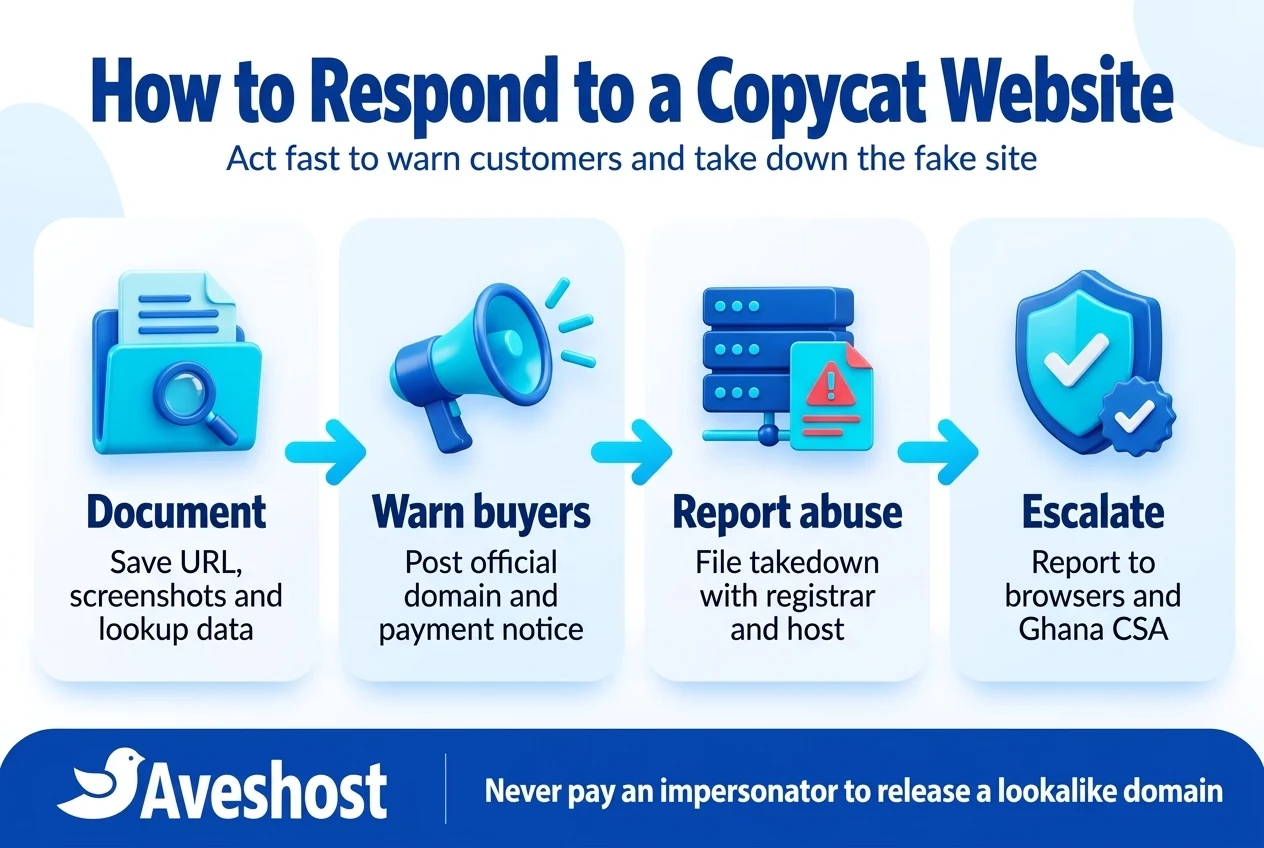
If you discover a live website or lookalike domain impersonating your business in Ghana, do not message the scammer or offer to buy the fake domain from them—paying extortion encourages them to register five more variations tomorrow. Instead, execute this structured four-stage takedown workflow:
Stage 1: Capture complete technical and visual evidence. Before the scammer hides the page, save full-page screenshots showing the URL bar, the copied logos/content, and any fraudulent phone numbers or Mobile Money wallet details displayed on the site. Save the HTML source of the page. Next, visit ICANN Lookup (or the relevant registry lookup for country-code domains) and record the fake domain’s Sponsoring Registrar, Registrar Abuse Contact Email, creation date and nameservers.
Stage 2: Publish an immediate customer warning across your real channels. Place a clear notice on your website header, WhatsApp status, Instagram/Facebook pages and Google Business Profile warning customers about the specific fake URL or phone number and reminding them of your only official domain and payment method.
Stage 3: Submit formal abuse takedown notices to the registrar and web host. Send a concise, factual abuse report to the Sponsoring Registrar’s abuse email (found via ICANN Lookup) and the hosting provider serving the fake website. State clearly that the domain is engaging in active phishing and brand impersonation targeting your customers, attach the screenshots and show your legitimate pre-existing domain and business registration.
Stage 4: Report the phishing URL to browsers and Ghana’s Cyber Security Authority (CSA). Submit the fraudulent URL to Google Safe Browsing’s Report a Phishing Page so Chrome, Android and Safari users see a red deceptive-site warning screen when they tap the scammer’s link. At the same time, report the impersonation and any associated Ghanaian phone numbers or Mobile Money wallets to the Cyber Security Authority (CSA). According to the CSA’s official reporting advisories and phishing guidance, you can report incidents via call or SMS to 292, WhatsApp at 0501603111, or email at [email protected].
| Takedown Channel | What to Submit | What Action They Can Take |
|---|---|---|
| Domain Sponsoring Registrar (via ICANN Lookup) | Fake domain name, phishing evidence, your official domain and business registration proof | Suspend the lookalike domain (ClientHold) so it stops resolving worldwide |
| Impersonator’s Web Hosting / CDN Provider | Exact fraudulent URLs, screenshots of cloned copyrighted/brand content and payment fraud | Disable the hosting account or remove the cloned website files |
| Google Safe Browsing & Browser Phishing Lists | The exact phishing / impersonation URL via the public reporting form | Display a full-screen ‘Deceptive site ahead’ warning in Chrome and mobile browsers |
| Ghana Cyber Security Authority (CSA) & Telecom Operators | Full evidence pack, fake URLs, and any Ghanaian phone numbers or MoMo wallets used | Coordinate national cybercrime investigation, advisories and wallet/number escalation |
Quick Brand and Website Protection Checklist for Ghanaian SMEs
Preventing website impersonation works best when responsibilities are clear across your founder, IT administrator and customer-support team. Review these six checkpoints twice a year or whenever you launch a new product line or campaign:
1. Domain portfolio review: Confirm your primary .com and .com.gh or .gh domains are active, auto-renewing or tracked ahead of due dates, locked with clientTransferProhibited, and redirecting cleanly to your canonical website.
2. Authoritative DNS cleanup: Remove any old CNAME or A records for retired subdomains, campaign landing pages or third-party apps so no dangling DNS record can be hijacked.
3. Email authentication check: Verify that your domain publishes a single valid SPF record, signs outgoing business email with DKIM, and enforces a DMARC policy (p=quarantine or p=reject).
4. Official payment & channel page: Ensure your website clearly displays your official domain name, customer-care numbers and a strict policy against paying personal Mobile Money wallets.
5. Search and certificate monitoring: Search public SSL Certificate Transparency logs and search engines for newly created domains or cloned text matching your brand.
6. Ready-to-use takedown folder: Keep a digital folder containing your business registration certificate, domain ownership invoice and official logo records so your team can submit registrar abuse reports without delay if a copycat appears.
Protect Your Brand, Domains and Hosting With Aveshost
Stopping website impersonation starts with owning your digital identity cleanly. At Aveshost, we help Ghanaian businesses register and lock their core international domains and .gh domains, set up automatic redirects for defensive domain variations, and run fast, secure web hosting and managed WordPress hosting.
Pair your website with authenticated business email configured with SPF, DKIM and DMARC so criminals cannot easily spoof your domain name in customer inboxes. If you want help choosing defensive domain extensions for your brand or reviewing your DNS and email authentication records, contact our support team and we will guide you step by step.
Frequently asked questions
What is website impersonation?
Website impersonation is a fraud where criminals create a lookalike domain name or clone your real website’s logo, photos and text to trick customers, suppliers or job applicants into sending money or sensitive login details to the scammer.
Can I technically block someone from copying my public website text or logo?
Because any public webpage must be downloaded by a visitor’s browser to display on screen, no script can completely stop a determined attacker from taking screenshots or copying public HTML. Instead, effective protection focuses on locking down core domain variations, authenticating your email domain, using verified website checkout gateways, and rapidly taking down copycat domains.
Should my Ghanaian business register both .com and .com.gh domains?
Yes. Registering both your primary extension and the matching local or international extension (.com and .com.gh or .gh) and redirecting the secondary domain to your main website prevents scammers from registering the obvious alternative to confuse your customers.
How do I find out who hosts or registered a fake website impersonating my business?
Use the official ICANN Lookup tool (lookup.icann.org) for generic domains or the relevant country-code registry lookup to view the domain’s Sponsoring Registrar, registrar abuse email address and nameservers.
Should I pay a scammer who offers to sell me a lookalike domain they registered?
No. Paying a fraudster or cybersquatter encourages them to register additional typosquatted variations of your brand name. Document the impersonation and file a formal abuse report with the domain’s registrar and relevant authorities instead.
How does DMARC help prevent website impersonation?
Fraudsters often send spoofed emails appearing to come from your real domain to drive victims to a fake website. Publishing SPF, DKIM and an enforced DMARC policy (p=quarantine or p=reject) instructs receiving mail servers to block unauthorized emails forging your domain.
What is a subdomain takeover and how do I prevent it?
A subdomain takeover happens when a DNS record (such as a CNAME) on your real domain still points to a third-party service you cancelled, allowing an attacker to register that external account and display a fake page on your subdomain. Prevent it by deleting unused DNS records immediately when you stop using an external service.
How can we help our customers in Ghana tell our real website from a fake one?
Publish a clear verification section on your website listing your only official domain name, your verified phone numbers, and a strict policy that payments are only accepted through your official website checkout or registered company merchant account—never via personal Mobile Money wallets.
Where do I report a website impersonating my business in Ghana?
Report the fake domain to its Sponsoring Registrar and web hosting provider using the abuse contact listed in ICANN Lookup, submit the URL to Google Safe Browsing’s phishing report page, and report the incident to Ghana’s Cyber Security Authority (call/SMS 292, WhatsApp 0501603111 or email [email protected]).
Does an HTTPS padlock mean a website is genuine?
No. An HTTPS padlock only indicates that the connection between the browser and that specific domain is encrypted. Fraudsters routinely install free SSL certificates on lookalike domains, so customers must always verify the exact domain spelling in the address bar.