
Knowing who owns your business domain is one of the most important governance checks any company, school, clinic or online store in Ghana can perform. Many founders pay a web designer or agency to launch a website, receive a WordPress username and password, and believe the company now owns everything behind the site—until the designer changes jobs, travels abroad or stops replying right when the domain expires.
Your domain name is more than a website link. It controls your public web address, every company email inbox on that address (such as info@ and accounts@), your Google search reputation, and the printed links on your packaging, invoices and vehicles. If the domain is registered in someone else’s personal account or under an external contractor’s email address, you do not have full operational control of your digital identity.
This guide explains how domain ownership actually works, how to check your current registration and billing records in minutes, the difference between website administration and domain control, and the complete checklist Ghanaian business owners should use to keep their domain name safely in company hands.
Table of Contents
Why Knowing Who Owns Your Business Domain Matters in Ghana
When a Ghanaian SME launches its first website, speed and convenience usually come first. A business owner in Accra, Kumasi or Takoradi sends a Mobile Money deposit to a freelance developer or digital agency and asks them to handle the domain registration, web hosting and design together as one package.
There is nothing wrong with hiring a professional to set up your website. The problem arises when the developer registers the company’s domain inside the developer’s own personal registrar account and enters the developer’s personal name, phone number and email address as the legal owner.
Years later, when your business has grown and dozens of customers email your domain every day, that early shortcut creates three serious business risks:
1. Accidental expiry and sudden outages: Renewal notices go to the contractor’s inbox instead of your finance team. If the contractor misses the reminder, both your website and your business email addresses in Ghana stop working overnight.
2. Vendor lock-in and inflated renewal markups: If you cannot log into the domain registrar portal yourself, you cannot check the real domain name price in Ghana or switch web developers without begging the previous contractor to release your address.
3. Ownership disputes during staff or agency changes: If an internal IT officer or external designer leaves on bad terms and holds the primary registrar login, recovering your domain requires formal dispute evidence and days of avoidable disruption.
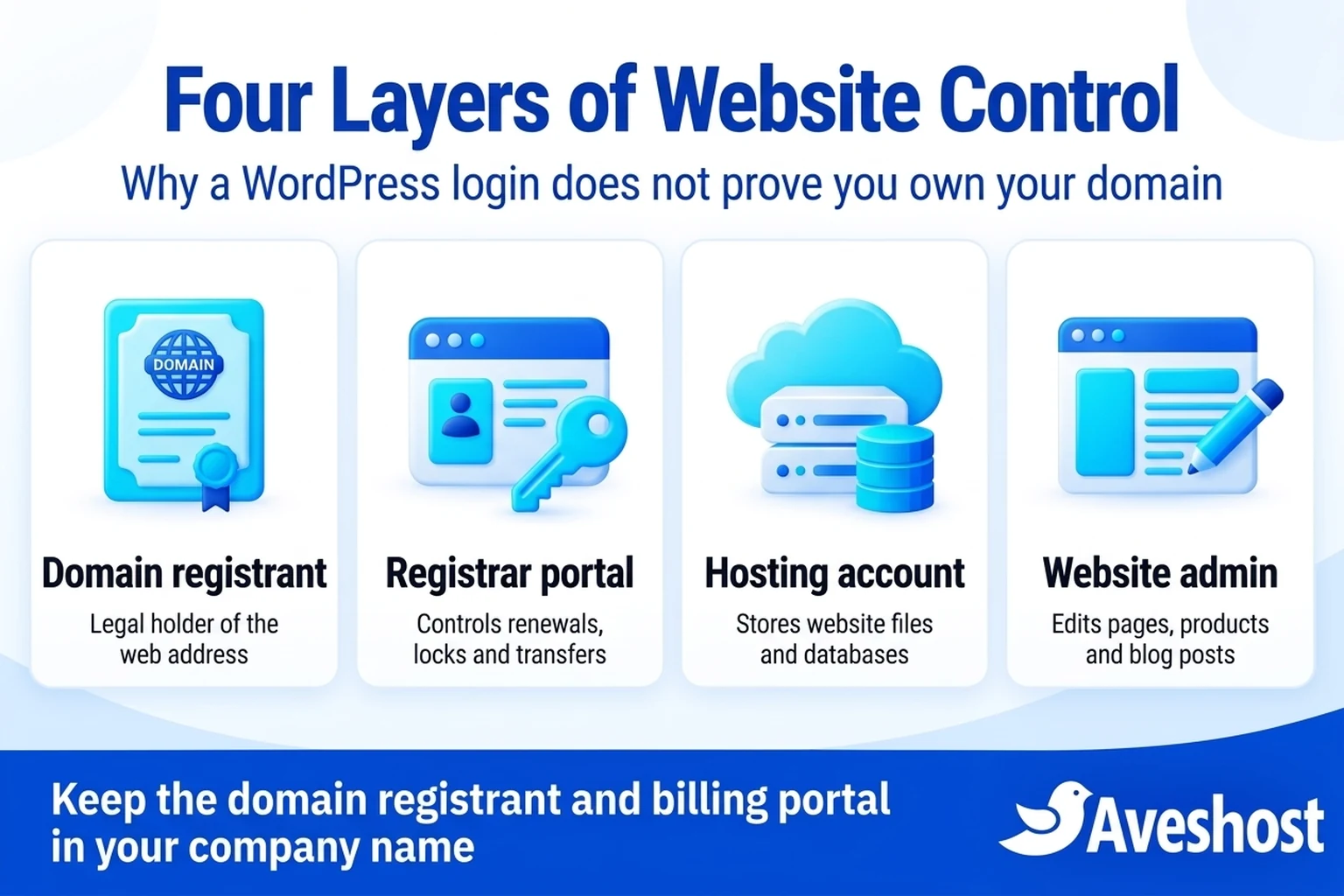
The Four Layers of Website Control: Why a WordPress Login Is Not Domain Ownership
To verify who owns your business domain, you first need to separate four distinct layers of access that are often bundled together during a website project:
1. The Domain Registrant (Legal Registration Holder): Under global domain rules coordinated by ICANN’s Registrant Rights and Responsibilities, the Registered Name Holder (Registrant) is the person or organisation recorded as the legal holder of the domain registration. If your company name and official contact email are listed as the Registrant, your business holds the registration rights.
2. The Domain Registrar Client Portal: This is the billing and management account (for example, your Aveshost client area) where the domain was purchased. Whoever controls the primary login to this portal can pay renewals, change nameservers, toggle the registrar transfer lock and generate the EPP authorisation code needed to move the domain.
3. The Web Hosting Control Panel (cPanel or DirectAdmin): Your web hosting account stores your website’s files, databases, backups and server-managed mailboxes. You can host a website on one account while the domain registration sits in another—or keep both under one company portal for simplicity.
4. The Website Content Admin (such as WordPress /wp-admin): A WordPress administrator login lets you publish blog posts, upload product photos and edit pages. It does not let you renew an expired domain, unlock a domain transfer or stop someone with registrar access from pointing your domain to a different server.
| Control Layer | What It Controls | Who Should Hold Primary Ownership | How Contractors Should Access It |
|---|---|---|---|
| Domain Registrant Record | Legal right to the domain name (.com, .com.gh, .gh, .org) | The business owner or registered Ghanaian company/institution | Never list an external freelancer as the Registrant |
| Registrar Client Portal (e.g. my.aveshost.com) | Domain renewals, DNS nameservers, transfer locks and EPP codes | The business owner or authorised company director | Delegate limited sub-account / technical contact access |
| Hosting Control Panel (cPanel / DirectAdmin) | Website files, databases, SSL certificates and server backups | The business’s own hosting account | Grant temporary or role-appropriate technical access during builds |
| Website Admin (e.g. WordPress /wp-admin) | Page edits, WooCommerce products, plugins and blog posts | Individual administrator accounts for the owner | Separate named user account that can be removed after handover |
Understanding the Four Domain Contact Roles
Every domain registration record stores up to four contact roles. Checking what is entered in each field inside your domain portal tells you immediately who has authority over your web address:
1. Registrant Contact: The legal owner of the domain. This field should show your registered business name (or the founder’s full legal name) and an email address that the business owner controls directly.
2. Administrative Contact: The person authorised to make major management decisions for the domain. Keep this assigned to the business owner or an executive director.
3. Technical Contact: The person who manages DNS records and nameserver settings. You can list your IT manager or web developer here if needed, provided the Registrant and primary account login remain with the business.
4. Billing Contact: The address that receives renewal invoices and payment confirmations. In a Ghanaian SME, this should go to the owner or finance lead so genuine renewal notices are never missed.
How to Check Who Owns Your Business Domain Right Now
You do not need advanced technical skills to audit your domain. Follow these three steps today to verify who owns your business domain:
Step 1: Run a public registration lookup. Open the Aveshost WHOIS Lookup tool (or ICANN Lookup for generic extensions such as .com, .net and .org) and type your domain name. The result will show your domain’s Sponsoring Registrar, the exact creation and registry expiration dates, the current domain status codes (such as clientTransferProhibited), and the active nameservers. Because modern privacy rules redact personal names and emails from public view on many extensions, a public lookup often says Redacted for Privacy—which is why Step 2 is essential.
Step 2: Log into the registrar client portal directly. Ask yourself a simple question: Can I open a browser right now, go to our domain provider’s client portal, and sign in using a company username and password that I hold? If your domain is registered with Aveshost, sign into your Aveshost client area, open Domains, and inspect the Contact Information tab. That screen shows the unredacted Registrant name, company name, email address and phone number on file.
Step 3: Check your invoice and payment trail. Look at your past renewal invoices. Are they billed directly to your company by the hosting/domain provider at transparent cedi rates, or do you only receive an informal WhatsApp message from a middleman once a year? For example, if the official Aveshost domain pricing page lists a standard annual renewal in Ghana cedis (for instance, around GH₵220 to GH₵300 per year depending on the extension) and your business has no direct invoice in its own portal, you are relying entirely on a third party’s account. (These figures are illustrative examples; check the live pricing page for exact current rates.)
Avoid the Circular Email Trap on Your Domain Account
One subtle mistake catches even careful Ghanaian business owners off guard: using an email address on the same domain (such as [email protected]) as the only login and recovery email for the registrar portal that controls yourcompany.com.
Think about what happens if your domain accidentally expires or if your DNS records break. The moment yourcompany.com stops resolving, your [email protected] mailbox can no longer receive incoming emails. When you try to log into your domain portal to renew the domain—and the portal sends a password-reset link or a two-factor verification code to [email protected]—you cannot receive the code because the domain is offline.
The fix is simple and costs nothing: keep a dedicated, MFA-protected recovery email address that does not depend on the same domain (or register a secondary notification contact in your client portal alongside your primary company phone number) so you can always access your billing portal even during a DNS or domain outage.
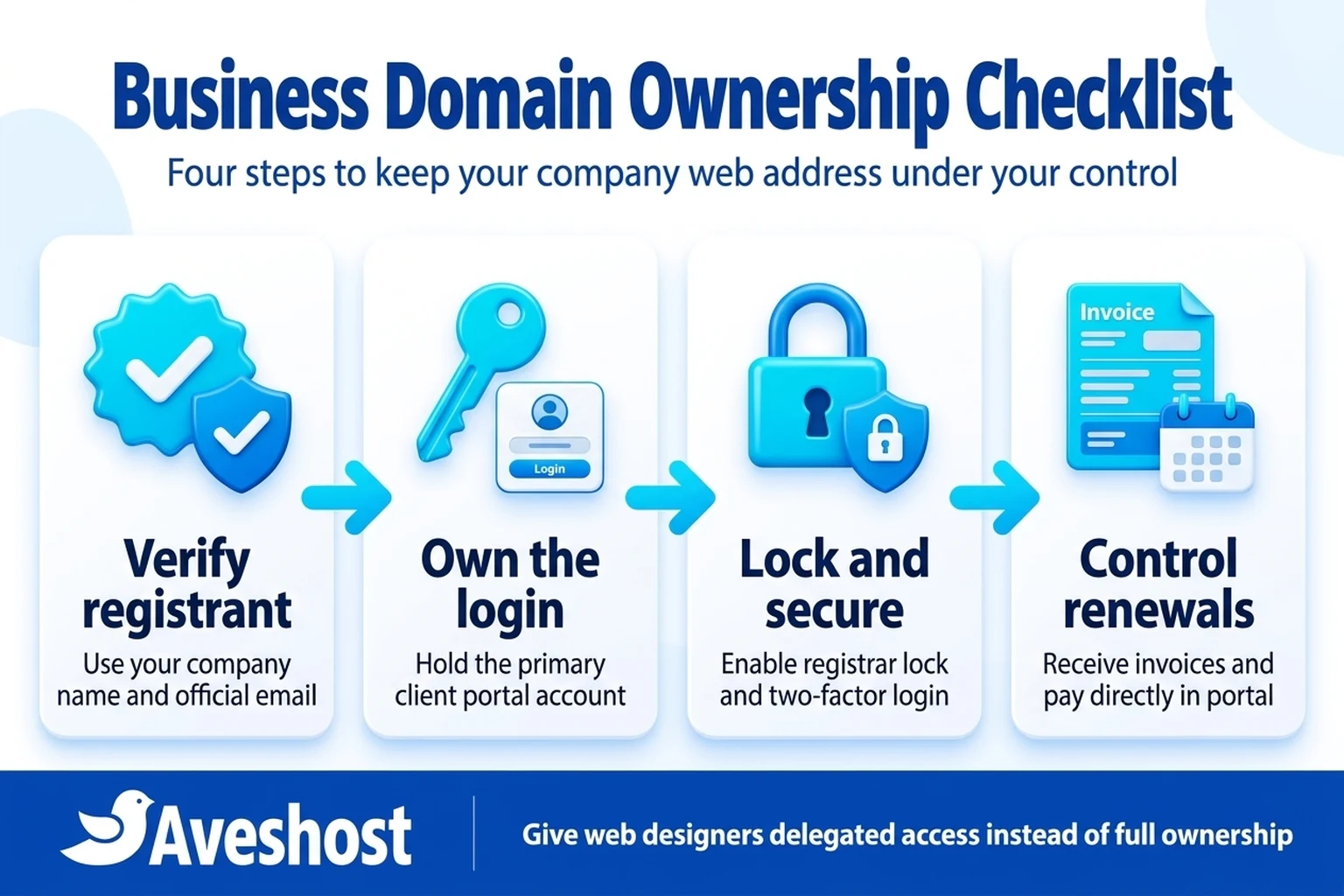
The 8-Point Business Domain Ownership Checklist for Ghanaian SMEs
Use this eight-point checklist whenever you launch a new website, audit your existing company assets, or onboard a new web developer or IT manager:
1. Primary account in the company’s name: The domain and hosting client portal account is created under the business’s legal name, not a freelancer’s personal profile.
2. Verified Registrant details: The domain’s Registrant organisation, name, phone number and email address belong to the business owner or an authorised company director.
3. Direct portal login held by the founder: The business owner holds the master login credentials to my.aveshost.com (stored safely in a company password manager) and has verified they work.
4. Two-Factor Authentication (2FA) enabled: Multi-factor authentication is active on the client portal and on the email account associated with it, following our website security checklist in Ghana.
5. Registrar Lock turned on: The domain status shows clientTransferProhibited (Registrar Lock enabled) so no one can initiate an unauthorized transfer away from your account.
6. Out-of-band recovery contact configured: The account recovery email and phone number can still receive messages even if the primary domain’s mail server is temporarily unreachable.
7. Delegated contractor access (not shared master passwords): Web designers or IT staff use sub-account permissions or separate WordPress/control-panel logins rather than the owner’s primary billing password.
8. Direct renewal billing visibility: Both the business owner and the finance lead receive official renewal reminders well ahead of the due date and know how to verify genuine invoices in the portal so the team never falls for fake hosting renewal emails in Ghana.
How to Work With Web Designers in Ghana Without Giving Up Ownership
Professional web designers and agencies in Ghana actually prefer when clients own their own domain and hosting accounts cleanly—because it separates ongoing infrastructure billing from web design fees and prevents misunderstandings years later.
When you hire a developer to build or redesign your website, follow this clean three-step workflow:
Step 1: Register the domain and hosting in your own Aveshost account first. Visit Aveshost domain registration or .gh domain registration, choose your web hosting plan, and complete the order under your own company details and Mobile Money or card payment. If you are deciding which extension fits your brand, review our guide on why your business needs a domain name in Ghana.
Step 2: Add your developer as a sub-account contact or technical user. Inside your Aveshost client area, you can add a contact/sub-account with specific technical permissions—or create a dedicated control-panel/WordPress login for the developer—without giving them permission to change the domain Registrant or transfer the domain away.
Step 3: Complete a formal handover checklist at launch. When the website goes live, review the domain contact details, confirm automated backups are running, remove temporary contractor logins you no longer need, and keep a written handover summary in your company files.
What to Do if Your Domain Is Currently in Someone Else’s Account
If your audit reveals that your web designer, a former business partner, or an ex-employee currently holds your domain in their personal account, act while communication is still friendly and before the domain is close to expiring.
Scenario A: The domain is already on Aveshost under your designer’s account. Ask the designer to open a support ticket from their account requesting an internal account move of the domain and hosting service into your own Aveshost client account, then update the Registrant contact details to your company.
Scenario B: The domain is at another registrar and you want to consolidate it under Aveshost. Ask your designer or current account holder to unlock the domain (disable Registrar Lock), confirm the administrative email can receive approval messages, and give you the EPP / Authorisation Code. You can then place a domain transfer order to Aveshost so your domain, web hosting and business email live under one company dashboard. Under ICANN’s Inter-Registrar Transfer Policy, generic top-level domains typically must be at least 60 days old and not within 60 days of a prior transfer or registrant change lock.
Scenario C: The account holder cannot be reached. Gather your original project contract, domain registration invoices, Mobile Money receipts and company registration documents, and contact the registrar’s official support team through a verified ticket to follow their formal registrant recovery process.
| Current Situation | What You Need From the Current Holder | Result After Completion |
|---|---|---|
| Domain is in your designer’s Aveshost account | Authorised request to move the service to your Aveshost client account + contact update | Domain and billing appear directly in your own my.aveshost.com portal |
| Domain is in a third-party registrar account | Registrar Lock disabled + EPP/Auth Code + transfer approval | Domain transfers into your Aveshost account and adds one year to expiry |
| Domain is in your account, but old staff email is listed | Log into my.aveshost.com, update Registrant/Billing email and enable 2FA | Renewal alerts and ownership verification go straight to current leadership |
Protect Your Core Domain Extensions From Copycats
Securing ownership of your primary domain is step one; step two is making sure competitors or scammers cannot register the obvious local or international twin of your brand name.
As we explain in our guide on how Ghanaian businesses can stop fraudsters from impersonating their website, many businesses register yourbrand.com and forget to secure yourbrand.com.gh (or vice versa). Registering both core extensions in your company’s Aveshost account and pointing the secondary domain to your main website with an automatic 301 redirect protects your customers from confusion and keeps your brand unified.
What Records to Keep in Your Company Domain File
Treat your domain registration the same way you treat your Registrar General’s Department (ORC) business certificates, tax identification records and bank mandates. Even if a trusted IT officer or agency manages your website day to day, the founder or managing director should keep a single, up-to-date domain governance sheet in the company’s secure records:
1. Official registrar and client portal URL: For example, https://my.aveshost.com/login.php along with your Client ID and the primary login email address.
2. Complete list of registered company domains: Every primary and defensive domain your business owns (such as .com, .com.gh and .gh), their exact renewal cycle, and whether auto-renewal is active.
3. Active nameservers and DNS host: Whether DNS is managed directly through Aveshost nameservers or an external DNS firewall, plus the location of your web hosting and business email accounts.
4. Named technical contacts and review schedule: The exact name and phone number of any developer or staff member who holds delegated technical access, reviewed once every six months so former contractors are promptly removed.
Keep Your Business Domain Safe and Under Your Control With Aveshost
Never leave the legal ownership of your company’s web address to chance. Whether you are registering a brand-new .com domain, securing an official .gh or .com.gh domain, or consolidating existing domains into one transparent Ghana cedi billing portal, Aveshost makes it straightforward to keep full ownership in your business’s name.
Log into your Aveshost client area today to review your domain contact records, enable Registrar Lock and check your upcoming renewal dates—or contact our support team if you want help transferring an existing business domain into your company account.
Frequently asked questions
How do I know who legally owns my business domain name?
The legal registration holder of a domain name is the person or organisation listed in the Registrant Contact field of the domain’s registration record. Log into your domain registrar portal to view and verify the unredacted Registrant name, organisation and email address.
Does having the WordPress admin login mean I own my domain name?
No. A WordPress administrator login only lets you edit website content and plugins. Domain ownership and renewal control belong to whoever holds the domain registrar account and is listed as the Registrant.
Why does ICANN Lookup say 'Redacted for Privacy' when I search my domain?
Modern data-protection rules and domain privacy services hide personal Registrant names, phone numbers and email addresses from public WHOIS tools (such as Aveshost WHOIS Lookup and ICANN Lookup) so spammers cannot harvest them. To see the actual Registrant details on file, log directly into the registrar client portal where the domain is managed.
Should my web designer register my business domain in their own account?
No. The business owner should create the primary domain and hosting client account in the company’s name and grant the web designer delegated technical access. That way, the business always retains legal ownership and direct billing visibility.
What is an EPP code or Authorisation Code?
An EPP (Extensible Provisioning Protocol) code, also called an Authorisation Code or Transfer Key, is a confidential password generated by your current registrar that is required to transfer a domain name to a new registrar.
What is Registrar Lock (clientTransferProhibited)?
Registrar Lock is a security setting that blocks unauthorized third parties from transferring your domain name to another registrar. Keep Registrar Lock enabled at all times unless you are actively transferring the domain yourself.
Why shouldn't I use an email on my own domain as my only registrar recovery email?
If your domain expires or its DNS breaks, email addresses on that domain stop receiving messages. If your registrar sends password resets or 2FA codes only to that email address, you could be locked out of the portal needed to renew or fix the domain.
Can I transfer my domain to Aveshost if my web developer gives me the EPP code?
Yes. Once the developer unlocks the domain at the current registrar and provides the EPP authorisation code, you can submit a domain transfer order to Aveshost and manage the domain directly in your own company account.
Does transferring a domain name take my website or business email offline?
A standard registrar transfer that keeps your existing nameservers unchanged does not take your website or email offline. If you are also moving your web hosting or email servers at the same time, migrating and testing the files first ensures a smooth transition.
Should a Ghanaian business own both its .com and .com.gh domains?
Yes. Registering both extensions under your company’s registrar account and redirecting the secondary domain to your main website prevents copycats from registering the matching extension and protects customers who type either address.